

Guide to Video Wall Processors: 2026 Pro AV Edition
Why do some high-end commercial displays look like a single, seamless digital canvas while others suffer from jarring “bezel jump” and distorted aspect ratios? The difference isn’t the screens themselves. It’s the hardware behind the scenes. A standard matrix switcher might route signals, but it won’t handle the complex pixel mapping required for a high-impact visual experience. To achieve professional results, you need a dedicated video wall processor designed to treat multiple panels as one unified resolution.
You understand that building a professional display system involves more than just mounting hardware. The technical hurdles of resolution scaling and signal management can quickly turn a flagship project into a troubleshooting nightmare. This guide will help you master the technology behind multi-screen displays and show you how to choose the perfect hardware for any commercial or retail environment. We’ll break down the architecture of WolfPack HDMI video wall processors, solve the mystery of bezel compensation, and provide the exact specifications you need for 2×2, 3×3, or custom arrays.
Key Takeaways
- Understand the critical distinction between a standard matrix switcher and a high-performance video wall processor to avoid image distortion.
- Learn to manage resolution scaling and aspect ratios to maintain 4K or 8K clarity across any multi-screen array.
- Identify the ideal hardware for specific layouts, including 2×2 and 3×3 configurations, while accounting for bezel compensation.
- Discover the advantages of modular WolfPack systems that allow for seamless scalability through hot-swappable input and output cards.
- Gain the technical knowledge needed to specify hardware for demanding 24/7 commercial, retail, or command center environments.
What is a Video Wall Processor and Why is it Essential?
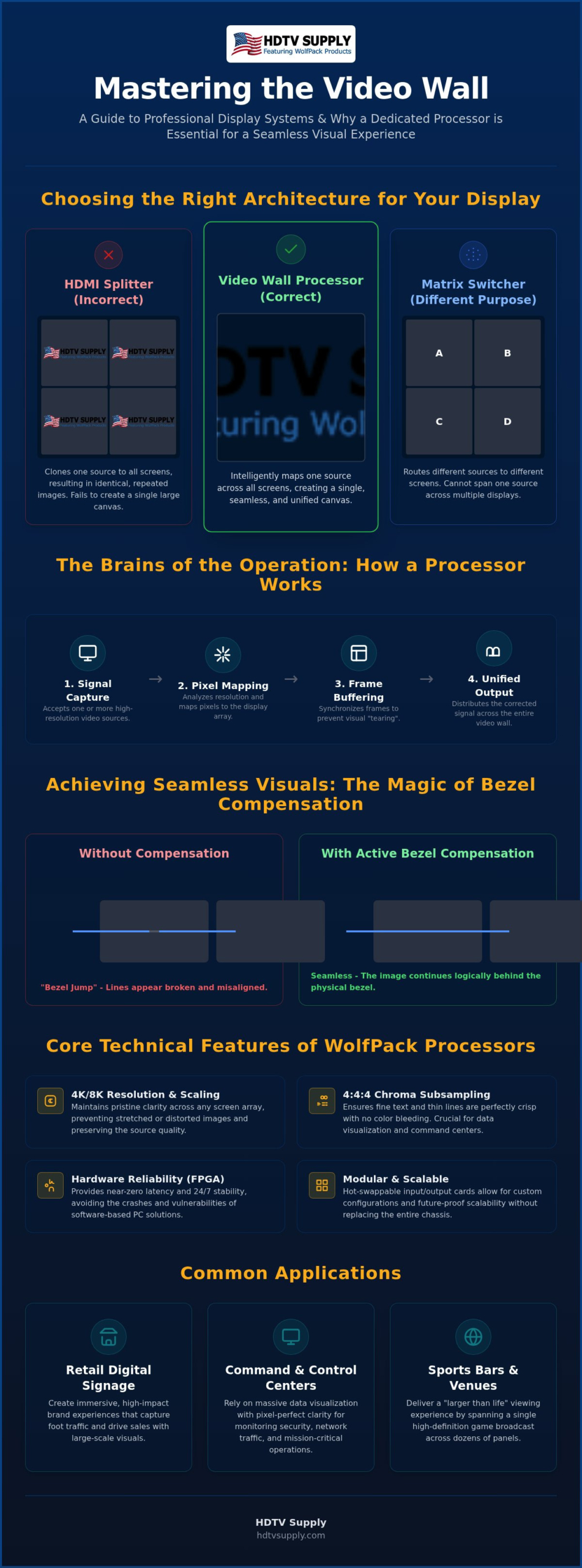
A video wall processor is a dedicated, high-performance signal scaling engine. It’s the brain of any professional visual installation. While a standard display simply shows a signal, a processor takes one or more video sources and intelligently distributes pixels across a multi-display array. It ensures that a single 4K image looks like a single, unified image rather than a collection of isolated pictures. Without this hardware, you cannot achieve the seamless “big picture” effect required for modern commercial spaces.
Professional integrators prioritize hardware-based processors over software controllers for 24/7 reliability. Software solutions rely on PC operating systems, which often introduce latency, security vulnerabilities, and potential system crashes. Hardware units, like the WolfPack series, utilize FPGA architecture. This specialized circuitry provides near-zero latency and immediate signal acquisition, which is vital for mission-critical environments where downtime isn’t an option. You get a stable, turnkey solution that functions independently of a local network or computer hardware.
Don’t confuse a processor with a standard HDMI splitter. A splitter clones the same image to every connected screen. If you use a 1×4 splitter on a 2×2 wall, you’ll see the exact same logo four times. A processor splits the signal into quadrants, allowing the source to span the entire wall without losing clarity or synchronization. It handles the heavy lifting of pixel distribution so your source device doesn’t have to.
How Video Wall Processing Works
The process begins with input signal capture. The hardware analyzes the incoming resolution and performs real-time pixel mapping across the physical display array. Internal buffers are critical here; they hold frame data to ensure that all screens in the wall refresh at the exact same microsecond. This prevents “tearing,” a visual artifact where one half of the image lags behind the other during fast-moving scenes. Canvas management is the ability to treat multiple displays as one coordinate system.
Common Applications for Processors
High-capacity environments demand these specialized tools to maintain operational efficiency and visual impact. In retail digital signage, processors create immersive brand experiences that stop foot traffic. Command and control centers rely on them for massive data visualization where every pixel must be legible for monitoring security or network traffic. For sports bar environments, large-scale game broadcasts require spanning a single high-definition feed across dozens of panels to create a “larger than life” viewing experience for patrons. Using a WolfPack video wall processor in these settings ensures your content remains synchronized and professional regardless of the array size.
Core Technical Features of Modern Video Wall Processors
Modern deployments demand high-density signal processing. A professional video wall processor must maintain 4K or 8K clarity across the entire array. If you’re building a command center, chroma subsampling at 4:4:4 is non-negotiable. This ensures that fine text and thin lines remain crisp. Lower subsampling, such as 4:2:0, causes color bleeding and makes data difficult to read at a distance. High-capacity hardware ensures that every pixel is rendered with precision, regardless of how many screens you connect.
Scaling and aspect ratio management prevent the “stretched” look that ruins professional installs. Whether you’re running a 2×2, 3×3, or a custom 1×10 ribbon, the processor must map the source resolution to the physical layout. Modular configurations allow for high input and output density. You can swap cards to meet specific project needs without replacing the entire chassis. This modularity is a hallmark of the WolfPack architecture, providing the flexibility required for evolving commercial spaces. For a comprehensive breakdown of how to architect these systems for maximum performance, our professional guide to WolfPack video wall processors covers HDCP 2.2 compatibility, uncompressed 4K 60Hz 4:4:4 signal handling, and scalable modular design in detail.
Bezel Compensation and Seamless Visuals
Bezel jump is the visual break that happens when an image moves from one screen to another. Without compensation, moving objects appear to skip over the monitor frames, which destroys the illusion of a single canvas. Active bezel compensation solves this by hiding a specific number of pixels “behind” the frames. It mimics the way a window frame blocks your view of the outside world. The processor calculates the physical width of the bezels and adjusts the output so lines and shapes remain perfectly aligned across the gap. This is fundamentally different from simple image overlapping, which often results in distorted proportions.
Creative Layouts and Windowing
Flexibility is key for high-impact retail and corporate lobbies. Multi-windowing and Picture-in-Picture (PiP) allow you to display diverse content sources simultaneously on the same wall. You can rotate displays for vertical layouts or create configurations where monitors are mounted in portrait mode. For those using projectors instead of panels, overlap features allow for edge-blending in projector-based walls, creating a truly borderless image. If you need to specify hardware for a complex 3×3 or custom array, you can browse professional WolfPack solutions to find the right modular fit.
Video Wall Processor vs. Matrix Switcher: Choosing the Right Architecture
Choosing the right system architecture requires a clear understanding of signal flow. A matrix switcher functions as a distribution hub, routing any input to any output. It maintains a one-to-one relationship between the source and the display. In contrast, a video wall processor acts as a scaling engine. It’s the brain that takes a single high-resolution input and stretches it across multiple physical screens. If you need to send a single source to four different TVs to show four different things, you’ll need a matrix. If you want that source to cover all four screens as one large image, you need a processor.
For large-scale facilities, a modular HDMI matrix switcher provides venue-wide distribution. You might route dozens of cable boxes to hundreds of individual displays throughout a casino or stadium. However, when you reach the centerpiece display, the matrix alone can’t handle bezel compensation or pixel mapping. This is where the hybrid approach excels. By feeding a matrix output into a video wall processor, you gain ultimate flexibility. You can switch the content of your video wall as easily as any other TV in the building while maintaining the professional “big picture” look.
Functionality Comparison
Matrix switchers excel at one-to-one or one-to-many routing without image manipulation. They’re the backbone of signal management in complex environments. Video wall processors focus on many-to-one-canvas scaling and precise bezel adjustment. They manipulate the signal to fit a specific physical geometry. To understand how these systems scale for larger projects, you can learn more in our Modular HDMI Matrix Switchers: 2026 Pro AV Guide. Selecting the right hardware depends on whether you need to move signals or modify them. For a deeper technical breakdown of the functional differences between these two device categories, our professional guide to choosing between a video wall processor vs matrix switcher provides a complete architecture comparison to help you avoid costly specification mistakes.
Use Case Scenarios
In sports bars, use a matrix for individual TVs and a dedicated processor for the “big game” wall. This allows you to show a different game on every small screen while dedicating the massive 3×3 array to the main event. For high-impact retail video wall displays, processors are the primary choice. They ensure brand content is shown with zero distortion. Corporate environments often split the load; a matrix manages conference room distribution, while a processor handles the lobby feature wall. This tiered architecture optimizes your budget by applying high-performance scaling only where it’s visually necessary.
Planning Your Display Layout: 2×2, 3×3, and Beyond
Successful installation begins with precise physical planning. You must determine the total wall dimensions and viewing distance before selecting hardware. Viewing distance dictates the necessary pixel density; a wall viewed from five feet requires a different approach than one viewed from fifty. Select monitors with ultra-thin bezels to achieve the best aesthetic. Minimizing the physical gap between screens ensures the content remains the focal point rather than the grid. Calculating your total resolution requirements is the next critical step. For instance, an array of four 1080p screens creates a native 4K canvas. Your video wall processor must be capable of driving this aggregate resolution while maintaining a consistent 60Hz refresh rate.
Scalability should be a primary concern during the specification phase. Always choose a processor with sufficient I/O for future expansion. Modular chassis designs allow you to populate only the cards you need today while leaving room for additional inputs or outputs tomorrow. This prevents a complete system rip-and-replace if the client decides to expand a 2×2 array into a 3×3 configuration later. For technical assistance with your specific layout, consult our AV specialists to find the right modular hardware for your project.
The 2×2 Video Wall: The Entry-Level Standard
The 2×2 configuration is the most popular choice for retail boutiques and small sports bars. It offers a massive visual impact without the structural or power complexities of larger arrays. The simplicity of setup using a dedicated 2×2 video wall processor makes it an efficient solution for quick deployments. Common pitfalls often involve cabling and signal management. Ensure all HDMI cables are rated for the total bandwidth of your source. Signal attenuation in long runs can lead to intermittent flickering or synchronization loss across the four panels.
Large Scale Arrays: 3×3 and 4×4 Configurations
Moving to 3×3 or 4×4 arrays increases technical demands exponentially. Managing massive data throughput in 9-screen and 16-screen arrays requires high-performance FPGA processing to prevent lag. Power management and cooling are vital for these high-density systems. A 16-output video wall processor generates significant heat and requires a rack environment with active ventilation. Synchronization techniques are mandatory for these larger surfaces. Without precise frame locking, you’ll experience “tearing” where moving images appear disconnected as they transition across the multiple rows and columns of your display.
Implementing WolfPack Video Wall Solutions for Commercial Success
WolfPack hardware represents the pinnacle of reliability for professional integrators. These systems aren’t just signal splitters; a WolfPack video wall processor provides a robust, FPGA-based architecture designed for continuous, high-stakes operation. The core advantage lies in modularity. You aren’t locked into a fixed configuration at the time of purchase. You can add input or output cards as your project requirements evolve, protecting your initial investment against future technology shifts. This flexibility is essential for businesses that plan to scale their visual impact over time. To see how these systems are architected for sports bars, control rooms, and other demanding commercial environments, review our complete WolfPack video wall processor deployment guide for detailed configuration strategies and compatibility requirements.
Commercial environments can’t afford system downtime. WolfPack units feature redundant power supplies and industrial-grade rack-mountable chassis built to withstand the rigors of 24/7 command centers or high-traffic retail hubs. They effectively manage the heat and power demands of driving large-scale arrays without performance throttling. Managing these complex systems is simplified through seamless integration with WolfPad TV control systems. This allows for intuitive, tablet-based management. You can switch layouts, change sources, or adjust bezel compensation with a single tap on a screen, eliminating the need for a dedicated PC at the display site.
Why Commercial Venues Choose WolfPack
High-stakes environments demand proven performance and immediate accessibility. This is why WolfPack is a staple in sports bar TV distribution systems. The built-in Web GUI allows for immediate configuration without the need for expensive or complex third-party programming. You get long-term value through extended warranty protection and direct technical support from seasoned specialists who understand the nuances of Pro AV integration. It’s a pragmatic choice for those who prioritize results and system stability over experimental software solutions.
Getting Started with Your Design
Design your system with confidence by utilizing HDTV Supply’s expert support for custom system architecture. We help define the exact hardware requirements to ensure compatibility across all components in your signal chain. EDID management is a critical factor in this process, especially when you’re deploying a multi-brand display array. Proper handshake protocols prevent black screens or resolution mismatches that can occur when different monitors have varying timing requirements. Reference our guide on Mastering HDMI Matrix EDID Management to ensure your video wall processor is optimized for peak performance from the moment of first power-on.
Future-Proof Your Visual Infrastructure
Mastering multi-screen technology starts with selecting hardware that treats your display as a unified canvas. You now understand that a professional video wall processor is essential for managing bezel compensation, resolution scaling, and high-density signal distribution. Whether you’re deploying a standard 2×2 retail array or a massive 16-screen command center, the right architecture ensures your content remains seamless and impactful. Prioritizing modularity and industrial-grade reliability will protect your investment as your venue’s needs evolve. Don’t let technical hurdles like resolution stretching or signal lag compromise your brand’s image.
HDTV Supply is ready to support your next project with over 12,000 Pro AV products in stock and free technical support for system design. Our professional-grade WolfPack hardware provides the stability required for demanding 24/7 commercial environments. Shop our full selection of WolfPack Video Wall Processors today to find the perfect fit for your specific installation. Build your next system with confidence and deliver the high-resolution, synchronized experience your audience expects.
Frequently Asked Questions
What is the difference between a video wall processor and a video wall controller?
A hardware-based processor utilizes dedicated FPGA circuitry for real-time scaling and near-zero latency. In contrast, a controller is typically a PC-based software solution that manages content via an operating system. While controllers offer flexible content scheduling, hardware processors provide the industrial-grade stability required for 24/7 mission-critical environments. Choosing hardware ensures your system remains operational even if a network or computer fails.
Can I build a video wall using just a standard HDMI splitter?
You cannot create a cohesive image spanning multiple screens with a standard HDMI splitter. A splitter simply clones the input signal, showing the exact same image on every connected display. To treat four or nine screens as a single digital canvas, you must use a dedicated video wall processor. This hardware manages pixel mapping and signal distribution to ensure the source spans the entire array correctly.
How do I handle bezel compensation on my video wall?
Bezel compensation is handled through the processor’s internal scaling engine. You input the physical width of your monitor’s frames into the control interface, and the hardware calculates which pixels to hide behind the bezels. This synchronization prevents moving objects from appearing to jump or skip as they transition from one panel to the next. It’s a critical step for maintaining a professional, seamless visual flow across the wall.
Do I need a specific type of monitor for a video wall processor to work?
Processors are compatible with any standard HDMI display, but commercial-grade monitors with ultra-thin bezels are the industry standard. These panels minimize the physical gap between screens for a more immersive effect. While consumer TVs work for basic setups, commercial displays offer the high brightness and internal cooling necessary for 24/7 operation. Always verify that your screens support the native output resolution of your hardware for peak clarity.
Can a video wall processor handle different input resolutions simultaneously?
Yes, modern hardware can normalize multiple input resolutions simultaneously. A high-performance video wall processor accepts various signals, such as 1080p from a media player and 4K from a PC, and scales them to fit your specific canvas. This internal scaling ensures that all content appears uniform across the array. It prevents the distortion or black bars that occur when source resolutions don’t match the physical layout of the screens.
What is the maximum number of screens a single processor can support?
Capacity depends entirely on the chassis architecture. Entry-level units are often fixed at 2×2 or 3×3 configurations. Modular WolfPack systems allow you to scale up to 36, 72, or even more outputs by adding specialized cards to a central frame. This modular approach allows you to specify the exact I/O density required for your project today while leaving room for significant physical expansion in the future.
Do video wall processors support 4K at 60Hz across all screens?
Professional-grade processors fully support 4K resolution at 60Hz with 4:4:4 chroma subsampling. This specification is vital for maintaining fluid motion and crisp text legibility across all panels in the array. Lower refresh rates like 30Hz can cause visible stuttering in fast-moving video content. Utilizing 4K/60Hz ensures your high-resolution sources are rendered with total precision, which is especially important for command centers and high-end retail displays.
How do I control the content layout on my video wall?
Layout management is typically performed through a Web GUI or a tablet-based interface like the WolfPad TV control system. These tools allow you to switch between presets, manage Picture-in-Picture windows, and drag-and-drop sources in real-time. You don’t need complex programming to change your wall’s appearance. The interface provides immediate access to scaling tools and bezel adjustments, making it easy for staff to update content layouts on the fly.
Leave a Reply
Want to join the discussion?Feel free to contribute!