
Video Wall Processor vs Matrix Switcher: The Professional Guide to Choosing (2026)
Buying a high-end matrix switcher to power a multi-display array is the fastest way to waste a Pro AV budget on a system that looks fundamentally broken. You’ve likely seen the results of this mistake: visible image misalignment, stretched aspect ratios, and staff struggling with interfaces they can’t understand. It’s a common trap in the industry. Selecting the wrong hardware results in either a routing bottleneck or expensive overkill that fails to deliver the visual impact your client expects.
This professional guide settles the video wall processor vs matrix switcher debate by breaking down the technical architecture of each device. You’ll master the functional differences between signal routing and pixel manipulation to ensure seamless video distribution across any display count. We provide the roadmap to selecting hardware that supports 4K 60Hz 4:4:4 signal paths, ensuring your installation is future-proofed for 2026 and beyond. From WolfPack modular systems to advanced processing units, you will learn exactly when to route and when to process.
Key Takeaways
- Distinguish between signal distribution and pixel manipulation to resolve the video wall processor vs matrix switcher dilemma for your specific project requirements.
- Master technical specifications like bezel compensation and internal scaling to eliminate visible image misalignment and “broken” visuals on multi-display arrays.
- Evaluate venue-specific needs to decide when a WolfPack modular matrix switcher suffices for distribution and when a dedicated processor is required for creative layouts.
- Implement future-proofed 4K 60Hz 4:4:4 signal paths and streamlined tablet-based control using WolfPad for a professional, user-friendly AV installation.
Understanding the Core Confusion: Routing vs. Visualization
Choosing between a video wall processor vs matrix switcher isn’t a matter of quality; it’s a matter of signal architecture. Many installers fail to distinguish between the two because both devices handle multiple inputs and outputs. However, using the wrong hardware for your display goal leads to stretched images, visible bezels, and wasted hardware. You must define your visualization objective before finalizing your system design.
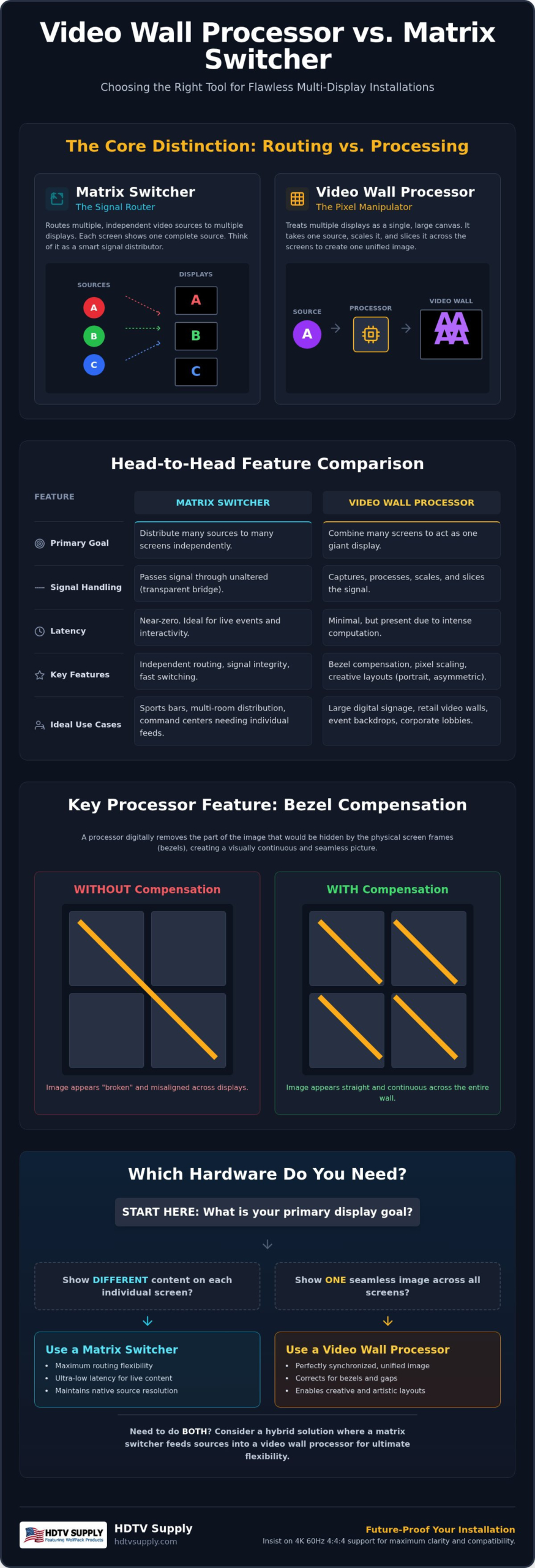
Routing is the act of moving a signal. Visualization is the act of manipulating it. If you need to send four different sources to four different screens, you’re routing. If you need to span one source across all four screens to create a single giant image, you’re manipulating pixels. This distinction is where the core confusion lies, often resulting in underpowered systems that can’t handle the scaling requirements of a modern Pro AV environment.
What is a Matrix Switcher?
A matrix switcher functions as a many-to-many distribution hub. It’s designed to take multiple independent signals and route them to specific displays without altering the content. In a sports bar, for example, a matrix switcher allows you to show a different game on every TV. It maintains the source’s native resolution and aspect ratio for each output. For high-capacity installations requiring flexibility, Modular HDMI Matrix Switchers: 2026 Pro AV Guide provides a deeper look into how these systems scale. Key characteristics include:
- Independent Routing: Any input can go to any output or combination of outputs.
- Signal Integrity: The device passes the signal through with minimal processing to ensure low latency.
- Fixed Layouts: Each screen acts as an individual unit; it doesn’t “know” about the screens next to it.
What is a Video Wall Processor?
A video wall processor is a specialized computer designed to treat a group of displays as a single, massive canvas. It takes a single 4K source and “slices” it into segments, sending the correct portion of the image to each screen in the grid. Unlike a switcher, a processor handles bezel compensation. This feature accounts for the physical frames of the TVs, ensuring that diagonal lines look straight and continuous across the entire wall. To understand the full technical capabilities of these units, refer to the Guide to Video Wall Processors: 2026 Pro AV Edition. These devices are essential for:
- Pixel Scaling: Stretching a single input across a 2×2, 3×3, or non-standard grid.
- Bezel Management: Electronically removing pixels that would be hidden behind the TV frames.
- Creative Layouts: Managing portrait, landscape, or asymmetrical display orientations.
Identifying your “Display Goal” is the first step in any professional installation. If your client wants the flexibility to toggle between individual games and a single “Big Game” mode, you may actually need a hybrid solution. However, starting with the right primary hardware prevents the image misalignment issues that plague amateur setups.
Architectural Differences: How Matrix Switchers and Processors Handle Pixels
The primary technical distinction in the video wall processor vs matrix switcher comparison lies in how each device manages the signal path. A matrix switcher is essentially a transparent bridge; it routes an input to an output with zero modification to the pixel data. This ensures the lowest possible latency for time-sensitive applications. In contrast, a video wall processor is a computational engine. It captures the incoming signal, stores it in a frame buffer, and then re-scales it across multiple outputs. This process requires significantly higher internal clock speeds to manage the immense data throughput without dropping frames.
Latency is a critical factor for professional installers. While a matrix switcher offers near-instantaneous switching, a processor introduces a slight delay due to the heavy lifting involved in scaling and synchronization. For live broadcasts or interactive command centers, this difference dictates the entire system architecture. You must choose between the raw speed of a routing hub and the transformative power of a pixel-manipulation engine.
The Internal Scaling Engine
High-performance scaling engines are mandatory for processors to prevent pixelation on large-scale walls. When stretching a single source across a 3×3 grid, the processor must intelligently fill in the gaps between pixels. WolfPackSecure 4K 60 4:4:4 HDMI Matrix Switchers and dedicated processors provide the necessary bandwidth to handle these transitions without signal degradation. Chroma subsampling 4:4:4 is the gold standard for 2026, ensuring that every pixel of color data is preserved for maximum clarity. This level of precision is vital for text-heavy digital signage or high-detail control room data.
Modular vs. Fixed Hardware
Modular matrix switchers provide a level of future-proofing that fixed hardware cannot match. By utilizing swappable I/O cards, you can scale a system from a 4×4 configuration up to a massive 160×160 frame in a single chassis. This allows for the integration of mixed signal types like HDMI, HDBaseT, and Fiber as your venue expands. Video wall processors are typically built for specific grid layouts. They prioritize pixel-perfect synchronization over I/O variety. While they don’t offer the same “swap-on-the-fly” flexibility, they provide superior control over the visual canvas.
EDID management is the final piece of the architectural puzzle. It ensures that your high-resolution sources don’t automatically downscale when they detect a single lower-resolution display in the chain. If you’re unsure which architecture fits your specific I/O requirements, our team offers free custom AV system design to help you map out the perfect signal path for your venue.
Feature Comparison: Bezel Compensation, Scaling, and Multi-View
The functional gap between a video wall processor vs matrix switcher is most evident in the specialized features required for high-impact visual displays. While a matrix switcher focuses on the efficiency of moving a signal from Point A to Point B, a processor focuses on the integrity of the image across a multi-display canvas. If your project involves a grid of screens, the lack of bezel compensation in a standard switcher will result in a “broken” image where straight lines appear jagged or disconnected as they cross from one monitor to the next.
Switching speed also differs significantly between these architectures. Professional matrix switchers often feature “seamless switching,” which uses internal scaling to eliminate the black screen or “searching” delay when swapping sources. Processors manage this differently; they maintain a constant sync with all displays in the wall, allowing for instant transitions and even animated window movements. Audio de-embedding is another critical consideration. High-end WolfPack systems allow you to extract the digital audio stream directly from the HDMI path, sending it to external amplifiers for venue-wide sound reinforcement.
Visual Integrity and Bezel Correction
Bezel correction is the process of electronically removing the pixels that would be hidden behind the physical frames of your TVs. Without this, a single image stretched across four screens looks unnatural because the bezels act as a visual barrier. Processors calculate the “hidden” pixels based on the physical dimensions of your display borders to ensure a continuous, fluid image. Standard matrix switchers lack these tools because they treat each output as an independent destination. For a deep dive into the math behind these layouts, see our Professional 2×2 Video Wall Setup Guide (2026).
Advanced Visualization Tools
Modern processors offer custom windowing and Picture-in-Picture (PiP) capabilities that go far beyond simple 1:1 routing. You can overlay multiple sources on a single large display or create “floating” windows that span across multiple screens in your grid. This is essential for command centers or high-end retail environments where content needs to be dynamic. Additionally, processors handle rotation and orientation, allowing you to mount displays in portrait mode for creative digital signage. Check out the Retail Video Wall Processors: 2026 Immersive Display Guide for more on these specialized layouts.
Choosing the right feature set prevents the visible misalignment that often ruins professional AV installations. If your goal is a single, unified image, the processing engine’s ability to manipulate pixels is non-negotiable. If you simply need to move high-resolution content to different rooms, the routing speed of a matrix switcher remains the superior choice.
Use Case Analysis: Identifying the Right Hardware for Your Venue
The decision between a video wall processor vs matrix switcher ultimately rests on how your venue interacts with content daily. While technical specs provide the foundation, the environmental demands of a sports bar differ wildly from those of a mission-critical command center. You must align your hardware choice with the specific operational workflow of the end-user to avoid over-complicating the system or under-delivering on visual impact.
The Sports Bar Hybrid Model
Sports bars represent a unique challenge because they require both mass distribution and high-impact focal points. For a venue with 30+ displays, a WolfPack Modular Matrix Switcher is the industry standard for routing different games to specific booths or tables. However, when it’s time for the “Big Game,” venue owners often want to transform a 3×3 grid of TVs into a single massive display. This is where the hybrid model excels. By feeding one or more outputs from the matrix into a dedicated HDMI Video Wall Processor, you gain the ability to toggle between individual routing and unified processing.
Managing these complex transitions shouldn’t require a computer science degree. We recommend integrating WolfPad TV Control Systems for iPad-based management. This allows staff to change layouts and sources with a single tap, eliminating the need for complex programming. For a deeper dive into these configurations, see our guide on 2026 Sports Bar TV Distribution: Scaling for Success.
Retail and Corporate Environments
Retail installations often demand non-standard, creative layouts to capture customer attention. If your design includes portrait-mode displays or asymmetrical grids, a video wall processor is mandatory. Matrix switchers cannot rotate signals or manage the complex scaling required for digital signage. Conversely, corporate boardrooms usually prioritize simple presentation routing. In these settings, a matrix switcher provides the most efficient path for laptop and VC camera signals to reach the main projector or display without unnecessary processing lag.
Mission-Critical Reliability
In command and control centers, situational awareness is the priority. These environments often combine both technologies to monitor dozens of live feeds simultaneously. WolfPack systems are engineered for this level of intensity, featuring redundant power supplies and hot-swappable cards to prevent downtime. Zero Latency is defined in 2026 as a signal transmission speed that remains under one millisecond through fiber-optic distribution, ensuring real-time data visualization for emergency response or network monitoring. If you’re designing a high-stakes environment, you can consult our AV experts to build a redundant, fail-safe architecture that meets your specific I/O requirements.
Selecting Your Hardware: WolfPack Solutions and Custom Design
Selecting the right hardware requires a balance between current needs and future scalability. The video wall processor vs matrix switcher decision often feels like a choice between two rigid paths; however, modular hardware bridges this gap. WolfPack systems allow you to start with basic routing and add advanced processing as your venue grows. This modularity ensures you don’t overspend on day one while maintaining a path to high-end visualization.
In 2026, professional installations must support 4K 60Hz 4:4:4 and HDCP 2.2 as baseline requirements. These standards ensure that high-bandwidth content, such as live sports or detailed medical imaging, remains crisp and free of digital artifacts. Choosing hardware that lacks these specifications will lead to immediate obsolescence. WolfPack systems are engineered to handle these data-heavy signal paths across diverse display counts without compromising signal integrity.
The WolfPack Advantage
WolfPack Modular systems provide the flexibility to mix and match I/O cards within a single chassis. You can integrate HDMI, SDI, or HDBaseT cards depending on your specific cable runs and source types. For environments requiring maximum data integrity and security, WolfPackSecure features provide the high-bandwidth paths needed for government and medical applications. These systems treat the signal path as a dynamic resource rather than a static connection. For a detailed breakdown of specific models and configurations, refer to The Professional Guide to WolfPack Video Wall Processors (2026).
Simplifying the Control Layer
The most common failure point in Pro AV isn’t the hardware; it’s the control interface. Traditional systems often require expensive third-party programming that leaves staff confused and unable to manage the system. WolfPad TV Control Systems eliminate this barrier. This iPad-based management tool provides a direct interface for matrix routing and video wall presets without the need for custom coding. You can swap between a 3×3 video wall and individual TV feeds with a single tap. This “no-programming” approach reduces installation time and empowers venue owners to manage their own content.
Every installation has unique challenges, from cable distances to mixed resolutions. Don’t guess which components you need for your specific environment. Our team of veteran technicians provides free custom AV system design to ensure your signal path is optimized for performance and reliability. We help you navigate the technical differences between routing and processing so you can invest with confidence. Contact HDTV Supply for a Free Custom AV Design today to finalize your project specifications.
Finalizing Your 2026 Pro AV Architecture
Mastering the video wall processor vs matrix switcher distinction ensures your installation delivers high-impact visuals without technical bottlenecks. A matrix switcher serves as your hub for efficient signal distribution; a processor acts as your engine for pixel manipulation and bezel correction. Selecting modular hardware like WolfPack systems allows you to bridge these functions, providing the scalability needed for expanding venues. By prioritizing 4K 60 4:4:4 signal paths, you guarantee a future-proofed system that meets the highest professional standards for 2026.
HDTV Supply has provided expert technical support since 1998, offering the industry knowledge required for complex integrations. We offer free custom AV system design to help you map out the perfect signal architecture using WolfPackSecure technology. Eliminate expensive programming by pairing your hardware with WolfPad tablet control for immediate accessibility. Shop WolfPack Video Wall Processors and Matrix Switchers at HDTV Supply to secure your professional-grade hardware today. Your high-performance installation is only one configuration away.
Frequently Asked Questions
Can a matrix switcher create a video wall?
No, a standard matrix switcher cannot stretch a single image across multiple displays. It is designed for 1:1 distribution, where each screen shows a full source. When comparing a video wall processor vs matrix switcher, the primary difference is that the processor handles the pixel-slicing required for a unified image. If you attempt to use only a switcher, you will be limited to showing independent content on each screen.
What is bezel compensation and why do I need it for a video wall?
Bezel compensation is a digital adjustment that removes the pixels that would be hidden behind the physical frames of your monitors. You need it because without this correction, the image will look disjointed and misaligned as it crosses from one screen to the next. It ensures that diagonal lines and moving objects appear continuous. Most professional processors include this feature as a standard tool for visual integrity.
Do I need a separate controller for my WolfPack matrix switcher?
You don’t necessarily need a separate controller, but we highly recommend the WolfPad TV Control Systems for streamlined management. While WolfPack systems offer built-in web GUIs and front-panel controls, the WolfPad provides an iPad interface that simplifies complex routing. This allows staff to manage presets and source switching without any custom programming. It is a cost-effective way to ensure your team can operate the venue without technical assistance.
Is 4K 60Hz 4:4:4 necessary for commercial video walls in 2026?
Absolutely. High-end commercial installations in 2026 require 4K 60Hz 4:4:4 to maintain signal parity with modern source devices. This specification ensures that every pixel of color data is preserved and motion remains fluid. Lower specs, like 4:2:0, can cause visible blurring or color bleed on large-scale displays. Utilizing video wall processor vs matrix switcher hardware that supports these rates is vital for future-proofing your Pro AV investment.
What is the maximum distance I can run an HDMI signal to a video wall?
Standard copper HDMI cables are generally limited to 50 feet before signal degradation occurs. To reach a video wall across a larger venue, you should utilize HDBaseT or fiber-optic extenders. Fiber is the superior choice for 2026 because it supports full 18Gbps bandwidth over distances exceeding 1,000 feet. This ensures your 4K 60Hz signal arrives at the wall without latency or the risk of electromagnetic interference from other electronics.
Can I mix different TV brands on a video wall processor?
Yes, a processor can output to mixed brands, but it is a poor practice for professional installations. Each manufacturer uses different panel technologies, color temperatures, and bezel thicknesses. While the processor can adjust for different bezel sizes, matching the color and brightness across different brands is nearly impossible. For a seamless look, always use identical display models from the same manufacturing batch to ensure visual uniformity across the entire wall.
How many inputs and outputs can a modular matrix switcher handle?
Modular matrix switchers offer immense flexibility compared to fixed-chassis units. WolfPack systems utilize swappable cards, allowing configurations to range from a small 4×4 setup to a massive 160×160 array. This allows you to scale the system as your venue grows. You can mix HDMI, SDI, and HDBaseT inputs within the same frame. This versatility makes modular switchers the preferred choice for high-capacity venues like sports bars or large corporate headquarters.
What happens if one TV in my video wall fails?
If a single display fails, the processor continues to send the signal, but that portion of the image will be missing. Because the processor handles the scaling, you can replace the faulty unit with an identical model without reconfiguring the entire system. You may need to perform a minor bezel recalibration to ensure the new screen aligns perfectly. This modular failure mode is why professional displays are preferred over consumer-grade televisions.
Leave a Reply
Want to join the discussion?Feel free to contribute!