
AV Matrix Switcher Control Without Programming: Busting the Custom Coding Myth
Why are you still paying a certified programmer thousands of dollars just to change which TV shows the big game? Achieving professional AV matrix switcher control without programming is no longer a myth; it’s a necessity for modern business efficiency. For years, the industry led us to believe that high-end video distribution required a wall of custom code and a technician on speed dial. It’s a frustrating cycle of high costs, system downtime, and the inability to make a simple change without a service call. You’ve likely felt the sting of a “buggy” control system that leaves your screens black exactly when your customers are ready to watch.
This guide will show you how modern hardware, like the WolfPack series, utilizes built-in web GUIs and WolfPad tablet interfaces to give you total command. We’ll break down the shift from code-heavy automation to configuration-based management. Discover how to achieve a reliable, plug-and-play setup that reduces installation expenses and empowers your non-technical staff to manage the system with confidence. It’s time to reclaim control of your hardware without the burden of custom coding.
Key Takeaways
- Challenge the legacy belief that pro-grade reliability requires custom coding by adopting hardware designed for instant configuration.
- Learn how to implement AV matrix switcher control without programming by utilizing built-in Web GUIs for immediate, cost-free system management.
- Reduce deployment time from weeks to hours and eliminate recurring service fees by switching to configuration-based control systems.
- Discover how the WolfPad ecosystem provides an industry-standard iPad interface that any staff member can operate without technical training.
- Master the essential network architecture steps, such as setting static IPs, to ensure your plug-and-play control system remains stable and responsive.
Busting the Myth: Does Every Pro AV System Require Custom Programming?
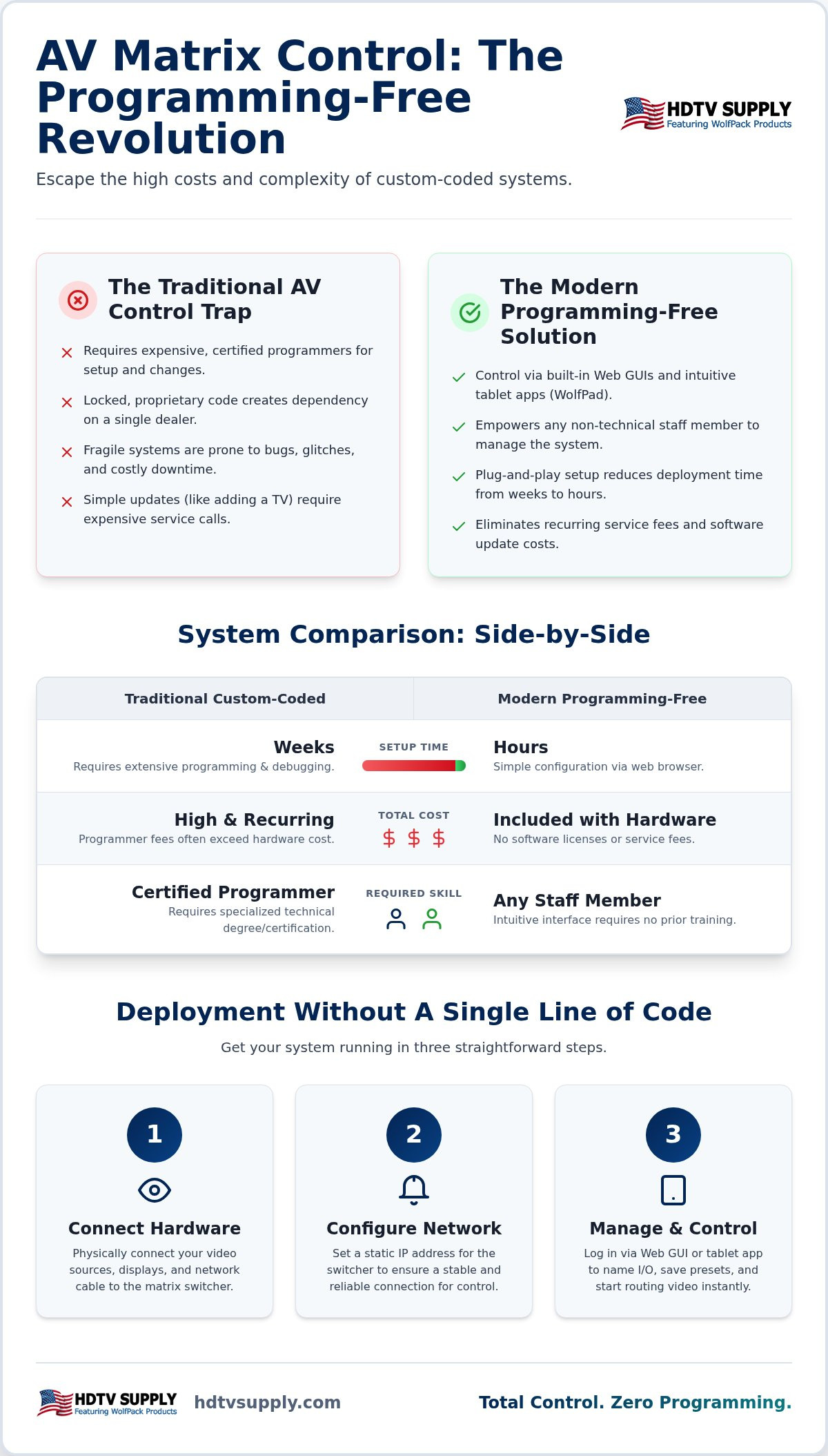
Professional AV installations don’t require a computer science degree to function reliably. For decades, the industry operated under the assumption that high-end video distribution demanded custom-written code. We’re here to dismantle that assumption. Modern AV matrix switcher control without programming relies on configuration-based logic. This means the control interface is already built into the hardware, waiting for you to toggle settings rather than write complex scripts. This shift allows for immediate deployment without the bottleneck of a specialized technician.
The core of any distribution system is the video router, also known as a video matrix switch. Traditionally, these units were passive components that required an external control processor to manage signal routing. That external brain was a blank slate. It required a certified specialist to spend days, or even weeks, mapping commands for every source and display. If the code wasn’t perfect, the system wouldn’t behave. This complexity was often sold as customization, but it functioned as a proprietary barrier for business owners.
The High Cost of Traditional AV Automation
Custom-coded systems come with significant financial baggage. Certified programmers charge premium hourly rates that can quickly exceed the cost of the hardware itself. Beyond the initial invoice, you face the proprietary trap. Because the code is often locked or written in a specific dealer’s software, you can’t update the system yourself. If you add a new media player or change a TV brand, you’re forced to pay for a service call. These systems are also inherently fragile. A single syntax error or a conflict between software versions can cause total system failure. In a high-stakes environment like a sports bar, a coding glitch during a major event is a disaster you can’t afford.
The Shift to User-Centric AV Architecture
A major shift in system architecture has occurred. Manufacturers now integrate control logic directly onto internal chipsets. This eliminates the need for external processors and the specialized code that comes with them. The Web GUI (Graphic User Interface) has evolved from a basic setup tool into a comprehensive management platform. You simply login via a browser, assign names to your inputs, and the system is ready. Modern users expect plug-and-play simplicity without sacrificing professional performance. This demand for immediate accessibility is driving the industry toward AV matrix switcher control without programming. It’s about efficiency, technical mastery, and removing the middleman from your AV workflow.
Modern Alternatives: Web GUIs and Tablet Apps
The transition to AV matrix switcher control without programming is largely driven by the adoption of IP-based architecture. Modern systems no longer rely on rigid, proprietary communication protocols that require specialized hardware. Instead, they utilize standard network infrastructure to facilitate communication between the matrix and the user. This shift enables wireless mobility across your entire venue. You aren’t confined to the equipment rack. Any authorized device on the local network becomes a potential control point, allowing staff to make changes from the bar, the floor, or the office.
The Power of the Built-in Web Interface
Most professional matrix switchers now feature a native Web GUI accessible through any standard browser. You simply enter the unit’s IP address into a laptop or tablet to gain immediate access to the system’s core functions. This interface eliminates the need for external software installations or driver updates. Key features typically include:
- I/O Routing: Real-time mapping of video sources to specific displays.
- EDID Management: Configuring Extended Display Identification Data to ensure source compatibility with various screen resolutions.
- Preset Saving: Creating and recalling complex routing configurations for different times of day or specific events.
Security is a priority. These interfaces use password protection and tiered access levels. You can ensure that only management has the authority to change system-wide settings, while floor staff might only have access to basic channel switching.
Professional Control Apps for Sports Bars
While browsers provide functional access, dedicated applications like WolfPad TV Control Systems represent the next level of user-centric design. These apps replace expensive, fragile touch panels with standard iPad or Android hardware. The primary advantage is visual feedback. Instead of guessing which source is active, you see exactly what’s playing on TV 1 through TV 50 directly on your tablet screen. This visual confirmation is critical in high-pressure environments like a busy sports bar.
The interface relies on drag-and-drop functionality, providing a true “no-programming” experience. Any staff member can learn to route a new game to a specific bank of TVs in seconds. This scalability allows you to manage 30 or more displays with precision. If you’re designing a new layout, explore a professional Sports Bar TV Distribution System to see how integrated app control can simplify your daily operations.
Programming-Free vs. Custom-Coded Systems: A Performance Comparison
Comparing system architectures reveals a stark contrast in operational efficiency. A custom-coded setup typically requires days or weeks of development, testing, and debugging before the first signal is routed. In contrast, achieving AV matrix switcher control without programming allows you to move from unboxing to full deployment in just a few hours. You don’t wait for a specialist to arrive; you simply configure the existing software parameters to match your venue’s layout. This speed translates directly to lower initial labor costs and faster revenue generation for your facility.
Staff training follows a similar trajectory of efficiency. A custom automation system often requires a thick manual and hours of orientation for non-technical employees. Navigation can be counterintuitive, leading to user errors during peak hours. Modern tablet-based interfaces require a five-minute walkthrough. If a staff member can use a smartphone, they can manage your video distribution. Flexibility is equally superior. Adding a new display to a custom system requires a programmer to update the code. With a configuration-based system, you can integrate new hardware in minutes by simply assigning an IP address and updating the GUI labels.
Reliability and Uptime Analysis
Stability increases when you remove unnecessary software layers. Custom code acts as a “black box” where errors are hidden from the user, making troubleshooting nearly impossible for local staff. If the control processor fails, the entire system goes dark. A programming-free environment relies on direct hardware communication, making it easier to verify IP settings and restore functionality. System redundancy in a programming-free environment is achieved through direct, peer-to-peer communication between the control tablet and the matrix hardware without relying on an external central processor.
Total Cost of Ownership (TCO) Over 5 Years
The “Programmer Tax” is a recurring expense that many businesses fail to calculate. Every minor change, such as swapping a cable box, adding a streaming media player, or replacing a failed TV, triggers a service call and an hourly bill. Over five years, these costs often exceed the original price of the equipment. Choosing a modular HDMI matrix switcher provides a much higher ROI because it’s a hardware-only investment. You eliminate software licensing fees and the ongoing dependency on external labor. You maintain total ownership of your system’s configuration, ensuring that your venue stays operational without the overhead of proprietary code maintenance.
Building Your System: Steps to Deploy Control Without a Single Line of Code
Deploying a professional system for AV matrix switcher control without programming is a methodical process that prioritizes configuration over coding. While the hardware is advanced, the setup relies on standard networking principles that any IT-literate manager can execute. The goal is to move from unboxing to a fully functional iPad interface in a single afternoon. Follow these four critical steps to ensure a stable, professional-grade installation.
- Step 1: Hardware Selection. Choose a platform like the WolfPack Modular Matrix Switchers. These units are designed with integrated IP control processors, eliminating the need for third-party automation boxes.
- Step 2: Network Architecture. Assign static IP addresses to both your matrix switcher and your control tablet. This is a non-negotiable step. If you rely on DHCP, your control device will eventually lose the “handshake” with the matrix when the IP lease expires.
- Step 3: Logical Configuration. Log into the Web GUI and replace generic labels like “Input 1” or “Output 12” with descriptive names. Use “DirecTV 1”, “Apple TV”, “Bar North”, and “VIP Room”. These labels will automatically populate your control app.
- Step 4: Signal Verification. Test every source against every display. Use the EDID management settings within the GUI to force a common resolution, such as 4K/60Hz, ensuring that every screen syncs instantly without flickering.
Network Requirements for Zero-Code Control
Stability depends on your local area network. We recommend using a dedicated AV VLAN or a standalone router to isolate video control traffic from guest Wi-Fi. This prevents bandwidth congestion from delaying your switching commands. While the matrix switcher must be hardwired to the network switch for maximum reliability, your iPad relies on a robust Wi-Fi signal. Ensure your wireless access points provide 100% coverage in the areas where staff will operate the system. A dropped Wi-Fi signal means a loss of control during critical game-day moments.
Optimizing the User Interface for Staff
The final stage is tailoring the interface for speed. Use the “Scenes” or “Presets” feature to create one-touch configurations. A “Saturday Football Kickoff” preset can instantly route all 12 cable boxes to their designated screens across the venue. This removes the possibility of human error during busy shifts. Properly labeling every element ensures that even a new hire can manage the system with zero training. To see these principles in action, review our guide on the sports bar TV distribution system and how it scales for high-volume venues. To start your deployment, browse our selection of WolfPack Modular Matrix Switchers and secure the hardware required for a code-free installation.
Scaling Success with WolfPad: The Future of Zero-Programming AV Control
WolfPad represents the pinnacle of user-centric design in the Pro AV industry. It functions as the premier alternative to traditional, code-heavy automation systems that have historically drained operational budgets. The architecture is inherently configuration-based, meaning the heavy lifting is already done by our engineers. You don’t need to write a single line of code to achieve sophisticated AV matrix switcher control without programming. Instead, you’re investing in an ecosystem designed for immediate accessibility and high-capacity performance. Pairing WolfPad with a modular HDMI matrix switcher ensures your system remains scalable as your venue grows.
Why WolfPad is Different
Most control apps offer basic button-mapping, but WolfPad provides a comprehensive management environment. It features pre-configured templates tailored for high-volume environments like sports bars, restaurants, and casinos. You don’t start with a blank screen; you start with a professional layout ready for your specific device names. A standout feature is the real-time video preview. This allows you to see exactly what’s playing on a source before you route it to your displays, eliminating the risk of switching to the wrong channel during a live event. The system also includes native support for thousands of HDMI devices. This broad compatibility means you won’t need to hire a specialist to write custom drivers for your cable boxes, media players, or displays.
Expert Support and System Longevity
Reliability is built into the hardware, but expert assistance is always available if your requirements become complex. Every system is backed by our toll-free technical support, providing you with direct access to specialists who understand the nuances of system configuration. This support structure, combined with the availability of extended warranties on our professional-grade WolfPack hardware, ensures your investment is protected for years. Professional control is no longer a separate labor expense or a recurring service fee; it’s a built-in feature of the hardware itself. This shift empowers you to maintain your system internally, making updates and changes as your business needs evolve.
Ready to modernize your venue with a reliable, no-programming control solution? Contact HDTV Supply today for a free custom system design. Our specialists will help you select the right WolfPack and WolfPad components to ensure your video distribution is efficient, scalable, and easy for any staff member to operate.
Reclaim Your Venue with Configuration-Based Control
The era of being tethered to a certified programmer’s schedule is over. By shifting to a configuration-based architecture, you eliminate the “Proprietary Trap” and the recurring costs of custom code maintenance. Achieving AV matrix switcher control without programming isn’t just about saving money; it’s about gaining the agility to manage your venue in real time. Whether you’re running a high-volume sports bar or a corporate facility, the ability to swap sources and displays from an iPad ensures your system stays active and your staff remains productive.
HDTV Supply is ready to help you deploy these efficient solutions with confidence. With over 12,000 professional AV products in stock and free custom AV system design services, we provide the resources you need for a successful installation. If you encounter technical hurdles, our expert support team is available via toll-free assistance to guide you through the process. Take the first step toward a more reliable, user-friendly environment today. View WolfPad No-Programming Control Systems at HDTV Supply and simplify your video distribution.
Frequently Asked Questions
Do I need an internet connection to control my matrix switcher from an iPad?
No, you only need a local area network (LAN) to maintain full functionality. The iPad and the matrix switcher communicate directly via your local router or network switch. While an internet connection is helpful for initial firmware updates or remote technical support, the actual AV matrix switcher control without programming happens entirely within your private network. This ensures your system stays active even if your external internet service provider goes down.
Can I still use a traditional remote control with a programming-free system?
Yes, most professional units include an IR remote control as a standard backup option. While the WolfPad ecosystem is designed for superior tablet-based management, the hardware still supports traditional infrared and front-panel button switching. This redundancy is vital for high-stakes environments. You can use the iPad for complex routing across 50 TVs and keep the handheld remote for quick, single-screen adjustments if the tablet is charging or unavailable.
What happens if my iPad breaks or is lost?
You can simply log in from another authorized device on your network to resume control. Because the control logic is hosted on the matrix switcher or within the cloud-synced WolfPad app, your configuration isn’t tied to one specific tablet. You won’t lose your labels, presets, or routing maps. Just download the app onto a new iPad or use a laptop browser to access the built-in Web GUI for immediate system recovery.
Is programming-free control secure against hacking?
Yes, these systems utilize standard network security protocols to prevent unauthorized access. You can set administrative passwords for the Web GUI and restrict control app access to specific user profiles. By placing your AV hardware on a dedicated VLAN, you isolate the control traffic from guest Wi-Fi users. This architecture ensures only your staff can change channels, keeping the system secure from outside interference or accidental changes by customers.
Can I control multiple matrix switchers from a single tablet?
Yes, the WolfPad interface is designed to aggregate multiple units into a single, unified dashboard. You don’t need a separate app for every floor or room in your venue. The software recognizes multiple IP addresses on the network and allows you to toggle between them seamlessly. This scalability is a core benefit of AV matrix switcher control without programming, allowing for massive expansion without adding technical complexity.
Do I need to pay monthly fees for no-programming control apps?
No, the WolfPad and WolfPack systems typically operate on a one-time hardware purchase model. Unlike SaaS-based automation platforms that require ongoing licensing fees, these systems are designed for long-term ownership without recurring costs. You pay for the professional-grade hardware and the control interface up front. This transparent pricing model helps business owners maintain a predictable budget while avoiding the subscription traps common in modern software.
How many TVs can I realistically control without the system slowing down?
You can control dozens of displays simultaneously without experiencing command latency. Modern IP-based control processors handle traffic efficiently, ensuring that a “switch all” command executes instantly across 30, 50, or more TVs. The bottleneck is rarely the software; it’s usually the quality of your local Wi-Fi signal. As long as your network infrastructure is robust, the control interface remains responsive regardless of the system’s physical scale.
What is the difference between a Web GUI and a dedicated control app?
A Web GUI is a browser-based tool used primarily for initial setup and deep technical configuration. It provides access to EDID settings, IP management, and firmware tools. A dedicated control app, like WolfPad, is a user-facing interface optimized for daily operations. The app adds essential visual feedback, such as video previews and drag-and-drop routing, making it much faster and more intuitive for floor staff to use during a busy shift.
Leave a Reply
Want to join the discussion?Feel free to contribute!