
The Essential WolfPad TV Control System Checklist for 2026
Your head bartender shouldn’t have to call you at home on a Saturday night just to switch the game on TV three. Managing a complex network of DirecTV or cable boxes often feels like a full-time job, especially when your current control system is too technical for your staff to use. The WolfPad TV control system solves this by providing a professional, tablet-based interface that requires no programming and eliminates the need for expensive, proprietary automation. It’s the reliable “brain” your sports bar or restaurant needs to keep the focus on the customers rather than the equipment rack.
We know you’re tired of high-cost systems that break the moment you need them most. This article delivers a complete implementation checklist to simplify your AV management and ensure your venue is ready for 2026. You’ll discover how to streamline your TV distribution, set up reliable switching for high-traffic events, and deploy a user-friendly interface that any employee can master. We’ll walk you through the essential hardware requirements, network configurations, and layout strategies needed for a seamless, professional rollout.
Key Takeaways
- Eliminate the “remote control jungle” by replacing dozens of handheld remotes with a single, intuitive tablet interface designed for non-technical staff.
- Discover how the WolfPad TV control system integrates with WolfPack Modular Matrix switchers to provide a “no programming needed” alternative to expensive, proprietary automation.
- Identify the specific network infrastructure requirements, including dedicated LAN segments and high-quality wireless access points, necessary for reliable tablet roaming.
- Learn to leverage free custom AV system design services to ensure your IP address schemes and matrix configurations are optimized for 2026 standards.
- Follow a streamlined implementation path from unboxing to game day to ensure zero-latency switching during your venue’s highest-traffic events.
Why Traditional AV Control Fails in Commercial Venues
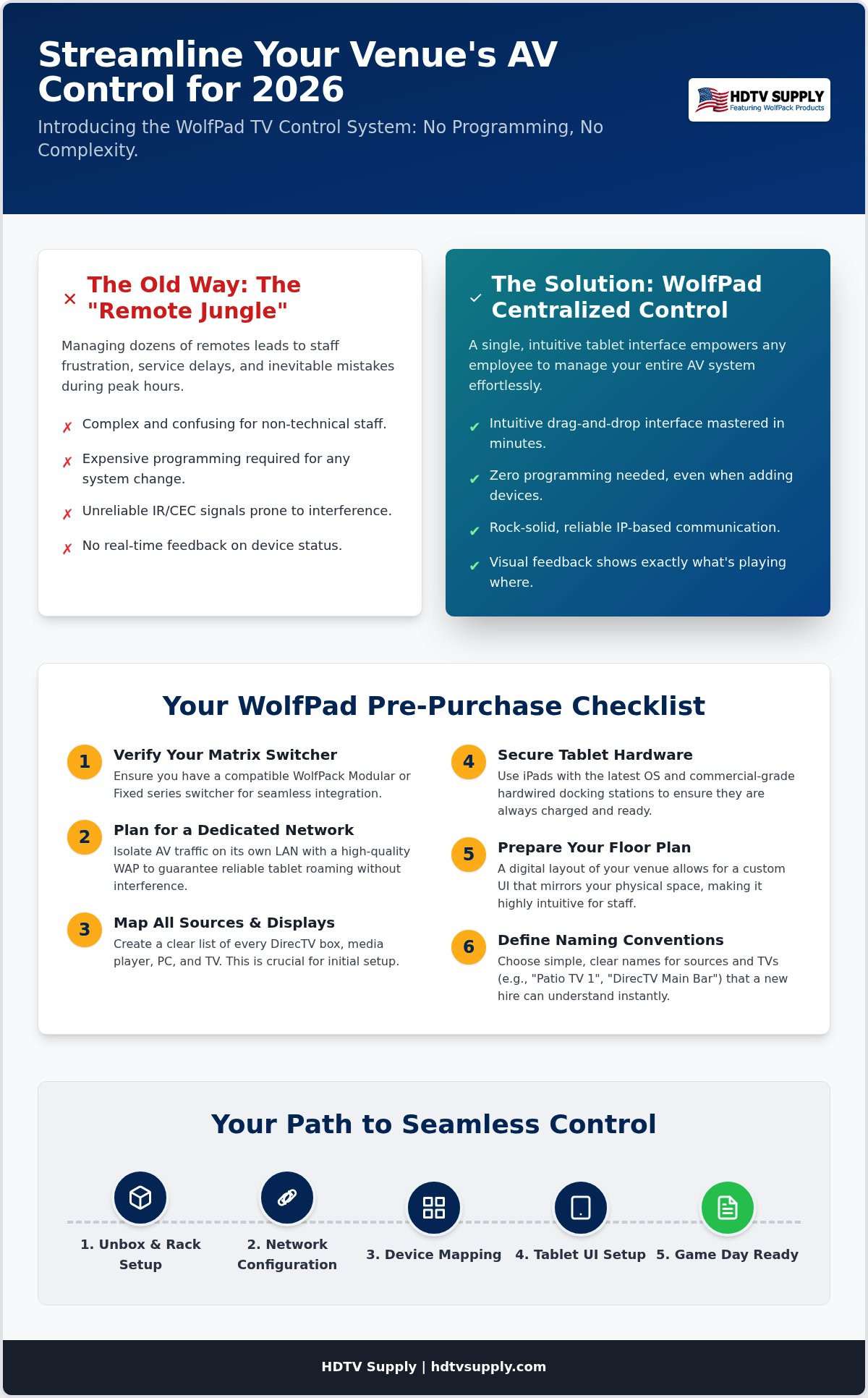
Managing 20 different IR remotes is a recipe for operational failure. In high-volume venues, staff errors are inevitable when bartenders must point a plastic remote at a specific receiver while juggling orders. This “Remote Control Jungle” leads to the wrong game being shown on the wrong screen at the wrong time. Traditional automation systems often promise a solution but hide a massive financial burden: complex programming. Every time you swap a cable box or add a display, you’re forced to hire a specialist at a high hourly rate. The WolfPad TV control system eliminates this bottleneck by providing a pre-configured, “no programming needed” architecture. Zero programming. Immediate results.
Visual feedback is the critical differentiator. Guessing which source is active on which display is an outdated workflow. Modern venues require a reliable bridge between high-performance hardware and human operation. By utilizing professional video over IP technology principles, the WolfPad offers a real-time, tablet-based overview of your entire matrix. This ensures that what the staff sees on the screen matches the physical output in the room. It transforms a complex equipment rack into a manageable visual map.
The Staff Frustration Factor
Complicated AV systems slow down service during peak hours. When a bartender struggles with a remote, they aren’t serving customers. The WolfPad provides a locked-down interface. This prevents accidental changes to core system settings that usually lead to emergency service calls. New employees can master the system in minutes. You don’t need a technical manual; you just need a finger. It simplifies training and keeps your staff focused on hospitality rather than troubleshooting.
Technical Limitations of IR and CEC
IR signals fail in large, open-plan spaces due to sunlight interference and physical obstructions. CEC is too unstable for commercial reliability. IP-based control via the WolfPad TV control system is the professional standard for 2026. It offers two-way communication, ensuring the controller knows the status of every device. This level of system awareness is impossible with basic switching setups. It provides the stability required for sports bars, casinos, and bowling alleys where downtime is not an option.
The WolfPad TV Control System Pre-Purchase Checklist
Before deploying the WolfPad TV control system, you must audit your current infrastructure. This “pre-flight” check ensures a seamless rollout without technical delays. The system is designed for immediate utility, but its performance depends on the foundation of your hardware and network. Start by verifying your matrix switcher. The WolfPad is specifically engineered to work with WolfPack Modular and Fixed series hardware. If you’re currently selecting a unit, refer to our guide on modular HDMI matrix switchers to ensure compatibility. Check the control ports on your switcher; while the system handles both RS232 and IP communication, knowing your architecture helps our team pre-configure your controller correctly.
Network stability is non-negotiable for commercial AV. You need a dedicated LAN for AV traffic to prevent bandwidth competition with guest Wi-Fi or POS systems. A high-quality wireless access point (WAP) is essential for tablet roaming. If a staff member moves from the bar to the patio, the connection must remain locked. Identify all your sources now. Create a clear map of every DirecTV box, Xumo player, and PC. This data is critical for the initial setup. For your control hardware, ensure your iPads are updated to the latest OS. The system utilizes the Crestron Go app, which requires modern software stability to function as the primary interface for your venue.
Hardware Compatibility Essentials
Match your power requirements to your environment. In a sports bar, you can’t rely on standard consumer charging cables that easily break or get lost. Use hardwired docking stations for your tablets to ensure they’re always charged and ready for game day. Check if you need video wall support. The WolfPad supports 2×2 or 3×3 configurations, but these must be defined during the pre-purchase phase to ensure the correct control codes are loaded into your rackmount controller.
User Interface Customization Prep
The “drag-and-drop” simplicity of the interface depends on the floor plan you provide. Gather a digital copy of your layout so the customizer can mirror your physical space. Establish naming conventions that make sense to a new hire. “North Wall 1” is far more effective than “Output 4.” Finally, decide on access levels. You can lock down the system so staff can only change channels, while managers retain the ability to modify source routing. If you’re unsure about your layout, contact our specialists for a free custom AV system design to get your project started.
WolfPad vs. Traditional Control: A Performance Comparison
Performance in a commercial environment is measured by speed and reliability. When comparing the WolfPad TV control system to traditional IR remotes or expensive proprietary automation, the latency gap is immediate. Handheld remotes rely on line-of-sight infrared pulses that can be disrupted by sunlight or foot traffic. In contrast, IP-based control sends commands directly through your network switch. This results in sub-second switching times. You tap the icon; the matrix responds. There is no lag while waiting for a sequence of IR codes to fire. It is precise and instantaneous.
Visual confirmation represents a major strategic advantage over blind switching. Traditional systems require staff to memorize which receiver is “Source 1” or “Source 2.” The WolfPad interface allows the user to see the source content or a clear icon on the tablet before making the switch. This prevents the “black screen” errors that frustrate customers during critical plays. When you consider the total cost of ownership, the value becomes even clearer. Most professional automation brands require a certified programmer for every minor change. The WolfPad eliminates these hourly rates by using a fixed, pre-configured architecture that doesn’t require ongoing software development.
Efficiency Gains for Staff
Staff efficiency peaks when the technology disappears into the background. Manual remote entry is slow. It requires finding the right remote, pointing it correctly, and entering the right channel. The drag-and-drop workflow of the WolfPad reduces this process to a two-second action. This is vital when managing complex sports bar TV distribution systems during live events. Managers can also execute synchronized commands, such as switching every TV in the building to a single source for a major announcement or a playoff game kickoff, with one single button press.
System Longevity and Updates
Longevity depends on adaptability. Hardware remotes are static; they cannot be updated to support new streaming devices or cable box protocols without physical replacement. The WolfPad TV control system is built on a flexible software platform. As we move through 2026, firmware updates ensure your system remains secure and compatible with the latest HDMI standards. Scalability is equally simple. If you add five more TVs to your patio, you don’t need a new control interface. You simply update your existing layout. This future-proofs your investment against the evolving demands of commercial media distribution.
Network and Hardware Requirements for WolfPad
Standardizing your IP address scheme is the first technical requirement for a stable WolfPad TV control system. The system operates on a DHCP-enabled network, but your WolfPack matrix and the rackmount controller should utilize reserved or static IP addresses. This prevents the tablet from losing communication with the hardware during a lease renewal. If the IP address of the matrix shifts, the control interface will fail. Assigning a logical, sequential numbering system to your equipment ensures that troubleshooting is fast and predictable. It creates a professional architecture that supports 2026 performance standards.
Organization within the equipment rack is equally vital for IP-based control. Use high-quality, shielded Cat6 cables for all network connections between the matrix, the WolfPad controller, and your network switch. Label every cable at both ends. An organized rack isn’t just about aesthetics; it’s about heat management and signal integrity. Poor cable management leads to accidental disconnects and restricted airflow, which can cause hardware to throttle or reboot during high-traffic events. Ensure your 3U rack space is clear and accessible for the modified Crestron controller that powers the interface.
Optimizing Your Wi-Fi for AV
A consumer-grade router cannot handle the demands of a commercial venue with 30 or more TVs. These devices often lack the processing power to manage simultaneous requests from multiple tablets while providing guest access. You must deploy a high-quality wireless access point (WAP) specifically for your AV traffic. Set up a dedicated, hidden SSID for the WolfPad TV control system to keep it isolated from customer traffic. This ensures that the control signal always has priority. Signal strength must be consistent across the entire floor plan. If your venue has dead zones, use a mesh system or additional hardwired WAPs to ensure the tablet never drops its connection while a staff member is roaming.
Source Integration: DirecTV and Beyond
The WolfPad interface provides direct channel control for DirecTV, DISH, and various cable boxes. It is also fully compatible with modern streaming platforms like Everpass and Xumo. This integration allows staff to change channels and manage volume from the same screen they use to route video. If you’re looking to understand how to control Everpass in your sports bar alongside your matrix switcher, a centralized AV setup ensures the right stream reaches the right screen without juggling remotes. For venues using legacy infrastructure alongside modern IP distribution, HDMI modulators play a key role in converting digital signals for distribution over existing coax runs. This hybrid approach allows you to maintain high-quality output while leveraging the centralized control of the WolfPad. To ensure your network is ready for these integrations, browse our full inventory of network-ready matrix switchers today.
Implementing WolfPad: Your Path to Seamless Control
Transitioning from a traditional setup to the WolfPad TV control system is a streamlined process when you leverage our free system design services. Our technical team works with your floor plan to pre-configure the rackmount controller before it ever leaves our facility. This minimizes on-site troubleshooting and ensures that the hardware arrives ready for your specific environment. Once you receive your system, the path to your first iPad-controlled game day follows a logical sequence of physical installation and network verification. Because the system is built on a “no programming needed” philosophy, your primary focus remains on the physical layout rather than code development.
Follow these steps for a successful rollout:
- Unbox and Rack: Install the 3U modified Crestron controller into your equipment rack and connect the included RS232 and IR cables to your WolfPack matrix.
- Network Integration: Connect the system to your dedicated AV network switch and ensure your wireless access point is active.
- App Synchronization: Launch the control app on your iPad; the pre-loaded proprietary code will automatically communicate with the controller.
- Staff Walkthrough: Conduct a 15-minute training session to familiarize bartenders with the drag-and-drop interface.
Effective staff training is the final piece of the implementation puzzle. While the interface is intuitive, providing a one-page “cheat sheet” at the bar helps staff remember specific zone names or preset triggers. This reduces the learning curve to nearly zero and prevents the need for manager intervention during busy shifts. As your venue grows, the system scales with you. Adding secondary zones or outdoor patios is a matter of updating the software layout rather than replacing the core hardware.
Customizing the WolfPad Experience
You can personalize the interface by uploading actual photos of your venue. This creates a 1:1 visual representation that makes it impossible to switch the wrong TV. “Presets” are another powerful tool for 2026. You can create a “Sunday Football” mode that instantly routes the most popular games to specific clusters of screens. For high-impact areas, integrating video wall processors into the tablet interface allows you to manage massive displays with the same simplicity as a single TV.
Support and Warranty for 2026
Reliability is backed by comprehensive support and a 5-year warranty on the modified Crestron rackmount controller. If you encounter any configuration challenges, our technical support team provides remote assistance to get your system back online quickly. We prioritize uptime because we understand that AV downtime equals lost revenue in a commercial setting. To start your transition to a professional, tablet-based distribution network, contact us today to request a custom quote for a WolfPad-ready system tailored to your venue’s unique requirements.
Future-Proof Your Venue with Professional TV Distribution
A seamless media experience is no longer a luxury for commercial venues; it’s an operational requirement. By moving away from the “Remote Control Jungle” and adopting the WolfPad TV control system, you eliminate technical friction that slows down service. You’ve seen how IP-based stability and a “no programming” architecture provide a reliable, cost-effective alternative to proprietary automation. Now is the time to optimize your network and hardware for 2026 standards.
As an authorized WolfPack distributor, HDTV Supply is ready to help you scale. We provide free custom AV design services to ensure your layout is perfect before purchase. If you have technical questions, our expert support is available at 833-WOLFPACK to guide you through every integration detail. Stop struggling with outdated remotes and start managing your venue with professional confidence.
Design Your Custom WolfPad Control System Today and give your team the tools they need for a successful, stress-free game day.
Frequently Asked Questions
Do I need to be a programmer to set up the WolfPad TV control system?
No, you don’t need any programming skills to set up or operate the system. The WolfPad TV control system arrives pre-configured with proprietary code based on your specific venue layout and equipment list. This “no programming needed” approach eliminates the high costs associated with hiring certified automation specialists. Your staff can manage the entire matrix using a simple drag-and-drop interface that requires zero technical training or software development knowledge.
Will the WolfPad work with any HDMI matrix switcher?
The WolfPad is engineered specifically for compatibility with the WolfPack Modular and Fixed Matrix series. It isn’t a universal remote for third-party hardware. This tight integration ensures that the tablet interface and the rackmount controller communicate without latency or command errors. By standardizing on WolfPack hardware, you guarantee that every switching command is executed reliably across your entire sports bar TV distribution network without compatibility conflicts.
How many iPads can I use to control my system simultaneously?
You can connect multiple tablets to the system, but only one user should operate the interface at a time to prevent command interference. This ensures that two different staff members don’t attempt to change the same TV simultaneously, which could cause signal confusion. While the system supports multiple devices for convenience across different zones, maintaining a single-user workflow during active switching events is the best practice for system stability.
Does the WolfPad require a monthly subscription fee?
There are absolutely no monthly, yearly, or recurring license fees associated with the WolfPad. Once you purchase the hardware and the initial license, you own the system outright. This creates a predictable total cost of ownership compared to competing platforms that require ongoing cloud subscriptions. You receive professional-grade control without the burden of hidden operational costs; it’s a financially sound investment for long-term commercial use in any venue.
Can I control my DirecTV boxes and my Matrix Switcher from the same screen?
Yes, you can manage your DirecTV boxes and your matrix switcher from the same visual interface. The WolfPad integrates source control directly into the layout, allowing bartenders to change channels, adjust volume, and route video without switching apps. This centralized control eliminates the need for physical remotes. It ensures that your staff can handle every aspect of the guest’s viewing experience from a single iPad or Android tablet with ease.
What happens if my Wi-Fi goes down during a game?
The tablet interface requires a stable Wi-Fi connection to communicate with the rackmount controller. If your wireless network goes down, the tablet will lose control functionality until the connection is restored. To prevent downtime during critical games, we recommend a dedicated SSID for AV traffic. For venues requiring maximum redundancy, we also offer 10-inch hardwired touchscreens that maintain control even if the wireless network experiences interference or a total failure.
Is the WolfPad compatible with Android tablets or just iPads?
The system is fully compatible with both iOS and Android platforms. You can use the “Crestron Go” app for iPads or the standard “Crestron App” for Android tablets. This flexibility allows you to choose the hardware that best fits your budget and venue requirements. Whether you prefer the ecosystem of a refurbished iPad or the cost-efficiency of a 10-inch Android tablet, the control logic and user interface remain consistent across all devices.
Can I use WolfPad to manage a video wall?
Yes, the WolfPad can manage complex video wall configurations, including 2×2 and 3×3 layouts. You can switch between a single large image across all screens or individual sources for each display with a few taps. This functionality is integrated directly into the custom floor plan layout we design for your venue. It allows your staff to transform the atmosphere of the room instantly without needing to access the physical video wall processor hardware.
Leave a Reply
Want to join the discussion?Feel free to contribute!