
The Professional Guide to HDMI Modulators: Distributing HD Video Over Coax (2026)
Why are you still overspending on fragile HDMI extenders and complex IP networks when the solution is already hidden in your walls? If you’re managing a sports bar or a large corporate campus, you know the frustration of signal degradation over long distances. High-performance HDMI cables are expensive and prone to failure at length. You’ve likely felt the sting of a black screen during a major event because an active cable simply couldn’t handle the distance. An hdmi modulator solves this by converting your digital signal into a dedicated RF channel, leveraging standard coaxial infrastructure to reach every screen in your facility without loss.
We understand that scaling a video network shouldn’t require a complete structural overhaul or an IT degree. This guide shows you how to build a professional-grade distribution system that supports unlimited displays while keeping hardware costs low. You’ll learn the technical specifications of 2026-standard 4K modulators and how to integrate them with control interfaces like our WolfPad system. From selecting multi-input units for complex arrays to managing high-density source racks, we’re laying out the blueprint for a reliable, scalable AV environment.
Key Takeaways
- Leverage existing coaxial infrastructure to distribute high-definition video across massive venues without the high cost of long-distance HDMI cables.
- Understand how a professional hdmi modulator converts digital sources into private cable channels, enabling unlimited display scalability across a single network.
- Compare modulation against traditional matrix switching to determine which architecture fits your specific venue size and latency requirements.
- Ensure content security and system reliability by prioritizing HDCP compatibility and professional-grade multi-input hardware for your rack.
- Streamline complex operations by integrating video distribution with the WolfPad TV Control System for centralized, iPad-based management of all sources.
What is an HDMI Modulator and Why Do Professionals Use Them?
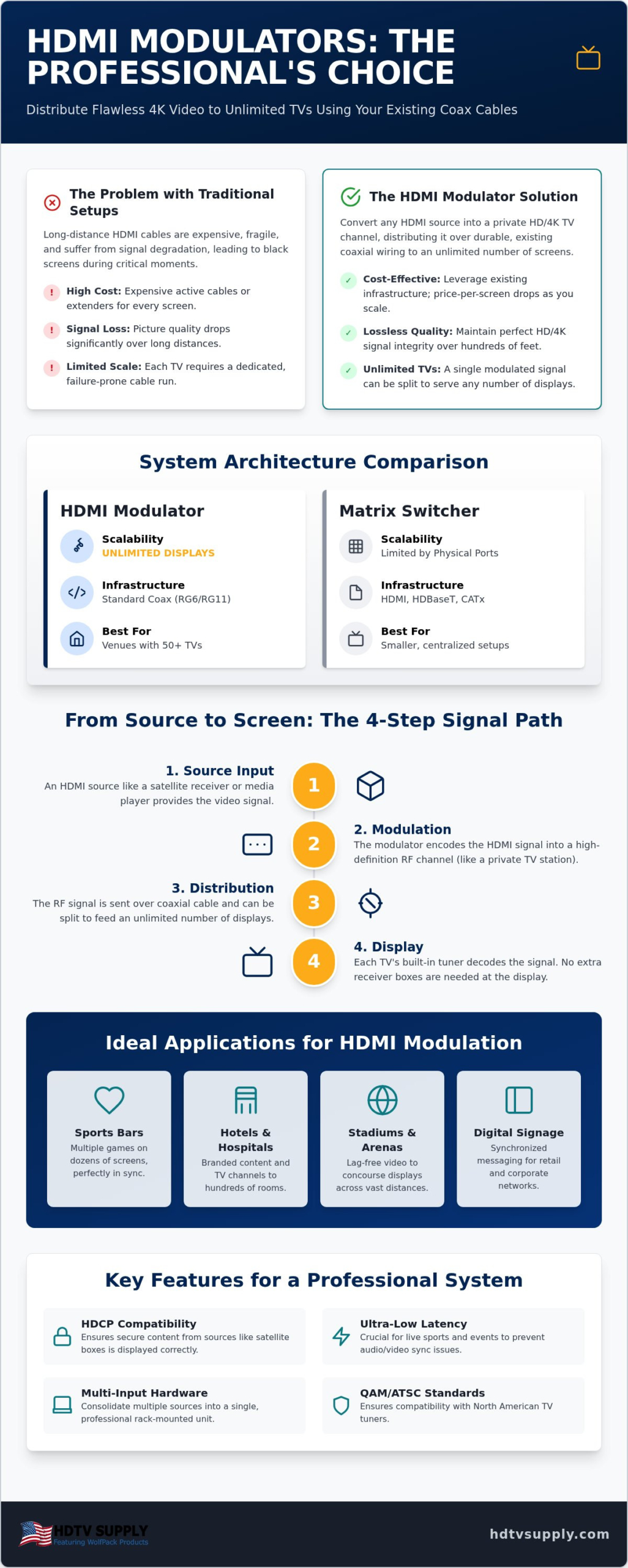
An hdmi modulator is a high-performance headend device that transforms a digital video signal into a radio frequency (RF) signal. This process effectively converts your HDMI source into a private cable television channel. While consumer-grade solutions exist, professional installers rely on these units to distribute high-definition content across vast distances without the signal dropouts common in traditional cabling. It’s the standard for environments where reliability and scale aren’t optional.
The primary advantage of modulation is the “Unlimited TV” architecture. Traditional matrix switchers are limited by their physical port count; a 16×16 matrix can only serve 16 screens. In contrast, a modulated signal travels over coaxial cable and can be split almost indefinitely using standard RF splitters. This makes coax superior for deployments with 50 or more screens. Professionals choose this route for several key venues:
- Sports Bars: Distribute multiple games to dozens of screens using a centralized sports bar TV distribution system.
- Stadiums and Arenas: Ensure lag-free, high-definition video reaches concourse displays located hundreds of feet from the source.
- Digital Signage: Manage synchronized messaging across retail networks with minimal hardware overhead.
Cost-efficiency is the final driver. Running long-distance HDMI cables or high-end HDBaseT extenders for 100 TVs is cost-prohibitive. By using an hdmi modulator, you leverage the existing RG6 infrastructure already present in most commercial buildings. The price-per-screen drops significantly as you add more displays, making it the most economical choice for large-scale video distribution.
The Core Mechanism: Turning HDMI into RF
Think of the modulator as a private broadcast station located in your equipment rack. It takes the uncompressed data from a media player or satellite box and encodes it into a format that a standard TV tuner can understand. Because the television’s internal tuner handles the decoding, you don’t need a separate receiver box at every display. This is why existing RG6 or RG11 coaxial cable is a goldmine for AV pros. It’s durable, shielded, and capable of carrying high-bandwidth signals over distances that would destroy a standard HDMI cable’s integrity.
Key Industry Standards: QAM, ATSC, and DVB-T
Selecting the right modulation standard is critical for hardware compatibility. In North America, most commercial cable systems use QAM (Quadrature Amplitude Modulation), while over-the-air broadcasts use ATSC. If you’re using modern flat-panel displays, they likely support both. However, frequency agility is paramount. A professional-grade unit allows you to shift your “private channel” to any open frequency on the spectrum. This prevents interference with existing cable providers and ensures a crystal-clear picture on every screen in the building.
How HDMI Modulation Works: From Source to Screen
The signal path for a professional distribution network is straightforward but requires precise hardware synchronization. It begins at the source, such as a satellite receiver or media player, which feeds into the hdmi modulator. The device encodes the digital data into an RF frequency, sending it through a series of coax splitters or combiners. Finally, the television tuner decodes the signal. This linear journey eliminates the need for complex network switches or IP configuration, making it a favorite for high-reliability environments.
Latency is a critical factor for live broadcast scenarios. In a sports bar setting, even a three-second delay can result in patrons hearing a cheer from the bar next door before the play happens on your screens. Modern 2026-spec 4K modulators target ultra-low latency to ensure real-time viewing experiences. If your cable runs exceed 200 feet, signal attenuation becomes a risk. In these cases, installing an RF amplifier at the headend or mid-run ensures the signal reaches the final TV tuner with enough strength to prevent pixelation. For a deeper look at how to architect stable video networks across large facilities, our pro guide to long distance HDMI signal distribution covers the latest HDBaseT 3.0 specifications and fiber optic integration strategies.
Encoding and Compression
Image quality on large-format displays depends heavily on the encoding bitrate. Higher bitrates provide the crisp detail required for premium viewing. However, you must balance this against the total bandwidth available on your coaxial network. H.264 encoding is the industry-standard compression method used by modulators to deliver high-definition video over RF channels while maintaining low bandwidth consumption. Using H.265 compression allows for even greater efficiency, though it requires newer TV tuners capable of decoding the more complex codec.
Channel Combining and Distribution
Managing multiple sources requires an RF combiner to merge several modulator outputs into a single coaxial trunk. This allows you to create a custom channel map where Source A is on channel 10.1 and Source B is on 10.2. It’s a clean solution for end-users who only need a standard remote to switch between feeds. If you encounter ghosting or signal noise, check for interference from legacy analog equipment or poor shielding on older cables. Integrating a Sports Bar TV Distribution System can help centralize these components, ensuring a clean signal across every display in your facility.
HDMI Modulators vs. Matrix Switchers: Which is Best?
Choosing between a matrix switcher and an hdmi modulator depends entirely on your venue’s footprint and performance needs. Matrix switchers offer the pinnacle of speed and uncompressed quality. Modulators provide unmatched scalability. Understanding where these technologies intersect is the key to building a cost-effective AV environment that doesn’t sacrifice reliability.
Matrix switchers, such as our WolfPack Modular Matrix Switchers, are the industry standard for zero-latency switching. They are ideal for a centralized bar area where you need instant source changes across a cluster of displays. However, they are limited by cable distance, typically capped at 330 feet when using HDBaseT. For installations where you need to bridge the gap between centralized matrix outputs and remote displays, deploying an HDMI extender over Cat6 can maintain signal integrity before the feed reaches your modulator headend. For massive deployments, an hdmi modulator excels because it utilizes existing coaxial wiring to reach screens 1,000 feet away or more without signal degradation.
Many professional installers now deploy hybrid systems for the best of both worlds. They use a high-speed matrix for the primary viewing area and feed one or two matrix outputs into a modulator. This allows the main bar to have instant control while the rest of the facility receives the same high-definition feeds over the more economical coax network. If you’re evaluating how to scale your switching backbone alongside modulation, our guide to modular HDMI matrix switchers for 2026 Pro AV deployments covers HDCP 2.3 and HDMI 2.1 standards in detail.
Performance Comparison
Matrix systems provide instant switching between sources. Modulators have a slight delay as the TV tuner locks onto the new RF channel, much like changing channels on a cable box. While both technologies support 4K resolution in 2026, matrix systems generally handle 4:4:4 chroma subsampling more natively. Coax runs can easily exceed 1,000 feet with simple amplification, whereas HDMI-based systems require expensive active boosters or fiber conversions to maintain integrity over long distances.
Decision Framework for Venue Owners
For a small sports bar with 8 to 16 screens, a matrix is often the most efficient choice for management and speed. If you are outfitted with a three-story hotel, a large casino, or a stadium, the modulator is the clear winner for its sheer scalability. Maintenance is also simpler with coax. If a single TV goes dark, you’re usually looking at a local connector issue rather than a failure in a complex HDBaseT point-to-point link.
The break-even point for hardware costs usually occurs around the 20-display mark. Below 20 screens, the cost of high-quality matrix hardware and specialized cabling is comparable to modulation. Above 20 screens, the cost per additional TV drop on a coax network is negligible. You only need a standard RF splitter rather than adding expensive ports and extenders to a matrix frame.
Key Features to Look for in Commercial HDMI Modulators
Selecting a professional hdmi modulator requires looking beyond basic resolution specs. In a commercial environment, HDCP compatibility is the most critical feature. If you’re distributing content from encrypted sources like DirecTV, cable boxes, or Blu-ray players, the hardware must support the latest handshake protocols. Without proper HDCP management, your displays will show a black screen or an “unauthorized content” error. High-performance units handle these keys automatically, ensuring your content flows across the coax network without interruption.
Remote management capabilities have become a standard requirement for 2026 deployments. You shouldn’t have to stand in a cramped equipment closet to adjust a channel frequency. Look for modulators with web-based GUIs that allow for off-site configuration. This allows you to manage channel maps, adjust bitrates, and troubleshoot signal noise from any computer on the network. It’s about operational efficiency and reducing the need for physical service calls.
Multi-Input Efficiency
Multi-input units are the industry standard for high-density environments like sports bars and casinos. Using a single 4-channel or 8-channel hdmi modulator saves significant rack space compared to stacking individual units. This density also improves thermal management. A single chassis with unified cooling reduces the risk of hardware failure due to heat. These professional units also standardize output levels across all channels. This prevents annoying jumps in volume or brightness when patrons switch between different game feeds on their TVs.
Advanced Video Standards
Future-proofing your facility means preparing for 4K at 60Hz. While many venues still operate on 1080p, the shift toward UHD is accelerating. Professional modulators in 2026 now support HDR10 and 4:4:4 chroma subsampling to maintain the color depth and contrast of premium sources. Robust EDID management is also essential. It allows the modulator to communicate the correct resolution requirements back to the source. This ensures a stable image even if your network contains a mix of modern 4K displays and legacy 720p or 1080i television sets. To ensure your system can handle these high-bandwidth requirements, browse our selection of WolfPack Modular Matrix Switchers and multi-channel modulators.
Implementing HDMI Modulation with HDTV Supply Solutions
Deploying a high-capacity distribution network requires more than just standalone hardware. It demands a cohesive strategy that integrates your hdmi modulator into a manageable, professional workflow. At HDTV Supply, we specialize in creating these high-reliability environments. By pairing our modulators with WolfPack Modular Matrix Switchers, you gain the ability to route any source to any local display while simultaneously broadcasting those same feeds over your facility’s coax trunk. This hybrid approach provides the zero-latency performance needed for main viewing areas and the extreme scalability of RF for remote zones.
Seamless Control with WolfPad
Managing a massive video wall or a 100-screen layout shouldn’t be a technical burden. Our WolfPad TV Control Systems replace the need for complex custom programming or high-cost automation platforms. You get a streamlined, visual interface on a standard iPad that allows bar managers to change channels across the entire building with a single tap. This level of simplicity is essential for fast-paced commercial environments. It reduces training time for new staff and eliminates the risk of technical errors during peak hours. You can see exactly what’s playing on every display without leaving the manager’s station.
Designing Your System
Every venue has unique architectural challenges and specific signal requirements. Whether you’re outfitting a multi-level casino or a sprawling sports complex, our team provides the expert consultation needed to map out your distribution. We help integrators calculate signal loss, select the right amplification points, and choose between high-density 4-channel and 8-channel units to maximize rack efficiency. For venue owners looking to eliminate equipment clutter and recurring hardware costs, our guide to scaling a professional sports bar TV distribution system in 2026 outlines how to centralize your entire AV rack into a single, manageable interface. Our global shipping resources and veteran technical support team ensure your project stays on schedule and within budget. We also offer extended warranties to protect your commercial AV investment against the rigors of 24/7 operation. If you’re ready to modernize your venue, Contact HDTV Supply for a custom HDMI modulator quote and let our specialists build a Sports Bar TV Distribution System tailored to your needs.
Modernize Your Venue With Scalable Video Distribution
Building a future-proof AV network requires a shift from restrictive point-to-point cabling to a broadcast-style architecture. By integrating a high-performance hdmi modulator, you unlock the ability to serve unlimited displays without the physical port constraints of a traditional matrix. You’ve seen how this technology leverages existing coaxial wiring to slash hardware costs while maintaining the signal integrity required for 4K 60Hz content. Reliability and simplified management are the benchmarks of a successful 2026 deployment.
HDTV Supply stands ready as your authoritative partner for professional distribution systems. As an authorized dealer for WolfPack products with expert technical support since 1998, we provide the specialized knowledge your project requires. Take advantage of our free system design assistance to ensure your hardware configuration meets the specific demands of your venue. It’s time to eliminate signal degradation and complex IP management once and for all. Browse Professional HDMI Modulators at HDTV Supply and start building a more efficient system today. We’re here to help you achieve seamless, large-scale video distribution with total confidence.
Frequently Asked Questions
What is the difference between an HDMI modulator and an HDMI extender?
Extenders are point-to-point solutions, usually requiring a dedicated Cat5 or Cat6 cable for every single display. An hdmi modulator functions differently by broadcasting a signal over a coax network to an unlimited number of screens. While extenders require a physical receiver box at every TV, modulators utilize the television’s internal digital tuner. This makes modulation the more efficient and cost-effective choice for large venues with high display counts. For scenarios where point-to-point extension is still required alongside your modulation network, our professional guide to deploying an HDMI extender over Cat6 for long-distance signal distribution covers the technical specifications needed to maintain 4K 60Hz integrity across complex installations.
Can I use an HDMI modulator with my existing cable TV service?
You can certainly merge the modulated signal with your existing cable feed using an RF combiner. You simply assign your private channel to a frequency that isn’t being used by your local provider. This allows your staff to switch from a commercial broadcast to your internal content just by changing the channel. It’s a standard practice in hotels and sports bars to maintain a unified, professional channel lineup.
How many TVs can I connect to a single HDMI modulator?
You can connect an unlimited number of televisions to a single modulator output. Because the signal is broadcast as an RF frequency, it doesn’t suffer from the physical port limitations of a matrix switcher. As long as you maintain proper signal strength using RF amplifiers and high-quality splitters, you can serve 50, 100, or even 500 screens from a single headend unit without any loss in digital clarity.
Does an HDMI modulator cause any delay or latency in the video?
All digital modulators introduce a small amount of latency due to the encoding process, typically between 100ms and 500ms. While this delay is unnoticeable for digital signage, it’s a vital consideration for live sports venues. Professional-grade units in 2026 utilize ultra-low latency encoding to keep the video synchronized with live audio. If you’re managing a sports bar, always prioritize hardware designed specifically for high-speed broadcast environments to avoid sync issues.
Is it possible to distribute 4K video over coaxial cable?
Modern 4K modulators successfully distribute Ultra HD content over standard RG6 coaxial cable by encoding the signal into a high-bandwidth RF channel. This allows 4K-capable TV tuners to decode the signal natively. You must use high-quality, shielded coax and ensure your splitters are rated for the appropriate frequency range. This configuration offers a significantly more stable 4K distribution path over long distances compared to traditional HDMI cables or expensive HDBaseT extension systems.
Do I need a special TV to receive a modulated HDMI signal?
No special television is required as long as the display has a built-in digital tuner, such as QAM or ATSC. Most commercial and consumer flat-panel displays manufactured in the last decade include these tuners. You simply run the coax directly into the RF port on the back of the TV. The display treats your hdmi modulator source as just another digital channel in its standard scanned lineup.
What is the maximum distance I can run coax for an HDMI modulator?
You can typically run coaxial cable up to 1,000 feet before requiring significant signal amplification. This far exceeds the 330-foot limit of standard HDBaseT or the 50-foot limit of passive HDMI. For extremely large campuses or stadiums, you can extend this distance even further by placing RF amplifiers at strategic points in the line. This makes coax the most reliable medium for massive, long distance HDMI signal distribution projects.
How do I handle HDCP copy protection when using a modulator?
Commercial-grade modulators include integrated HDCP management to handle encrypted signals from satellite receivers and media players. These devices perform the necessary digital handshake with your source to ensure the content plays without interruption. It’s essential to select a unit that explicitly supports HDCP 2.2 or higher for modern 4K sources. This internal processing prevents the common black screen errors that occur when lower-end hardware fails to negotiate the security protocols of protected digital content.
Leave a Reply
Want to join the discussion?Feel free to contribute!