

Does 4k Video Work Over Coax? Modulators and Limits
A coax cable can carry 4K, but a standard HD-over-coax modulator is limited to 1080p. So, does 4K video work over coax? Yes, with a compatible 4K-capable format such as HD-SDI; the cable alone doesn’t determine the result.
It’s easy to assume that if coax carries a video signal, it will also carry the source’s full resolution. In practice, the transmission format and receiving equipment matter just as much as the cable, and distance can affect performance.
This guide explains what a modulator can and can’t do for 4K, how cable type and run length shape transmission, and where HD-over-coax, HD-SDI, and IP differ. You’ll have a clearer basis for choosing a distribution approach that matches your resolution needs and system layout.
Key Takeaways
- Choose the transmission format for the resolution you need; a modulator’s capabilities matter as much as the coax itself.
- Estimate transmission distance using the cable type and video format together, since supported run lengths vary.
- Compare HD-over-coax, HD-SDI, and IP by resolution, distance, and the rest of your system’s requirements.
- For multi-display setups, explore how HDMI video wall processors fit into your signal-distribution design.
Coaxial cable transmission distances
Does 4K video work over coax in an existing cable-TV or CCTV run? It can, if the cable path and every connected device support the selected 4K transmission format. Coax-based video systems vary in the resolutions they support, so compatibility depends on the transmission format and equipment. The cable’s previous use alone doesn’t establish 4K compatibility.
A 4K system needs a source, transmitter, receiver, and display that work with the same signal format. Adapters or converters may connect devices with different interfaces, but they must support the format being transported. A connector adapter changes the connection, not the video signal’s resolution.
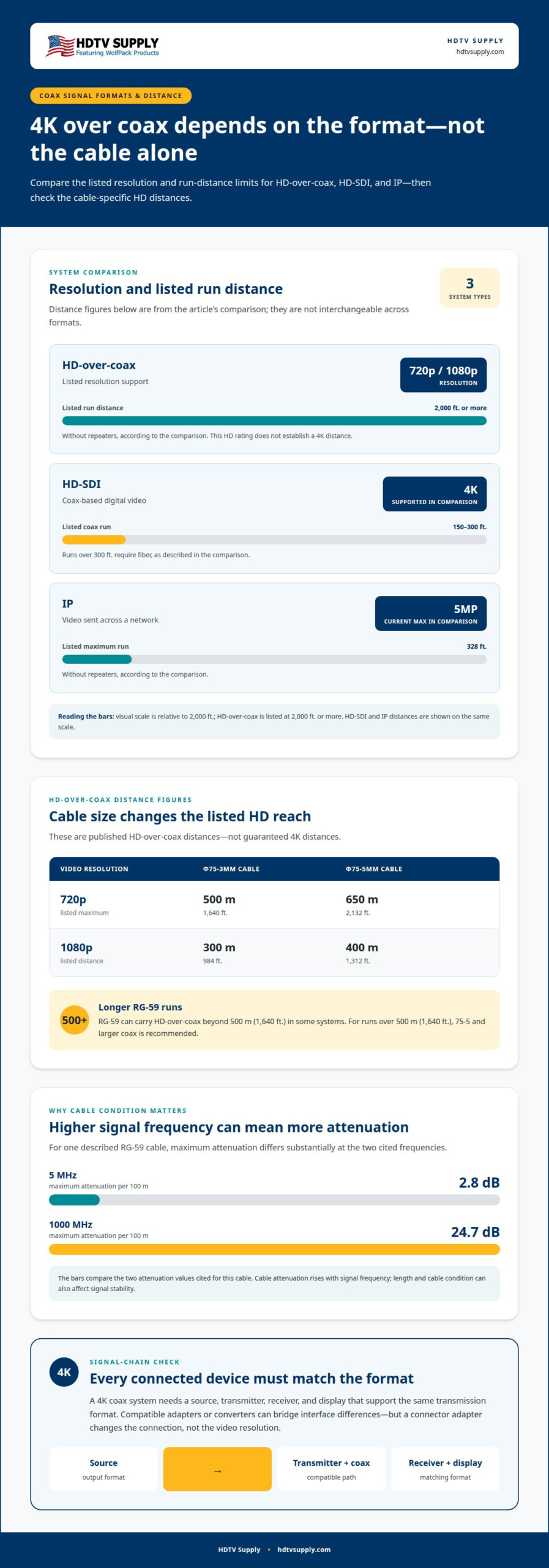
Published HD-over-coax distances vary with resolution and cable size. For 720p, the listed maximum is 500 m (1,640 ft.) over Φ75-3mm cable and 650 m (2,132 ft.) over Φ75-5mm cable. For 1080p, listed distances are 300 m (984 ft.) over Φ75-3mm and 400 m (1,312 ft.) over Φ75-5mm. These figures describe HD-over-coax, not a guaranteed 4K distance.
RG-59 can carry HD-over-coax beyond 500 m (1,640 ft.) in some systems. For runs over 500 m (1,640 ft.), 75-5 and larger coax is recommended. Cable attenuation also rises with signal frequency. One described RG-59 cable has maximum attenuation of 2.8 dB per 100 m at 5 MHz, compared with 24.7 dB per 100 m at 1000 MHz.
Whether 4K video works over coax across an existing run depends on the format, cable condition, and equipment at both ends. Identify the cable type and route, then match the transmitter and receiver to the intended format. An HD distance rating can guide an HD design, but it doesn’t establish the maximum 4K run length.
HD-over-coax advantages and limitations
HD-over-coax can reuse coax infrastructure for HD video, but it doesn’t automatically provide 4K. Bandwidth and format compatibility set practical limits.
Installation costs and requirements
Installation costs come from the equipment and any work needed to make the existing signal path compatible. A 4K setup requires a source, transmitter, coax run, and receiver that support the same transmission format; adapters or converters bridge interface differences when needed. Reusing suitable cable can avoid replacing the run, while incompatible equipment or cable conditions can add work. The signal path matters because one mismatched component can prevent the intended format from reaching the display.
Resolution and frame rate limits
Coax can carry different video formats, but its capabilities depend on the specific system. There’s no single frame-rate limit for every coax system: supported resolution and frame rate follow the specific transmission format and equipment at both ends. Match those specifications across the source, transmitter, receiver, and display. This distinction matters because a 4K-capable coax path doesn’t mean every HD-over-coax modulator can pass 4K.
Bandwidth is a key constraint. According to the U.S. Congress, Office of Technology Assessment, most coaxial cable systems had bandwidths of about 300 to 400 MHz, and some reached 550 MHz. Those figures describe system capacity, not a guarantee of 4K support. Traditional cable infrastructure can deliver 4K with HDR encoding, but bandwidth limits make widespread 4K channel delivery impractical.
HDR, HDCP, and surround sound aren’t properties of coax alone. Each requires compatible source and receiving equipment, plus a transmission format that carries the necessary video, copy-protection, and audio signals. Confirm that the entire signal chain supports the features you want. Changing a connector or cable cannot add them.
Flicker or signal loss can result from attenuation, poor terminations, damaged cable, or a mismatch between signal format and equipment. Higher-frequency signals lose more strength along a cable run, so cable condition and length can affect stability. In multi-display venues, video distribution planning helps align the source format with the intended display layout.
HD-coax, HD-SDI, and IP system comparison
4K over coax, HDMI, Ethernet, or fiber depends on the transmission format and equipment. Compare supported resolution, run distance, and signal path before selecting a system.
HD-coax, HD-SDI, and IP system differences
HD-coax commonly distributes HD video over coax, while HD-SDI carries digital video and IP systems send video across a network. In the listed comparison, HD-coax supports 720p and 1080p, with runs of 2,000 ft. or more without repeaters. HD-SDI supports 4K, but listed coax runs are 150-300 ft.; runs over 300 ft. require fiber. IP runs are listed at 328 ft. maximum without repeaters, with 5MP as the comparison’s current maximum resolution. These distinctions help match the system to the required image format and route.
Comparing coax, HDMI, Ethernet, and fiber
Coax carries a signal through a coaxial cable, HDMI connects compatible audio-video equipment, Ethernet provides a network path, and fiber carries signals over optical cable. HDMI 2.0 can run over Category 6A cable for fairly long distances, but the specific setup still depends on compatible endpoints and transmission equipment. HD-SDI offers a coax-based route for 4K; fiber becomes relevant when an HD-SDI run exceeds the listed 300 ft. threshold. Choose by the required format, available cable route, and distance between source and display.
Coax-based 4K transmission technologies
HD-over-coax, MoCA, and HDMI over coax describe different approaches to using coax infrastructure, not interchangeable guarantees of 4K support. HD-over-coax systems in the comparison support 720p or 1080p, so they don’t provide 4K by default. Some coax transmission systems may support 4K, depending on compatible equipment and signal requirements. MoCA and HDMI-over-coax setups depend on compatible transmitting and receiving equipment; the technology name alone doesn’t establish resolution support.
To choose the right setup, start with the source’s output format and the display’s input requirements. Then match the transmitter, receiver, and cable path to that format. In a camera system, connect HD-over-coax cameras to an HD-over-coax DVR, not an analog DVR. Matching the equipment helps ensure the connection carries the intended video signal, not just a compatible cable connection.
What technologies carry 4K video over coax, such as HD over Coax, MoCA, or HDMI over coax?
Coax is the cable path, not a guarantee of 4K support. The transmission technology and equipment determine whether a 4K signal reaches the display intact.
HD-SDI over coax
Whether a video format can carry high-resolution video over coax depends on the equipment and system design. It differs from HD-over-coax systems limited to 720p or 1080p. For a 4K design, the source and receiving equipment must support the same HD-SDI format. The coax run also needs to meet that equipment’s transmission requirements. This approach is relevant when a system needs 4K and coax is the chosen cable route. The signal format, not the connector alone, determines what video can pass.
MoCA over coax
MoCA carries network traffic over coax, so it can serve as part of an IP video path. That does not make every MoCA link a direct 4K video connection. The source must provide video over the network, and the receiving device must decode it for the display. Network capacity, signal path, and compatible endpoints shape the result. For example, a networked video source and receiver need matching network interfaces before coax can connect them.
HDMI over coax
HDMI-over-coax equipment converts an HDMI signal for transport over coax, then restores it at the receiving end. The transmitter and receiver must support the intended resolution and signal features. A 4K source paired with equipment designed for lower resolutions won’t produce a 4K path. Check the full chain: source, transmitter, coax, receiver, and display. The coax connection carries the converted signal; it does not upgrade the source or equipment.
Choose by starting with the signal format: HD-SDI for supported 4K transport, MoCA for networked video, or HDMI-over-coax equipment for an HDMI source. Then match the endpoints and cable route to that format. For a multi-display design, explore video distribution options suited to the signal path and screen layout.
HDTV Supply: HDMI Video Wall Processors
HDTV Supply offers HDMI Video Wall Processors for systems that arrange video across a video wall. They’re relevant when your project involves multiple displays and coax transmission is only one part of the signal design.
For HDMI source routing, WolfPackSecure 4K 60 4:4:4 HDMI Matrix Switchers provide another option to consider. Match the processor or matrix switcher to your source format, display layout, and the transmission equipment connecting them. These products address HDMI distribution and video wall processing; they don’t turn standard HD-over-coax equipment into a 4K system.
Contact HDTV Supply to discuss which video distribution products fit your system requirements.
Plan the signal path for your next display system
Make the next decision around the complete signal path, not the cable in isolation. Whether 4K video works over coax depends on matching the source, transmission format, receiving equipment, and display. That same system-level view helps you plan future changes, such as adding screens, routing more sources, or centralizing control.
For projects that need flexible routing, WolfPack Modular Matrix Switchers and WolfPack TV Control Systems can support different parts of an AV design. Using robust multi-zone hardware is another option for distributing signals reliably to screens throughout a venue. Choose equipment based on your layout and signal requirements, rather than treating each connection as a standalone choice.
Discuss your video distribution requirements with HDTV Supply and identify a suitable next step for your system. Contact HDTV Supply about video over coax, and move forward with a clearer plan for your displays.
Frequently Asked Questions
Can you use a modulator?
Yes, if the modulator and receiving equipment support the video format you need. A standard HD-over-coax modulator sends HD video, with systems limited to 1080p. For a 4K signal, the complete path must use equipment and a transmission format designed for 4K, such as compatible HD-SDI. A modulator doesn’t increase the source resolution or make downstream devices 4K-capable.
What are the pros and cons of HD-over-coax?
HD-over-coax can make use of coax already installed for CCTV or other video runs, and its system comparison lists long cable distances without repeaters. Its main limit is resolution: the described systems support 720p and 1080p, not 4K. Results also depend on cable quality, termination, and matching transmitter and receiver equipment. It’s a practical HD option, but not a shortcut to 4K.
What is HD-over-coax exactly?
HD-over-coax is a video transmission method that sends an HD signal through coaxial cable between compatible equipment. For example, an HD-over-coax camera sends video to an HD-over-coax DVR. The DVR must match the camera’s transmission type; an analog DVR isn’t the right receiver for that signal. The term describes the system format, not a guarantee that every coax connection carries the same resolution.
What’s so great about HD-over-coax?
Its practical advantage is using coax as the signal route for HD video, which can suit buildings with existing CCTV cabling. It can also support longer HD runs than some other transmission approaches, depending on the system and cable. That makes it useful where replacing a cable path would complicate a project. The trade-off is that HD-over-coax remains an HD solution, rather than native 4K.
Can coaxial cable transmit 4K video?
Yes. Some coax-based video systems may support higher-resolution signals, depending on the equipment and format. That’s different from conventional HD-over-coax, which is limited to HD resolutions. A coax cable by itself doesn’t convert or upgrade video, so the signal format and every device in the route must be suitable for 4K.
How far can 4K video travel over coaxial cable?
There isn’t one universal maximum distance for 4K over coax. The usable run depends on the transmission format, cable type and condition, terminations, and the capabilities of the transmitter and receiver. As signal strength drops along a cable, the system may lose stability. Use the distance rating for the specific 4K equipment and cable path, rather than an HD-over-coax distance as a 4K guarantee.
Leave a Reply
Want to join the discussion?Feel free to contribute!