
Digital Signage for University Campus: Content, Maps, and Access
The campus message that matters most is the one students can find where they need it. Digital signage for a university campus puts timely information on screens across buildings and shared spaces, helping students, faculty, and visitors find destinations, follow updates, and see relevant announcements. Its value depends not only on the content, but also on display placement and how information reaches each screen.
Campus teams already know that a map in the wrong place or an outdated notice can leave people unsure where to go. A coordinated signage network can combine campus-wide messages with content tailored to individual buildings, while permissions and approval workflows help manage who publishes what. This guide explains how campus signage works, how maps and wayfinding fit in, and how universities can plan content, access, and display locations. It also explores practical uses across libraries, classrooms, and other campus spaces, including how displays can help communicate room changes and route people around unavailable facilities.
Key Takeaways
- Campus displays can deliver timely information to students, faculty, and athletes, with messages tailored to the spaces where they appear.
- Place maps and directories at decision points so people can identify destinations and follow clear routes through campus.
- Set approval workflows and user permissions to coordinate campus-wide announcements while giving local teams control over relevant building content.
- Match display locations and content to campus needs, from library updates to lecture-room changes and rerouting notices.
What is Campus Digital Signage?
Campus digital signage uses connected displays to share current information across university buildings. It gives students, faculty, and athletes location-specific communications, from library notices to lecture theatre changes.
Campus Information for Students and Staff
Digital signage is a display network that presents information for distinct campus audiences. Students can see event announcements, faculty can share academic updates, and athletes can receive team or facility information. In a library, screens might highlight research workshops, study tips, and quiet-hour reminders. Tailored messages help people find useful notices without relying on a single channel.
Communication in High-Traffic Spaces
Screens in busy spaces put messages near the people who need them. A commons screen can show dining updates, while a student services display can direct visitors to advising or registration. Placement matters: a message near an entrance can orient people before they reach a corridor or service desk. Secure the hardware on the network, restrict publishing access, and keep personal information off public screens.
Student Engagement and Campus Messaging
Campus screens can make communications more visible by promoting events where students gather, such as at a student union or library entrance. Use concise announcements with a clear action, such as a workshop time and room, then assess engagement through attendance or service inquiries. This gives campus teams a practical way to judge whether messages are reaching their audience and which locations need different content.
Accessibility, Costs, and System Planning
For U.S. universities, use ADA accessibility obligations and WCAG guidance to inform display design. Provide readable text, strong contrast, and equivalent access to essential information. System costs depend on hardware, software, installation, and ongoing maintenance, so scope and support needs shape the budget. Plan by identifying audiences and locations, selecting compatible components, arranging installation, and testing content and playback before launch. Include network controls and content access in the plan.
Campus maps, directories, and interactive wayfinding
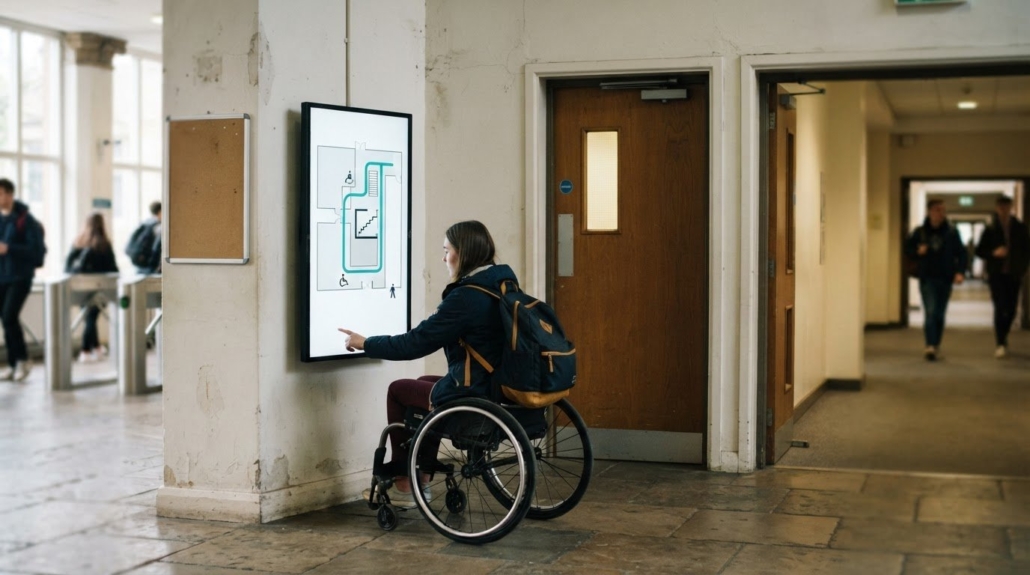
Campus maps and digital directories turn a display into a practical wayfinding point. Visitors arriving at the student union can locate admissions, a meeting room, or the nearest accessible entrance without searching multiple building signs. Consistent building names and recognizable landmarks help people connect directory listings with physical locations. This is a core use of digital signage for a university campus, especially where unfamiliar visitors need to decide which route to take.
Interactive wayfinding lets visitors select a destination and follow a route across campus. A directory can group destinations by purpose, such as academic departments, student services, athletics, and dining. For example, a prospective student could find an admissions office, then use mobile directions from an outdoor path to the correct entrance. Keep route information aligned with construction and building access, so directions don’t lead toward a closed passage. A digital signage for a university campus network can make route changes visible at relevant locations.
Place map displays where visitors make decisions: campus entrances, parking areas, transit stops, and major building lobbies. Pair each map with concise visitor information, including the building’s name and nearby destinations. For a campus tour or scheduled meeting, announcements can point guests toward the correct check-in location. Clear directions support the university’s mission by making key services easier to find without requiring visitors to interpret unfamiliar abbreviations.
Maps can also support urgent communications. A campus network can distribute emergency messages that override scheduled content, and authorized staff can activate them remotely. Keep ordinary wayfinding focused on destinations, while emergency messages identify affected areas and relevant instructions. For the display layer behind campus maps, consider how professional AV equipment fits the network’s routing and control needs.
Content approval workflows and user permissions
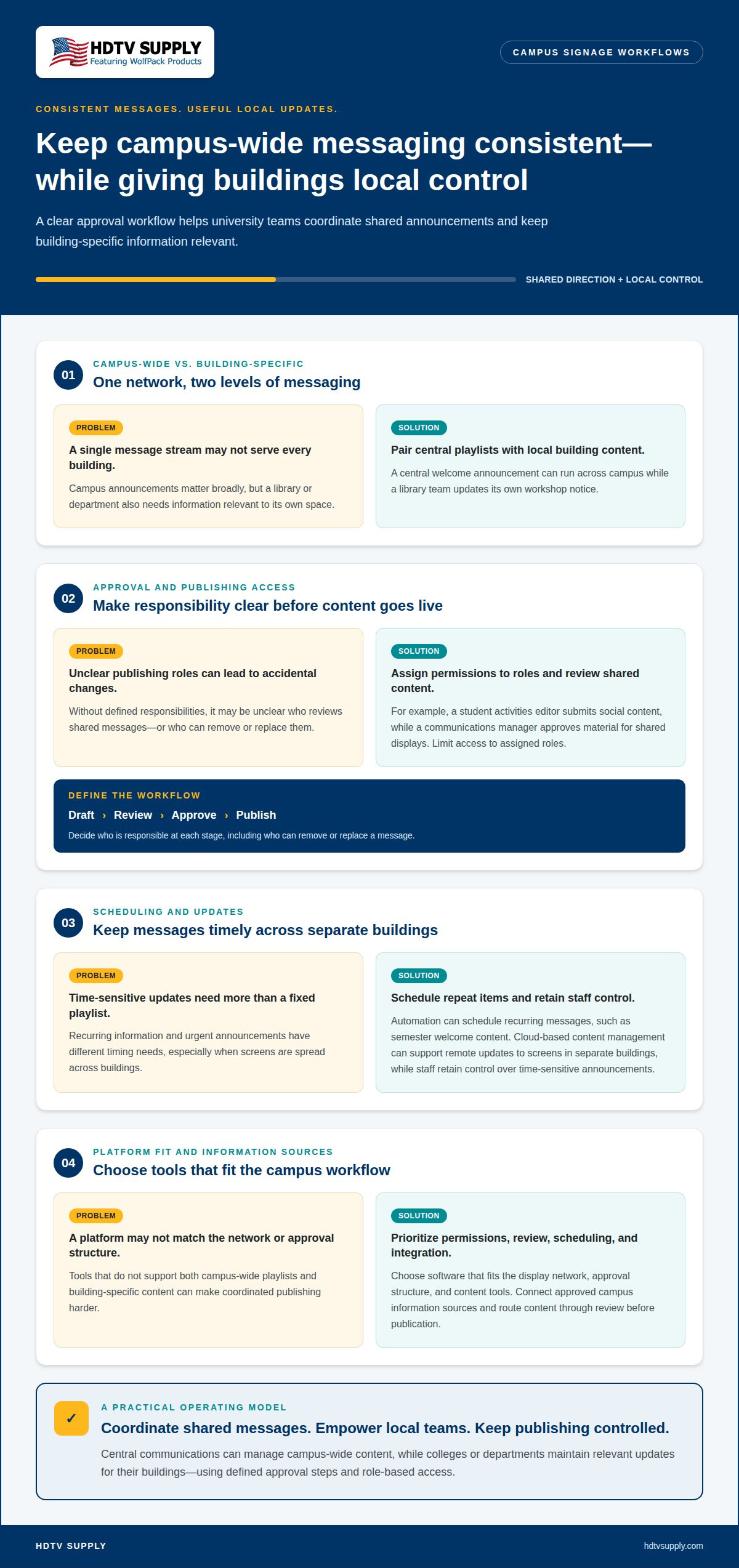
A university workflow defines who drafts, reviews, approves, and publishes each screen message. Central communications teams can manage campus-wide playlists, while a college or department maintains content for its building. For example, a central welcome announcement can run across campus while a library team updates its workshop notice locally. This division keeps shared messaging consistent while preserving useful local control.
The best signage software for a college is the platform that fits its display network, approval structure, and content tools. Prioritize role-based permissions, review before publication, and straightforward scheduling. A platform should support campus-wide playlists alongside building-specific content, so teams can manage both through an appropriate workflow.
Integration connects signage with approved campus information sources and content tools. A department might prepare an event announcement in its communications workflow, then submit it for review before publication. Cloud-based content management can support remote updates to screens in separate buildings. Automation can schedule recurring items, such as semester welcome messages, while a staff member retains control over time-sensitive announcements.
Permissions should match publishing responsibilities. A student activities editor might submit social media content, while a communications manager approves material for shared displays. Limit publishing access to assigned roles, and define who can remove or replace a message. These controls reduce accidental changes and help keep local updates within university standards.
Dynamic content can change by location, schedule, or audience. For instance, a commons display might show an upcoming meeting, while a department screen carries a course-related announcement. Interactive content can let viewers choose categories or access relevant information. Before publication, connect each content owner with an approval role and screen group. Then test a sample update on its intended display to confirm that the right message appears in the right place.
Digital signage locations and use cases across campus
Campus digital signage places relevant messages where people need them. In libraries, displays can share quiet-hour reminders, study tips, and research workshop schedules. Student centers can promote events, dining updates, and student services, while athletic facilities can carry team announcements. Match each display’s content to its audience and location instead of repeating one campus-wide playlist everywhere.
Lecture halls and classroom corridors need fast operational updates. If a lecture theatre becomes unavailable, displays can announce the room change and direct attendees along an alternate route. At building entrances, boards can show operating hours, event locations, or service changes. Identify each message’s source and destination clearly, so students and visitors can act without searching for another notice.
U.S. campus examples show how networks can serve different scales. The University of Kentucky has more than 300 digital displays, while the University of Southern California has 150+ digital endpoints. The University of Florida replaced sixteen signage platforms with one platform. These examples highlight practical planning choices: coordinate content across locations, reduce platform fragmentation, and reserve local screens for information relevant to each building.
Build a location plan around daily movement and campus operations. Put event schedules near gathering spaces, service information near offices, and urgent messages where occupants can see them. Libraries may need research and study content, while residence halls may prioritize community notices. Review each display’s purpose and content source as campus needs change. For equipment supporting campus display systems, explore professional AV equipment.
HDTV Supply
HDTV Supply helps campus teams source audiovisual equipment for display routing, control, and large-format visual systems. If a university is planning connected screens across buildings or a video wall in a student commons, the right components depend on the signal paths and control needs.
Its range includes WolfPad TV Control Systems, HDMI Video Wall Processors, and WolfPackSecure 4K 60 4:4:4 HDMI Matrix Switchers. These offerings can support different parts of an audiovisual setup, from managing TV sources to processing content for video walls. They are relevant when campus teams are evaluating hardware for a defined display environment, rather than content approvals or wayfinding software.
Share your campus display requirements with HDTV Supply to discuss suitable audiovisual equipment.
Put Your Campus Display Plan Into Motion
Choose the next step around your campus priorities: clearer visitor routes, more timely building updates, or a consistent way to manage shared displays. A well-planned digital signage for university campus strategy should connect those priorities to the audiovisual equipment that distributes and controls content. Define the display environment first, then align equipment choices with its signal-routing and control requirements.
HDTV Supply offers advanced matrix switchers, robust video distribution platforms, and intuitive touch screen control systems. These equipment options address different audiovisual needs; they do not replace campus content planning or approval workflows. Share your project requirements with HDTV Supply to explore which category fits your display setup.
Contact HDTV Supply to discuss equipment for your campus display system. With clear priorities and a defined technical plan, your university can take a practical next step toward more coordinated campus communications.
Frequently Asked Questions
Can It Send Emergency Alerts?
Yes, campus signage can display emergency alerts instead of scheduled material. A useful setup defines who may issue an alert, which screens receive it, and how authorized staff communicate the message. Prepare concise templates with clear instructions and locations before an incident. Include signage within the university’s broader emergency communications plan, rather than treating public displays as the only alert channel.
What Content Can You Show on Campus Screens?
Campus screens can show academic deadlines, student organization notices, dining hours, transportation changes, and cultural events. Match content to each screen’s location: a dining area can highlight service hours, while a department lobby can carry office updates. Use approved images and readable text, and set an end time for temporary notices so outdated event information doesn’t remain on display.
What hardware do schools and campuses need?
A campus network typically needs displays, media players or other playback sources, mounting hardware, network connections, and power at each screen location. Routing and control equipment depend on how sources connect to displays and whether the design includes video walls. For example, a central communications room may need signal distribution components, while a standalone lobby screen may use a simpler playback setup.
What types of digital signage displays work best for indoor and outdoor campus locations?
Choose displays based on their environment and viewing conditions. Indoor screens suit controlled spaces such as classrooms, corridors, and libraries. Outdoor locations call for displays designed for local weather and changing light. Consider viewing distance, glare, placement, and maintenance access before selecting a screen. A bright entrance exposed to sunlight has different requirements from a sheltered indoor hallway.
How can campus digital signage integrate with emergency alerts, class schedules, wayfinding, and campus apps?
Integration depends on connecting approved information sources to the signage platform. Schedule data can populate room or class updates, while map content can direct viewers to buildings or services. Emergency messages need a defined priority and publishing path. Campus apps can complement displays by letting users continue to access directions or announcements on personal devices.
How should universities manage content, approvals, screen schedules, and digital signage governance?
Establish a written governance policy that identifies content owners, approvers, publishing access, and escalation routes. Set standards for branding, accessibility, privacy, and message expiration. A department could submit a notice for communications review, schedule it for relevant screens, and remove it after the event. Periodic reviews help identify inactive content and clarify responsibilities when staff roles change.
Leave a Reply
Want to join the discussion?Feel free to contribute!