

How to Design a Digital Signage Network: 2026 Guide
A costly digital signage mistake can happen before equipment is ordered: choosing displays and players before deciding how video will reach them. To understand how to design a digital signage network, start with the signal path, not the screen count.
It’s easy to focus on screens, but the number of content sources, display locations, cable routes, and control requirements all shape the design. Network-based distribution and point-to-point setups each have trade-offs. The right choice depends on how the system needs to operate and how it may grow.
This guide explains how to map the signal path, compare distribution approaches, and plan the network, display control, and hardware around your source and screen count. You’ll also learn how to allow for expansion, keep content readable at viewing distance, and define testing and operating responsibilities before launch. The result is a clear architecture to guide equipment selection, including whether matrix switchers or video wall processors fit the design.
Key Takeaways
- Start with the audience, content, and site so business goals shape the technical plan.
- Trace each signal from source to display, and define content management, video transport, and screen control as separate functions.
- Compare network-based distribution, direct HDMI, and matrix switching by distance, routing needs, endpoint count, and room to expand.
- Use a staged design and validation workflow to document requirements and distinguish AV planning from physical installation.
- To learn how to design a digital signage network, translate the approved signal-flow diagram into hardware requirements instead of choosing a matrix switcher by output count alone.
Start digital signage network design with the audience, content, and site
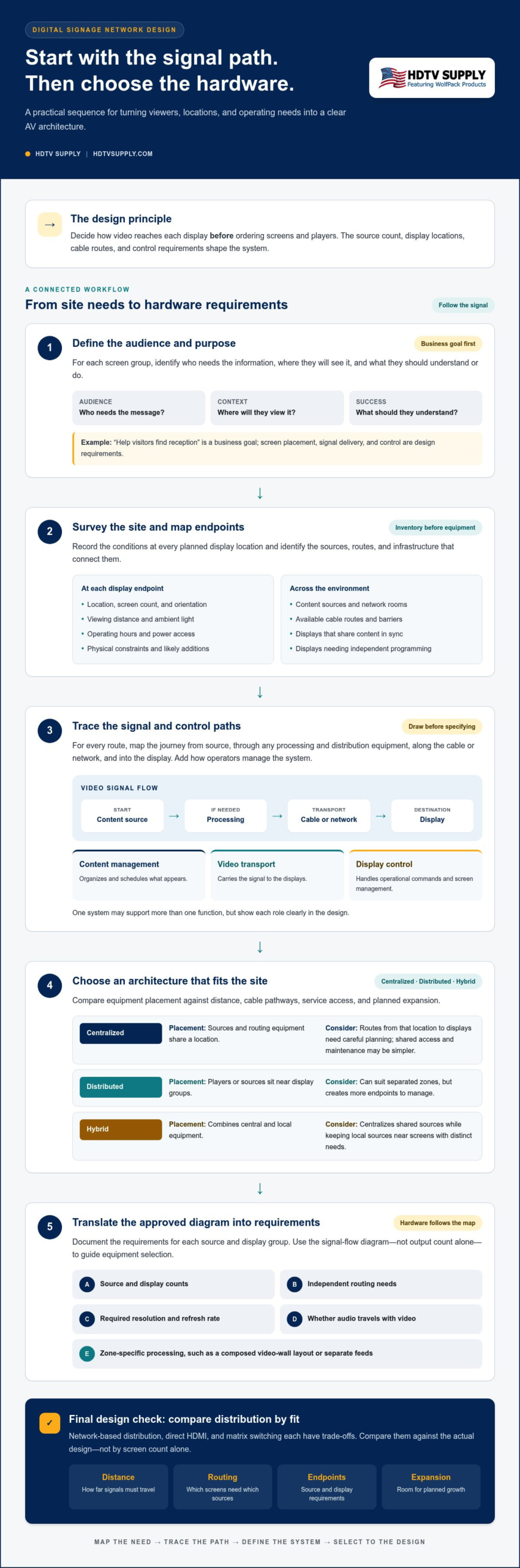
Define the viewer and use case before specifying equipment. A screen welcoming visitors at a building entrance has a different job from one showing menus to customers in a queue or announcements to staff in a break room. For each screen group, document who needs the information, where they’ll see it, and what they should understand or do.
This is the foundation for how to design a digital signage network: align the communication goal with the physical setting, then turn both into technical requirements. Keep the steps distinct. “Help visitors find reception” is a business goal; screen placement, signal delivery, and control are design requirements that support it.
Define viewers, messages, and success measures
For each screen or screen group, note the audience, typical viewing position, and likely attention time. Match the message to that context: wayfinding needs clear directions, while promotions may call for a concise offer and a strong visual. The What is digital signage? overview provides useful context on system types and applications. Then decide how you’ll assess success. For example, check whether text is visible from the intended distance, updates reach screens within the required timeframe, and staff can manage routine changes efficiently.
Survey locations and map every endpoint
Build a site inventory before choosing displays or distribution hardware. For every planned endpoint, record its location, screen count, orientation, viewing distance, ambient light, operating hours, power access, and physical constraints. Note likely additions as well. Planned expansion can affect cable pathways, network capacity, and equipment layout, even if those screens aren’t part of the first phase.
Map the whole environment, not just the wall where a display will hang. Identify content sources, network rooms, available cable routes, and barriers between those points and the screens. Flag locations that need the same content in sync, locations requiring independent programming, and areas where a multi-screen layout may work better than a single display.
- Audience and purpose: Who needs the message, and what should it communicate?
- Viewing conditions: Where will people stand, how far away will they be, and what lighting will affect visibility?
- Endpoints and routes: Where are sources, displays, power, network rooms, and practical cable paths?
- Operating needs: Which screens share content, need separate content, or may be added later?
A digital signage network connects content sources, signal distribution, displays, and control to deliver information to viewers. Content layout determines what appears on each screen, including hierarchy, text, and graphics. Infrastructure determines how that content gets there and how screens are managed. Include both in the plan, but don’t mistake a well-designed slide for a complete network design.
Map the digital signage signal path, network, and control requirements
Turn the site inventory into a signal-flow diagram before selecting hardware. Trace each route from the content source through any processing and distribution equipment, along the cable or network, to the display. Add the control path: how operators update content, choose sources, adjust layouts, or manage screens. This map helps expose missing connections and mismatched requirements early.
The signal path determines which equipment must connect, where it belongs, and what cabling or network routes the design requires. Keep three functions distinct: content management organizes and schedules what appears; video transport carries the signal to displays; display control handles operational commands. One system may support more than one function, but show each role clearly in the design rather than treating them as interchangeable.
Record the technical requirements for every source and display group. Include the source and display counts, which screens need independent routing, required resolution and refresh rate, and whether audio travels with the video. Note where needs differ by zone. For example, a lobby video wall may need a composed layout, while nearby information screens show separate feeds. These distinctions affect routing and processing.
Choose centralized, distributed, or hybrid architecture
A centralized design places sources and routing equipment in a shared location. It can simplify access and maintenance, but the routes from that location to displays need careful planning. A distributed design places players or sources near display groups, which can suit separated zones but creates more endpoints to manage. A hybrid design combines the two, centralizing shared sources while keeping local sources near screens with distinct needs.
Compare the options against distance, cable pathways, service access, and planned expansion. Map where equipment can be reached for routine checks, and avoid relying on routes that will be difficult to extend as the site grows.
Specify control, access, and operating responsibilities
Assign responsibilities before commissioning: who updates content, changes schedules, routes sources, and performs routine checks? Design the operator’s control interface around those tasks without tying the plan to a particular software platform. Then coordinate network access, permissions, and segmentation with the organization’s IT requirements. Clear responsibilities reduce confusion when a screen shows the wrong source or content needs an update.
Use the diagram to distinguish routing from image composition. An HDMI matrix routes selected inputs to selected outputs; a video wall processor arranges content across a multi-display layout. A project may need one, the other, or both, depending on whether screens need flexible source selection, a composed canvas, or separate zones.
When planning how to design a digital signage network, document each connection and control responsibility in a format the AV and IT teams can review together. Once the diagram defines inputs, outputs, signal needs, and operating tasks, compare it with relevant AV signal-routing hardware, including matrix switchers and video wall processors. This ties equipment selection to the design, not just a headline output count.
Compare digital signage distribution options by distance, routing, and scale
Choose a distribution method based on the site’s routes, source-to-screen requirements, and expansion plans. Direct HDMI, matrix switching, network-based video, and HDMI-over-coax solve different problems. None is the automatic choice for every project. Compare each approach with the actual layout before settling on a topology.
Use this as a planning comparison, not a substitute for validating the selected system’s supported formats, cable limits, and endpoint compatibility. Those details depend on the equipment and design.
| Approach | Topology and distance | Routing flexibility | Endpoint count and expansion |
|---|---|---|---|
| Direct HDMI | Point-to-point source-to-display connection; practical reach depends on the cable and equipment. | Simple paths, with limited centralized source selection unless additional switching is added. | Works well for straightforward connections; expansion adds routes and may add equipment. |
| HDMI matrix | Sources and displays connect to a central routing point; distance depends on the signal path and any extension method. | Routes selected inputs to outputs, supporting different source assignments across displays. | Plan input and output capacity around current routing and likely additions. |
| Network-based video | Uses network paths between source or encoder and receiver endpoints; site distances rely on the network design. | Can support distributed endpoints; routing options depend on the chosen system. | Can suit growing, distributed layouts, provided network capacity and endpoint compatibility are planned. |
| HDMI-over-coax | Uses coax infrastructure as part of the signal path, where site cabling makes it relevant. | Distribution and source selection depend on the system architecture. | May make use of existing routes; confirm endpoint and format requirements for each planned screen. |
When network-based video distribution fits
Network transport can suit sites where screens are spread across a building or a centralized content source needs to reach endpoints in separate zones. Before choosing it, account for bandwidth, network paths, endpoint compatibility, and how signage traffic will be managed alongside other network use. Don’t assume a standard data network automatically meets video system requirements. Define those requirements and validate the proposed design against the selected equipment.
When matrix switching, coax, or video wall processing fits
Matrix switching suits systems that need to route multiple sources among multiple displays. For a closer look at modular routing, see the modular HDMI matrix switcher guide. If coax is already part of the site, HDMI modulators can be considered within a coax distribution design; the HDMI modulator guide explores that approach.
A video wall processor addresses a different need: arranging content across multiple displays as a coordinated canvas. Explore video wall processor design when the layout calls for that kind of composition. When planning how to design a digital signage network, match the distribution method to the signal routes and control requirements, then review relevant professional AV distribution hardware as part of the equipment plan.
Design and validate a digital signage network in clear project stages
A reliable rollout depends on decisions being documented and checked in sequence. Keep network and AV design separate from physical installation: the design package defines what connects and how it should operate; installation puts the approved plan in place. Use this workflow to move from requirements to commissioning without leaving key assumptions to the field.
- Confirm requirements. Gather the approved display inventory, content needs, source and destination relationships, network conditions, operating responsibilities, and expansion plans. Resolve conflicts between user needs and what the site can support before finalizing the design.
- Build the site plan. Mark display positions, source locations, network rooms, cable routes, power dependencies, and access points. Show physical constraints that may affect routing or maintenance. The plan should make intended connection routes clear to the installation team.
- Create the signal-flow diagram. Show each source, any processing or distribution equipment, the network or cable path, and the destination display. Identify which screens share a feed and which need independent routing.
- Prepare schedules and equipment documentation. Translate display needs into a source-and-destination matrix, endpoint schedule, and equipment list. Record required signal formats and check compatibility against the actual selected equipment, without assuming unsupported capabilities.
- Commission and record results. Test representative paths, correct issues, and document the final configuration. Capture changes made during rollout so the operating team has an accurate reference for future updates or expansion.
At minimum, prepare a site plan, signal-flow diagram, endpoint schedule, and equipment list before the project moves to commissioning. These documents connect the design intent to the physical system and make it easier to locate mismatches.
Turn requirements into a design package
Use the source-and-destination matrix to show which inputs must reach which screens, including any independent feeds. Pair it with documented cable paths, network drops, display positions, power dependencies, and access points. List the required formats and how compatibility will be checked. Keep the package version-controlled so design revisions are visible to the AV, IT, and installation teams.
Commission, test, and prepare for expansion
Test each representative route from source to assigned display, then verify all endpoints before rollout. Assess legibility from intended viewing positions, content timing, synchronization between screens, audio needs, and operator control in the actual environment. Record test results and assign ownership for routine checks and content updates. Document planned endpoint capacity so future additions can be assessed against the original design.
For teams planning how to design a digital signage network, a documented workflow clarifies responsibilities: AV and network teams define and validate the system, while physical installation follows the approved plan. Use the finalized requirements to select AV hardware for your design and keep the equipment list aligned with tested signal paths.
Match signage network requirements to the right AV hardware
Turn the approved signal-flow diagram into a parts plan. Start by defining what each connection must do, then identify the equipment category that supports it. Count source inputs and display outputs, but also document which outputs need independent routing, where processing is required, and how signals will travel between locations. Screen count alone won’t tell you whether the system needs flexible source selection, a composed video wall, or distribution over existing cabling.
Separate the AV distribution layer from the rest of the system. A content platform schedules and manages material; network infrastructure provides the required data paths; displays present the content; AV hardware routes or processes signals. Keeping those roles distinct helps prevent duplicate functions or gaps in the equipment list.
Select hardware from system requirements, not screen count alone
Compare source and destination formats, independent routing needs, processing requirements, and the operating workflow. A matrix switcher is relevant when multiple sources must be routed to multiple displays. Size it for the actual input-to-output relationships and expected expansion, not simply the number of screens. For modular switching concepts, consult the HDMI matrix architecture guide.
- Inputs: List each source and its required signal format.
- Outputs: Identify every display or display group, including those needing a separate feed.
- Processing: Include a video wall processor only when screens must form a coordinated multi-screen canvas.
- Distribution: Consider HDMI modulators only when the documented design calls for HDMI signals to be distributed over coax.
- Connections: Match cabling and network paths to the planned endpoints and validated equipment requirements.
Check each component as part of the complete signal path. Confirm that the planned source, distribution equipment, processing, cabling, and display requirements align, and account for the operator’s routine control tasks. Don’t infer compatibility from a product category or a similar-looking connection. Verify the selected equipment’s specifications against the design.
Move from design documents to equipment planning
Use the endpoint schedule and signal-flow diagram together to build one coherent equipment list. The schedule identifies where each endpoint belongs; the diagram shows how it connects and what role each device plays. Note required quantities, connection types, format requirements, and any capacity reserved for planned additions. Keep content-management software, network infrastructure, display hardware, and AV distribution as separate lines in the plan so their responsibilities remain clear.
Relevant hardware categories can include WolfPack Modular Matrix Switchers for routing designs, HDMI Video Wall Processors for coordinated display layouts, and HDMI modulators where coax distribution fits the architecture. Select by documented function, then review the specific equipment requirements and compatibility before finalizing the system plan.
That’s the practical approach to how to design a digital signage network: let signal flow drive the equipment list, not the other way around. With the requirements defined, explore professional AV hardware at HDTV Supply and match the available categories to your documented design.
Put your signage design into action
A scalable signage system should be ready for change, not just launch. Treat the approved design as a working reference and update it when screen locations, content needs, or operating responsibilities change. That gives future decisions a clear starting point and helps keep additions aligned with the original architecture.
Knowing how to design a digital signage network also means knowing when to move from planning to equipment selection. Use documented requirements to identify the AV hardware categories that support your signal paths, such as matrix switchers for source routing or video wall processors for coordinated displays. Keep the content platform and network infrastructure distinct from those AV components.
HDTV Supply offers professional AV equipment and technical support for installers and integrators worldwide, with more than 12,000 products across its broader AV catalog. Compare options against your documented design and project needs.
Explore professional AV hardware for your signage design. With a clear plan and the right components, you’re ready to build a system that can adapt as your needs grow.
Frequently Asked Questions
What equipment do I need to build a digital signage network?
A digital signage network needs content sources, a way to distribute signals, displays, control interfaces, and suitable cabling or network connections. The specific hardware depends on the number of endpoints, routing needs, signal formats, and site layout. A content-management system handles tasks such as organizing or scheduling content; AV distribution equipment moves or processes video signals. For example, a single-source screen may need a simpler signal path than several zones with separate feeds.
Should digital signage use Wi-Fi or wired Ethernet?
Either may fit, depending on site conditions, network traffic, reliability requirements, and endpoint design. A wireless connection may be practical where a cable route is difficult, while wired Ethernet may suit fixed endpoints with planned network drops. Map connection needs by screen and coordinate with your IT team on network capacity, access, and traffic management. Don’t assume every display or player supports the same connection options.
Can one source display different content on multiple screens?
Yes, if the source and distribution architecture can provide independent content paths. For example, a shared source can feed one display group while separate players or sources serve another. A matrix can route inputs to outputs, but routing alone doesn’t create different content that the source isn’t supplying. Confirm that the selected equipment and content workflow support the intended screen assignments before rollout.
How do I choose between an HDMI matrix and network-based video distribution?
Compare how sources must reach displays, the distances involved, available cabling, endpoint scale, and expected expansion. An HDMI matrix routes selected inputs among connected outputs; network-based video may suit distributed endpoints when the network design supports the system. When planning how to design a digital signage network, use the signal-flow diagram to compare these needs. Screen count alone doesn’t show how flexible routing must be.
How can I distribute HDMI over existing coax cable?
HDMI-to-coax modulation can be considered when coax cabling is already present and useful to the signal path. The design still needs to account for the source format, destination requirements, route, and compatible equipment at the relevant points. Existing coax doesn’t automatically mean every display can receive the intended signal. Map the connections and validate the selected equipment’s requirements before including the coax route in the final design.
What should be included in a digital signage network design plan?
Include a site and display inventory, source-and-destination matrix, signal-flow diagram, cable and network paths, required formats, control responsibilities, and testing plan. Add notes about access points and dependencies that could affect routine operation, such as which team manages content versus network access. A clearly labeled equipment list helps teams trace each component to its role and gives future updates a reliable starting reference.
How do you test a digital signage network before launch?
Test representative paths from source to display, then confirm each intended screen receives the correct feed. Check readability from normal viewing positions, content timing, synchronization where screens must match, audio where required, and operator control workflows. Record results by endpoint, including changes made during testing. Resolve issues before expanding the rollout so the remaining screens follow a tested configuration rather than an unverified assumption.
Leave a Reply
Want to join the discussion?Feel free to contribute!