

Get Free Custom AV System Design from HDTV Supply
What if a good AV system starts with mapping signal flow, not choosing equipment? Sources, displays, control, cable distances, and resolution requirements all need to work together. The Free audio and video design Services from HDTV Supply offer businesses and AV professionals a starting point for planning a custom system.
A useful design brief can turn screen counts and room use cases into a practical system architecture. In this article, you’ll learn what project details to gather, how design assistance can clarify signal distribution and equipment categories, and what to confirm before moving ahead. We’ll cover sources and displays, distances and signal formats, scaling needs, and control requirements, along with questions to ask about the design’s scope and deliverables. That way, you can share specific requirements and better understand what the proposed system needs to do.
Key Takeaways
- Separate existing equipment from planned purchases and future expansion to make your AV brief more useful.
- Learn how matrix switching, video wall processing, and TV distribution serve different system roles.
- Find out what to verify about the scope and deliverables of Free audio and video design Services from HDTV Supply.
- Before purchasing, check that each device supports the required formats, interfaces, and control needs.
What Can Free AV Design Help You Solve in a Commercial Audio and Video System?
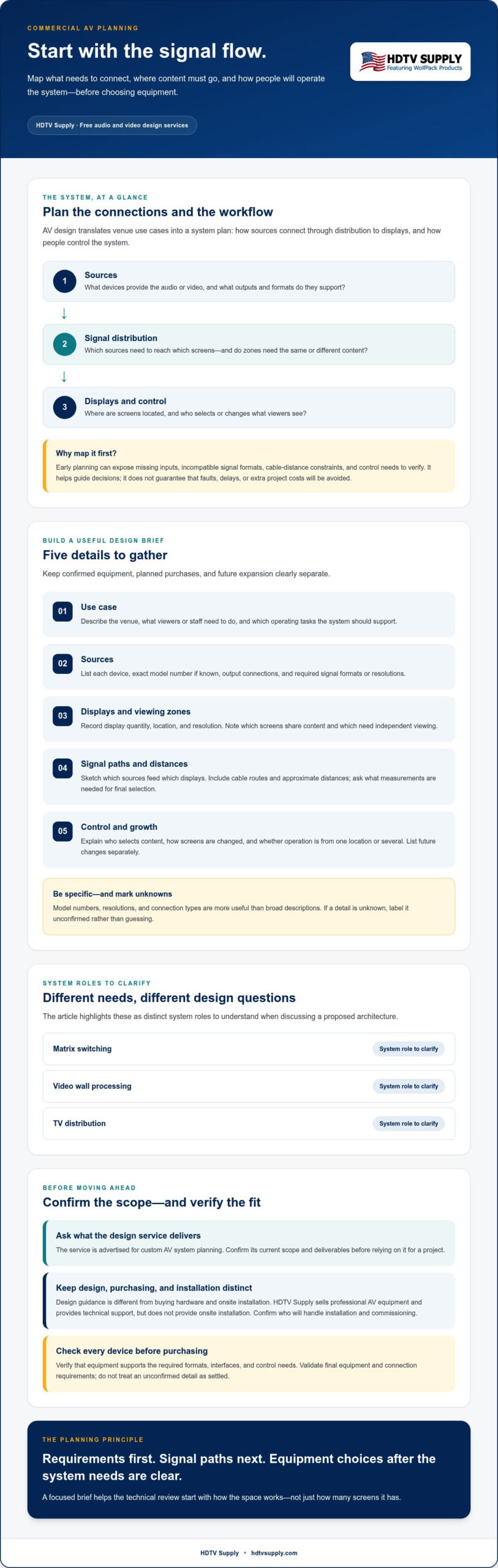
AV system design plans how audio and video sources connect through signal distribution to displays and control, including how people will operate the system. It translates a venue’s use cases into a system plan instead of starting with a list of equipment.
The Free audio and video design Services from HDTV Supply are advertised for custom AV system planning. Design guidance is distinct from purchasing hardware and from onsite installation. HDTV Supply sells professional AV equipment and provides technical support, but doesn’t provide onsite installation. Confirm the current scope and deliverables of the advertised design service before relying on them for a project.
Which AV projects benefit from a custom system plan?
A plan can help when adding screens, expanding a venue, replacing equipment, or simplifying daily operation. In a sports bar, screen count and viewing zones affect how staff distribute content. A multiroom venue may need sources routed differently in each room, while a retail space or control room can have its own display and operator needs. For a sports bar example, see this sports bar TV distribution system guide.
Start with how the space is used: which sources feed which displays, whether different zones need different content, and who selects or changes it. These workflows shape the system requirements more directly than screen count alone.
What problems can early AV planning prevent?
Mapping the signal path before selecting equipment can expose missing inputs, incompatible signal formats, and cable-distance constraints. It can also surface practical questions, such as whether a source must reach multiple displays or whether users need independent control of viewing zones. These checks help identify what to verify, but they can’t guarantee that faults, delays, or extra project costs will be avoided.
Think of design as a decision-making aid. The broader principles of systems design involve defining a system’s architecture and components against its requirements. In an AV project, that means documenting what needs to connect and how it should work, then checking whether the proposed equipment fits.
Keep responsibilities clear: design guidance helps shape the architecture and identify specifications to confirm. Physical installation and commissioning are separate project tasks. Confirm who will handle them, and validate the final equipment and connection requirements before purchasing.
What Information Should You Prepare Before Requesting AV Design Assistance?
A focused brief helps a technical reviewer understand what the system must do before discussing equipment. Separate confirmed, existing hardware from planned purchases and possible future expansion. This distinction can affect the architecture and helps prevent future requirements from being treated as current ones.
Use this sequence to organize the essentials:
- 1. Define the use case. Describe the venue, what viewers or staff need to do, and which operating tasks the system should support.
- 2. List the sources. Record each device, its exact model number if known, output connections, and required signal formats or resolutions.
- 3. Map the displays. Note the quantity and location of each display, its resolution, and whether screens show the same content or need independent viewing.
- 4. Describe signal paths. Sketch which sources need to reach which displays. Include cable routes and approximate distances, and confirm whether exact measurements are needed.
- 5. Document control and growth needs. Explain how staff select content and manage routine tasks. List planned changes separately from immediate requirements.
Specific model numbers, resolutions, and connection types are more useful than general descriptions such as “HDMI source” or “large screen.” They help reveal whether source outputs, distribution equipment, and display inputs align. If details are unknown, mark them as unconfirmed rather than guessing.
How to document sources, displays, and viewing zones
For each source, state which screens it must reach and whether it needs to appear on more than one at a time. Group displays by room or viewing zone, then note where each is installed and whether it shares content with other screens. Approximate cable distances are a useful starting point, but don’t assume they’re enough for final equipment selection. Ask what measurements or route details are required.
Which control and expansion requirements should you include?
Describe the operator workflow: who chooses content, how they change screens, and whether tasks happen from one location or several. Include network, tablet, or centralized-control needs as requirements to assess, not proof that specific devices are compatible. For an example of venue operator workflows, see this guide to controlling 30 TVs from an iPad. AVIXA’s standards guidelines can also provide industry context as you organize system requirements.
Before submitting anything, confirm HDTV Supply’s current request process, the information or documents needed, and the design service’s scope. The HDTV Supply professional AV hardware catalog can help you identify existing or planned equipment to include in your brief.
How Does an AV Design Translate Requirements into a System Architecture?
An AV architecture turns the brief into a signal path: source devices feed switching or distribution equipment, which routes content to displays, while control gives users a way to select and manage that content. The design connects each device’s role to the venue’s requirements, then identifies specifications to check before selecting equipment.
A matrix switcher routes selected input sources to designated display outputs, allowing different screens to receive the same or different content as the system supports. The exact routing options depend on the model and its confirmed specifications.
When might a matrix switcher or video wall processor be relevant?
A matrix switcher may suit a venue that needs flexible routing between multiple sources and displays. A video wall processor serves a different purpose: coordinating content across several displays that function as one visual canvas. TV distribution focuses on delivering selected content across a group of TVs. These categories serve distinct roles, so choose based on the required signal path, not just screen count. For more selection context, see this guide to modular HDMI matrix switchers.
| Category | Primary role | Requirement to clarify |
|---|---|---|
| Matrix switching | Route sources to display outputs | Which sources must reach which screens? |
| Video wall processing | Coordinate content across a multi-display canvas | How should content appear across the wall? |
| TV distribution | Distribute content to TVs in a venue | Which TVs need shared or separate content? |
How do distribution and control fit into the signal path?
Signal transport and user control are related, but they perform different functions. Distribution carries video through the system. Switching determines which source feeds which output. Control gives an operator a way to make selections and manage screens.
HDTV Supply sells sports bar TV distribution systems and WolfPad TV Control Systems, alongside WolfPack Modular Matrix Switchers and HDMI Video Wall Processors. Their relevance depends on the design requirements. Don’t assume specific equipment will interoperate or support a particular port count, signal format, or control workflow without checking its specifications.
The Free audio and video design Services from HDTV Supply can be a starting point for discussing an architecture, but confirm the service scope and what it will provide. Before choosing hardware, validate the full path from source output to display input, including required formats, interfaces, and control needs.
What Does Free AV Design Include, and What Should You Confirm First?
“Free” describes the advertised cost of the design service, but it doesn’t define its scope or guarantee a particular deliverable. Before treating a proposed design as ready for purchasing or implementation, confirm what the assistance covers, what information HDTV Supply needs, and what the resulting plan will include. The Free audio and video design Services from HDTV Supply may be a useful planning resource, but verify project eligibility and service details directly.
HDTV Supply is an online retailer of professional AV hardware with technical support for installers and integrators. Its catalog includes matrix switchers, TV distribution systems, control systems, and video wall processors. Those company offerings are separate from the specifics of the design offer, such as whether your project qualifies or whether a particular document is provided.
Which service details should you verify with HDTV Supply?
Ask focused questions before sharing project requirements. Confirm whether assistance applies to your project type, size, and location, and whether eligibility criteria or other terms apply. Clarify how to submit your brief and what information or documents are needed.
Also ask what you’ll receive. Does the service provide a signal-flow diagram, equipment list, written recommendations, or revisions? These are items to confirm, not promised inclusions. Check the expected turnaround, how changes to your requirements are handled, and whether the design covers the whole system or only specified components. Clear answers help you understand what decisions the design can support.
Does AV design include equipment sales or installation?
Design guidance helps translate system needs into an equipment plan. It’s distinct from buying hardware and from onsite installation. HDTV Supply sells professional AV equipment and offers technical support, but doesn’t provide onsite installation. A design or equipment recommendation shouldn’t be mistaken for a commitment to install, configure, or commission the system.
Before proceeding, assign responsibility for each project stage. Confirm who will handle physical installation, configuration, system testing, and ongoing support, and determine what assistance is available for each. This makes the handoff between planning, equipment selection, and implementation explicit.
Once you’ve confirmed the service terms, compare the proposed equipment against your brief and verify model-level specifications before ordering. To review relevant professional AV hardware categories, explore HDTV Supply’s AV equipment catalog.
From AV Design Brief to Equipment: Next Steps
A proposed design is a planning tool, not a substitute for checking the final equipment list against your venue and installation conditions. Move from requirements to purchasing in stages: review the brief, validate the architecture, confirm device specifications, then source the equipment. Resolve uncertainties before ordering, especially if they affect how sources, displays, or control will work together.
How to review a proposed AV equipment plan
Trace the plan from each source to its destination. Check that every source, display, signal path, and operator workflow appears. If a source must feed displays in separate zones, confirm the design accounts for that routing. Then compare each proposed device’s specifications with your requirements and installation conditions, including the signal formats, interfaces, cable routes, and control needs identified in your brief.
For a sports bar project, this best matrix switcher for a sports bar roundup offers additional selection context. Treat any product option as a candidate to verify, not a fit based on category name alone.
What should you do before placing an equipment order?
Close open questions first. Confirm compatibility across the complete signal path, required quantities, necessary accessories, and whether the architecture can accommodate planned expansion. Check product-level specifications rather than assuming devices with similar connection types or labels support the same formats and control requirements.
HDTV Supply is a global online retailer of professional AV hardware, with technical support for installers and integrators. Before ordering, confirm current stock, support availability, and applicable service terms directly with the company. Also clarify who will handle installation, configuration, and testing, since HDTV Supply doesn’t provide onsite installation.
Keep your brief, proposed equipment list, model numbers, and unresolved compatibility questions together. If you’re considering the Free audio and video design Services from HDTV Supply, confirm its current scope and submission process before relying on specific deliverables. When you’re ready to compare hardware against your plan, explore professional AV equipment from HDTV Supply.
Turn Your AV Requirements into a Clear Next Step
A strong AV plan starts with the venue’s signal flow and operating needs, then maps those requirements to equipment. Prepare accurate source and display details, review the proposed architecture, and verify each device’s formats, interfaces, and control requirements before ordering.
The Free audio and video design Services from HDTV Supply may help you plan, but confirm the current service scope and deliverables before relying on them. HDTV Supply is a direct retailer of professional AV hardware, with more than 12,000 products in its online catalog and technical support for installers and integrators worldwide. Onsite installation isn’t provided, so confirm who will manage implementation.
Have your project requirements and open questions ready, then explore professional AV equipment and contact HDTV Supply about your project. With a clear brief and the right specifications, you can move forward with greater confidence.
Frequently Asked Questions
What are free audio and video design services from HDTV Supply?
The phrase Free audio and video design Services from HDTV Supply refers to the company’s advertised design offer, but confirm specific deliverables directly. AV design generally plans how sources, signal distribution, displays, and control fit a project’s requirements. Before relying on a diagram, equipment list, or other output, ask HDTV Supply to confirm the current service scope, project eligibility, and terms.
Is HDTV Supply’s AV system design service really free?
The design offer is advertised as free, but that alone doesn’t establish eligibility, limitations, or the amount of assistance available. Confirm whether your project qualifies, what information the company needs, and whether any terms or restrictions apply. Don’t assume every project receives unlimited design work or guaranteed deliverables. Ask what’s included for your requirements before using the design as the basis for equipment purchases.
What information should I provide for a custom AV layout?
Prepare the venue’s use case, source devices and model numbers, display count and locations, connection types, approximate cable distances, control preferences, and plans for expansion. Include required resolutions or signal formats when known. For example, note which sources need to reach which screens and whether displays show shared or independent content. Confirm HDTV Supply’s current submission process and any required documents directly, since this list isn’t a verified mandatory checklist.
Does HDTV Supply provide AV installation with its design service?
No, HDTV Supply doesn’t offer onsite installation. The company sells professional AV hardware and provides technical support, which is separate from physical installation at your venue. Clarify who will handle cabling, equipment setup, configuration, and commissioning, and confirm what the design assistance itself covers. If you need onsite work, arrange an installer separately and ensure the final equipment plan aligns with the installation conditions.
Can HDTV Supply design a system for a sports bar with multiple TVs?
HDTV Supply sells sports bar TV distribution systems and related professional AV equipment, so these categories may be relevant to a multi-screen venue. The right architecture depends on the sources, display locations, viewing zones, and staff control workflow. Ask the company to confirm whether its advertised design assistance covers your project. Have an accurate screen list and source details ready to explain the system requirements.
What equipment might an AV system design recommend?
Depending on signal flow and operating needs, a proposed system may consider switching, distribution, video wall processing, and control equipment. HDTV Supply’s confirmed categories include WolfPack Modular Matrix Switchers, HDMI Video Wall Processors, and WolfPad TV Control Systems. These are examples, not guaranteed recommendations for your project. Before purchasing, check each proposed device’s specifications, interfaces, supported formats, and control requirements against the complete system plan.
How do I request free AV design help from HDTV Supply?
Visit HDTV Supply’s website or use its current contact options to ask about the design offer. Before reaching out, organize your project brief with source and display details, signal routes, control needs, and expansion plans. Confirm the current request process, eligibility, required information, and expected deliverables directly with the company. Available information doesn’t establish a specific submission form, response time, or required document, so verify those details first.
Leave a Reply
Want to join the discussion?Feel free to contribute!