
Best Modulator for Sports Bar TV: How to Choose the Right System in 2026
The best modulator for sports bar tv may not be a standalone modulator. If your venue already has coax, RF distribution may make practical use of that wiring. If you need to route several games independently, a matrix-based system may be a better starting point.
Choosing a system means matching source devices, screen locations, existing cabling, and resolution requirements. The right setup depends on the full signal path and how staff need to assign feeds to TVs, not simply on the number of inputs on a device.
This guide compares RF coax, IPTV, and matrix-based distribution so you can identify an architecture that fits your bar. You’ll learn which compatibility details affect picture quality and channel flexibility, how to plan for multiple sources and screens, and what to consider before expanding. HDTV Supply offers a Sports Bar TV Distribution System, along with WolfPack Modular Matrix Switchers and WolfPad TV Control Systems. Start by documenting your wiring, sources, and display needs, then choose a system that supports the venue’s current viewing plan and planned growth.
Key Takeaways
- The best modulator for sports bar tv depends on how many independent feeds you need, where they must appear, and which signal paths your venue can support.
- Trace the full HDMI-to-coax path and match the modulator’s RF output to the distribution system and the TVs’ tuning capabilities.
- Compare RF, IPTV, and HDMI matrix options by infrastructure, routing flexibility, and how staff will manage feeds across screens.
- Use a planning checklist to inventory sources, map displays, identify cabling, verify compatibility, and define day-to-day control needs.
- Compare HDTV Supply’s Sports Bar TV Distribution System with matrix and control options to plan a setup around your venue’s requirements.
Best Modulator for Sports Bar TV: Start With What Each Screen Must Show
An HDMI modulator converts a source signal into a format that can travel over a compatible RF system, typically using coaxial cable to carry the feed to connected TVs. But the best modulator for sports bar tv depends on more than whether HDMI and coax are available. First determine how many sources you have, whether screens should show the same game or different games, what cabling is installed, and how many TVs need a signal.
Signal path: HDMI source → HDMI-to-RF modulator → RF distribution over coax → compatible TVs tuned to the feed’s channel
If every screen should show one game, the system can distribute a shared feed venue-wide. If separate areas need different games, plan for independent feeds and the equipment needed to route them. Modulation creates a channel for distribution; it doesn’t decide which source appears on each screen. For a technical primer on the underlying technology, see What is an RF Modulator?
When a sports bar needs an HDMI modulator
An HDMI modulator can suit a venue where sources such as receivers or media players need to travel through an existing coax distribution path. The modulator turns a source into an RF channel that compatible TVs can tune. For this path to work, the source output, modulator format, RF distribution equipment, and TV tuners must be compatible as a system. Verify the full signal chain, not just the modulator’s input.
When a modulator alone may not meet the viewing plan
A single distributed feed can serve screens that all need the same content. Assigning different games to separate TVs or zones requires source routing and a way to control those assignments, in addition to distribution. Map which sources must reach which screens before selecting equipment. For broader architecture and scaling considerations, see the sports bar TV distribution system guide.
Make the screen map concrete. List each source and note whether it should appear everywhere, in a particular zone, or only on selected displays. That distinction helps determine whether a coax-based modulator path meets the need or whether routing equipment, such as a matrix system, belongs in the design. Choose according to the venue’s signal path and viewing plan, not a one-size-fits-all device label.
How an HDMI-to-RF Modulator Sends Sports Feeds Over Coax
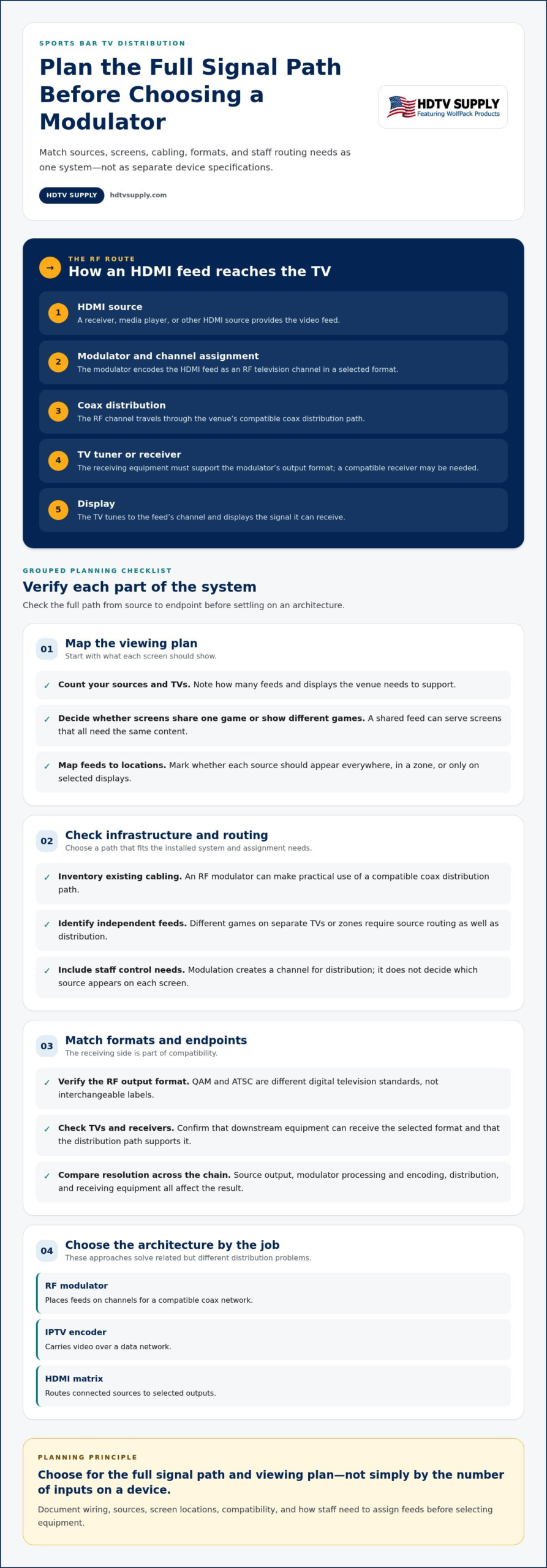
An HDMI-to-RF system carries a video source through several stages before it appears on a screen. The source connects to the modulator, which encodes the HDMI feed as an RF television channel. Coaxial distribution carries that channel through the venue, and compatible TVs or receivers tune in to display it.
Modulation turns an HDMI video feed into a television channel that can travel over a compatible coax system.
From HDMI source to a channel on the TV
A receiver, media player, or other HDMI source sends its output to the modulator. The modulator assigns the feed a channel within the selected RF format. The signal then travels through the coax distribution network to displays. A TV can show the feed only if its tuner supports that format; otherwise, a compatible receiver may be needed between the coax outlet and the display.
Signal path: HDMI source → modulator and channel assignment → coax distribution → compatible TV tuner or receiver → display
Check each stage as part of one system. A compatible HDMI input doesn’t guarantee compatibility with the coax network or receiving equipment. Confirm that the modulator’s RF output format can pass through the distribution equipment and be received at each endpoint.
QAM, ATSC, and other formats: check the receiving side
QAM and ATSC are different digital television standards, not interchangeable labels. QAM is commonly associated with digital cable channels, while ATSC is used for over-the-air digital television. The modulator’s output standard must match what the downstream equipment can receive. Check the specifications for the TVs and any set-top receivers, then confirm that the distribution path supports the selected format. The professional HDMI modulator guide offers further detail on formats and coax distribution.
Resolution is also a system-level result. The source’s output, the modulator’s processing and encoding, the RF distribution path, and the receiving device all affect what viewers see. A high-resolution source can’t overcome a limitation elsewhere in the chain. Before choosing the best modulator for sports bar tv, compare the source and display capabilities with the full path between them, including any receivers or intermediate equipment.
For a practical next step, review HDMI modulators and distribution equipment alongside your signal-path requirements. Match the output format and receiving equipment first, then assess the resolution needs of the screens.
RF Modulator vs. IPTV Encoder vs. HDMI Matrix for a Sports Bar
These approaches solve related but different distribution problems. RF modulation places feeds on channels for a compatible coax network. IPTV carries video over a data network. An HDMI matrix routes connected sources to selected outputs. The right fit depends on the installed infrastructure, the number of independent feeds, and how staff need to assign content to screens.
| Approach | Signal path | Infrastructure | Routing flexibility | Planning question |
|---|---|---|---|---|
| RF modulator | HDMI source becomes an RF channel distributed over coax | Compatible coax cabling, RF distribution equipment, and TV tuners or receivers | TVs can tune distributed channels; channel assignment and endpoint compatibility matter | Can the existing coax path carry the required channels to the displays? |
| IPTV encoder | Video is encoded and sent over the local network | Network infrastructure and compatible TVs or dedicated receivers | Content is delivered through network endpoints; network configuration and management are part of the design | Can the venue network support the video traffic and endpoints? |
| HDMI matrix | Connected sources are routed to selected outputs | Matrix hardware and compatible connections from sources to displays or distribution equipment | Routes different sources to specific outputs, supporting screen or zone assignments | Which source must reach each display, and how should staff change those routes? |
Choose RF over coax when the coax path fits the system
Existing coax can provide a direct distribution path when the cabling, RF equipment, modulator output, and receiving devices are compatible. Each modulated feed is assigned a channel, and viewers can select that channel on a compatible TV or receiver. Plan channel assignments in advance, especially if several sources need to be available. A coax connection alone doesn’t guarantee that every endpoint can tune or display the signal.
Choose IPTV or matrix routing when the signal plan calls for it
IPTV uses the venue’s network rather than coax, so the design must account for network capacity, configuration, and suitable receiving endpoints. A matrix serves a different role: it routes inputs to outputs, allowing a game feed to go to selected screens instead of broadcasting every source as a channel across the venue. These approaches address different needs, and their fit depends on the complete system design.
For example, a bar that wants several channels available across compatible TVs may plan around RF distribution. A venue that needs staff to assign different HDMI sources to particular zones may prioritize matrix routing. The best modulator for sports bar tv is therefore determined by the signal path and viewing plan, not by a universal ranking. For more detail on modular routing architecture, see the modular HDMI matrix switcher guide.
How to Select the Right Sports Bar Modulator: A Planning Checklist
Choose equipment after mapping the viewing plan, not by screen count alone. The key questions are how many independent feeds the bar needs, where each feed should appear, and whether the signal path supports that arrangement. Use this checklist to turn those needs into a clear system brief.
- Inventory your sources. List every intended input, such as television receivers, streaming devices, or other HDMI sources. Note which feeds must be available at the same time. Count independent content feeds, not just source devices.
- Map screens and zones. Group TVs by area, then record whether each group should show one shared feed or select different content. Identify individual displays that need their own routing. This map clarifies where signals must go.
- Document the cabling. Trace the existing path from source locations to screens. Record where the system uses coax, Ethernet, HDMI, or a combination, and note any distribution equipment already in place. This narrows the architecture to options that fit the venue.
- Verify compatibility end to end. Compare source outputs with the modulator or routing equipment, distribution path, and TV tuners or receivers. Check supported signal formats and resolution across the whole chain. A mismatch at any stage can prevent a feed from reaching or displaying correctly.
- Plan operation and growth. Decide how staff will change feeds during service and whether they need centralized control. Separate today’s requirements from planned additions, such as new sources, screens, or viewing zones. Allow for those changes in the routing and distribution plan.
Map feeds, screens, and viewing zones
Make the map specific enough to guide equipment selection. For example, label a main dining area, bar counter, and private room, then assign the required feeds to each. Mark shared displays separately from screens that need independent content. This shows whether channel distribution alone fits the plan or whether staff need source-to-screen routing and control.
Verify cabling, formats, and expansion needs
Document the actual signal path rather than assuming every screen is wired alike. Check RF output and receiver compatibility for coax paths, and account for network infrastructure where video will travel over Ethernet. Record planned capacity separately from current needs so future expansion doesn’t force a redesign. The phrase best modulator for sports bar tv only has a useful answer once these requirements are clear.
Planning summary: Count independent feeds, map where they must appear, trace the cabling, verify every endpoint, and define how staff will operate the system.
Use your completed map to compare systems against the venue’s actual signal path. Review HDTV Supply’s sports bar TV distribution options to explore equipment for your requirements.
Build a Manageable Sports Bar TV System With HDTV Supply
Your equipment choice should follow the venue plan: the sources to distribute, which screens or zones need each feed, the cabling already in place, and how staff will control the system. HDTV Supply offers a Sports Bar TV Distribution System for venues planning this kind of setup. The goal isn’t to select a device by name alone. It’s to build a signal path that suits the venue and its intended use.
Match the system components to the venue plan
If the bar’s coax path fits the sources, RF distribution equipment, and receiving devices, HDMI modulation may be suitable for the design. If staff need to route different sources to selected screens, a matrix switcher may better address that requirement. Network-based distribution uses a different signal path and should be planned around the venue’s network infrastructure and compatible endpoints. These approaches aren’t interchangeable; choose according to the documented routing needs and system compatibility.
HDTV Supply’s product range includes options for different parts of a venue’s signal plan. WolfPack Modular Matrix Switchers support source-to-display routing, while WolfPad TV Control Systems are relevant when centralized control is part of the operating requirements. Choose components around the complete path rather than assuming a single device handles every distribution and control task.
Move from requirements to equipment selection
Prepare a concise system brief before comparing equipment. Include:
- Sources: Each video input and the number of independent feeds needed.
- Displays: Screen count, zones, and which feeds should appear in each area.
- Cabling: Existing coax, Ethernet, HDMI, and any distribution equipment in the signal path.
- Formats: Required signal formats and the capabilities of receiving devices and displays.
- Operation: How staff will select, route, or change feeds, plus expected future sources or screens.
This brief connects the viewing plan to the right product categories and makes it easier to assess how distribution, routing, and control components need to work together. HDTV Supply sells professional AV hardware and provides technical support to installers and integrators worldwide.
Use your plan to narrow down the best modulator for sports bar tv and related distribution equipment. Explore sports bar TV distribution solutions.
Turn Your TV Distribution Plan Into a System
The best modulator for sports bar tv is the one that fits your sources, screen-by-screen viewing plan, cabling, and compatibility requirements. RF modulation can suit a compatible coax path, while IPTV or matrix routing may better match other infrastructure and routing needs. Map the signal chain and how staff will control feeds before choosing equipment.
HDTV Supply’s Sports Bar TV Distribution System is one option for this plan, alongside related distribution and control hardware. Its professional AV catalog includes more than 12,000 products, and technical support is available to installers and integrators worldwide. Bring your source list, display count, zones, cabling details, and required formats together to make product selection more focused.
Explore sports bar TV distribution solutions and compare options against your venue’s requirements. With a clear plan, you can build a manageable system today and make room for what comes next.
Frequently Asked Questions
What is the best type of modulator for a sports bar?
The best type depends on your signal path, video sources, screen plan, and existing cabling. An HDMI-to-RF modulator can distribute a source as a channel over a compatible coax system. IPTV uses the venue’s network, while an HDMI matrix routes sources to selected outputs. Map which feeds each TV or zone needs, then check format and endpoint compatibility across the entire system before choosing an architecture.
Do sports bars need an HDMI modulator for every TV?
No, a modulator isn’t automatically required for every TV. It converts a source for distribution through a compatible RF system, and multiple displays may receive that distributed feed. The number and type of components depend on how many independent sources or channels the venue needs, how feeds are distributed, and what receiving equipment the TVs use. Map sources to screens first, then plan the modulation and distribution capacity accordingly.
Can an HDMI modulator send different games to different TVs?
It can be part of a system that distributes multiple sources as separate channels, but the complete design determines whether viewers can select them or screens receive specific feeds. Check the modulator’s input and output capabilities, RF format, distribution equipment, and TV tuners or receivers. If staff need to assign different sources to selected screens, include matrix switching or other routing and control components in the plan.
Can I use existing coax cable to distribute sports bar TV signals?
Yes, if the coax path and connected equipment support the planned RF distribution system. The cable layout, splitters or other distribution components, signal format, and TV tuners or receivers all affect compatibility. Document the existing cabling and identify the equipment between the source and each display. Don’t assume every coax installation supports every format or configuration; match the full system to the required signal path.
What is the difference between an RF modulator and an IPTV encoder?
An RF modulator converts a source into a signal for distribution over a compatible RF and coax system. An IPTV encoder prepares video for distribution over a network to compatible endpoints. The technologies use different infrastructure and receiving equipment, so they aren’t interchangeable by default. Choose by assessing the venue’s cabling, network capabilities, source-to-screen requirements, and how the system will be managed during service.
How many channels does a sports bar TV modulator need?
Base the channel plan on the number of independent feeds the venue needs to distribute, not its total TV count. Several screens may share one game, while different zones may need separate feeds. List the sources, map each feed to its intended screens, and account for planned additions. Then compare the required channel capacity with the modulator and compatible distribution equipment specified for the system.
Can a sports bar use a matrix switcher instead of a modulator?
Yes, a matrix switcher may suit a plan that needs sources routed to selected outputs, but it performs a different function from an RF modulator. A modulator converts a source for distribution over a compatible RF path; a matrix manages source-to-display routing. Depending on cabling and viewing needs, a system may use one approach or combine components. Compare the signal path, routing plan, and display requirements before selecting equipment.
Leave a Reply
Want to join the discussion?Feel free to contribute!