
Best HDMI to IPTV Encoder for Sports Bars: 2026 Guide
What if you could eliminate the massive cable clutter behind your bar while gaining the ability to sync 50+ TVs with zero lag? Managing a high-volume venue is difficult enough without fighting your AV rack during a busy shift. You likely already know the frustration of signal delays between different screens or the high cost of running long-distance HDMI cables. Finding the best hdmi to iptv encoder for sports bars is no longer just a luxury for tech giants. It’s the most efficient way to manage limitless display counts using your existing network infrastructure.
In this 2026 guide, you’ll learn how to transform your video distribution with encoders that offer 4K crystal-clear quality and professional-grade reliability. We’ll examine the latest H.265 compression standards and low-latency protocols that keep every screen in perfect synchronization. From modular system architecture to the simplicity of WolfPad control systems, this breakdown provides the technical clarity you need to upgrade your sports bar into a high-performance media hub.
Key Takeaways
- Learn why IPTV infrastructure allows for infinite display expansion without the cable clutter of traditional matrix systems.
- Identify the best hdmi to iptv encoder for sports bars by prioritizing H.265 compression for 4K quality and sub-200ms latency.
- Understand the architectural differences between AV-over-IP and traditional HDMI matrix switchers to choose the right solution for your venue size.
- Discover how to deploy a managed network switch and integrate WolfPad iPad control for effortless game switching across dozens of screens.
- Leverage free custom system design services to ensure your hardware architecture supports 24/7 reliability during peak game days.
Why Sports Bars Switch to HDMI to IPTV Encoders in 2026
HDMI to IPTV involves taking a standard video source and converting it into data packets. This allows the signal to travel over a standard local area network (LAN). By utilizing Internet Protocol television (IPTV), sports bars can bypass the physical limitations of hardware ports. This technology is the foundation for finding the best hdmi to iptv encoder for sports bars, as it enables a level of flexibility that traditional cables simply cannot match. You aren’t just moving video; you’re turning your entire venue into a scalable data network.
The scalability advantage is the primary driver for this shift. Adding your 50th TV becomes as simple as adding your 5th. You don’t need a new matrix chassis. You just need another receiver and a network port. Centralizing your sources is another major operational win. Keep your cable boxes, satellite receivers, and media players in a cool, secure rack in the back office. You no longer need hardware stuffed behind the bar where heat, dust, and spilled drinks create constant failure points.
The Death of the Traditional 8×8 Matrix
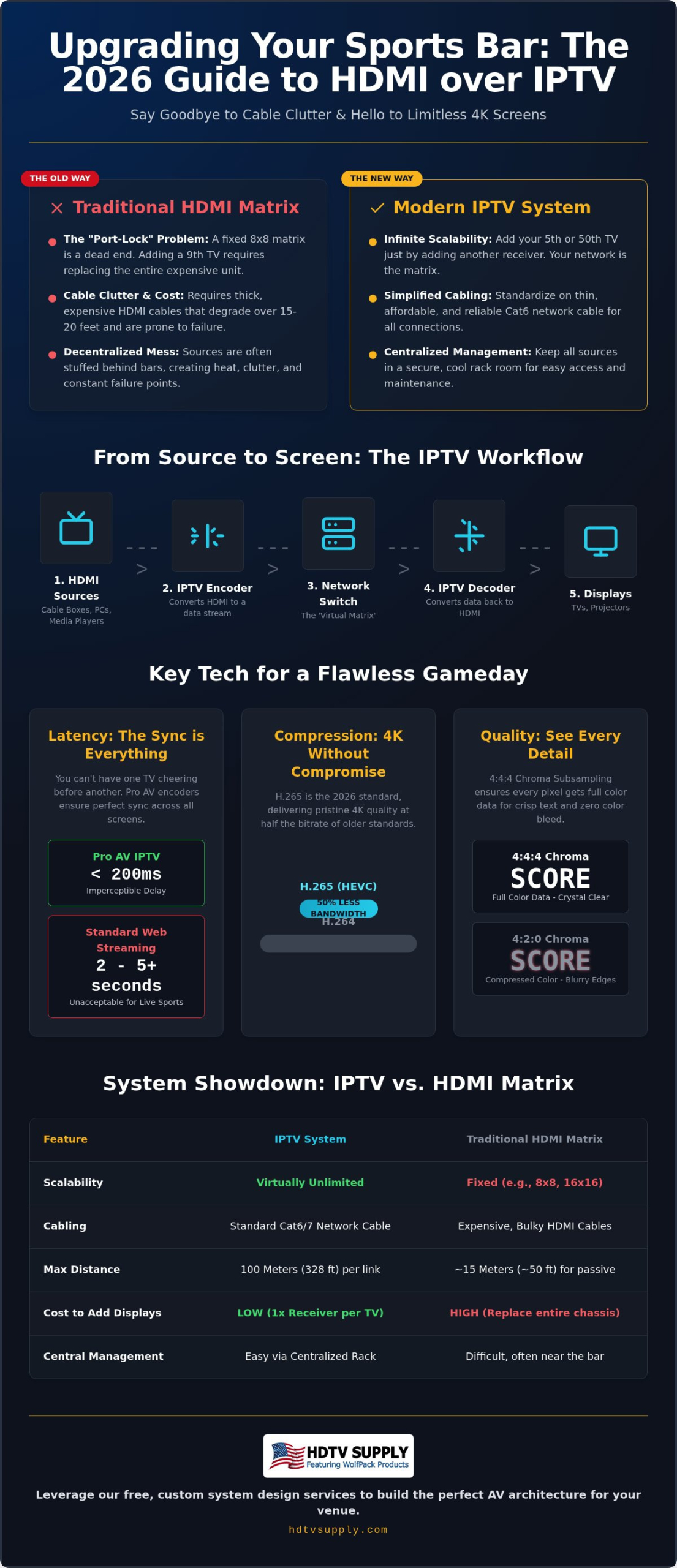
Fixed-frame hardware is a legacy solution. It limits your future growth. Many providers still push 8×8 matrix switchers for small bars, but these units create a “Port-Lock” problem. If you have eight TVs and want to add a ninth, you’re forced to replace the entire chassis. It is a hardware dead end. IPTV encoders remove these physical boundaries. Your network switch becomes a virtual matrix. You can scale one port at a time. This modularity is why the best hdmi to iptv encoder for sports bars is now the preferred choice for venues planning for 2026 and beyond.
Solving the Sports Bar Cable Nightmare
Traditional setups require thick, expensive HDMI cables that degrade over long distances. High-quality active HDMI cables for 100-foot runs are bulky and prone to failure. Switching to an IPTV system allows you to standardize on Cat6 cabling. It’s thinner, significantly cheaper, and easier to maintain. You can keep all your source equipment in a centralized, ventilated rack. This move reduces heat and clutter behind your bar counter while ensuring your staff has more room to work. Consider these immediate benefits:
- Standardize on Cat6: Simplify troubleshooting with standard IT tools and testers.
- Use Existing Infrastructure: Save on installation labor by using existing network drops.
- Centralized Management: Keep cable boxes away from high-traffic, high-heat bar areas.
- Signal Integrity: Eliminate signal degradation across long cable runs with digital packet delivery.
How HDMI to IPTV Encoding Works: Latency and 4K Quality
The mechanics of video distribution have shifted toward high-efficiency network protocols. Modern encoders convert HDMI signals into IP streams using either H.264 or H.265 (HEVC) compression. While H.264 remains compatible with legacy hardware, H.265 is the 2026 standard for 4K delivery. It provides superior image quality at roughly half the bitrate of its predecessor. This technical efficiency is why research from Harvard Business Review suggests that modern enterprises are re-evaluating their video technology to support higher data demands. Selecting the best hdmi to iptv encoder for sports bars requires balancing this compression against your network’s total throughput capacity.
The Importance of Low-Latency Hardware
Standard encoders designed for web streaming often introduce several seconds of lag. This is unacceptable in a commercial sports environment. You cannot have the front half of the bar cheering for a touchdown while the back half is still watching the snap. Professional AV encoders prioritize “glass-to-glass” speed to prevent this synchronization failure. Pro AV hardware uses specialized chipsets to process frames in real time, unlike consumer encoders that rely on heavy buffering. Sub-100ms latency is the industry gold standard for live events. This ensures every TV in your building stays in perfect sync, regardless of how many switches the signal passes through. For venues that need advanced technical solutions for live and hybrid environments, straightst.com offers professional expertise in production and technical integration.
Crisp jersey numbers and legible scoreboard text require high chroma subsampling. 4:4:4 means every pixel receives its own unique color data. This is a significant step up from 4:2:0 subsampling, which compresses color information and often results in blurred edges or “color bleeding” around fast-moving objects. Most modern UHD broadcasts also require HDCP 2.2 compliance to function. Without this security handshake, your screens will stay black when attempting to display protected content like UFC pay-per-views or NFL Sunday Ticket. For a deeper dive into these specifications, see our guide on Advanced UHD Standards.
Managing bandwidth is the final piece of the 4K puzzle. Streaming 4K content across dozens of screens can easily overwhelm a standard network if it isn’t configured correctly. High-capacity encoders use IGMP snooping to ensure that video data only travels to the ports that actually need it. This prevents your video traffic from crashing the bar’s Wi-Fi or point-of-sale systems. If you’re currently planning a high-density layout, our experts at HDTV Supply offer free custom AV system design to ensure your network architecture is ready for the load.
IPTV vs. HDMI Matrix vs. Modulators: Which is Best?
Choosing the right architecture depends on your TV count and existing wiring. Traditional HDMI matrix switchers are ideal for small, 4-8 TV setups where distances are short. However, as you scale toward 20, 30, or 40 screens, the technical limitations of fixed-port hardware become a bottleneck. RF Modulators over coax are reliable for simple 1080p distribution but fall short for modern 4K sports. For large venues requiring 4K distribution and limitless scalability, IPTV (AV over IP) is the clear winner in 2026. It bypasses the physical port limitations that plague traditional hardware. For a comprehensive breakdown of how these two approaches compare on cost, latency, and scalability, see our HDMI modulator vs matrix switcher 2026 Pro AV guide.
Total Cost of Ownership (TCO) over a five-year lifespan favors IPTV for growing businesses. A matrix switcher requires a large upfront investment in a chassis that you might outgrow. Conversely, the best hdmi to iptv encoder for sports bars allows for incremental investment. You only buy the encoders and receivers you need today. When you add a patio or a back room next year, you simply add more endpoints to your network switch. This modular approach ensures your hardware budget isn’t wasted on unused ports or obsolete frames.
When to Choose an HDMI Modulator
If you’re operating in an older building with existing coax wiring, an HDMI modulator is a cost-effective way to distribute video without pulling new Cat6. It is a solid choice for digital signage where slight latency doesn’t matter. For more detail, read The Professional Guide to HDMI Modulators. While reliable, these systems are often limited to 1080p. They cannot match the image depth and high-speed refresh rates required for high-stakes 4K sports broadcasts.
The Matrix Switcher Use Case
Matrix switchers provide “zero-latency” performance. This makes them an excellent choice for high-speed environments or gaming lounges where even a 100ms delay is noticeable. The primary constraint is physical cable length. Standard HDMI cables struggle with signal integrity over long runs. You can find more on this in our guide to Long Distance HDMI Signal Distribution. Our WolfPack Modular Matrix Switchers bridge the gap by offering modular frames. These allow you to mix and match input cards, providing more flexibility than a fixed-chassis unit. For many, finding the best hdmi to iptv encoder for sports bars is about moving away from these physical constraints entirely.
How to Set Up an IPTV Distribution System: A 5-Step Guide
Deploying a robust video network requires a methodical approach. While consumer-grade solutions promise “plug-and-play” simplicity, commercial environments need specific configurations to handle high-bitrate 4K traffic. To find and successfully implement the best hdmi to iptv encoder for sports bars, follow this professional setup sequence to ensure your system remains stable during peak hours.
- Step 1: Map Requirements. Audit your source-to-display needs. Calculate the total bandwidth required for simultaneous 4K streams to ensure your network backbone can handle the peak load without stuttering.
- Step 2: Select a Managed Switch. Choose a high-capacity managed network switch with PoE support. This allows you to power decoders directly via the Cat6 cable, eliminating the requirement for power outlets behind every TV.
- Step 3: Configure VLANs. Segment your network. Creating a dedicated Virtual Local Area Network (VLAN) for video traffic prevents guest Wi-Fi or point-of-sale data from interfering with your live game streams.
- Step 4: Physical Integration. Connect your encoders to your source rack and decoders to each display. Use high-quality Cat6 cabling to maintain signal integrity across long distances throughout the venue.
- Step 5: Implementation of Control. Deploy a centralized interface. This final step ensures that your staff can manage the entire system without specialized technical knowledge or a drawer full of remotes.
Configuring Your Network for Success
Standard network settings won’t suffice for multicast video traffic. You must enable IGMP Snooping on your managed switch. This feature ensures that video packets are only sent to the specific ports where a receiver is active. Without it, your network will be flooded with unnecessary data, leading to system wide crashes. Additionally, enable Jumbo Frames to allow the network to handle the larger data packets essential for maintaining high-bitrate 4K video. A managed switch prevents network flooding by directing traffic only to active receivers.
Staff-Friendly Control Interfaces
Your bartenders shouldn’t need a degree in IT to change a channel during a busy Saturday night. Complex menus and multiple remotes lead to errors and frustrated customers. The WolfPad TV Control System solves this by providing a visual, iPad-based interface for your entire Sports Bar TV Distribution System. You can drag and drop sources to any screen in seconds. This technology eliminates the “remote control drawer” once and for all. If you’re ready to modernize your venue, HDTV Supply provides free custom AV system design to help you build the perfect setup.
Best HDMI to IPTV Solutions from HDTV Supply
HDTV Supply delivers specialized hardware designed specifically for high-traffic commercial environments. When searching for the best hdmi to iptv encoder for sports bars, you need equipment that maintains 24/7 reliability without signal dropouts. Our WolfPack IPTV Encoders provide this stability by utilizing professional-grade chipsets that handle the heavy processing demands of live 4K sports. These units are built for continuous operation, ensuring your screens stay active during the busiest game days of the year.
WolfPack Modular Integration
WolfPack systems combine the rock-solid reliability of a traditional matrix with the infinite flexibility of an IP network. These encoders support 4K60 4:4:4 uncompressed video. This ensures your patrons see every detail of the game exactly as the broadcaster intended, with no color bleeding or artifacts. For installations where a dedicated network isn’t feasible for every display, an HDMI Extender over Cat6 serves as a high-performance complementary solution for long-distance point-to-point runs. This modularity allows you to scale your system as your business grows.
The WolfPad TV Control System serves as the intuitive heart of our Sports Bar TV Distribution System. It replaces complex technical interfaces with a visual, iPad-based app. Your bartenders can change games on 50+ TVs with simple drag-and-drop gestures. This minimizes errors and keeps the focus on customer service rather than technical troubleshooting. It is the definitive solution to the “iPad control” pain point identified by venue owners.
Get Started with Professional Design
You don’t have to navigate these complex technical requirements alone. HDTV Supply functions as your expert consultant and high-volume distributor. We offer free custom AV system design to ensure your hardware architecture is perfectly suited to your specific floor plan. Our engineers analyze your source-to-display requirements and provide a comprehensive system map tailored to your venue. Consider these benefits of working with a seasoned industry veteran:
- Custom Layouts: Submit your floor plan for a personalized WolfPack system design.
- Global Technical Support: Access expert assistance for installers and technicians worldwide.
- Extended Warranties: Secure your investment with long-term protection on all modular systems.
- Comprehensive Catalog: Choose from over 12,000 products to find the exact match for your infrastructure.
Installers worldwide trust HDTV Supply as their one-stop resource for high-capacity distribution and technical mastery. We prioritize results and system integration over aesthetic marketing. Contact HDTV Supply for your Free Sports Bar AV Design and ensure your venue is equipped with the best hdmi to iptv encoder for sports bars available in 2026.
Future-Proof Your Sports Bar Video Distribution
Modern sports bars require more than just a cluster of cables; they need an integrated network architecture that scales with their business. You’ve seen how shifting to IP-based distribution eliminates the physical limits of traditional matrix hardware while maintaining the 4K60 4:4:4 quality your patrons expect. Identifying the best hdmi to iptv encoder for sports bars is the first step toward a zero-lag, staff-friendly environment where game switching happens in seconds via iPad. This technology ensures your venue stays competitive as broadcast standards continue to evolve.
HDTV Supply acts as your authoritative partner in this transition. Our WolfPack systems are trusted by venues globally for 24/7 reliability. We don’t just sell hardware; we provide specialized technical support for installers and free custom AV system design from our expert engineers. This ensures your specific floor plan is optimized for peak performance without the guesswork. Take the complexity out of your next upgrade. Browse our Sports Bar TV Distribution Systems and get a Free Custom Design today. Your venue is ready for a high-performance overhaul that will keep your customers coming back every season.
Frequently Asked Questions
What is the difference between an HDMI to IPTV encoder and a standard modulator?
An HDMI to IPTV encoder converts video into data packets for distribution over a standard local area network. In contrast, a standard modulator converts signals into RF channels for delivery over coaxial cable. While modulators are useful for legacy 1080p setups, they lack the 4K capabilities and modularity of modern IP systems. Choosing the best hdmi to iptv encoder for sports bars ensures your venue can handle high-bitrate UHD streams that modulators often compress. To understand the full strategic implications of each approach, our HDMI modulator vs matrix switcher Pro AV guide provides a detailed side-by-side comparison.
Will an IPTV system cause lag between my TVs?
Professional IPTV systems eliminate noticeable lag when using low-latency hardware. Glass-to-glass latency in pro-AV encoders is typically sub-100ms, which is imperceptible to the human eye. This ensures that every screen in your venue displays the same “Goal!” at the exact same moment. Consumer-grade streaming encoders often have delays of several seconds, but commercial WolfPack systems are engineered specifically to maintain perfect synchronization across dozens of displays during live events.
Can I use my existing bar Wi-Fi network for IPTV distribution?
You shouldn’t use a standard guest Wi-Fi network for video distribution. High-definition 4K video streams require massive, consistent bandwidth that wireless networks cannot reliably provide. Attempting this will likely crash your point-of-sale systems and result in stuttering video. A dedicated, wired infrastructure using Cat6 cabling and a managed network switch is mandatory. This physical connection ensures the stability required for a 24/7 commercial environment where signal drops aren’t an option.
Do I need a special network switch for HDMI over IP?
Yes, you require a managed network switch that supports IGMP Snooping and Jumbo Frames. IGMP Snooping is critical because it prevents video traffic from flooding every port on your network; it directs the data only to the specific TVs tuned to that game. Additionally, selecting a switch with Power over Ethernet (PoE) allows you to power your decoders directly through the network cable, simplifying installation behind wall-mounted TVs by removing the need for local outlets.
How many TVs can I connect to a single HDMI to IPTV encoder system?
There is virtually no limit to the number of TVs you can connect to an IPTV system. Unlike a traditional matrix switcher with a fixed 8×8 or 16×16 port count, an IP-based system scales by adding more network switches. You can start with 10 TVs and expand to 100+ without replacing your core hardware. This scalability is why venue owners consider these the best hdmi to iptv encoder for sports bars when planning for expansion.
Is it possible to control my IPTV system from an iPad?
Yes, the WolfPad TV Control System provides a visual iPad interface for managing your entire venue. You can drag and drop any source to any display or group of displays instantly. This eliminates the need for dozens of individual remote controls or complex technical training for your staff. The interface shows a live preview of what’s playing on each source, making it easy for bartenders to switch games even during a busy shift.
What happens if my internet goes out? Will my bar TVs stop working?
Your TVs will continue to function normally if the internet goes out. IPTV distribution happens entirely on your internal Local Area Network (LAN). As long as your cable boxes, satellite receivers, and network switches have power, the signal will reach your TVs. You only need an internet connection if you’re specifically using cloud-based streaming services as a source. For traditional satellite or cable sources, the internal distribution remains fully operational regardless of outside connectivity.
Can I show different games on different TVs at the same time?
You can show as many different games as you have source devices. Each individual cable box or receiver is connected to its own encoder, which then broadcasts that specific channel onto the network. Any TV in your bar can then “tune in” to any of those streams independently. This allows you to show the local NFL game on the main wall while simultaneously running different regional matchups on smaller screens in the booths or at the bar.
Leave a Reply
Want to join the discussion?Feel free to contribute!