
16×16 vs. 32×32 HDMI Matrix Switchers: The 2026 Professional Buying Guide
Is your HDMI matrix switcher 16×16 actually a bottleneck disguised as a solution? Many professionals assume that more ports solve distribution problems, but the wrong architecture often leads to signal loss and massive control complexity. You’ve probably felt the frustration of legacy 1080p screens crashing a 4K 60Hz 4:4:4 feed or the nightmare of staff struggling with a convoluted remote system. It’s a common hurdle in high-density venues where reliability is non-negotiable.
We’re here to help you master the technical nuances of modern video distribution. This 2026 guide compares 16×16 and 32×32 architectures to ensure you choose a system that fits your specific venue needs perfectly. You’ll learn how to achieve seamless TV distribution with WolfPad iPad-based control that requires zero programming. We’ll also dive into the benefits of WolfPack modular systems for future-proof 4K 60Hz performance and easy field-servicing. From HDMI 2.1a standards to HDCP 2.3 compliance, we’re breaking down exactly what you need for a robust, high-capacity install.
Key Takeaways
- Learn why the HDMI matrix switcher 16×16 is the commercial benchmark for growing venues and how to determine when your distribution needs require a 32×32 architecture.
- Master 2026 technical standards, including 4K 60Hz 4:4:4 support and HDCP 2.3 compliance, to ensure absolute signal integrity across every display.
- Compare fixed versus modular architectures to decide between cost-effective static units or flexible, card-based systems for easier field repairs and upgrades.
- Discover how to eliminate complex programming and staff frustration using WolfPad iPad-based control for effortless management of up to 32 TVs.
- Identify the critical hardware features, such as redundant power supplies and modular chassis, that maintain 24/7 uptime in professional environments.
Scaling Video Distribution: Why the 16×16 HDMI Matrix is the Commercial Standard
An HDMI matrix switcher 16×16 serves as the central nervous system for high-capacity AV environments. It allows any 16 inputs, such as cable boxes, media players, or PCs, to be routed to any 16 outputs independently. While an 8×8 system might suffice for a small retail shop, it quickly becomes a bottleneck as a business expands. Professional venues like sports bars, casinos, and command centers require the overhead that a 16×16 architecture provides. It isn’t just about having more ports; it’s about the flexibility to manage a complex web of content without the need for manual cable swapping or signal degradation.
Think of the matrix as the “brain” of your distribution system. It handles the logic of which source goes where, ensuring that a single input can be mirrored across all 16 screens or distributed as 16 unique feeds. This level of control is what separates consumer-grade splitters from professional integration tools.
The 16×16 vs. 32×32 Decision Matrix
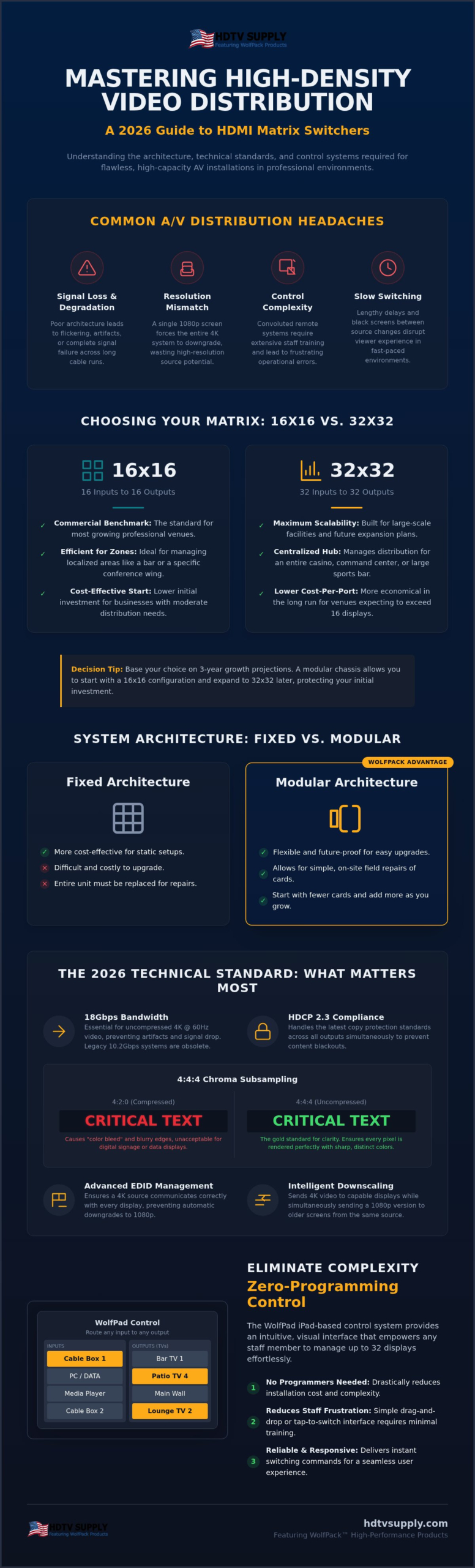
Choosing between a 16×16 and a 32×32 chassis requires a cold look at your three-year growth projections. A 32×32 system offers a lower cost-per-port in the long run if you plan to exceed 16 displays, but the initial jump in chassis price is significant. Modular systems like the WolfPack line allow you to start with a 16×16 configuration in a larger chassis, providing a clear path to 32×32 without replacing the entire unit. This scalability is vital for businesses that anticipate adding more displays as they renovate or expand their footprint. If your venue uses localized zones, a 16×16 unit is often the most efficient choice. For centralized hubs serving an entire facility, the 32×32 provides the necessary scale. Don’t buy for today alone. Buy for the expansion you’ve already planned.
Beyond Simple Switching: Signal Management
Managing signals involves more than just moving data from point A to point B. In a mixed-resolution environment, EDID management is critical. It ensures a 4K source doesn’t default to 1080p just because one legacy screen is connected to the network. These systems must also handle HDCP 2.2 copy protection across all 16 screens simultaneously to prevent blackouts. High-stakes environments like sports betting lounges rely on fast, seamless switching to keep up with live odds. Fast switching is not just a luxury; it is a requirement when viewers expect instant transitions between live games or data feeds. If your system takes five seconds to sync, you’ve already lost your audience’s attention. When these digital handshakes break down unexpectedly, having a solid approach to HDMI matrix switcher troubleshooting is essential to restoring signal integrity without costly downtime.
This technology is built upon the evolving HDMI standard, which dictates the bandwidth and encryption protocols necessary for 2026-era content. Unlike older systems that struggled with 10.2Gbps, modern WolfPack solutions handle the 18Gbps required for true 4K 60Hz 4:4:4 performance. This ensures that every pixel of your high-resolution content reaches the display with absolute clarity and zero latency.
Technical Specifications: 4K 60Hz, HDCP 2.2, and Signal Integrity
Achieving professional signal integrity in 2026 requires more than just basic connectivity. A high-performance HDMI matrix switcher 16×16 must support 4K 60Hz 4:4:4 to meet the visual expectations of modern audiences. While older systems operated at 10.2Gbps, today’s uncompressed 4K video demands 18Gbps of bandwidth to prevent flickering or artifacts. Understanding these HDMI Matrix Switcher Applications helps installers navigate the complexities of high-density distribution. It’s not just about resolution; it’s about the speed and reliability of the data stream.
Audio matrixing is another critical specification for commercial venues. Professional installs often require separating audio from the HDMI stream to feed external house sound systems or amplifiers. Simultaneously, an HDMI matrix switcher 16×16 must handle mixed-resolution environments. Intelligent downscaling allows you to send 4K content to modern displays while providing a 1080p feed to legacy TVs. This prevents the entire system from downgrading to the lowest common denominator, ensuring your newest screens always look their best. For a comprehensive overview of how these specifications fit into a complete infrastructure strategy, our 2026 Pro AV HDMI distribution system buyer’s guide covers bandwidth requirements, HDCP 2.3 compliance, and scalable hardware selection in detail.
Chroma Subsampling and Visual Clarity
Text-heavy displays and digital signage suffer significantly under heavy compression. While 4:2:0 subsampling might work for basic video, it causes “color bleeding” around sharp edges and text. 4:4:4 chroma subsampling is the gold standard for color accuracy in 2026. WolfPackSecure systems prioritize uncompressed signal paths to maintain this clarity. This ensures that every spreadsheet, menu board, or sports ticker remains crisp across all 16 outputs without the blurry artifacts common in lower-tier hardware.
Long-Distance Distribution with HDBaseT
Standard HDMI cables typically fail after 30 to 50 feet. This creates a massive logistical challenge in large venues where the rack room is far from the display floor. Integrating HDBaseT baluns allows for signal runs exceeding 300 feet over standard CAT6 cabling. This architecture is essential for a clean installation and long-term reliability. Power over Cable (PoC) technology further simplifies the setup by powering the remote receivers directly through the network cable. You won’t need to hunt for power outlets behind every TV, which reduces installation time and clutter. For those planning a high-density rollout, exploring WolfPack modular options ensures your infrastructure can handle these distances with ease.
Fixed vs. Modular 16×16 Systems: Choosing the Right Architecture
Selecting the right HDMI matrix switcher 16×16 architecture is a choice between immediate cost savings and long-term operational resilience. Fixed-chassis units are the standard for static setups. They offer a compact 1U or 2U footprint and a lower initial price point. These units are ready to deploy out of the box. However, they lack flexibility. If your display requirements shift or a single HDMI port fails, the entire unit often needs factory service. For a small boardroom, this might be acceptable. For a high-traffic venue, it’s a significant risk.
Modular systems, such as WolfPack Modular Matrix Switchers, utilize a card-based frame. This architecture allows you to swap individual input and output cards as needed. It’s the ultimate future-proofing strategy. When new standards like HDMI 2.1 become the venue requirement, you don’t replace the chassis. You simply upgrade the cards. This modularity also supports mixed-signal environments. You can populate a single chassis with HDMI, HDBaseT, and even SDI cards to handle diverse source types in one centralized hub. For a deeper look at how these modular platforms scale from small installs to enterprise-level deployments, the WolfPack matrix switcher 2026 Pro AV guide details chassis options reaching up to 160×160 and the zero-latency switching performance that high-traffic venues demand.
Serviceability in Commercial Environments
In 24/7 environments like casinos or sports bars, downtime is a liability. Modular cards drastically reduce this risk. If an output card develops an issue, you replace that specific card in the field. There is no need to de-rack the entire system or rewire 32 different cables. The WolfPack 16×16 frame architecture is built for this kind of heavy-duty service. It provides a stable backplane that ensures signal integrity even as you modify the configuration. It turns a potential system-wide failure into a five-minute maintenance task.
Hybrid I/O Configurations
Modular frames aren’t restricted to symmetrical layouts. You can easily configure a 12×16 or 16×8 setup to match your specific hardware count. This is a major advantage over Orei fixed units, which lock you into a rigid port count. If you still rely on legacy VGA or Component sources, modularity allows you to integrate them alongside modern 4K 60Hz 4:4:4 inputs. You get a unified distribution system that respects your existing hardware while preparing you for future displays. It’s about efficiency and total control over your AV infrastructure.
Control and Integration: Managing 16-32 Displays Without a Programmer
Managing a high-density video network shouldn’t require a dedicated engineering team. The biggest pain point for any manager in a sports bar or casino is staff frustration. When a customer asks to change the channel on TV 14, the bartender often has to hunt for the right remote or navigate a clunky web interface. Traditional automation systems like Crestron or Control4 offer solutions, but they come with high costs and a reliance on external programmers for every minor change. A modern HDMI matrix switcher 16×16 needs a control interface that is as agile as the hardware itself.
WolfPad TV Control Systems bridge the gap between technical power and ease of use. This iPad-based interface provides real-time visual feedback. You don’t have to guess what is playing on a screen across the room; you see it directly on your tablet. This transparency prevents routing errors and ensures your venue’s atmosphere remains exactly as intended. If you’re ready to simplify your operations, explore our WolfPad TV Control Systems today.
WolfPad TV Control System Features
The interface uses an intuitive drag-and-drop system. Switching a source is as simple as moving an icon from the input column to the desired output. It’s fast. It’s reliable. For sports bars, we can customize floor plans to match your exact TV layout. This allows staff to identify screens by location rather than memorizing port numbers. WolfPad also provides direct control for DirecTV, cable boxes, and media players. You can change channels and adjust volume without leaving the matrix app.
Third-Party Driver Support
While WolfPad is the preferred choice for many, we recognize the need for integration into existing ecosystems. Our systems support RS232 and IP control protocols, allowing for seamless communication with professional automation platforms. We provide dedicated drivers for major third-party systems to ensure your HDMI matrix switcher 16×16 integrates into a broader facility management plan. WolfPad eliminates the need for expensive AV programmers by offering a pre-configured, user-ready environment. This saves you thousands in initial setup fees and ongoing maintenance costs.
WolfPack 16×16 Solutions: Reliability for High-Stakes AV
WolfPack systems are the benchmark for reliability in mission-critical environments. US Government agencies and professional installers rely on this hardware because it’s built for 24/7 operation. When you deploy an HDMI matrix switcher 16×16 in a high-stakes venue, you can’t afford a single point of failure. Our 16×16 and 32×32 chassis often include redundant power supplies. If the primary power module fails, the backup kicks in immediately without interrupting the video feed. This internal redundancy is what separates professional-grade matrixes from entry-level switchers that might leave your screens dark at the worst possible moment.
Acoustic performance is another factor that installers often overlook. In a corporate boardroom, a loud cooling fan is a dealbreaker. We provide fanless designs for these sensitive spaces to ensure silent operation during important meetings. Conversely, our rack-mount systems for sports bars utilize high-flow cooling to manage heat in cramped equipment closets. You get the right thermal management for your specific environment. Beyond the hardware, we protect your $2,000+ investment with extended warranty options. You can secure your system for up to five years, providing peace of mind for long-term installations.
Direct Sourcing and Support
Buying commercial AV hardware online from a specialized retailer like HDTV Supply gives you a distinct advantage. You gain immediate access to over 12,000 products and specialized expertise. Our toll-free technical support is available to assist with complex system design, ensuring your HDMI matrix switcher 16×16 integrates perfectly with your existing infrastructure. We also handle global shipping and logistics. Whether you’re an integrator in the US or abroad, we ensure your hardware arrives on time and ready for deployment. You aren’t just buying a component; you’re securing a partner for your AV infrastructure.
Implementation Checklist for Your 16×16 Matrix
Before finalizing your purchase, run through this critical checklist to avoid installation delays. Proper planning ensures your system performs at its peak from day one.
- Verify every display resolution and ensure HDCP 2.3 compliance for 4K content.
- Calculate cable run distances to decide between HDBaseT baluns or Fiber HDMI cables.
- Choose your preferred control interface, whether it’s the standard Web GUI or the WolfPad iPad system.
- Confirm the availability of 4K 60 4:4:4 modular cards if you’re building a custom frame.
Ready to build your system? Design your custom WolfPack 16×16 Matrix Switcher here.
Future-Proof Your Venue with Professional Matrix Routing
Selecting an HDMI matrix switcher 16×16 is about more than just counting ports; it’s about securing a reliable backbone for your venue’s visual experience. You’ve seen how modular architecture provides the flexibility to upgrade as standards evolve and why uncompressed 4K 60Hz 4:4:4 is the non-negotiable standard for 2026. By integrating WolfPad control, you eliminate the need for complex programming and empower your staff to manage dozens of screens with a simple tablet interface.
WolfPack modular systems are trusted by high-stakes organizations like NASA and the US Navy for their uncompromising reliability in critical environments. We stand behind our hardware with free lifetime technical support and offer optional 5-year extended warranties to protect your long-term investment. Whether you’re outfitting a sports bar or a corporate command center, the right infrastructure ensures your content always reaches its destination without delay or signal loss. Our team is ready to help you design a system that scales with your growth.
Shop our full selection of 16×16 HDMI Matrix Switchers and take total control of your video distribution today.
Frequently Asked Questions
What is the difference between an HDMI matrix and an HDMI splitter?
An HDMI splitter duplicates a single input signal to multiple outputs, forcing every connected screen to show the exact same content. In contrast, an HDMI matrix switcher 16×16 allows for independent routing of 16 different sources to 16 unique displays. This flexibility is essential for commercial venues where different zones require specific content. You can mirror one source across all screens or show 16 different games simultaneously, providing total control over your distribution.
Can I control a 16×16 HDMI matrix from an iPad?
Yes, you can control the entire system from an iPad using the WolfPad TV Control System. Unlike traditional automation platforms that require expensive custom programming, WolfPad is a pre-configured solution that offers a visual, drag-and-drop interface. It allows staff to see exactly what is playing on every display in real-time. This eliminates the need for complex remotes and ensures that switching channels on 16 or more TVs is fast, intuitive, and error-free.
Do I need HDBaseT for my 16×16 matrix installation?
You need HDBaseT if your cable runs exceed the 30 or 50 foot limit of standard HDMI cables. In large commercial environments, displays are often located hundreds of feet away from the central equipment rack. HDBaseT technology allows you to transmit uncompressed 4K video, audio, and power over a single CAT6 cable for distances up to 330 feet. This architecture is critical for maintaining signal integrity and simplifying the installation process in high-density professional venues.
What happens if I have a mix of 4K and 1080p TVs?
If you have a mix of 4K and 1080p TVs, you must select a matrix with per-port downscaling capabilities. Without this feature, the system might default the entire network to the lowest resolution detected, downgrading your 4K screens to 1080p. Advanced 16×16 systems intelligently scale the signal for each specific display. This ensures that your newest 4K displays receive a full-resolution feed while legacy screens continue to function perfectly without causing system-wide signal blackouts.
Is a modular matrix better than a fixed matrix for a sports bar?
A modular matrix is generally superior for a sports bar due to its field-serviceability and scalability. If a single port fails on a fixed unit, the entire matrix often needs factory repair, leading to significant downtime. With a modular WolfPack matrix switcher, you can replace individual input or output cards in minutes. This architecture also allows you to expand from a 16×16 to a 32×32 configuration as your venue grows, protecting your initial hardware investment.
Does a 16×16 HDMI matrix switcher support 4K 60Hz 4:4:4?
Professional-grade 16×16 systems like the WolfPackSecure line fully support 4K 60Hz 4:4:4. This specification is non-negotiable for 2026 installs because it provides the 18Gbps bandwidth necessary for uncompressed video and absolute color accuracy. It prevents the blurry text and color bleeding common in lower-tier 4:2:0 systems. Always verify that both the HDMI matrix switcher 16×16 and the cabling support this standard to ensure the highest visual clarity for text-heavy content or live sports.
Can I use a 16×16 matrix for a video wall?
Many modern 16×16 matrices include built-in video wall and multiview processing. This allows you to take a single source and stretch it across a 2×2, 3×3, or 4×4 array of displays without needing external processors. While a standard matrix routes signals, a matrix with video wall capabilities provides the logic to tile images across multiple screens. This is a cost-effective way to create high-impact visual displays in sports bars, casinos, or corporate lobbies.
What kind of cables should I use for a 16×16 matrix setup?
For short runs under 30 feet, use certified Premium High Speed HDMI cables capable of 18Gbps. For longer distances, you should utilize CAT6 or CAT6a cabling paired with HDBaseT baluns to maintain signal integrity up to 330 feet. In environments with heavy electromagnetic interference or runs exceeding 300 feet, active optical HDMI cables or fiber-based distribution are the best choices. Always use shielded cabling in professional racks to prevent cross-talk between high-density signals. If you encounter persistent “No Signal” errors or HDCP conflicts during installation, refer to our comprehensive guide on HDMI matrix switcher troubleshooting to systematically diagnose and resolve these issues.
Leave a Reply
Want to join the discussion?Feel free to contribute!