
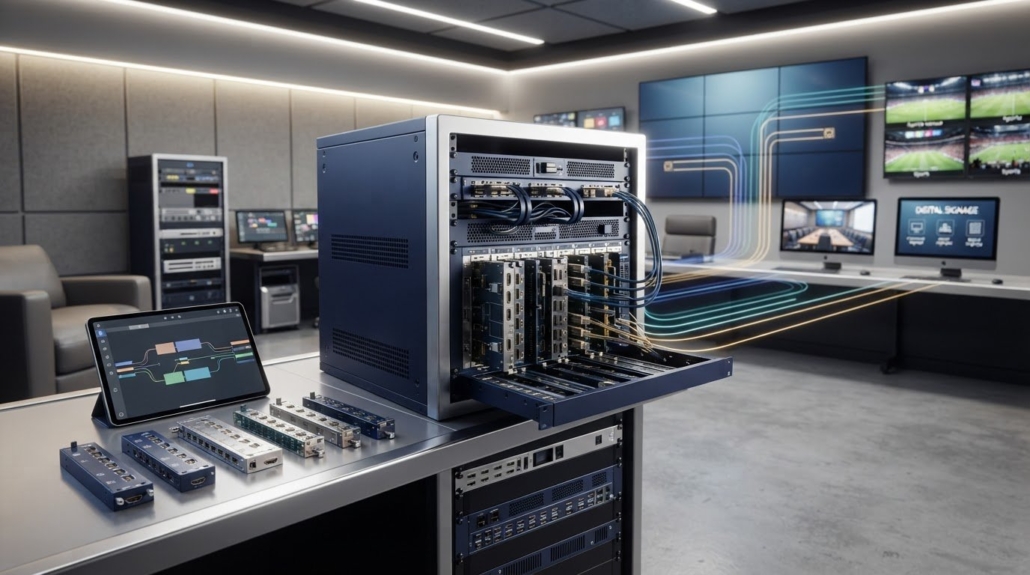
The Key Benefits of Modular HDMI Matrix Switchers
What if the right matrix switcher for your system today could also accommodate tomorrow’s changes without a complete redesign? That’s the practical case for modularity. If you’re searching “what is the benefit of modular HDMI Matrix pictures,” the key advantage is being able to configure a system with compatible input and output modules, then adapt it as requirements change. The options depend on the chassis and the components it supports.
Modularity is most useful when a project is likely to add sources or displays, or change its signal requirements. For a smaller, stable setup, unused capacity may not justify the added design flexibility. Base the decision on current needs and realistic plans for change.
This article compares modular HDMI matrix switchers with fixed-configuration models, explains where expansion and component-level maintenance can matter, and outlines the compatibility details to evaluate before selecting equipment. HDTV Supply carries WolfPack Modular Matrix Switchers for professional AV projects with evolving distribution requirements.
Key Takeaways
- Understand how a modular chassis uses compatible input and output cards, and why expansion is limited by the system’s design.
- Focus on the practical value of modularity: adapting a system to planned changes without assuming every project needs it.
- Compare modular and fixed matrices against maintenance needs, system complexity, and likely future changes.
- Map current sources, displays, and routing needs separately from possible future requirements to avoid paying for speculative capacity.
- Explore WolfPack Modular Matrix Switchers for professional AV projects that need configuration flexibility.
What Is a Modular HDMI Matrix Switcher, and What Does It Change?
A modular HDMI matrix switcher routes selected video sources to selected displays through a chassis that accepts compatible input and output cards. A fixed-configuration matrix has a set number and type of ports. A modular design can be configured around supported cards and the chassis’s available slots.
A modular HDMI matrix combines a central routing chassis with compatible cards that provide its signal inputs and outputs. Like any video matrix switch, it routes incoming signals to selected destinations. Modularity changes how the system’s connections are configured, not the basic purpose of the matrix.
How a modular chassis and its cards work together
The chassis houses the routing platform and provides the slots, connections, and capacity supported by that model. Where the design allows it, input cards connect source devices and output cards connect displays or other destinations. The cards determine the available connections, within the chassis’s limits.
This differs from adding an external HDMI splitter or using a simple source selector. A splitter duplicates one source to multiple destinations, while a selector chooses between sources for an output. A matrix routes multiple sources to multiple outputs. Modular cards let supported systems be configured or expanded at the hardware level.
What modularity means for an AV installation
Consider a hospitality venue that starts with media players feeding displays in different areas. Later, it might add sources for another room, replace displays with models that have different signal requirements, or change which sources appear in each zone. A modular architecture may allow the matrix configuration to be adjusted with compatible cards instead of replacing the entire switching platform.
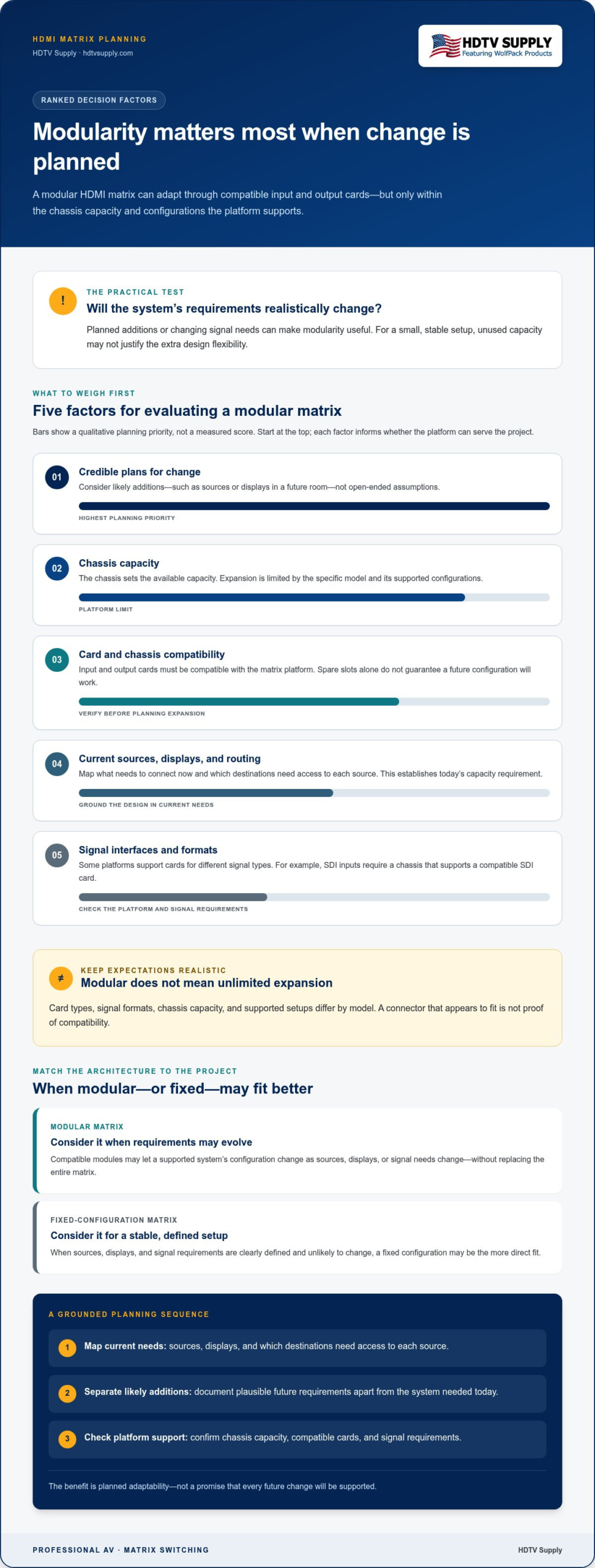
That flexibility has limits. Expansion depends on available chassis capacity, card compatibility, and the specific matrix’s supported configurations. Models differ in card types, signal formats, and possible setups. Modular does not mean every card works in every chassis or that capacity can grow without limit.
To answer “what is the benefit of modular HDMI Matrix pictures,” focus on planned system changes. Modularity can help match input and output capacity to a project as requirements evolve. Map current sources, displays, and routing needs, then compare them with credible future changes. This keeps the design grounded in the installation instead of assumptions about unlimited expansion.
How Modular HDMI Matrix Switchers Support Expansion and System Changes
A modular matrix can keep a signal-routing plan adaptable as a project grows. If a venue adds sources, extends distribution to more displays, or changes the signal interfaces it needs, compatible modules may let the system’s configuration change without replacing the entire matrix. That can reduce the scope of a redesign, provided the additions fit the platform.
Scaling inputs and outputs as requirements evolve
Count the sources that need to reach the displays, then map which destinations need access to each source. This establishes the matrix capacity required now. For a phased installation, document likely additions, such as displays in a future room, separately from current needs. Avoid buying capacity based on open-ended assumptions.
Expansion depends on the chassis and its supported modules. The chassis sets the available capacity, while compatible card types determine which input and output connections can be added. A larger matrix is not automatically expandable, and spare slots alone don’t guarantee a future configuration will work. For a closer look at sizing, see the published guide comparing 16×16 and 32×32 HDMI matrix switchers.
Adapting signal types and formats
Some modular platforms support cards for different interfaces or signal types, which can help accommodate a mix of source equipment. For example, SDI inputs may be available only when a particular chassis supports a compatible SDI card. A card’s connector type alone does not establish compatibility; the matrix platform and signal requirements must also align. The guide on adding SDI inputs to WolfPack modular matrix switchers explores this configuration topic.
Modular HDMI matrices are one approach to signal distribution. Network-based AV is another architecture. Semtech’s overview of Professional AV signal distribution describes technology associated with Ethernet-based AV networks. Choose an approach based on the project’s routing design and infrastructure rather than treating network distribution and modular matrix cards as interchangeable.
For teams asking “what is the benefit of modular HDMI Matrix pictures,” the practical answer is planned adaptability, not unlimited growth. A phased conference center, for instance, might design its initial matrix around the rooms in service today and document the sources and displays expected in a later phase. That plan helps integrators identify a suitable chassis and supported modules while avoiding assumptions that future capacity is guaranteed.
As you plan a professional AV system around current routing needs and expected changes, review the WolfPack Modular Matrix Switchers range.
Modular vs. Fixed HDMI Matrix Switchers: Is the Added Flexibility Worth It?
Modularity isn’t automatically the better choice. It’s useful when a system is likely to change and the selected chassis supports those changes. A fixed-configuration matrix may be a more direct fit for a stable installation with clearly defined sources, displays, and signal requirements. Choose based on the project, not the assumption that every system needs room to grow.
| Consideration | Modular matrix | Fixed-configuration matrix |
|---|---|---|
| Configuration flexibility | Supported input and output cards can provide options for configuring the system. | Port count and types are set by the model. |
| Future changes | May accommodate planned changes if the chassis has capacity and supports compatible modules. | Changes beyond its fixed capacity may require a different matrix or additional equipment. |
| Maintenance approach | Some designs allow components to be replaced or reconfigured individually; procedures depend on the manufacturer. | Service may involve the fixed unit as a whole, depending on its design. |
| Design complexity | Requires planning around chassis limits, card compatibility, and configuration options. | Can be simpler to specify when requirements are settled. |
When a modular matrix is a stronger fit
Consider modular architecture for projects with evolving source counts, varied signal requirements, or planned phases, such as a facility adding rooms over time. A compatible card may support a different configuration or component replacement, depending on the manufacturer’s design. Don’t assume cards are interchangeable across models or can be changed while the system is running. Hot-swapping and uninterrupted operation are specific capabilities, not automatic benefits of modularity.
When a fixed-configuration matrix may be sufficient
A fixed matrix can suit an installation where the source list, display count, and routing plan are unlikely to change. With fewer configuration choices to resolve, system planning may be more straightforward. If there’s no credible expansion plan, paying for unused capacity or flexibility may not benefit the project. Select a configuration that meets real requirements, including clearly planned additions.
Project economics depend on equipment, system requirements, and the implications of future changes. Compare the initial configuration with the likely effort of adapting or replacing it later; neither architecture is universally less expensive. If you’re searching “what is the benefit of modular HDMI Matrix pictures,” ask whether supported components can address a change your system is realistically expected to face. That’s a better basis for choosing than modularity alone.
How to Evaluate a Modular HDMI Matrix for Your Project
Choose a matrix from a signal plan, not a port count alone. First separate current requirements from likely changes, then check the compatibility details that determine whether a modular design can support the project.
- 1. Inventory current sources and displays. List each source device, destination display, and required routing. Note which sources must reach which displays, including zones with distinct routing needs.
- 2. Record signal requirements. Document the interface, resolution, and bandwidth requirements for each connection. Include planned signal-format variations, but don’t assume every input or output card supports every format or resolution.
- 3. Separate current needs from future plans. Identify confirmed additions, such as a scheduled room expansion, separately from possibilities that haven’t been approved. This helps size the current system without treating every open chassis slot as a requirement.
- 4. Match the plan to chassis and cards. Review product documentation for supported input and output card types, chassis slot capacity, and compatible card combinations. Check firmware requirements and confirm that the proposed configuration supports the necessary signal paths.
- 5. Check control and integration. Determine how operators will control routing and how the matrix connects with existing AV equipment or control systems. Confirm interoperability across the actual components rather than assuming a shared connector or signal label guarantees compatibility.
- 6. Plan for service access. Consider how technicians can access the chassis and what the manufacturer specifies for module replacement or reconfiguration. Don’t assume cards are hot-swappable or that servicing can happen without interrupting operation.
Keep a simple matrix schedule with the source, destination, required format, current status, and anticipated changes. This helps distinguish a real capacity requirement from a speculative one and gives the design team a clear basis for evaluating compatible hardware. For broader architecture context, consult the published guide to modular HDMI matrix switchers.
If you’re asking “what is the benefit of modular HDMI Matrix pictures,” the answer depends on whether supported modules address a defined system need. Capacity, signal format, control, and service access all matter. Compare modular HDMI matrix options with your project schedule and routing plan.
WolfPack Modular Matrix Switchers for Pro AV Systems
Modular architecture is most useful when a professional AV system has defined plans to change. Those plans might involve adding sources or displays in a later project phase, or adapting the configuration to changing signal requirements. If the installation is stable and its needs are clear, a fixed matrix may be a better fit. The value comes from matching the system design to real project needs, not from modularity alone.
Match WolfPack modular options to the system design
HDTV Supply carries WolfPack Modular Matrix Switchers for professional AV projects. Start product research with your system schedule: current input and output counts, required signal formats, routing patterns, control requirements, and planned expansion. Compare those needs with the chassis and supported configurations in the product documentation. This keeps selection grounded in the design rather than assumptions about capacity or compatibility.
For product-family context, consult the published WolfPack matrix switcher guide. The build-your-own WolfPack HDMI matrix guide offers a closer look at configuration. These resources can help connect architecture planning to product research while keeping chassis limits and supported components in view.
Move from architecture planning to product research
Before narrowing the options, check the details that shape a workable system:
- Capacity: Match the matrix inputs and outputs to current sources, destinations, and routing needs.
- Signal compatibility: Compare the required formats and resolutions with the supported cards and system specifications.
- Control and interoperability: Consider how the matrix will work with existing AV equipment and control methods.
- Expansion: Base future flexibility on documented chassis capacity and compatible modules, not presumed universal support.
- Service access: Understand the manufacturer’s replacement and maintenance procedures without assuming hot-swapping or uninterrupted operation.
These checks put “what is the benefit of modular HDMI Matrix pictures” in project terms: modularity may provide a path to adapt the system when requirements change, if the selected platform supports the needed configuration. They also help identify when modular capacity would go unused.
Once your requirements are documented, explore HDTV Supply’s WolfPack modular matrix range or request technical assistance with product research. A clear signal plan gives you a practical starting point for evaluating the available options.
Plan Your Matrix Around What Comes Next
Modular HDMI matrix switchers are most valuable when a system has realistic plans to change. Compatible cards may help adapt capacity or signal connections without redesigning the entire routing layout, but chassis limits and compatibility determine what’s possible. For stable systems with defined requirements, a fixed matrix may be more suitable.
Start with your current sources, displays, routing, and signal requirements. Separate confirmed expansion plans from possibilities, then evaluate supported capacity, control, compatibility, and service access. That practical checklist answers “what is the benefit of modular HDMI Matrix pictures” for your project: flexibility matters when it supports a defined need, not simply because it’s available.
HDTV Supply carries WolfPack Modular Matrix Switchers and serves installers and integrators worldwide. Explore the options with your project requirements in view, and choose a system design that fits your needs today while planning responsibly for change.
Explore WolfPack Modular Matrix Switchers and take the next step toward a well-planned AV system.
Frequently Asked Questions
What is a modular HDMI matrix switcher?
A modular HDMI matrix switcher routes selected video sources to selected displays through a chassis designed to accept compatible input and output cards. Those cards determine available connections within the chassis’s capacity and supported configurations. A fixed matrix has a set port configuration, while a modular model may allow supported cards to shape its setup. Modularity doesn’t mean every card fits every chassis, so review the product documentation for compatibility.
What are the main benefits of a modular HDMI matrix switcher?
The main benefit is configuration flexibility. A modular matrix may let a project match its input and output setup to current requirements, with room for planned changes when the chassis supports them. This can help avoid redesigning an entire signal-routing system as sources, displays, or signal needs evolve. If you’re searching “what is the benefit of modular HDMI Matrix pictures,” focus on whether compatible modules address a real project need, not flexibility for its own sake.
Are modular HDMI matrix switchers better than fixed matrix switchers?
Neither type is universally better. A modular matrix can suit projects with planned growth, changing signal requirements, or a need for configuration options. A fixed matrix may be a straightforward fit when the input count, output count, and routing plan are stable. Compare both against current requirements and realistic future changes. Modularity can involve more design choices, so unused capacity or flexibility may not be worthwhile in a small, settled system.
Can you add inputs or outputs to a modular HDMI matrix later?
Sometimes, if the matrix supports compatible input or output cards and the chassis has capacity for them. Expansion is not unlimited, and an open slot alone doesn’t guarantee that a needed card or configuration will work. Before planning an addition, review the manufacturer’s documentation for chassis limits, supported modules, signal compatibility, and required system configuration. Separate approved future additions from possibilities that haven’t been defined.
Can modular HDMI matrix cards be replaced while the system is running?
Not necessarily. Whether a card can be replaced while the matrix is operating depends on the manufacturer’s design and documented service procedures. Modularity by itself doesn’t guarantee hot-swapping, uninterrupted output, or continued operation during maintenance. Plan service around the product’s instructions, including any required shutdown or reconfiguration. For critical AV systems, account for maintenance’s operational impact when comparing equipment designs.
Does a modular HDMI matrix switcher support different signal types?
Some modular platforms support different interfaces or signal types through compatible cards, but support varies by chassis and model. A card for a particular connector or signal format won’t necessarily work in every modular matrix. Compare the sources and displays with the system documentation, including resolution and bandwidth requirements. If a project needs a signal type such as SDI, confirm that the specific chassis supports a compatible card and the intended configuration.
When should I choose a modular HDMI matrix for a commercial AV project?
Consider a modular matrix when your project has planned changes to source or display counts, varied signal needs, or phased expansion. First map current routing requirements, then identify likely additions and check that the chassis and supported cards can accommodate them. A fixed matrix may be sufficient for a stable system with clearly defined needs. Choose modularity when its supported flexibility solves a specific requirement, rather than buying expansion capacity based only on speculation.
Leave a Reply
Want to join the discussion?Feel free to contribute!