

Future-Proofing Commercial AV: A Practical 2026 Guide
What if the best way to future-proof your AV system is to stop trying to predict the next format? Standards change, and choosing every new capability upfront can add complexity without solving a current need. Future-proofing a commercial AV installation means building clear upgrade paths so you can adapt without replacing the entire system.
It’s reasonable to worry that a choice made today could make future expansion disruptive. The answer isn’t to overbuild. Document what the system must do now, identify likely changes, and select components and infrastructure that support practical upgrades. This guide provides a repeatable planning process and a framework for comparing fixed, modular, and network-based AV architectures.
You’ll learn how to assess compatibility, plan for changing room or distribution requirements, and match equipment to current needs and anticipated growth. We’ll also look at where matrix switching, video wall processing, and TV distribution fit into a flexible commercial AV design, helping you make informed decisions without adding complexity for its own sake.
Key Takeaways
- Future-proofing a commercial AV installation means planning upgrade paths around likely business changes, not trying to predict every future format.
- Use a structured audit to document sources, destinations, connections, control needs, infrastructure, and current operational pain points.
- Compare fixed, matrix-based, modular, and AV-over-IP architectures by how they expand and what changes when requirements grow.
- Preserve options in cabling, pathways, rack space, power, and network planning while keeping signal transport, processing, switching, and control decisions distinct.
- Build a buying plan around required performance, interoperability, supportability, and the impact of future replacements.
Why Future-Proofing a Commercial AV Installation Starts With Upgrade Paths
A commercial AV system should support the business as it changes, without forcing a full rebuild for every new requirement. That is the practical aim of future-proofing a commercial AV installation: reduce the disruption and scope of likely upgrades, rather than trying to predict every format or technology the future might bring. The system’s role matters, too. Audiovisual (AV) technology combines visual and audio components, but commercial environments also depend on how reliably people can operate and maintain them.
Future-proofing makes likely AV changes easier to implement. It does not guarantee that today’s equipment will remain compatible with every future standard. That distinction keeps planning realistic. Instead of buying the newest specification across the board, identify the changes the organization may actually need, then build a manageable route to accommodate them.
What future-proofing means for a commercial AV system
Adaptable infrastructure creates options: accessible pathways, documented connections, and a design that can accommodate planned changes. Permanently future-compatible equipment is not a realistic promise. New devices and formats may introduce requirements that existing hardware cannot meet, so a sensible plan defines what can be expanded and what may eventually need replacement.
Consider a venue that expects to add displays in another area. If the distribution architecture and pathways account for that likely addition, the venue may be able to expand without reworking the entire system. That’s an upgrade path, not a guarantee that every existing component will support every new display.
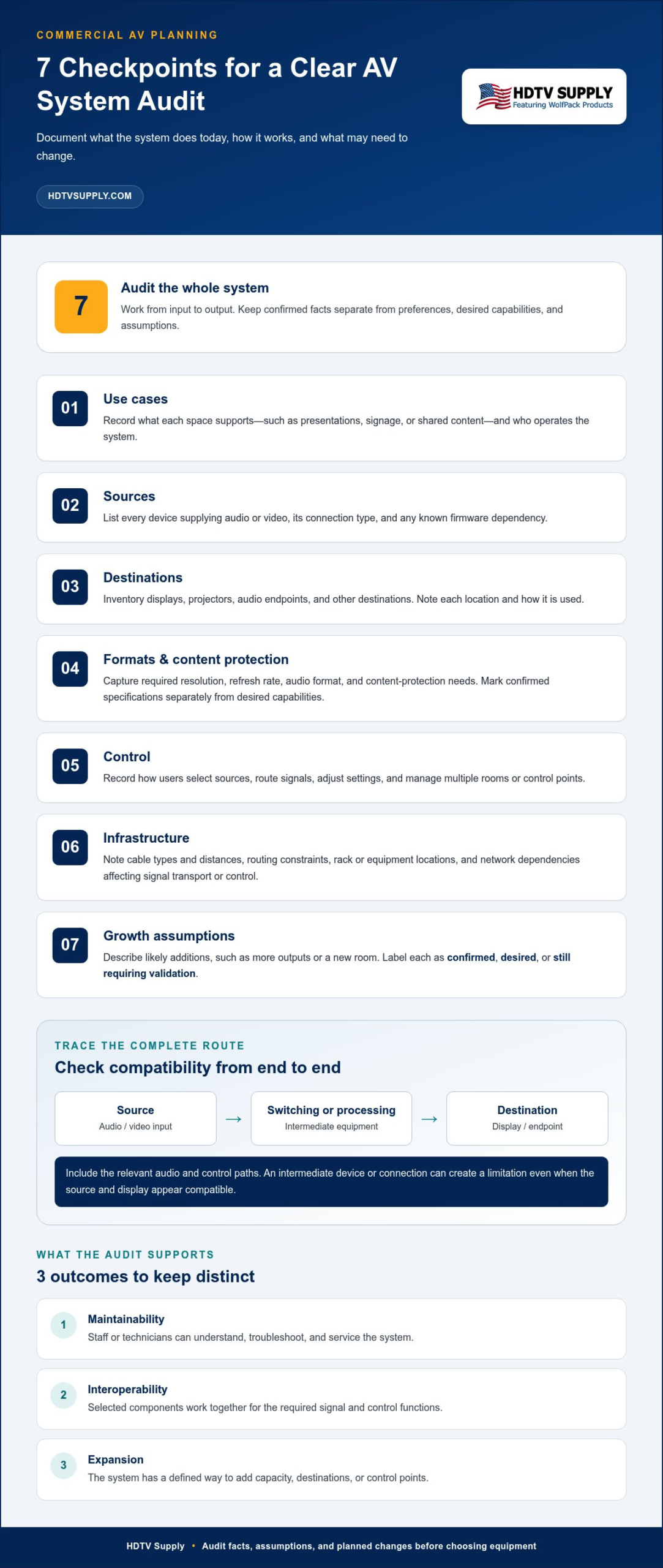
Keep three outcomes distinct:
- Maintainability: Staff or technicians can understand, troubleshoot, and service the system.
- Interoperability: Selected components work together for the required signal and control functions.
- Expansion: The system has a defined way to add capacity, destinations, or control points.
Which business changes should the system accommodate?
Start with business plans, not technology headlines. Consider whether audience size may grow, room count may change, more displays are likely, or new source types will be introduced. Separate near-term requirements from speculative trends. A planned room conversion belongs in the design assumptions; an unapproved technology shift should not automatically drive equipment choices today.
Then rank each change by operational impact. If a display supports essential communication, uptime may matter more than adding a rarely used feature. If staff need to route sources quickly, ease of operation should shape control priorities. A flexible system that’s confusing to use can create more operational friction, not less.
Record each anticipated change with its timing, business reason, and likely system impact. For example, adding a room could affect signal distribution, control, and network capacity. This turns “we may expand” into a planning assumption that can guide equipment selection and later review. Keep assumptions visible and revisit them when room use, staffing, or operating priorities change.
How to Audit Requirements Before Future-Proofing a Commercial AV Installation
A useful audit records what the AV system must do, how it works today, and what may change. For future-proofing a commercial AV installation, keep facts separate from preferences and assumptions. This helps prevent unverified expectations from becoming costly design constraints.
Map sources, signal paths, displays, and control
Work through the system from input to output. Document the current setup first, then note requirements for planned changes. A numbered audit keeps the review consistent across rooms and teams:
- Use cases: Record what each space supports, such as presentations, signage, or shared content, and who operates the system.
- Sources: List every device that supplies audio or video, including its connection type and any known firmware dependency.
- Destinations: Inventory displays, projectors, audio endpoints, and other destinations. Note their location and how each is used.
- Formats: Capture required resolution, refresh rate, audio format, and content-protection needs where applicable. Separate confirmed specifications from desired capabilities.
- Control: Record how users select sources, route signals, adjust settings, and manage multiple rooms or control points.
- Infrastructure: Note cable types and distances, routing constraints, rack or equipment locations, and network dependencies that affect signal transport or control.
- Growth assumptions: Describe likely additions, such as more outputs or a new room, and mark each as confirmed, desired, or still requiring validation.
Documenting the complete signal path can expose mismatches in formats, connections, or control requirements before they become compatibility problems. Trace each route from source through switching or processing to destination, and include the relevant audio and control paths. A source and display may appear compatible on paper, while an intermediate device or connection creates a limitation.
Turn current needs into measurable expansion scenarios
Replace “we may need more capacity” with a scenario the team can assess. For example, describe adding another display to an existing room, introducing a new source type, or extending distribution into an adjacent room. Specify which signal routes, outputs, control actions, and infrastructure would be affected. Don’t treat an unapproved possibility as a fixed specification.
For each scenario, capture its business reason, likelihood, and planning status. Record current operational pain points too, such as unclear controls, difficult troubleshooting, or disruptions during routine service. Then set priorities for centralized control, serviceability, and acceptable downtime. A critical presentation space may require a different upgrade sequence from a room used occasionally.
Keep the audit as a working document. When requirements are uncertain, assign them for verification rather than silently converting them into equipment specifications. Integrators comparing signal-routing hardware can review matrix switching and AV distribution options as part of that requirements review.
Comparing Commercial AV: Fixed, Modular, or AV-over-IP
Architecture determines how signals move, how capacity grows, and what a future change could require replacing. There isn’t one best layout for every site. For future-proofing a commercial AV installation, compare the options against actual routing needs, infrastructure, and the operational skills available to support the system.
| Architecture | Expansion method | Routing and infrastructure | Operational complexity | Potential replacement scope |
|---|---|---|---|---|
| Fixed point-to-point | Add or rework connections for new routes. | Dedicated paths connect defined sources and destinations; cabling access matters. | Simple when routes are few and stable. | Changes may require new cabling or replacement of affected signal-path components. |
| Matrix-based | Increase routing capacity by adding or replacing switching hardware, subject to system design. | Central switching assigns multiple sources to multiple destinations. | Routing is centralized, with configuration and control requirements to manage. | May be limited to the switcher or related components if the rest of the system remains compatible. |
| Modular | Change or add compatible modules where the equipment supports them. | Uses a modular chassis or platform; module types and system capacity define options. | Requires tracking module compatibility and configuration. | Some upgrades may be targeted, but incompatible or unsupported components may still need replacement. |
| AV-over-IP | Add network endpoints and capacity as the design permits. | Transports AV over network infrastructure, making network capacity and configuration central. | Depends on AV and network knowledge, plus clear troubleshooting procedures. | Changes can involve endpoints, network equipment, or both, depending on requirements. |
When a fixed or matrix-based system is the practical fit
Fixed connections suit spaces with a small number of known routes that rarely change. They can be straightforward to operate, but adding destinations may mean running more cable or revising the signal path. A matrix architecture is useful when operators need to assign different sources to different displays. Size it to the project’s actual input, output, and format requirements, rather than assuming that a larger system is automatically a better fit.
Keep equipment roles clear. A matrix switcher routes signals; a video wall processor manages how content is arranged across wall displays; a distribution system sends signals to multiple destinations. These functions can be part of a broader design, but one device doesn’t necessarily replace the others.
When modular hardware or AV-over-IP improves adaptability
Modular hardware can support targeted changes when compatible modules are available for the platform and meet the required signal formats. AV-over-IP distributes signals across a network, which can suit systems with endpoints spread across a site. It also makes network design, capacity, configuration, and troubleshooting part of the AV plan. Neither approach removes compatibility checks or guarantees simpler operations.
Use the comparison to identify trade-offs, then verify current device specifications across the complete signal path. Confirm format and bandwidth support for each connected component before selection, including any required adapters or intermediate processors. The right architecture meets today’s routing needs and provides a supportable, defined way to expand.
How to Build Upgrade Capacity Into the Signal Path and Control Layer
Upgrade capacity comes from planning the parts of an AV system that are difficult to change after a space is in use. Preserve options in the physical infrastructure, then make deliberate decisions about signal transport, switching, processing, control, and the user interface. These are related layers, but they solve different problems.
Validate every end-to-end path against the required source, processing, and display capabilities. A source and display may each meet the target, yet an intermediate device, adapter, or cable can limit the complete route. EDID and HDCP are also compatibility dependencies: EDID communicates display capabilities to connected sources, while HDCP manages protected content. Check how each device in the path handles them, especially when sources and displays have different format capabilities.
Protect the signal path from avoidable compatibility bottlenecks
Document cable routes, lengths, connector transitions, and every point where the signal is converted, extended, or processed. Record the required performance at each handoff, not just at the source and display. The weakest component in a signal chain can constrain the result, so a future display upgrade may also require changes to an intermediate device or connection.
Build access into the physical layout. Keep pathways usable for cable replacement or additional runs, reserve rack space for planned hardware, and account for power and cooling needs. For network-based transport, coordinate AV requirements with network planning, including the routes and capacity needed for endpoints. These provisions create choices; they don’t guarantee that future equipment will work with every existing component.
Keep switching, processing, and control choices serviceable
Choose the switching layer around actual routing needs. Modular matrix switching can support targeted changes when the platform, available modules, and required capabilities align. A video wall processor has a different role: it manages content across a display-wall layout, rather than serving as a general replacement for source routing. Keep the user interface and control workflow distinct from both signal transport and video processing.
Make service straightforward. Label cables and rack positions consistently, keep equipment accessible, and document configuration settings and dependencies. Clear records help technicians isolate whether a fault sits with the source, transport, switcher, processor, display, or control layer. That separation can reduce diagnostic guesswork and make component changes more manageable.
Use phased implementation to reduce redesign risk
Prioritize pathways, power, network readiness, and core routing before optional features. Test representative source-to-display paths, including the required format and content-protection behavior, before expanding the design across every room. Test control workflows too, such as source selection and routing, so operational issues surface before broader deployment.
As you evaluate expansion capacity, compare modular HDMI matrix switchers against the planned input and output needs, signal requirements, and replacement impact. Future-proofing a commercial AV installation depends on a documented path from current operation to likely change, not on any single device or feature.
Future-Proofing a Commercial AV Installation With a Lifecycle and Buying Plan
A lifecycle plan turns system requirements into decisions the team can review, test, and maintain. For future-proofing a commercial AV installation, base equipment choices on the work each component must perform and the changes the business is likely to make. Avoid fixed lifespan promises. Set review points around performance, product support, operational needs, and the cost or disruption of replacement.
Create a staged procurement and refresh plan
Move through the plan in order. Keep must-have functions separate from optional capabilities and provisions for later expansion, so the purchase meets current needs without treating every possible feature as essential.
- Sign off requirements: Confirm source and display counts, required formats, control priorities, operating conditions, and likely expansion scenarios.
- Set procurement priorities: Separate required performance from optional features. Identify infrastructure provisions that are easier to make before equipment is selected.
- Compare candidates: Evaluate each component for required performance, interoperability with the complete signal path, expansion route, supportability, and replacement impact.
- Test representative paths: Verify the source, switching or processing, control workflow, and destination together under the intended operating conditions.
- Document the system: Record configuration, firmware dependencies, cabling, and approved signal paths. Keep the record accessible for troubleshooting and future changes.
- Schedule reviews: Reassess equipment when performance no longer meets requirements, support needs change, or business operations call for an upgrade.
Plan replacements by dependency. If a core routing component limits required performance, replacing it may need to come before adding peripheral features. Document the reason for each proposed refresh and its effect on connected equipment. That makes lifecycle decisions easier to explain and helps teams avoid replacing components simply because a newer specification exists.
Match equipment categories to the system role
Choose hardware by function, not by the assumption that one device makes the system adaptable. Matrix switchers route multiple sources to multiple displays. Modular matrix options can suit projects where routing needs may change, subject to equipment compatibility. HDMI video wall processors address coordinated multi-display layouts, while TV distribution systems serve projects that deliver programming across multiple venue screens. Control systems address how users manage AV functions. Each role should map to a defined requirement.
Before researching equipment, prepare a concise selection brief: source count, display count, resolution requirements, cable distances, control priorities, and planned expansion. Compare specifications against that brief, then record why the selected option fits and what a later upgrade would affect.
Use the brief to explore professional AV hardware and technical support for product research. HDTV Supply offers matrix switchers, HDMI video wall processors, TV distribution systems, and control systems for distinct AV functions, giving installers and integrators categories to assess against project requirements.
Make Your Next AV Decision Easier
The most useful next step is to turn your upgrade assumptions into a living system record. Set a review trigger, such as a room change, a new source requirement, or a component reaching the limit of its role. At each review, update the requirements and approved signal paths before choosing replacement hardware. This keeps future decisions grounded in how the business actually operates, rather than a guess about which technology will dominate next.
That discipline is what makes future-proofing a commercial AV installation practical. The goal isn’t to avoid every future replacement. It’s to make each change more deliberate, reduce unnecessary disruption, and give decision-makers a clear basis for comparing options.
Ready to move from planning to product research? Explore HDTV Supply’s professional AV hardware and choose components for your system. With a clear brief in hand, you can evaluate equipment against real requirements and take the next step with confidence.
Frequently Asked Questions
Can a commercial AV installation really be future-proof?
No. A commercial AV system can’t guarantee compatibility with every future format or device. In practice, future-proofing a commercial AV installation means keeping requirements current, preserving practical ways to expand, and limiting how much of the system a likely change affects. For example, an added presentation source might require a new input or converter, not a wholesale replacement. Planning reduces avoidable redesign, but standards and business needs will still evolve.
How do I future-proof a commercial AV system?
Start with the tasks each room must support, then map the routes from sources to displays and note required control actions. Identify likely additions, such as another room, separately from speculative features. Test a representative route across its connected devices, then compare fixed, matrix-based, modular, and networked options against the use case. Preserve infrastructure options where justified, and save configuration details and test results. Let project requirements, not trend headlines, guide decisions.
Should I choose a modular AV system for a commercial installation?
Choose modular equipment if you expect input, output, or format requirements to change and the platform supports suitable modules. For instance, a facility that may add source types could benefit from a platform with compatible expansion options. Modularity isn’t valuable by itself: confirm the available modules meet the intended signal requirements. If connections and routing are stable, a simpler fixed architecture may be easier to operate and maintain.
What happens if one device in an AV signal chain is outdated?
A device with lower format or bandwidth capability can limit the entire route or prevent a feature from working as intended. For example, a source may support a signal that an intermediate switcher or extender can’t pass through to the display. Check the source, switcher, extender, processor, cabling, and display as one path. Don’t assume every older device needs replacement; test the required function and identify the actual limitation first.
Is AV-over-IP always the most future-proof choice?
No. AV-over-IP can distribute signals over a network and provide options for adding endpoints, but its fit depends on the site and system design. Assess network capacity, endpoint requirements, management responsibilities, and how technicians will isolate faults. A networked approach may add dependencies that a project with straightforward, defined routes doesn’t need. Matrix-based switching or another architecture can remain a practical choice when its routing capacity matches the requirements.
How often should a commercial AV system be upgraded?
There’s no universal upgrade interval. Review the system when business needs change, performance problems arise, support status shifts, compatibility becomes an issue, or operational risk increases. Periodic inventory and functional testing can reveal whether a component still meets its assigned role. For example, a room expansion may prompt a targeted routing review, while equipment that continues to perform reliably may not need replacement just because newer technology is available.
What should be documented before expanding an existing AV system?
Record equipment models, source and display connections, signal paths, required formats, cable routes, control configuration, firmware dependencies, and known limitations. Include which routes have been tested and any settings needed to reproduce them. This record helps reveal dependencies before adding hardware. If a cable route or configuration is undocumented, treat it as an assumption and validate it before selecting equipment, so the expansion is based on the system’s actual behavior.
Leave a Reply
Want to join the discussion?Feel free to contribute!