
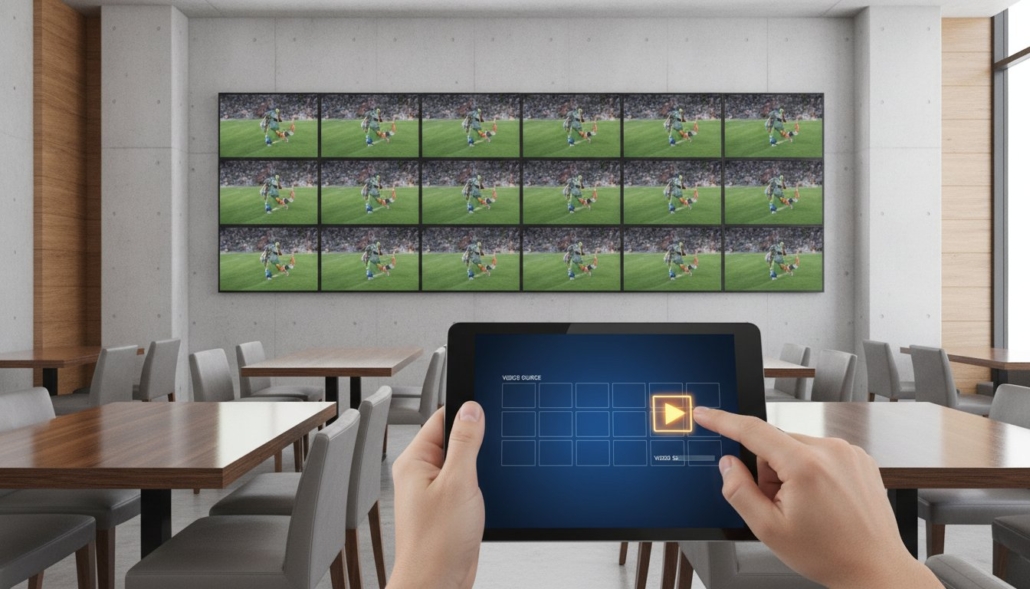
How to Control 30 TVs from an iPad: The Professional Venue Guide (2026)
Managing a sports bar with 30 screens using a basket of plastic remotes isn’t just inefficient; it’s a recipe for operational disaster during the Saturday rush. You’ve likely faced the frustration of IR interference or a staff member accidentally turning off the wrong display while trying to change a channel. Learning how to control 30 TVs from iPad is no longer a luxury reserved for high-end stadiums. It is a functional requirement for any modern venue that values speed and reliability. By moving away from consumer-grade hardware, you can centralize your entire AV architecture into a single, professional interface that any employee can master in seconds.
We understand that the high cost and complex programming of legacy systems often feel like a barrier to entry for growing businesses. This guide will show you how to eliminate remote clutter and manage your entire display network seamlessly using professional AV distribution. You’ll discover how the WolfPad interface provides a visual, drag-and-drop experience that requires zero specialized training. We’ll break down the hardware requirements for WolfPack Modular Matrix Switchers and explain how to build a scalable system that grows with your venue. From instant source switching to reliable signal distribution, you’re about to transform your venue’s technical workflow.
Key Takeaways
- Identify why consumer-grade apps and IR remotes fail in professional environments and how to eliminate signal interference permanently.
- Discover how to control 30 TVs from iPad using a WolfPack modular matrix switcher to centralize all video sources and displays.
- Learn the critical infrastructure requirements, including rack space calculations and thermal management, necessary for a stable 30-plus screen deployment.
- Streamline venue operations with the WolfPad interface, a no-programming solution that allows staff to manage complex switching via a visual drag-and-drop layout.
- Understand the step-by-step process for configuring a dedicated local network to ensure secure and instantaneous communication between your iPad and the matrix hardware.
Why Consumer Remote Apps Fail for 30+ TVs
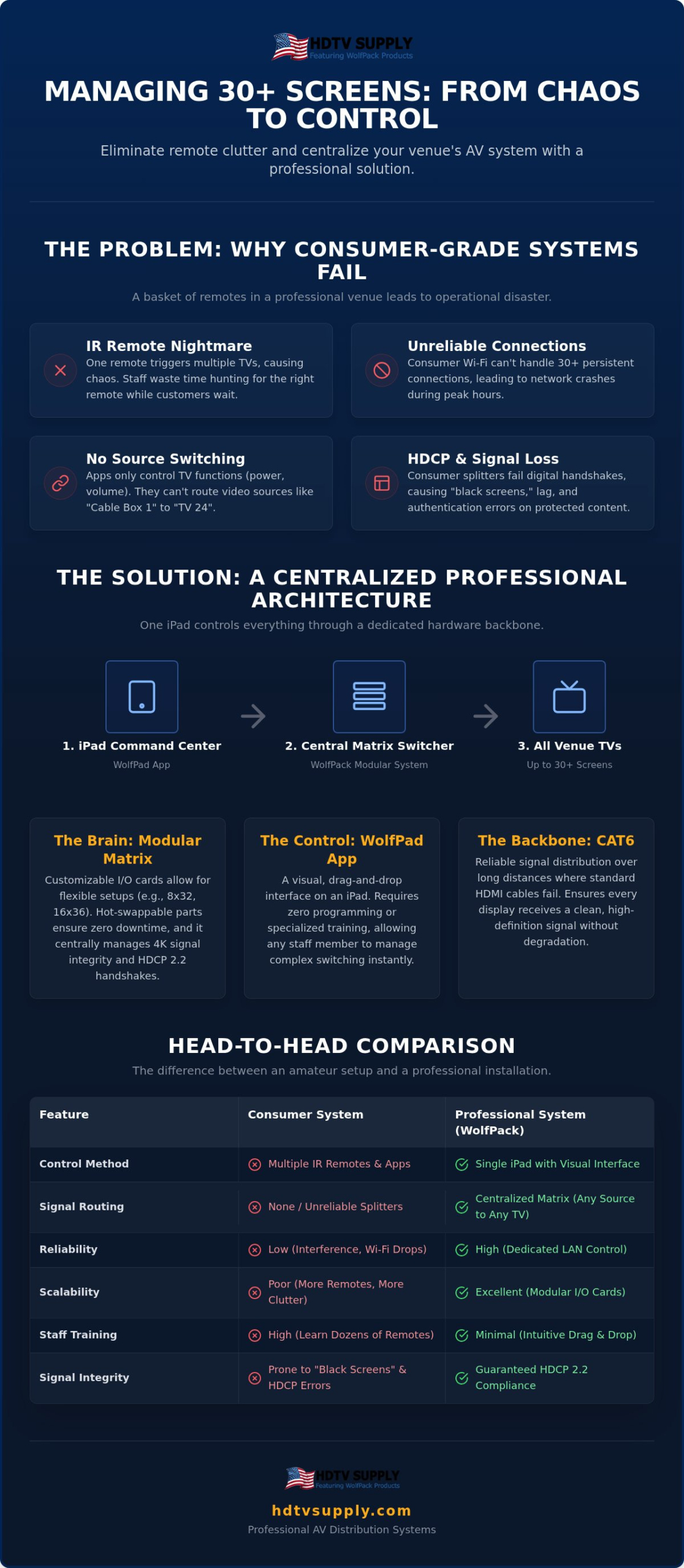
Many venue owners begin their search for a centralized solution by browsing the App Store for a free universal remote. They quickly discover that consumer-grade apps are designed for residential living rooms, not high-density commercial environments. When you’re trying to figure out how to control 30 TVs from iPad in a sports bar or restaurant, these tools fail because they lack the necessary architecture to handle scale. A standard consumer Wi-Fi router is not built to maintain 30 persistent IP connections from smart TVs while simultaneously managing guest traffic. The result is a network crash that leaves your staff unable to change a single channel during peak hours.
There’s also a critical distinction between controlling a TV and distributing a signal. Consumer apps only manage the TV’s internal functions like volume or power. They cannot switch HDMI sources at a central point. If you have 30 TVs and 10 cable boxes, a consumer app won’t help you move “Source 1” to “TV 24” across the room. You need a hardware backbone that handles the heavy lifting of video routing while the iPad serves as the simplified command center.
The IR Remote Nightmare in Sports Bars
Line-of-sight requirements are a major liability in professional venues. If you mount 10 TVs on a single wall, a standard IR remote will likely trigger three or four displays at once. Staff members often find themselves walking around with a box of individual remotes, hunting for the right one while customers wait. This leads to significant labor waste. Worse, a single accidental button press can turn off the wrong screen during a big game, creating an immediate customer service crisis. IR interference and the physical clutter of dozens of remotes are symptoms of an unmanaged system that professional hardware is designed to solve.
Consumer vs. Professional Control Architecture
Professional systems like the WolfPack series use a centralized matrix switching architecture. In this setup, your iPad doesn’t talk to the TVs directly; it communicates with a central control processor. This creates a unified control layer that is far more reliable than fragmented consumer apps. This professional backbone is also essential for maintaining HDCP compliance. When you distribute live sports content to 30 screens simultaneously, the system must manage digital handshakes to prevent “black screens.” Consumer-grade splitters and apps frequently fail these handshakes. A professional matrix ensures that every display receives a clean, high-definition signal without lag or authentication errors. Learning how to control 30 TVs from iPad effectively requires this shift from individual device management to a centralized distribution strategy.
The Backbone: Understanding HDMI Matrix Switchers
To understand how to control 30 TVs from iPad, you must first look at the hardware routing the signals. An HDMI matrix switcher is the central brain of a professional AV system. Unlike a standard splitter that sends one image to every screen, a matrix switcher allows for independent routing. This means you can send a specific football game to 20 displays and a digital menu or a different match to the remaining 10 simultaneously. For a venue with 30 plus screens, a fixed-frame switcher is rarely the right choice. You need a system that offers both high-capacity routing and signal stability over long distances.
Signal integrity is the primary challenge in large venues. Maintaining 4K 60Hz 4:4:4 chroma subsampling across 30 displays requires significant bandwidth. Professional matrix switchers manage these digital handshakes centrally. This prevents the “black screen” issues common with consumer equipment. If you want a reliable system, you should look into WolfPack Modular Matrix Switchers to ensure your infrastructure handles HDCP 2.2 security across every display without lag.
WolfPack Modular Systems for Large Venues
Modular systems provide the flexibility that fixed switchers lack. Instead of being stuck with a standard 32×32 frame, modular cards allow you to customize your input and output counts. You can configure a system for 8 inputs and 32 outputs or even 16 inputs and 36 outputs depending on your specific needs. This prevents you from paying for ports you don’t use. WolfPack frames feature hot-swappable I/O cards. If a single port or card fails, you can replace it without taking the entire venue offline. This architecture is essential for zero-downtime environments like sports bars and casinos. Before finalizing your hardware selection, reviewing the best matrix switcher for sports bar applications in the 2026 professional roundup can help you identify the right modular configuration for your specific venue size and signal requirements.
Signal Distribution via Cat6 Cabling
Standard HDMI cables are unreliable for commercial use because they fail after approximately 50 feet. In a large venue, your cable runs will likely exceed this limit. HDBaseT technology solves this by converting the HDMI signal for transmission over Cat6 cabling. This allows for stable runs up to 330 feet while maintaining full 4K resolution. Using Cat6 also enables Power over Cable (PoC). This feature sends power to the receivers mounted behind your TVs directly from the matrix. It eliminates the need for extra power outlets at every TV location, which simplifies your installation and reduces electrical costs. This centralized power and signal distribution is the only way to ensure a stable 30-TV network.
Step-by-Step: Setting Up iPad Control for Your Venue
Transitioning from a hardware-only setup to a tablet-managed system requires a logical configuration of your local area network (LAN). When you’re determining how to control 30 TVs from iPad, the configuration of your local network is the most critical step. Your iPad doesn’t send signals to the TVs directly; it sends commands to the matrix switcher’s control processor. This communication must be instantaneous and reliable to prevent staff frustration and customer complaints during peak operating hours.
Network Requirements for Reliable Control
A dedicated AV-only router is mandatory for venues of this scale. Sharing a router with guest Wi-Fi or your POS system introduces latency and command drops. You must assign a static IP address to the matrix switcher. This ensures the iPad can always find the hardware at the same network location. Without a static IP, a simple power cycle could change the address and break the control link. Security is equally vital. Use a hidden SSID and a strong WPA3 password for the control network to prevent unauthorized users from hijacking your displays during a broadcast.
The WolfPad Configuration Process
The WolfPad system is engineered for efficiency, removing the need for the expensive custom programming typically associated with large-scale AV. Once the hardware is networked, you will map your sources and displays within the interface. This involves labeling each HDMI input (e.g., Cable Box 1, PC, Media Player) and each output (e.g., Bar Left, Booth 4, Patio 2). Clear naming conventions allow any staff member to understand how to control 30 TVs from iPad with zero specialized training.
Creating ‘Scenarios’ or ‘Presets’ is the next step in optimizing your workflow. You can program a single button to trigger a ‘Game Day’ mode, which instantly switches all 30 screens to the primary sports broadcast. This eliminates the need to manually toggle every TV when the main event begins. You should also configure ‘Closing’ presets that power down all displays simultaneously, saving electricity and staff time at the end of a shift. These automations transform a complex technical task into a simple, one-touch operation.
Finally, perform a thorough latency test. Switch several sources at once and observe the response time on the screens. Professional WolfPack systems should respond nearly instantly. If you notice a delay, check your wireless signal strength at the iPad’s primary usage location. A reliable system depends on a strong, consistent connection between the tablet and the dedicated router. Test the system under load to ensure it performs when the venue is full.
Infrastructure Requirements for 30+ Screens
A successful AV deployment relies on a solid physical foundation. When you’re planning how to control 30 TVs from iPad, the environment of your AV closet is just as important as the software interface. A 32×32 or 40×40 matrix frame typically occupies between 5U and 10U of rack space. You must also account for the vertical real estate required by your source devices, such as cable boxes and media players. Thermal management is the most frequent point of failure in large venues. A high-capacity matrix generates significant heat during 4K signal processing. Without dedicated rack fans or an actively cooled closet, processors will throttle, leading to intermittent signal dropouts across your display network.
Rack Mounting and Cable Organization
Managing 30 plus Cat6 runs requires a methodical approach to prevent “cable spaghetti.” Do not plug field-terminated cables directly into the back of your matrix switcher. Instead, utilize rack-mounted patch panels. This strategy prevents physical wear on the matrix ports and allows for easier troubleshooting. Use shielded Cat6a cabling to maintain 4K 60Hz signal integrity, as it provides superior protection against the electromagnetic interference common in commercial kitchens and mechanical rooms. Every cable must follow a strict labeling convention that matches your TV zones. This ensures that the logical mapping you see when learning how to control 30 TVs from iPad perfectly aligns with the physical wiring in your equipment rack.
Power and Surge Protection
A distribution system of this scale pulls substantial amperage. You need to calculate the total power draw for the matrix frame, all source devices, and your network hardware to ensure your circuits aren’t overloaded. An Uninterruptible Power Supply (UPS) is a mandatory component for professional installations. Even a momentary power flicker can trigger an “EDID handshake” reset. When this happens, every TV in the building goes black for several seconds while the system renegotiates digital security keys. To protect your investment, ensure your rack is equipped with professional-grade power conditioning. Most commercial warranties for WolfPack Modular Matrix Switchers require specific surge protection to remain valid, as this hardware is sensitive to voltage spikes.
Ready to build your venue’s backbone? Explore our full range of WolfPack Modular Matrix Switchers designed for high-density commercial environments.
WolfPad: The No-Programming Solution for Sports Bars
The primary hurdle for many venues is the perceived complexity of professional AV software. Traditional automation systems often require thousands of dollars in custom coding just to get a basic power button on a screen. WolfPad eliminates this barrier by providing a native, no-programming environment. It is specifically engineered to interface with WolfPack hardware, allowing you to deploy a sophisticated system without hiring an external specialist. When you order from HDTV Supply, our team provides “Install-Ready” pre-configuration. This means the system arrives with your specific inputs and outputs already mapped, which significantly reduces your setup time and ensures immediate accessibility upon arrival.
User Interface (UI) Benefits for Staff
Staff turnover is a reality in the hospitality industry. You need a system that requires no formal training to operate during a busy shift. If an employee can use a smartphone, they already know how to control 30 TVs from iPad using our visual interface. The WolfPad layout uses a drag-and-drop system that provides immediate visual feedback. You can see a thumbnail of exactly what is playing on a source before you send it to a display. This visual confirmation prevents embarrassing mistakes, such as sending the wrong game to a high-priority booth. Since the system supports multi-user access, different managers can carry their own iPads to manage separate sections of the floor simultaneously. This decentralized control is the most efficient way to manage a large venue without creating a technical bottleneck at the bar or host stand. To further enhance the guest experience, venues can also integrate professional background music from sonicsense, ensuring the audio environment is as well-managed as the video system.
Beyond the technical setup, the physical ambiance of your venue plays a major role in customer satisfaction; for contemporary furniture and decor that elevates your space, check out elevenpast.
The total cost of ownership is a major differentiator for venue owners. High-end proprietary systems like Crestron or Savant are built on closed ecosystems. These platforms often involve recurring licensing fees and require certified technicians for even minor adjustments or channel additions. In contrast, you can Buy WolfPad TV Control Systems and enjoy a professional-grade interface with zero recurring fees for standard setups. By choosing a system that is designed for the end-user rather than a programmer, you maintain full control over your venue’s technology. This pragmatic approach ensures your investment remains scalable and affordable as your business grows. Understanding how to control 30 TVs from iPad effectively means choosing a platform that prioritizes uptime and ease of use over complex, expensive custom code. Our toll-free technical support acts as a safety net, ensuring you have expert guidance whenever you decide to expand your display network.
Future-Proof Your Venue’s AV Strategy
Deploying a professional display network doesn’t require expensive programmers or technical bottlenecks. You eliminate the chaos of individual remotes by centralizing your hardware with a WolfPack modular matrix and the intuitive WolfPad interface. This strategy ensures your venue delivers a flawless 4K experience through robust infrastructure and shielded cabling. By following the steps outlined in this guide, you’ve moved from a fragmented setup to a unified, scalable system that’s ready for high-capacity performance.
Mastering how to control 30 TVs from iPad empowers your staff with a visual, drag-and-drop system that works instantly. HDTV Supply supports your integration with expert technical assistance and modular designs from an inventory of over 12,000 products. We’re trusted by sports bars and stadiums worldwide to provide high-capacity solutions that scale with your growth. Our systems are designed for immediate accessibility and long-term reliability in demanding environments.
Don’t let technical limitations slow down your operations during the next big game. Get a Custom Quote for Your 30-TV WolfPack System Today and take full command of your venue’s entertainment. It’s time to streamline your workflow and focus on your guests.
Frequently Asked Questions
Can I control different brands of TVs from one iPad?
Yes, you can control a mix of different TV brands from a single interface. Because the WolfPack matrix switcher acts as the central hub, it distributes signals regardless of the display’s manufacturer. The iPad interface communicates with the matrix hardware rather than the individual screens. This flexibility allows you to utilize existing displays or install different models in various zones without compromising the centralized control of your entire venue.
Do I need an internet connection to control my TVs with an iPad?
You don’t need an active internet connection to manage your displays. The system operates on a dedicated local area network. Your iPad communicates with the matrix switcher via a local Wi-Fi router. While internet access is required for firmware updates or remote technical support sessions, the daily operation of switching channels and managing your screen network remains fully functional even if your external internet service goes offline.
What happens if the iPad breaks or loses charge?
If your primary iPad fails, you can quickly switch to any other tablet or smartphone connected to the same local network. The WolfPad system supports multiple simultaneous users. Additionally, most WolfPack matrix switchers feature manual front panel buttons or an included IR remote as a physical backup. This ensures you maintain control over your video distribution even if your primary mobile device is unavailable or needs to be recharged during a shift.
How many sources can I connect to 30 TVs?
The number of sources depends on the specific configuration of your WolfPack modular frame. For a 30-TV setup, many venues utilize an 8-input or 16-input card configuration. This allows you to connect a variety of devices, including cable boxes, satellite receivers, PCs, and media players. Because the system is modular, you can choose the exact number of inputs required for your specific source needs while maintaining the capacity for 30 or more outputs.
Is there a limit to how far the TVs can be from the iPad?
The distance between the iPad and the router is limited by standard Wi-Fi range, usually about 50 to 100 feet. However, the distance between the matrix switcher and the TVs can be significant. By using HDBaseT technology over Cat6 cabling, you can reliably send 4K signals up to 330 feet. This allows you to house your equipment in a central rack while controlling displays located across a large facility or outdoor patio.
Do I need special TVs for an iPad control system to work?
You don’t need special smart TVs or specific commercial models for this system to function. Any display with a standard HDMI input is compatible. The matrix switcher handles all the complex signal routing and HDCP handshakes. This is a primary benefit when learning how to control 30 TVs from iPad; the intelligence lives in the distribution hardware, allowing you to use standard consumer or commercial displays without compatibility issues.
How much does a 30-TV control system cost?
The total investment for a professional distribution system varies based on your specific requirements. Factors such as the number of inputs, the required signal resolution, and the distance of the cable runs all influence the final configuration. While consumer-grade splitters are cheaper, they lack the reliability and centralized control needed for 30 screens. For an accurate assessment, it’s best to consult with an expert to design a modular system that fits your venue’s needs.
Can I show one game on all 30 TVs at the same time?
Yes, you can broadcast a single source to every display simultaneously with one touch. The WolfPad interface makes it simple to understand how to control 30 TVs from iPad by allowing you to create presets that instantly route a high-profile game to all screens. This capability is essential for major sporting events where you want a unified viewing experience. The matrix hardware ensures the signal remains stable across the entire network.
Leave a Reply
Want to join the discussion?Feel free to contribute!