
Tablet-Based AV Control: 2026 Professional Guide
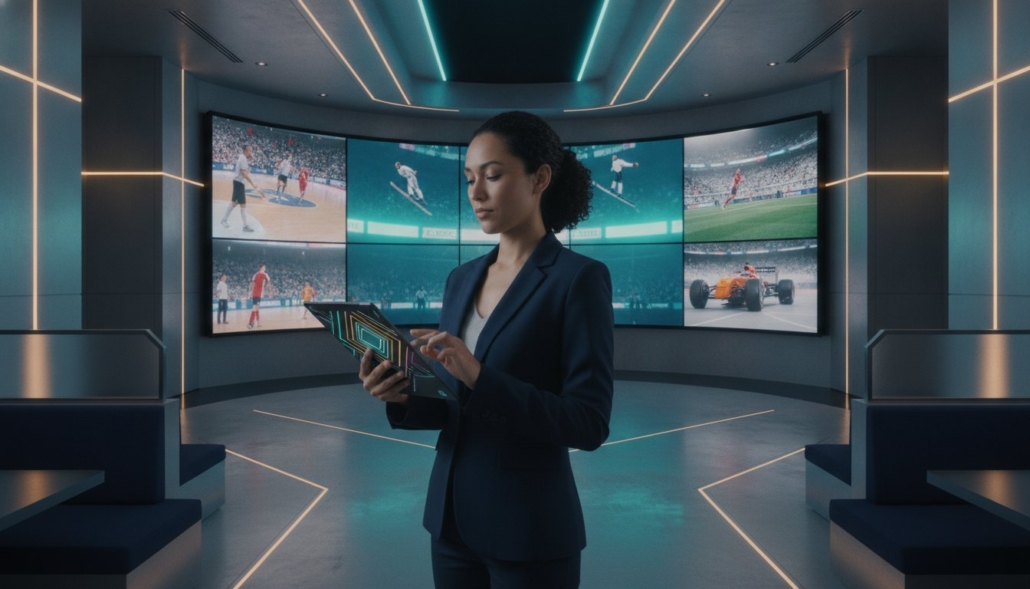
Why are you still paying five figures for custom AV programming just to change a television channel? Legacy systems often rely on proprietary code that leaves staff frustrated and hardware frozen. You likely recognize the struggle of training new employees on a control panel that feels like a flight simulator. It’s time to move past inflexible hardware and high maintenance costs. A modern tablet based AV control system provides the immediate accessibility and professional authority your facility demands.
This guide demonstrates how to replace complex, manual configurations with a streamlined interface that manages your entire video distribution matrix effortlessly. Achieve a ‘no-programming-required’ architecture that allows you to see exactly what is playing on every screen directly from your tablet. We will break down the latest 2026 integration standards, focusing on WolfPad control systems and WolfPack modular hardware to lower your total cost of ownership and ensure 4K signal reliability across your entire network.
Key Takeaways
- Transition from outdated physical remotes to a centralized tablet based AV control system that provides real-time visibility of every screen in your facility.
- Eliminate the need for expensive, custom-coded programming by utilizing pre-configured drivers that slash setup time and long-term maintenance costs.
- Learn how to assess zone requirements and ensure compatibility between your mobile interface and modular matrix hardware for independent control of different venue areas.
- Follow a streamlined setup process involving static IP assignment and dedicated router linkage to ensure a lag-free, secure network for your video distribution.
- Maximize ROI by integrating WolfPad and WolfPack systems to manage massive TV arrays with 4K 60Hz resolution without recurring software fees.
What is a Tablet-Based AV Control System?
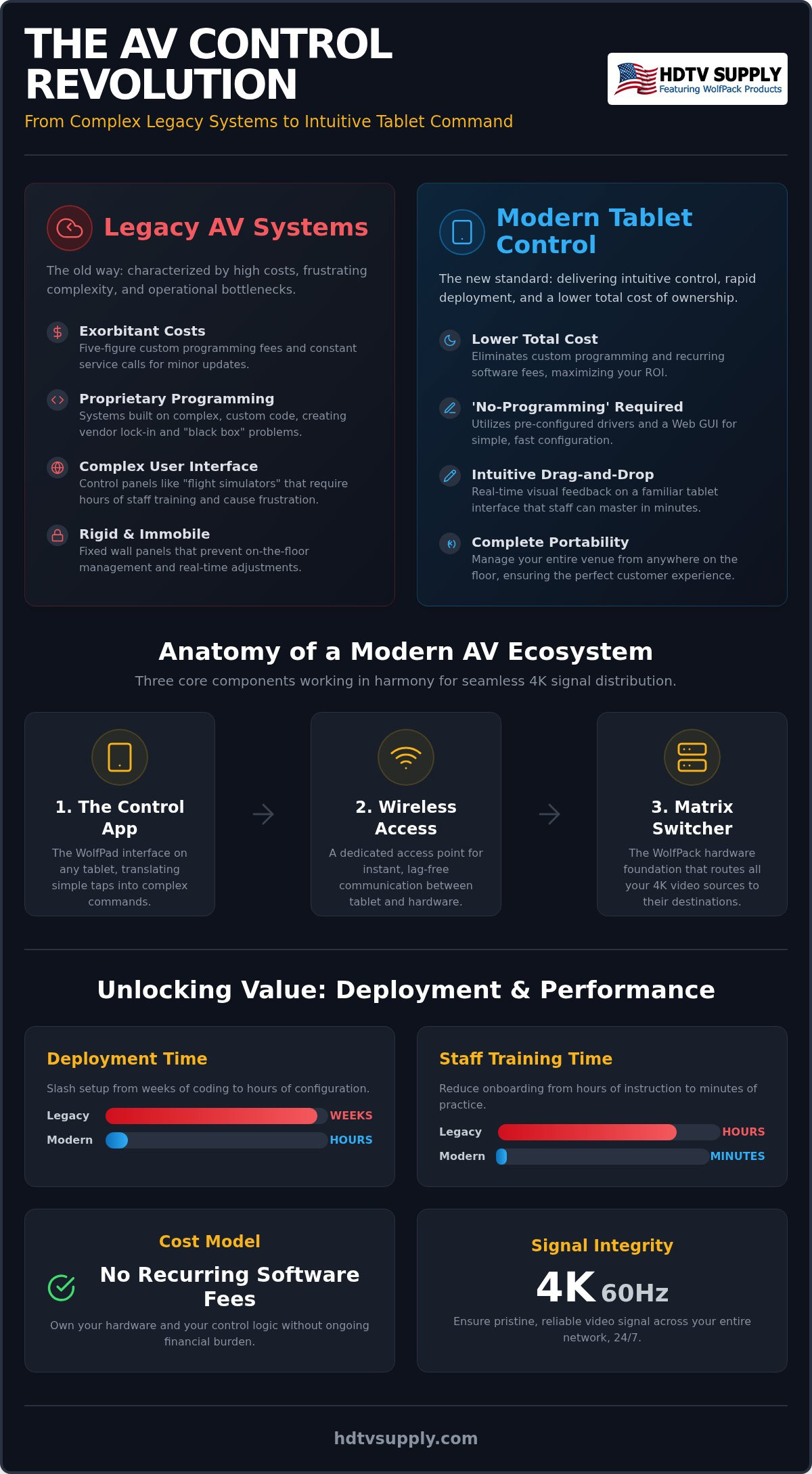
A tablet based AV control system is a centralized software interface that runs on mobile devices to manage complex audiovisual hardware through a local network. In the past, managing a large venue required a basket of IR remotes or a wall of physical buttons. Modern technology has digitized this process. By 2026, the industry has largely abandoned the need for dedicated, high-cost external control processors. Instead, hardware like WolfPack Modular Matrix Switchers integrates a Web GUI that acts as a bridge. This allows standard tablets to communicate directly with the matrix architecture. This setup functions as a sophisticated control system that prioritizes speed and user accessibility over proprietary hardware lock-in. It’s a pragmatic shift toward efficiency.
Key Components of a Modern Control Ecosystem
A functional ecosystem relies on three primary pillars to ensure 24/7 reliability. You don’t need a degree in computer science to understand the architecture. It’s built for installers who value uptime and immediate results.
- The Matrix Switcher: This is the foundation of your setup. Hardware like WolfPack Modular Matrix Switchers handles the physical video signals. It routes 4K sources to specific displays across your facility with precision.
- The Wireless Access Point: Low-latency communication is mandatory. A dedicated wireless access point ensures that when you tap a button on your tablet, the signal reaches the hardware instantly. You won’t deal with the lag found on crowded guest Wi-Fi networks.
- The Control App: The WolfPad TV Control System serves as the user interface. It translates simple taps into HEX or RS232 commands. This allows you to switch inputs or adjust volume without manual programming.
Why Tablets Beat Traditional Control Panels
Standard tablets have replaced proprietary touch panels for several practical reasons. The market has moved toward hardware that staff already understands. It’s about results, not aesthetic marketing or over-engineered solutions.
Portability is the primary advantage. You can’t unmount a fixed wall panel to check a screen’s status in a far corner. With a tablet, you manage the sports bar floor while standing next to customers. You see exactly what they see in real-time. Cost efficiency is equally important. A proprietary touch panel can cost thousands of dollars. An iPad or Android tablet provides superior resolution and processing power at a fraction of that price. Finally, consider staff familiarity. Employees already understand tablet gestures. This reduces training time from hours to minutes. Most staff master the WolfPad interface in a single shift. This ensures your operations remain efficient even during high-turnover periods.
Comparing Tablet Control vs. Legacy AV Programming
Legacy AV systems relied on proprietary code. This created a massive bottleneck for venue owners. A programmer had to write thousands of lines of code just to switch a single HDMI source. Today, the ‘No Programming’ revolution has fundamentally changed the industry. A modern tablet based AV control system uses pre-configured drivers. This shifts the focus from expensive coding to simple configuration. Deployment now takes hours instead of weeks. Reliability has also improved significantly. Older serial-only systems suffered from signal degradation and lacked feedback. Modern IP-based control follows AVIXA standards for network performance. This ensures two-way communication between the tablet and the matrix, providing a more stable environment for 24/7 operations.
The Hidden Costs of Custom Programming
Custom systems come with heavy long-term baggage. You don’t just pay for the initial setup. You pay for every minor change. If you add a new cable box or replace a Roku, you often need a technician to update the code. This service call model is designed to keep you dependent on a specific dealer. Proprietary lock-in is a significant operational risk. If your original programmer retires, your system becomes a “black box” that nobody else can fix. We advocate for technical self-sufficiency. Learning the basics, such as Mastering HDMI Matrix EDID Management, allows you to troubleshoot signal issues without waiting for a service van. You should own your hardware and your control logic.
User Experience: Drag-and-Drop vs. Command Lines
The interface is where the value becomes visible to your staff. Legacy panels were often text-heavy and confusing for new hires. A tablet based AV control system provides real-time visual feedback. You see a thumbnail of what is playing on each source directly on the tablet. This prevents embarrassing mistakes during busy game nights. No more guessing which cable box is showing which game.
Grouping is another critical feature for large venues. You can change 10, 20, or even 50 TVs to the same game with a single tap. This level of efficiency is impossible with standard IR remotes or manual buttons. Scalability is also simplified. In a coded system, adding a 31st TV requires rewriting the entire system logic. With a WolfPad system, you simply input the new IP address and the icon appears. It’s a linear, predictable process. If you’re tired of being held hostage by complex code, consider upgrading to a WolfPad TV Control System to regain full control of your venue’s atmosphere.
Selecting the Right Tablet Control Interface for Your Venue
Choosing the right interface depends on your specific operational environment. A high-volume sports bar has vastly different demands than a corporate boardroom or a military briefing center. You must assess your zone requirements before selecting hardware. If your venue requires independent control for a patio, a main bar, and a VIP lounge, your tablet based AV control system must support multi-zone partitioning. This prevents a manager in the bar area from accidentally changing the source for a private event in another room. Compatibility is the next technical hurdle. You must ensure your matrix switcher supports the tablet’s communication protocol, whether it’s native IP-based control or requires a translator box for RS232 and IR commands. For detailed venue-specific layouts and scaling strategies, consult our 2026 Sports Bar TV Distribution Guide.
Staff access levels are vital for maintaining system integrity during busy shifts. Implement ‘Admin’ modes for lead technicians who need to change network settings, adjust EDID configurations, or update firmware. Use ‘User’ modes for floor staff and servers. This limits their interface to basic functions like channel switching and volume adjustments. It’s a setup that prevents accidental system resets or configuration changes during peak hours.
IPad vs. Android for AV Control
iOS remains the professional standard due to its long-term stability and the wide availability of industrial-grade iPad mounts. Many professional mounts now include PoE (Power over Ethernet) adapters, allowing the tablet to stay charged and networked through a single cable. Android tablets offer significant flexibility for budget-conscious installations. However, Android requires careful vetting to ensure the specific hardware supports the latest control apps. Regardless of the operating system, always use dedicated tablets. Don’t use the same device for your POS system, personal emails, and AV control. Dedicated hardware ensures the interface is always ready and eliminates the risk of software crashes caused by unrelated background applications.
Essential Features for Commercial Venues
High-performance interfaces must provide advanced video wall management within your tablet based AV control system. You should be able to toggle between a 2×2 or 3×3 configuration on the fly without rebooting your matrix. Audio integration is equally critical. Your staff needs to control volume levels and audio source selection from the same screen used for video switching. Custom labeling is a final, non-negotiable requirement. Don’t settle for generic names like ‘Input 1’ or ‘Output 4’. Label them ‘Directv 1’ or ‘Patio Left’ to ensure staff clarity. This eliminates guesswork, reduces errors, and speeds up customer service during live events.
Step-by-Step: Setting Up Your Tablet-Based AV Control System
Setting up a tablet based AV control system doesn’t require a computer science degree. It requires a methodical approach to networking and hardware integration. Follow these steps to deploy your system with professional precision and ensure your 4K matrix performs at its peak. Physical stability is the foundation of digital control. You must prioritize your network architecture before you ever open the control application.
Step 1: Network Configuration. Access your matrix switcher’s network settings and assign a static IP address. This ensures the control tablet always finds the hardware at the same digital location. Don’t rely on DHCP for professional installations. A changing IP address will break your control link during a busy shift.
Step 2: Hardware Linkage. Connect your matrix to a dedicated AV router. This isolates your control traffic from guest Wi-Fi or POS data. High-volume environments demand this separation to prevent signal lag and command collisions.
Step 3: Interface Customization. Use the WolfPad editor to upload your venue’s floor plan. Name your zones logically. Label inputs by source name, such as “DirecTV 1” or “Media Server,” rather than generic port numbers. This makes the system intuitive for new staff members.
Step 4: Tablet Syncing. Install the WolfPad app on your iPad or Android device. Input the static IP address of the matrix switcher. The app will automatically populate your custom buttons and layouts based on the hardware configuration.
Step 5: Testing and Optimization. Cycle through every source and every display. Verify that switching speed meets your requirements. Check for signal sync and ensure audio follows the video correctly across all zones.
Network Best Practices for AV Control
Isolating your traffic is mandatory for 24/7 reliability. Use a separate VLAN or a dedicated router for all AV components. This prevents guest traffic from causing lag in your tablet based AV control system. Disable ‘Sleep Mode’ on your tablets. You need the interface to wake up instantly when a customer asks for a channel change. Secure your network with WPA3 encryption and a hidden SSID to prevent unauthorized access to your hardware. These small adjustments prevent the most common causes of system downtime.
Troubleshooting Common Connection Issues
If your tablet cannot ‘see’ the matrix switcher, verify that both devices are on the same subnet. IP conflicts are common in large-scale installations where multiple devices attempt to claim the same address. Always keep an IP log of every connected device. For hardware-side fixes or card-level troubleshooting, refer to our Modular HDMI Matrix Switchers Guide. If you need a pre-configured solution to avoid these technical hurdles, browse our WolfPad TV Control Systems for a ready-to-deploy package.
Maximizing ROI with WolfPad and WolfPack Systems
ROI is the ultimate metric for any commercial AV project. Traditional pro AV installations often carry a hidden burden: a $5,000+ programming fee just to make the hardware talk to a touch panel. A tablet based AV control system like the WolfPad eliminates this overhead entirely. By using pre-configured drivers, you bypass the need for custom-coded logic. This creates a direct path to profitability. The WolfPad integrates seamlessly with WolfPack Modular Matrix Switchers, supporting high-bandwidth 4K 60Hz distribution across your entire facility. You get the performance of a high-end broadcast center with the simplicity of a consumer app.
Hardware swaps are expensive and disruptive. Software-driven control solves this problem. As new streaming protocols or source devices emerge in 2026, your system stays current through field-upgradable firmware. You update the tablet interface without pulling cables or replacing the core matrix. This future-proofing ensures your initial investment continues to deliver value for years, rather than becoming obsolete when a new HDMI standard arrives.
Consider the efficiency gains observed in high-volume venues. A 40-TV sports bar recently achieved a 40% reduction in total installation costs by switching to tablet-based control. They replaced a complex, dealer-dependent setup with a WolfPad system. The owner now manages the entire floor independently, reducing the need for recurring service contracts and expensive technician visits for simple channel changes.
The Advantage of a ‘One-Stop’ Hardware/Software Solution
Managing multiple vendors is a logistical nightmare. When you use a “one-stop” hardware and software solution, you eliminate the finger-pointing that often occurs between matrix manufacturers and third-party software developers. Everything works in a unified ecosystem designed for compatibility. You also gain access to HDTV Supply’s free custom system design services. Our experts provide a comprehensive layout tailored to your venue’s architecture. If your layout includes high-impact visuals, you can easily integrate Video Wall Processors within the same tablet-controlled environment for a cohesive user experience.
Getting Started with Your Custom AV Design
Start your project with a professional blueprint. Contact HDTV Supply to receive a free system design that matches your specific input and output counts. We help you select the right WolfPackSecure matrix to ensure your 4K content remains protected and stable. Don’t let complex programming fees drain your budget. It’s time to take command of your facility with a solution built for speed and reliability. Explore WolfPad Tablet Control Systems at HDTV Supply and take full control of your AV matrix today.
Modernize Your Facility Operations Today
Transitioning to a tablet based AV control system is the most effective way to eliminate the technical bottlenecks that plague legacy installations. You’ve seen how removing custom programming fees and utilizing pre-configured drivers can slash your total cost of ownership while improving staff efficiency. By prioritizing network-based stability and intuitive visual feedback, you ensure your 4K distribution matrix remains a reliable asset rather than a source of frustration. High-capacity venues demand this level of immediate accessibility and low-latency control.
Don’t let complex code or proprietary hardware hold your business hostage. HDTV Supply provides a comprehensive ecosystem designed for rapid deployment and 24/7 performance. Whether you’re managing a massive sports bar array or a secure corporate network, our solutions deliver technical mastery without the overhead of traditional systems. Take the first step toward a more efficient, scalable environment by leveraging our specialized resources.
Build Your Custom Tablet-Controlled AV System with HDTV Supply. Our team offers free custom AV system design and expert technical support to ensure your layout is optimized for success. With no-programming-required WolfPad interfaces, you can deploy professional-grade control in hours. We look forward to helping you master your venue’s atmosphere.
Frequently Asked Questions
Do I need to hire a programmer to set up a tablet-based AV control system?
No, you don’t need to hire a custom programmer for a WolfPad tablet based AV control system. Unlike legacy systems that require proprietary code, our “No Programming” approach uses pre-configured drivers. This allows installers or venue managers to set up the interface through a simple Web GUI. You save thousands in upfront labor costs and eliminate the need for a technician every time you add a new source.
Can I control multiple brands of TVs from a single tablet interface?
Yes, you can manage a diverse mix of TV brands from a single interface. The control commands are handled by the matrix switcher and the WolfPad controller rather than the TVs themselves. Whether you’re using LG, Samsung, or Sony displays, the system routes the signal and manages power or volume through RS232 or IR emitters. This flexibility is essential for venues that expand their screen count over time.
What happens to the TV control if the Wi-Fi goes down?
If your Wi-Fi fails, the matrix switcher continues to distribute the last selected video signal to all screens without interruption. However, you’ll lose the ability to change channels or switch inputs from the tablet until the connection is restored. We recommend using a dedicated AV router and hardwired PoE tablet mounts for professional environments to ensure maximum uptime and prevent interference from guest network traffic.
How many TVs can a single iPad control in a sports bar setting?
A single iPad can control dozens or even hundreds of screens depending on your matrix configuration. Because the WolfPad software communicates with the central matrix switcher, the tablet functions as a remote for the entire system. You can group 20 TVs to show the same game with one tap or manage individual screens independently. The system’s scalability ensures that adding more displays doesn’t degrade the control interface’s performance.
Is the WolfPad control system compatible with both iOS and Android?
Yes, the WolfPad system is compatible with both iOS and Android platforms. This allows you to choose the hardware that fits your budget and operational needs. While many professional installers prefer iPads for their mounting options and long-term stability, Android tablets offer a flexible alternative. You can even use a mix of different devices across your venue to provide managers and floor staff with simultaneous access.
Can I manage a video wall using a tablet-based control system?
Yes, you can manage complex 2×2, 3×3, or custom video wall layouts directly from the tablet. When paired with WolfPack video wall processors, the interface allows you to toggle between a single large image and multiple smaller windows on the fly. This eliminates the need for manual hardware adjustments. You simply select the desired preset on the screen, and the matrix handles the signal processing and scaling instantly.
Do I need a special type of HDMI matrix switcher for tablet control?
You need a matrix switcher that supports network-based control protocols, such as WolfPack Modular Matrix Switchers. These units feature a built-in GUI and communication ports designed specifically for tablet based AV control system integration. Standard consumer-grade splitters or basic switchers lack the necessary processing power and IP-controllability. Always verify that your hardware includes an Ethernet port and supports the HEX or RS232 commands required for two-way communication.
How do I prevent staff from changing sensitive system settings on the tablet?
The WolfPad interface includes customizable access levels to protect your system’s integrity. You can set up Admin profiles for owners and lead technicians, providing full access to network configurations and EDID settings. User profiles for floor staff are restricted to basic functions like channel switching and volume control. This prevents accidental resets or unauthorized changes during a busy shift, ensuring your video distribution remains stable and secure.
Leave a Reply
Want to join the discussion?Feel free to contribute!