

AV Rack Cooling and Ventilation Best Practices: A Professional 2026 Checklist
Heat is the silent killer of every high-density AV installation, yet many technicians treat ventilation as an optional accessory rather than a core system requirement. You’ve likely felt that wave of hot air when opening a rack door or heard the frantic whine of fans struggling to keep up during a packed Saturday night at a sports bar. It’s frustrating to deal with intermittent signal loss or hardware throttling when your professional reputation is on the line.
Implementing rigorous AV rack cooling and ventilation best practices isn’t just about equipment comfort; it’s about protecting your investment in sophisticated hardware like WolfPack modular matrix switchers and video wall processors. We’ll help you master the thermal management strategies required to prevent heat-related failure and ensure your equipment operates within its specified thermal envelope. This guide provides a professional 2026 checklist covering active versus passive airflow, rack density mapping, and a sustainable maintenance schedule to keep your systems running silently and reliably for years.
Key Takeaways
- Identify how thermal stress leads to intermittent signal loss and catastrophic hardware failure in high-density professional AV environments.
- Master the technical calculations for BTU and CFM requirements to implement AV rack cooling and ventilation best practices specific to your hardware load.
- Execute strategic airflow designs by leveraging natural convection and high-capacity forced-air systems to maintain optimal operating temperatures.
- Optimize component placement within the rack to utilize the chimney effect and ensure heat-intensive processors receive maximum ventilation.
- Integrate modern IoT thermal sensors and automated monitoring to provide 24/7 protection for your critical modular matrix switchers and processors.
Why Thermal Management is Critical for Pro AV Reliability
Heat is the primary cause of premature hardware failure in professional installations. Excessive temperatures degrade internal components, specifically shortening the life of electrolytic capacitors and sensitive semiconductors. When internal temperatures rise, electrical resistance increases, leading to intermittent signal loss or the visual artifacts commonly known as “digital snow.” Implementing AV rack cooling and ventilation best practices ensures these issues don’t compromise your system’s uptime or your professional reputation.
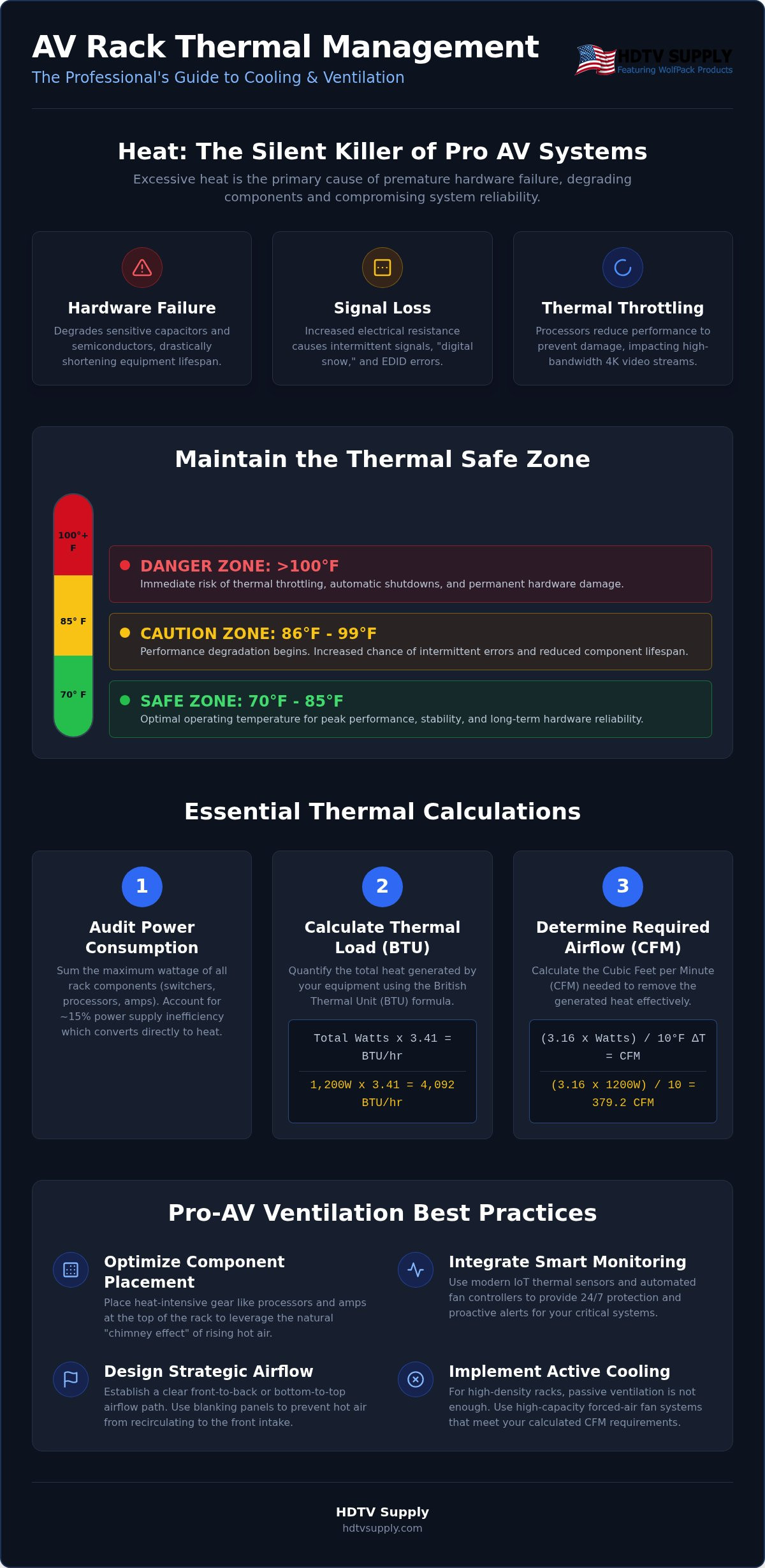
Modern high-bandwidth signals like 4K 60Hz 4:4:4 require intensive processing power. This data density forces chipsets to work harder, generating significantly more thermal energy than legacy 1080p systems. To maintain a “Safe Zone,” you should aim for an internal rack temperature between 70°F and 85°F. Anything exceeding 100°F puts your high-end processors at immediate risk of thermal throttling or total hardware shutdown.
The Impact on Modular Matrix Switchers
Concentrated heat pockets are a major challenge for modular HDMI matrix switchers. These units utilize individual input and output cards that create localized thermal zones. If the airflow across the backplane is obstructed, heat builds up between the cards, leading to port failure or EDID communication errors. This is a critical consideration for 24/7 environments like sports bars or casinos where system downtime directly impacts revenue and customer experience.
Heat Profiles of Video Wall Processors
A high-performance video wall processor handles complex scaling and image stitching, which demands constant, dedicated cooling. Because these units are often packed into dense configurations, they frequently become the primary “hot spots” within the enclosure. Adhering to 19-inch rack standards for component spacing and chassis depth allows for better heat dissipation. Effective AV rack cooling and ventilation best practices dictate that you must account for the specific chassis design of these processors to avoid trapping stagnant hot air in the upper sections of the rack cabinet.
Calculating Thermal Load: Assessing BTU and CFM Requirements
Effective thermal management starts with precise data. You can’t rely on guesswork when protecting high-capacity distribution systems. To implement AV rack cooling and ventilation best practices, you must first quantify the heat your equipment generates. This involves calculating the British Thermal Units (BTU) and determining the required Cubic Feet per Minute (CFM) of airflow.
Start by auditing the maximum power consumption of every component in the rack. Sum the wattage of your switchers, processors, and amplifiers. Don’t forget to account for power supply inefficiency. Most professional power supplies operate at 80% to 90% efficiency, meaning roughly 10% to 20% of the total power draw is converted directly into waste heat before it even reaches the internal circuits.
The BTU Calculation Formula
A British Thermal Unit (BTU) measures the heat energy required to raise the temperature of one pound of water by one degree Fahrenheit. In a Pro AV context, BTU per hour represents the total thermal output generated by your equipment density. Use this standard formula for your calculations:
Total Watts x 3.41 = BTU per hour
If your rack contains a modular matrix and several video wall processors totaling 1,200 watts, your thermal load is 4,092 BTU/hr. This figure tells your HVAC contractor exactly how much additional cooling the room’s air conditioning must offset. If you’re unsure of your hardware’s specific draw, browse our inventory of professional AV hardware for detailed specifications and technical data sheets.
Determining Necessary CFM for Active Cooling
BTU tells you the heat volume, but CFM determines the speed of air movement needed to remove it. To calculate the required airflow for active cooling systems, use the following equation:
(3.16 x Watts) / Allowable Temperature Rise = CFM
Professional installations use a 10-degree Fahrenheit rise as the industry standard. This “delta T” ensures that the air exiting the rack is only 10 degrees warmer than the intake air, effectively preventing internal hotspots. Using our 1,200-watt example: (3.16 x 1,200) / 10 = 379.2 CFM.
You need fan arrays capable of moving at least 380 CFM to maintain stability. Always factor in the ambient room temperature. If the equipment room is already at 80°F, a 10-degree rise puts your gear at 90°F. Ensure your AV rack cooling and ventilation best practices account for these environmental variables to avoid hardware throttling during peak operation.
Strategic Airflow Design: Passive vs. Active Cooling Methods
Selecting the right thermal strategy depends entirely on the BTU calculations performed in the previous stage. Passive cooling relies on natural convection, while active cooling uses mechanical fans to force air through the enclosure. For high-density systems housing modular switchers and processors, a hybrid approach often yields the best results. Implementing AV rack cooling and ventilation best practices requires a clear understanding of how air moves within both enclosed and open-frame rack systems.
The “Chimney Effect” is the foundation of passive design. As internal components generate heat, the air expands and rises. In an open-frame rack, this heat dissipates into the room. In an enclosed cabinet, you must provide a clear path for this rising air to escape or you risk creating a thermal trap. Proper intake and exhaust placement ensures that cool air enters at the bottom and exits at the top, maintaining a continuous cycle of displacement.
Passive Ventilation Best Practices
Passive cooling is most effective in low-to-medium density racks. It requires no power and generates zero noise, making it ideal for quiet environments. To maximize efficiency, follow these protocols:
- Utilize Vented Panels: Install perforated rack panels at the top and bottom of the enclosure to facilitate natural air exchange.
- Implement 1U Spacing: Leave a 1U gap between high-heat components like matrix switchers. This prevents “heat soaking” between chassis.
- Organize Cable Runs: Use vertical and horizontal cable managers to keep wire bundles away from intake and exhaust vents. Blocked vents are the most common cause of passive cooling failure.
Active Cooling Configurations
When your thermal load exceeds the capacity of natural convection, active cooling is mandatory. This involves the use of fan arrays to move high volumes of air. The most common configuration is the front-to-back airflow path, though top-mounted exhaust fans are highly effective for extracting heat that has already risen to the top of the cabinet.
Modern AV rack cooling and ventilation best practices favor thermostatically controlled fan systems. These units only activate when a specific temperature threshold is met, reducing wear on the fans and minimizing background noise. This is a critical balance in sports bars or corporate boardrooms where loud fan whine can distract patrons or executives. Selecting fan units with high-quality bearings allows you to achieve the necessary CFM without exceeding acceptable decibel levels in client-facing areas.
The Pro AV Rack Ventilation Checklist: Step-by-Step Optimization
Successful field deployment requires more than just installing fans. It demands a systematic approach to environmental control. By following these AV rack cooling and ventilation best practices, you can eliminate the ‘guesswork’ that often leads to emergency service calls and hardware failure.
- Conduct a Thermal Audit: Measure the ambient room temperature before installation. Ensure the room’s HVAC system can handle the additional BTU load calculated in previous steps.
- Strategic Component Stacking: Position your highest-heat components, such as amplifiers and processors, toward the top of the rack. This leverages the natural upward movement of heat.
- Install Blanking Panels: Seal every unused rack space. This prevents “air recycling,” where hot exhaust air is drawn back into the front intake of your equipment.
- Implement Cable Lacing: Use lacing bars to secure wire bundles. This prevents “air dams” that block critical intake or exhaust vents.
- Optimize EDID Management: Improper HDMI matrix switcher EDID management can cause internal chipsets to overwork while trying to sync signals. Proper configuration reduces unnecessary processing heat.
Physical Rack Configuration
Consistency is key for airflow. Use 1U or 2U vent panels between every three components to provide breathing room. Maintain at least three inches of clearance behind the rack enclosure to prevent heat from pooling against the wall—a layout consideration often emphasized by HiFi Rack when planning adequate ventilation depth for oversized gear. Don’t overlook proper grounding and power distribution. Inefficient power routing creates localized heat that can trigger thermal sensors prematurely.
Airflow Path Verification
Never assume your airflow design is working. Use smoke pens or visual indicators to verify that air is moving in the intended direction. Ensure intake fans aren’t positioned near floor-level dust or debris. This is especially vital when optimizing a sports bar TV distribution system. These environments are often high-traffic and high-dust, requiring frequent filter checks to maintain long-term reliability.
Ready to build a more resilient system? Source your professional rack accessories and cooling hardware from HDTV Supply for immediate shipping and technical support.
Professional Monitoring and Hardware Integration for 2026 Systems
The landscape of 2026 Pro AV demands proactive oversight. We’ve moved beyond simple thermometers to IoT-enabled thermal sensors that provide real-time telemetry from within the rack enclosure. Integrating these sensors into your central AV management system allows for automated alerts when temperature thresholds are breached. This layer of intelligence ensures you can react to a cooling failure before it results in hardware damage. Adhering to AV rack cooling and ventilation best practices provides a critical safety net for high-density components that operate 24/7.
Automated alerts should be configured with multiple tiers. A “Warning” alert might trigger at 90°F, while a “Critical” alert at 105°F could initiate an automated shutdown of non-essential equipment. This level of automation is essential for unmanned equipment rooms in large venues or corporate campuses where manual monitoring is impossible.
Smart Thermal Controllers
Modern thermal controllers utilize multi-zone sensors to detect localized hotspots. Look for units that support variable speed fans. These fans adjust their RPM based on real-time demand, which significantly reduces noise and power consumption. Data logging is equally vital. It provides a historical record of thermal trends, making it easier to troubleshoot intermittent failures or identify when the room’s HVAC is struggling. If residential AV spaces or dedicated media closets require supplemental cooling, consumer resources from Air Conditioner Lab can help you compare suitable climate control equipment. Automated cooling adjustments prevent catastrophic system shutdowns by maintaining a stable environment without manual intervention.
Maintenance and Long-Term Care
Hardware protection is a continuous process. Schedule quarterly inspections to perform dust removal and check fan bearings for signs of wear. Dust buildup acts as an insulator, trapping heat against sensitive circuits. You should also regularly update the firmware on your hdmi modulators and processors. Manufacturers often release updates that optimize power consumption and heat output. Replace fan units every two to three years to ensure continuous protection. Even high-quality bearings have a finite lifespan in high-heat commercial environments.
Extended warranties are a necessity for high-heat environments. Most professional warranties require strict adherence to specific operating environments. Following AV rack cooling and ventilation best practices keeps your system stable and ensures your hardware remains eligible for manufacturer support if a component fails. This comprehensive approach to monitoring and maintenance protects your investment and guarantees long-term system reliability.
Future-Proof Your AV Infrastructure
Protecting high-density systems requires more than basic fans; it demands a data-driven approach. By mastering AV rack cooling and ventilation best practices, you transition from reactive troubleshooting to proactive system management. You now have the tools to calculate precise BTU loads, leverage the chimney effect, and implement real-time IoT monitoring. These strategies ensure your modular matrix switchers and processors maintain peak performance even under 24/7 commercial loads.
Reliability depends on the quality of your components. With over 12,000 Pro AV products in stock and technical support from industry veterans, we provide the hardware and expertise needed for any scale. Take advantage of our free custom AV system design to ensure your next project is thermally optimized from day one. Shop Professional AV Rack Cooling and Hardware at HDTV Supply today to secure your installation’s future. Build with confidence knowing your hardware is protected by the industry’s best thermal standards.
Frequently Asked Questions
What is the ideal temperature for an AV rack?
The ideal operating temperature for a professional AV rack is between 70°F and 85°F. Maintaining this range prevents the thermal degradation of internal components like capacitors and processors. Once internal temperatures exceed 100°F, you risk intermittent signal loss or permanent hardware failure. Consistently monitoring these levels is one of the most effective AV rack cooling and ventilation best practices for extending the lifespan of your high-bandwidth equipment.
Do I really need active cooling for a matrix switcher?
Active cooling is essential for high-density equipment like WolfPack modular matrix switchers and video wall processors. These units generate significant thermal energy during 24/7 operations. Passive cooling often fails to dissipate heat pockets that form between modular cards. Forced-air systems ensure a constant exchange of air, preventing stagnant hotspots that lead to “digital snow” or system reboots. Relying on active fans protects your investment and maintains system uptime.
How do I calculate how many fans I need for my rack?
You calculate fan requirements by determining the necessary Cubic Feet per Minute (CFM) for your specific thermal load. Use the formula: (3.16 x Total Watts) / Allowable Temperature Rise. If your rack draws 1,000 watts and you allow a 10-degree rise, you need a fan array rated for at least 316 CFM. Always choose fans with a slightly higher rating than your calculation to account for airflow resistance from cables and filters.
Should I put the fans at the top or bottom of the AV rack?
You should position exhaust fans at the very top of the rack and intake fans at the bottom. This configuration leverages the “chimney effect,” where hot air naturally rises and is pulled out by the upper fans. Placing intake fans at the bottom draws in cooler air from floor level. This directional flow creates a consistent pressure differential that moves heat away from sensitive processors and prevents internal air stagnation.
What are blanking panels and do they actually help with cooling?
Blanking panels are solid plates used to cover empty rack units. They are critical for cooling because they prevent “air recycling,” a condition where hot exhaust air from the back of the rack is pulled back into the front intake of your equipment. By sealing these gaps, you force the cooling system to pull only fresh, cool air from the front, significantly improving the efficiency of your AV rack cooling and ventilation best practices.
How can I reduce the noise of my rack cooling system?
To reduce noise, implement thermostatically controlled fan systems that only run at full speed when necessary. Using larger fans that move more air at lower RPMs also decreases decibel levels without sacrificing CFM. High-quality bearings, such as fluid dynamic or dual-ball bearings, minimize mechanical friction. This is especially important in quiet environments like boardrooms where loud fan whine can interfere with meetings or presentations.
Will a closed cabinet rack overheat my AV equipment?
A closed cabinet will overheat your equipment unless it’s designed with a dedicated airflow path. Enclosed racks require active exhaust fans at the top and perforated or vented doors to allow for intake. Without these features, the cabinet acts as an oven, trapping thermal energy and rapidly exceeding safe operating limits. Proper ventilation design allows you to enjoy the security and aesthetic benefits of a closed rack without risking hardware failure.
How often should I clean the filters on my AV rack?
You should inspect and clean your rack filters at least once every three months. In high-traffic or dusty environments, such as sports bars or industrial settings, monthly cleaning is often required. Clogged filters restrict airflow and force fans to work harder, increasing both noise and internal temperatures. Regular maintenance ensures your cooling system operates at peak efficiency and prevents dust from settling on sensitive internal circuit boards.
Leave a Reply
Want to join the discussion?Feel free to contribute!