
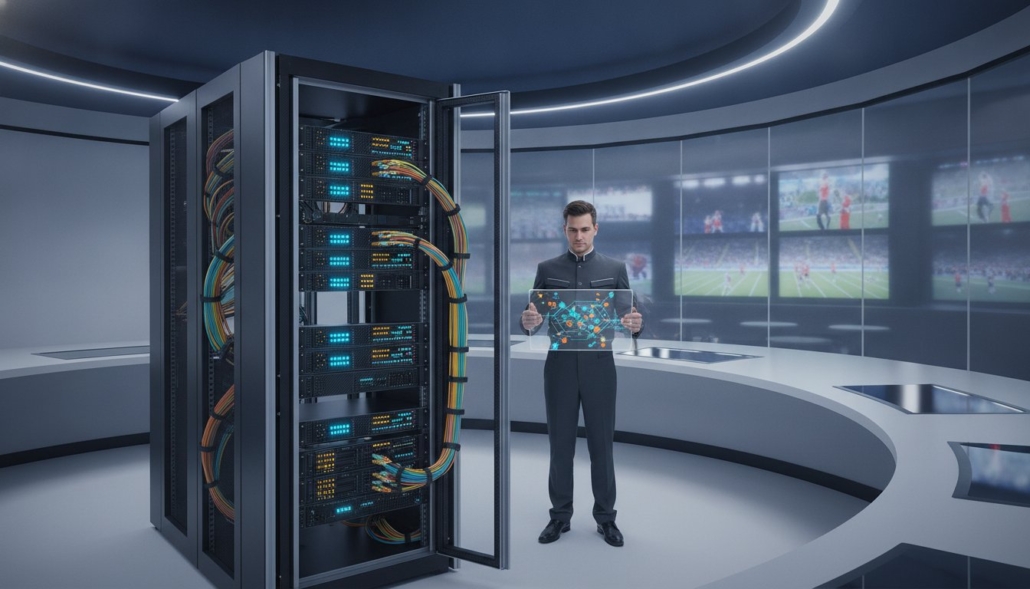
Professional AV Equipment Specification Checklist 2026
The success of a professional AV installation isn’t determined by the features of your displays. It’s dictated by the technical infrastructure of your distribution system. You’ve likely dealt with the frustration of signal dropouts on long cable runs or the headache of trying to make legacy sources play nice with modern 4K hardware. These failures often stem from a lack of granular planning at the specification stage. This AV equipment specification checklist provides the technical roadmap you need to eliminate these variables and ensure total system reliability. We’re moving past generic hardware lists to focus on high-performance signal distribution that meets the demands of 2026.
You’ll learn how to achieve a flawless 4K 60Hz 4:4:4 video distribution system that remains stable under heavy load. We’ll cover how to simplify the management of 50+ screens through intuitive tablet control while building a scalable architecture for future expansion. This guide breaks down the essential specs for modular matrix switchers and secure signal routing to ensure your next project is both high-performance and operationally simple. From uncompressed video standards to robust control interfaces, we’re providing the benchmarks for a professional-grade environment.
Key Takeaways
- Identify the exact number of unique sources and display zones to determine whether your project requires fixed-frame or modular system architecture.
- Use this AV equipment specification checklist to evaluate WolfPack modular matrix switchers for uncompressed 4K distribution across high-capacity venues.
- Maintain signal integrity by verifying HDCP 2.2/2.3 compliance and selecting appropriate cabling like Active Optical (AOC) for long-distance 4K 60Hz runs.
- Streamline user experience with WolfPad tablet-based control systems that manage 50+ screens without the high cost of custom programming.
- Protect your investment by conducting a 48-hour system burn-in test and documenting the physical rack layout for rapid future maintenance.
Defining System Scale and Venue Infrastructure Goals
Planning a pro-AV system starts with a rigorous inventory of your hardware environment. You can’t specify a matrix switcher until you know the exact count of unique sources, such as cable boxes, dedicated PCs, media players, and streaming hardware connected to NEXOTT IPTV Service. This AV equipment specification checklist requires you to calculate total display zones and identify which areas need independent routing versus mirrored content. Mapping these connections early prevents the common mistake of buying a fixed-frame switcher that leaves no room for the last two displays in your layout.
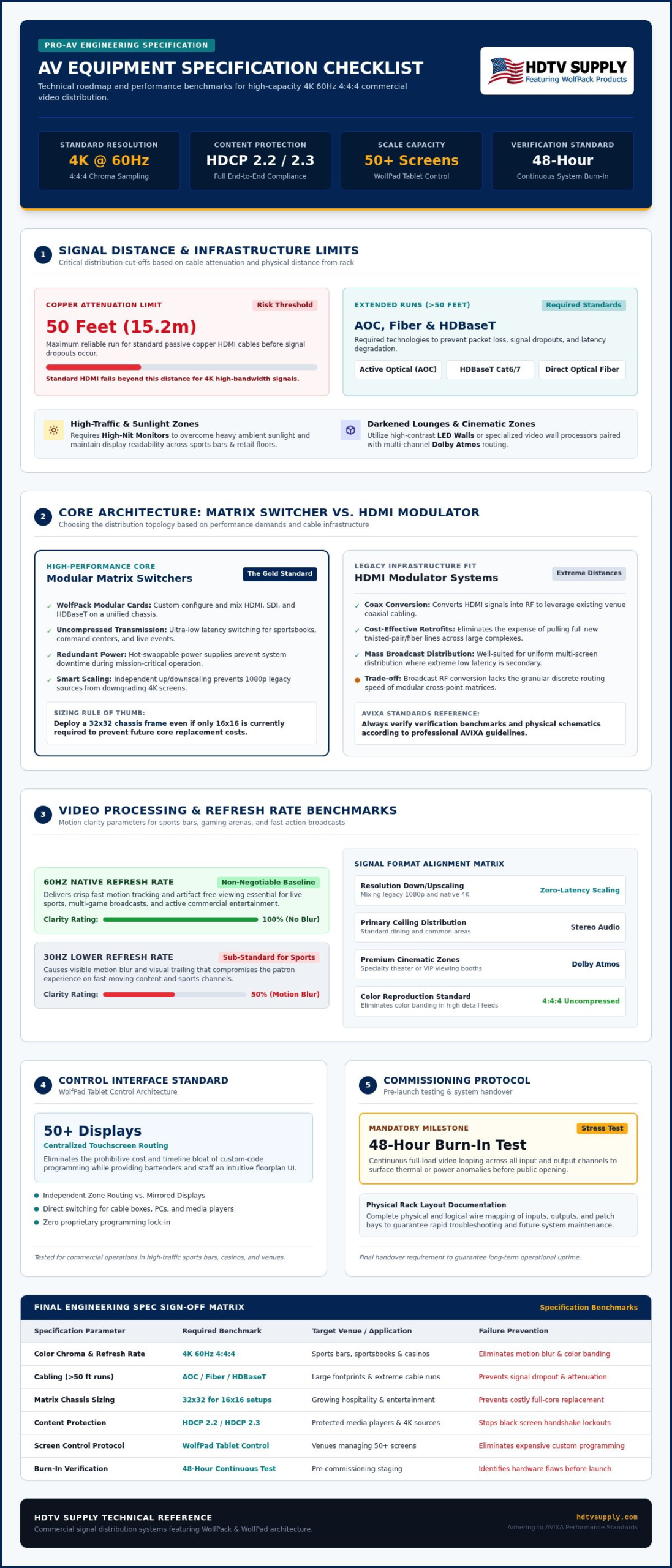
You must measure the maximum distance between the central equipment rack and the furthest display. Signal dropouts usually occur because installers underestimate the cable run length or ignore the attenuation limits of copper. For distances exceeding 50 feet, standard HDMI often fails, necessitating a shift to HDBaseT or fiber-based distribution. Additionally, analyze ambient light conditions at each display location. High-traffic areas with significant sunlight require high-nit monitors to maintain visibility, while darkened lounges might benefit from the high contrast of LED walls or specialized video wall processors.
Commercial Venue Requirements: Sports Bars to Casinos
In environments like sports bars and casinos, the system must handle multi-game viewing and simultaneous distribution across dozens of panels. Scalability is your primary concern. You don’t want to replace your entire core just to add four more TVs next season. Utilizing a modular video matrix switch architecture allows you to expand input and output cards as your venue grows. For specific zone planning and high-capacity layouts, refer to our guide on 2026 Sports Bar TV Distribution to ensure your infrastructure can scale without a full rip-and-replace.
Source and Resolution Mapping
Document every source resolution in your signal chain. Mixing 1080p legacy devices with native 4K displays requires a distribution system that can handle downscaling or upscaling without introducing latency. For sports and fast-motion content, 60Hz is non-negotiable. Lower refresh rates like 30Hz cause motion blur that ruins the viewing experience for patrons. Your AV equipment specification checklist must also account for audio formats. Determine if you’re distributing simple stereo to ceiling speakers or if specific zones require Dolby Atmos for a premium cinematic feel. Precision at this stage prevents compatibility bottlenecks that often stall installations on day one.
Core Distribution Hardware: Matrix Switchers vs. Modulators
Choosing the right distribution core is the most critical decision in your AV equipment specification checklist. Fixed-frame switchers work for smaller, static setups, but modular architectures offer the flexibility needed for enterprise environments. You must evaluate whether your facility requires the low-latency switching of a matrix or the broad distribution capabilities of a modulator system. If you’re working with existing coax infrastructure over extreme distances, HDMI modulators provide a cost-effective alternative to full rewiring. They convert HDMI signals into RF, allowing you to leverage existing cable runs without sacrificing significant quality. However, for high-performance signal integrity, a dedicated matrix remains the gold standard. Adhering to AVIXA performance standards ensures that your hardware selection meets professional benchmarks for signal verification and system documentation.
It’s about matching the tool to the task. Use our guide on Modular HDMI Matrix Switchers to understand how these systems handle future I/O expansion and high-capacity routing.
The WolfPack Modular Advantage
WolfPack systems allow for precision tailoring. You can specify exact input and output cards, mixing HDMI, SDI, and HDBaseT within a single chassis. This versatility is essential when your sources use different connection standards. For mission-critical environments like sportsbooks or command centers, verify that the chassis includes hot-swappable power supplies to prevent downtime. Don’t just plan for today. Select a chassis that supports your maximum future capacity. Starting with a 32×32 frame when you only need 16×16 prevents expensive hardware replacements later. This foresight is a cornerstone of any professional AV equipment specification checklist. If you need help with a custom configuration, our experts at HDTV Supply can assist with your system design.
Video Wall Controllers and Processors
When your project demands high-impact visual arrays, a standard matrix isn’t enough. You need a dedicated Video Wall Processor to manage grid layouts like 2×2, 3×3, or custom artistic configurations. These processors handle the heavy lifting of image scaling and synchronization. Ensure your processor includes bezel compensation features. This tech prevents image distortion across the screen gaps, creating a seamless visual field. Processing speed is vital to avoid lag or frame drops, especially during live sporting events. A robust processor will also support various input resolutions, ensuring your 4K content looks crisp on every panel. Consult the Guide to Video Wall Processors for detailed specs on refresh rates and signal synchronization. This ensures your visual array performs as expected under pressure.
Signal Integrity and Connectivity Specification
Signal reliability isn’t a suggestion; it’s a requirement for high-performance distribution. Every AV equipment specification checklist must prioritize HDCP 2.2/2.3 compliance across the entire signal chain. If one legacy component fails this handshake, the entire 4K stream will drop to 1080p or result in a total black screen. You should also specify 4K 60Hz with 4:4:4 chroma subsampling. This ensures that text and fine details remain crisp, which is vital for digital signage and high-end presentation rooms. Using 4:2:0 subsampling might save bandwidth, but it compromises the visual clarity your clients expect from modern hardware.
Cable selection must be based on distance and environment. For runs up to 330 feet, HDBaseT remains the industry standard, while Active Optical Cables (AOC) are preferred for direct point-to-point 4K connections where EMI isn’t a primary concern. In commercial spaces with high electrical interference, always specify shielded CAT6a or CAT7 cabling. Following UFGS 27 41 00 audiovisual specifications provides a professional framework for cabling verification and commissioning procedures, ensuring your infrastructure meets federal and commercial benchmarks for longevity.
EDID and HDCP Handshake Verification
Handshake failures are the most common cause of system downtime. To prevent resolution mismatches, implement robust EDID management. You should set a “lowest common denominator” EDID to ensure every display in a zone receives a compatible signal. If you have a mix of 4K and 1080p displays, verify that your switcher can downscale content locally. This prevents a single older TV from forcing the entire system into a lower resolution. For a deeper technical dive, see our guide on Mastering HDMI Matrix EDID Management to eliminate handshake delays and black screens.
Transmission Standards: HDBaseT 3.0 vs. IPTV
Deciding between HDBaseT 3.0 and IPTV depends on your latency and network requirements. HDBaseT 3.0 offers uncompressed 4K 60Hz 4:4:4 with zero latency, making it ideal for sports bars where timing is everything. Conversely, IPTV provides massive flexibility over 10G networks for campus-wide distribution. For projects utilizing existing coax infrastructure, selecting the right HDMI modulator is essential for stable multi-input RF distribution. Your AV equipment specification checklist should clearly define the transmission protocol based on the venue’s existing network capacity and the user’s tolerance for signal delay. Precision here prevents the “ghosting” or lag that plagues poorly specified systems.
Control Interface and User Experience Checklist
High-performance distribution hardware is useless if the end-user cannot operate it. Your AV equipment specification checklist must define who will interact with the system daily. Floor staff in a sports bar require a radically different interface than an on-site engineer in a corporate casino. While engineers might need deep access via a Web GUI for remote troubleshooting and signal routing, staff need a simplified, foolproof interface. Verify if the hardware supports third-party integration via RS232 or IP. This ensures compatibility with existing automation systems like Crestron, Control4, or Elan without requiring a complete infrastructure overhaul.
Remote management is a mission-critical spec. A robust Web GUI allows you to switch sources or power down displays from a laptop across the building. This reduces the need for physical presence at the rack, saving time during peak hours. If your project involves high-volume screen management, prioritize hardware that offers real-time status feedback. Knowing a display is actually receiving a signal is better than assuming it’s working. Don’t overlook these diagnostic layers when finalizing your system architecture.
The WolfPad Tablet Control Framework
Traditional control systems often require thousands of dollars in custom programming. The WolfPad framework changes this by offering pre-configured layouts that eliminate the need for expensive coding. It enables a drag-and-drop interface where staff can move a source to a display in seconds. This mobility is essential for modern venues. Whether you’re using iPad or Android tablets, the interface remains consistent and responsive. By specifying a tablet-based system, you give your staff the power to manage the venue from the floor rather than being tethered to a hardwired panel.
Automation and Scheduling
Efficiency is built through automation. Your AV equipment specification checklist should include auto-power sequences that turn the entire system on or off based on venue hours. This extends the lifespan of your displays and reduces energy costs. Implement one-touch Scene presets, such as a Game Day Mode, which instantly routes specific cable boxes to designated screen groups. Finally, ensure the controller has a feedback loop. This allows the system to confirm if a display is actually on, preventing the black screen scenarios that frustrate patrons and staff alike.
Ready to simplify your venue management? Explore our WolfPad TV Control Systems for intuitive, programming-free screen distribution.
Final Verification and Long-Term Reliability
Finalizing a pro-AV installation requires more than just connecting cables. It demands a rigorous verification process to ensure the system survives the transition from a controlled setup to a high-traffic environment. The final stage of your AV equipment specification checklist should always include a full-system burn-in test. Run the entire distribution network for 24 to 48 hours of continuous operation. This stress test identifies potential component failures or thermal issues in the equipment rack before they can disrupt venue operations. If a modular matrix card is going to fail, it’s better that it happens during testing rather than during a major event.
Documentation is your primary defense against future downtime. Create a comprehensive map of the physical rack layout and implement a clear, alphanumeric cable labeling system at both ends of every run. This level of detail allows for rapid troubleshooting when a source goes dark. Don’t rely on the memory of the technician who performed the setup. Professional documentation ensures that any engineer can step in and identify signal paths immediately. Finally, schedule a “Day One” training session. Ensure all staff and managers understand the basic operation of the control interface to prevent user errors that look like system failures.
The AV Equipment Maintenance Schedule
Reliability is an ongoing process. Establish a quarterly maintenance schedule that includes firmware checks for all WolfPack matrix switchers and video processors. Manufacturers release updates to improve HDCP compatibility and fix known bugs. Don’t let your system fall behind. Perform a physical inspection of the equipment rack to ensure fans are clear of dust and ventilation is unobstructed. High-capacity hardware generates significant heat. If airflow is restricted, component lifespan drops dramatically. Additionally, verify the health of your Uninterruptible Power Supply (UPS) batteries. A dead battery in a power surge can lead to corrupted EDID settings or hardware damage.
Securing Your Investment
High-duty cycle hardware in sports bars or casinos operates 16 to 24 hours a day. Evaluate the need for 3-year or 5-year extended service contracts to protect your capital investment. These warranties provide peace of mind for critical infrastructure where downtime equals lost revenue. Establish a direct line to technical support for all mission-critical hardware to ensure immediate assistance when needed. If you’re overwhelmed by the technical requirements of a large-scale project, seek expert guidance early in the planning phase. Ready to build? Get a Free custom AV system design from HDTV Supply and ensure your next installation is built for long-term performance.
Future-Proof Your Pro-AV Infrastructure
Master your next installation by prioritizing signal integrity and system scalability. We’ve covered why modular matrix switchers and precise HDCP compliance are the benchmarks for 2026. This AV equipment specification checklist serves as your technical roadmap from the initial source inventory to the final 48-hour burn-in test. Success depends on moving beyond display features and focusing on the underlying distribution core that powers your entire venue. Don’t leave your system reliability to chance when precise planning can eliminate signal dropouts and user error.
Ready to implement these standards? HDTV Supply offers a massive catalog of over 12,000 professional AV products in stock to meet any project scale. We’re trusted by major stadiums, global casinos, and high-traffic sports bars worldwide to deliver reliable, high-capacity hardware. Our expert technical support team is based in the USA and stands ready to assist with your specific system configuration needs. Build Your Custom WolfPack System Now and ensure your venue operates with total reliability and peak performance. Your next flawless installation starts here.
Frequently Asked Questions
What is the most important item on an AV equipment specification checklist?
The most critical item on an AV equipment specification checklist is the signal distribution architecture. While displays are visible, the core matrix determines system reliability and resolution limits. You must verify that every component supports the highest required bandwidth and HDCP version before purchasing. Mapping your inputs and outputs correctly prevents costly hardware mismatches. This foundational planning ensures your venue can handle 4K 60Hz signals without dropouts during mission-critical events.
Do I really need a matrix switcher for a 10-TV sports bar?
A matrix switcher is essential for a 10-TV sports bar if you want the flexibility to show different games on different screens simultaneously. Without a system like our WolfPack modular matrix, you’re limited to mirrored content or complex manual switching. A centralized distribution system allows staff to route any of your cable boxes to any TV instantly. This creates a professional viewing experience that keeps patrons engaged and simplifies daily venue management.
What is the difference between 4K 60Hz 4:4:4 and 4:2:0?
The difference lies in chroma subsampling and color data compression. 4K 60Hz 4:4:4 provides uncompressed color where every pixel has its own color information, which is critical for crisp text and fine detail. In contrast, 4:2:0 discards 75% of the color data to save bandwidth, often resulting in “color bleeding” or blurry edges around graphics. For professional digital signage or high-end sports viewing, specifying 4:4:4 ensures the highest possible visual fidelity.
Can I run 4K HDMI signals over 100 feet without loss?
Standard passive HDMI cables cannot reliably carry 4K signals over 100 feet without significant signal degradation or total loss. To maintain a flawless 4K 60Hz 4:4:4 signal over these distances, you must use Active Optical Cables (AOC) or HDBaseT extenders. AOC uses fiber optics to prevent electromagnetic interference, while HDBaseT converts the signal for transmission over shielded CAT6a or CAT7. These technologies are mandatory for stable long-distance runs in commercial environments.
How do I prevent HDCP errors in a multi-display system?
You prevent HDCP errors by ensuring every device in your signal chain supports the same version, typically HDCP 2.2 or 2.3 for 4K content. A single non-compliant display or splitter will cause the entire system to default to 1080p or show a black screen. Using a high-quality AV equipment specification checklist helps you verify compliance during the design phase. Additionally, selecting switchers with robust EDID management helps resolve handshake conflicts before they reach the screen.
Is modular AV equipment worth the extra cost over fixed-port devices?
Modular equipment is absolutely worth the investment for venues planning for longevity and scalability. Unlike fixed-port devices, modular systems like the WolfPack series allow you to swap input and output cards individually. If a single port fails, you don’t have to replace the entire chassis. It also makes future upgrades easier, as you can add new technology cards, such as HDBaseT 3.0, without discarding your existing infrastructure or rewiring the entire rack.
What control system is easiest for non-technical staff to use?
Tablet-based interfaces like the WolfPad are the easiest for non-technical staff to operate. These systems replace complex, hardwired panels with a familiar drag-and-drop environment on an iPad or Android tablet. Staff can visually route sources to displays without memorizing input numbers or navigating engineer-level menus. Since these systems don’t require expensive custom programming, they’re both more affordable to implement and much faster for new employees to learn during their initial training.
Why should I use HDBaseT instead of standard HDMI cables?
HDBaseT is superior to standard HDMI for commercial installations because it supports uncompressed 4K video, audio, and control signals over a single CAT6a cable. Standard HDMI cables are bulky and prone to connector failure over time. HDBaseT allows for runs up to 330 feet while providing Power over Cable (PoC) to the receivers. This reduces the need for electrical outlets at every display location, significantly lowering your overall infrastructure and installation costs.
Leave a Reply
Want to join the discussion?Feel free to contribute!