
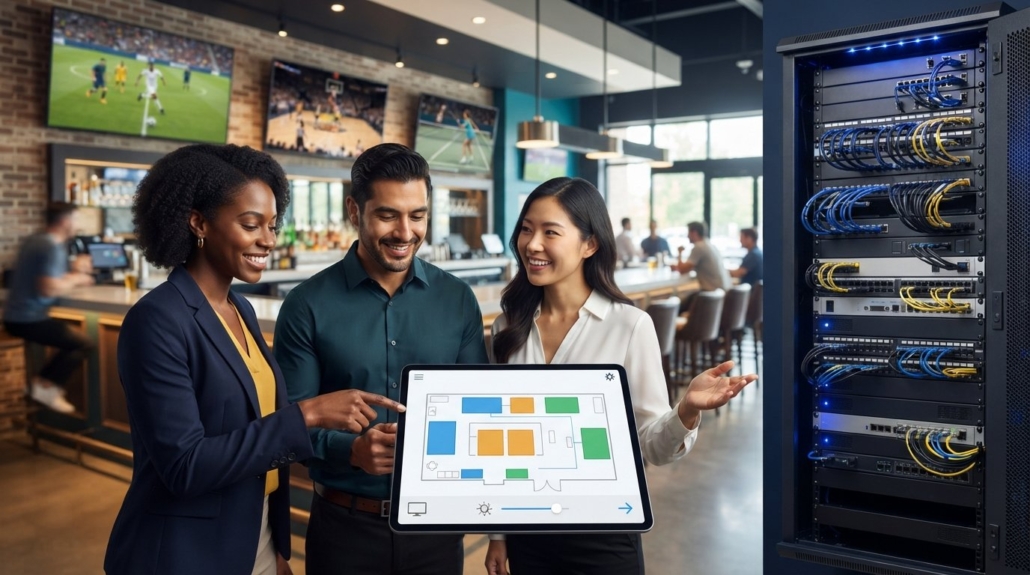
Best AV Control System for Non-Technical Users: 2026 Buying Guide
The era of paying a “programming tax” just to change the channel on your sports bar TVs is officially over. You shouldn’t need a computer science degree or a $225 per hour specialist to manage your facility’s media. Most business owners feel trapped between a basket of confusing remotes and the constant fear that a staff member will accidentally reset the entire system. Finding the best AV control system for non-technical users means looking beyond traditional, rigid architectures that keep your hardware hostage.
We’ll show you how to manage complex multi-TV setups with zero programming knowledge using intuitive tablet-based interfaces like the WolfPad. You’ll discover how to unify cable boxes, DirecTV, and streaming sources into one visual floor plan. This 2026 buying guide explores the shift toward off-the-shelf tablets and zero-subscription models. We cover everything from modular WolfPack matrix switchers to the technical specs required for seamless 4K switching. You’ll gain the confidence to deploy a professional-grade system that your team can’t break and your budget can actually sustain.
Key Takeaways
- Stop paying for expensive custom code and learn how zero-programming architectures allow your staff to manage complex TV setups without technical training.
- Identify the best AV control system for non-technical users by prioritizing visual drag-and-drop floor plans over abstract matrix grids.
- Replace high-cost proprietary touch panels with standard tablets to significantly reduce hardware expenses while maintaining professional-grade reliability.
- Unify multiple sources like DirecTV, Apple TV, and streaming boxes into a single interface to eliminate the frustration of managing a “basket of remotes.”
- Discover how the WolfPad TV Control System provides a scalable, subscription-free “brain” for managing WolfPack modular matrix switchers.
Why Traditional AV Control Systems Fail Non-Technical Users
Many commercial audiovisual systems rely on proprietary, closed-source architectures. While these setups offer deep customization, they create a “Black Box” environment. If a single display stops responding or an input source changes, the end-user is often helpless. You can’t simply plug in a new cable box and expect it to work. Instead, you’re forced to wait for a technician who understands the specific logic of your system’s code. This dependency is the primary reason businesses search for the best AV control system for non-technical users. Traditional setups often result in remote control clutter, where staff must juggle a dozen handheld remotes just to manage a few screens. It’s inefficient and prone to error. Batteries die, remotes disappear, and signals cross, causing the wrong TV to switch during peak hours.
The Hidden Costs of Professional AV Programming
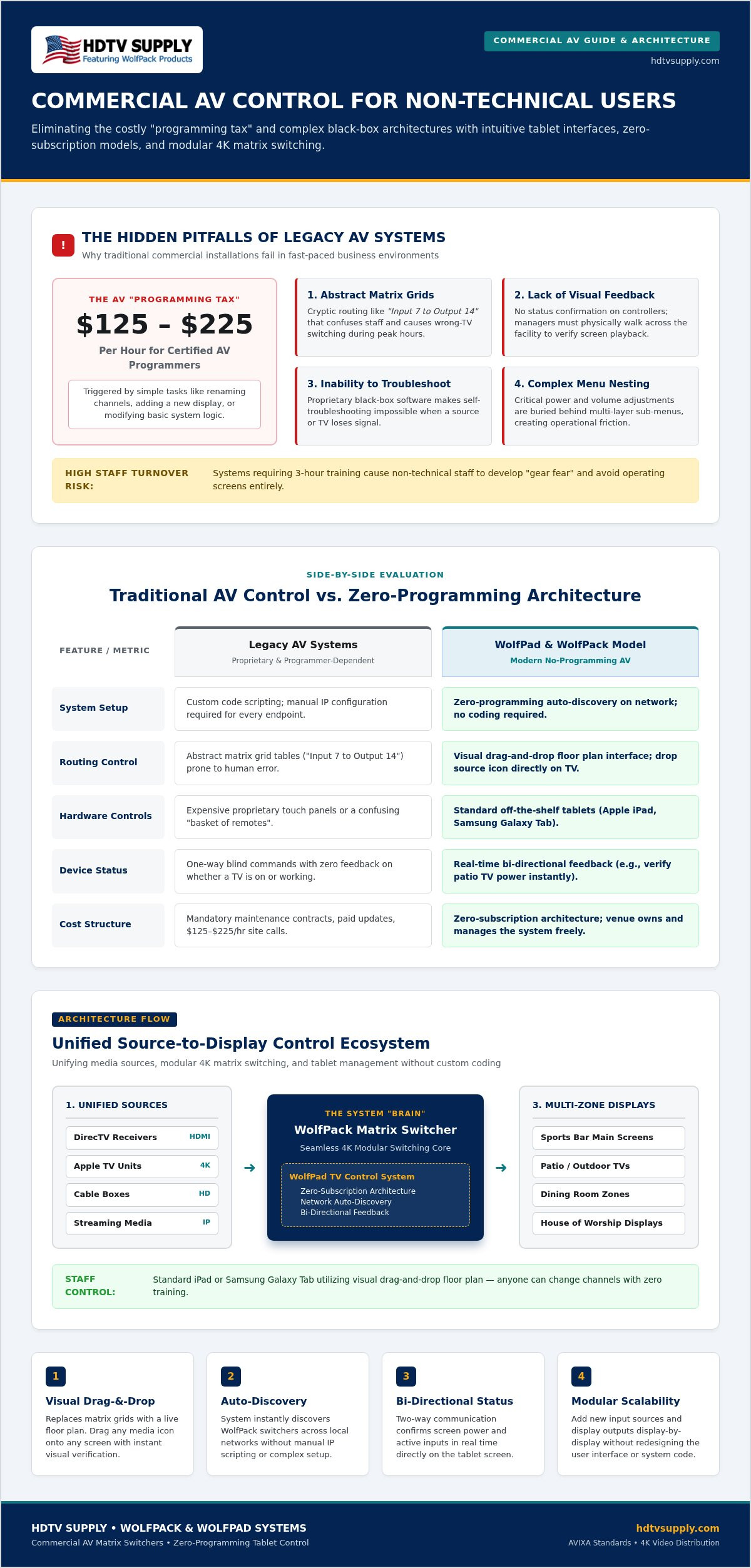
Certified AV programmers are specialized professionals. In 2026, standard billing rates for these experts range from $125 to $225 per hour for custom GUI modifications and system reconfigurations. Every minor adjustment, from renaming a channel to adding a single new display, triggers a service call. These “programming taxes” accumulate quickly. A system that seems affordable at installation can become a financial burden through mandatory maintenance contracts and proprietary updates. You don’t truly own a system if you can’t modify its basic functions without external help. Reliable switching between cable boxes and streaming apps shouldn’t require a line of custom code every time a provider updates their hardware.
Staff Turnover and System Complexity
High turnover in hospitality and retail environments makes complex interfaces a liability. If your AV system requires a three-hour training session, it’s too complicated for a fast-paced environment. Consider the “Sunday Morning” scenario at a house of worship or a busy sports bar. If the only person who knows the system is away, the entire operation grinds to a halt. Non-technical employees often develop “gear fear,” avoiding the equipment entirely because they’re afraid of accidentally breaking the system settings. The best AV control system for non-technical users removes this anxiety by offering a locked-down, intuitive interface. Common failure points in legacy systems include:
- Abstract Matrix Grids: Routing tables like “Input 7 to Output 14” that confuse non-experts.
- Lack of Visual Feedback: No way to see what is playing on a screen without walking across the room.
- Inability to Troubleshoot: Systems that require specialized software just to check a connection status.
- Complex Menu Nesting: Hiding basic volume or power toggles behind multiple layers of sub-menus.
To remain competitive in 2026, venues need a single, visual interface for all screens. Relying on an integrator for every minor change is no longer a viable business model. You need a solution that empowers your existing team to handle daily operations with confidence.
Key Features of User-Friendly AV Control in 2026
Modern control systems have moved away from abstract lists and complex command lines. The best AV control system for non-technical users in 2026 relies on a visual architecture where users simply drag a source icon to a destination TV icon. This removes the guesswork associated with traditional matrix routing. Systems adhering to AVIXA standards for AV systems prioritize the user experience by ensuring high performance and verification across all connected hardware. No-programming architecture is now the industry benchmark. These systems utilize auto-discovery to find hardware like WolfPack matrix switchers on the network instantly, eliminating the need for manual IP entry or custom scripting.
Bi-directional feedback is another essential feature for simplified management. It allows the controller to “talk” to the displays and sources. You’ll know if a TV in the patio area is actually powered on without having to walk outside to check. This real-time data flow ensures that what you see on your control screen accurately reflects the state of your hardware. Modular scalability ensures that as your business grows, your system can grow too. You can add new inputs or outputs display-by-display without having to redesign the entire user interface from scratch.
Tablet-Based Control vs. Traditional Remotes
Consumer and commercial tablets like the iPad and Samsung Galaxy Tab have become the gold standard for AV management. They offer high-resolution touchscreens that staff already know how to use. By utilizing these devices, you can create customizable layouts that hide advanced settings from everyday users. This “lock-down” capability prevents accidental changes to system configurations. Integrating these tablets into sports bar TV distribution systems allows for centralized control over dozens of screens from a single handheld device. It’s a significant upgrade over the “basket of remotes” approach that plagues many older venues.
Visual Previews and Real-Time Monitoring
Live video thumbnails are a critical component of modern user-friendly interfaces. They allow managers to see exactly what is playing on a source before they switch it to a public-facing screen. This prevents the embarrassment of switching to a blank screen or the wrong game during a live event. Over 35% of enterprise AV projects in 2026 now budget for automated switching and self-healing management to reduce downtime. Automated power scheduling further simplifies operations by ensuring all screens turn off at closing time, preserving hardware life. If you’re looking to simplify your setup, the experts at HDTV Supply can help you select modular components that support these advanced visual features.
Comparing Top AV Control Solutions for Simplified Management
Selecting the best AV control system for non-technical users involves evaluating how the interface communicates with the hardware. There are two primary paths: web-based GUIs and native tablet applications. Web GUIs offer immediate access through any device with a standard browser. They’re convenient for remote management but often suffer from execution latency. In contrast, native tablet applications provide a more responsive experience. These apps are built to adhere to standard usability and user experience principles, ensuring that icons and menus respond instantly to touch commands. Speed matters when you’re managing a live crowd. You don’t want a “loading” spinner when you’re trying to switch a high-stakes game to the main screen.
Web GUI vs. Native Tablet Apps
With 50% of commercial pro AV infrastructure now allocated to networked or AV-over-IP systems, the choice between a browser and a native app has significant security and performance implications. Native apps usually offer better multi-user support with tiered permission levels. You can configure the system so a bartender can only change channels, while a manager retains access to deeper system settings. Web browsers are more vulnerable to network-based interference and unauthorized access if not properly secured behind a VPN. Native apps also allow for offline cached layouts, meaning the interface remains snappy even if the local network experiences a momentary spike in traffic.
The Role of the Matrix Switcher in Control
The control interface is only as functional as the hardware it manages. A modular HDMI matrix switcher serves as the system’s foundation. These units handle the heavy lifting of signal routing and distribution. One of the most common technical support calls involves “no signal” errors caused by mismatched resolutions between the source and the TV. Professional-grade hardware handles this automatically through Mastering HDMI Matrix EDID Management. This technology ensures the cable box and the display communicate perfectly without manual intervention from your staff. It eliminates the need for technical troubleshooting during peak business hours.
Avoid the trap of hybrid systems that mix third-party controllers with proprietary matrix hardware. This often leads to compatibility nightmares during firmware updates. Hardwired keypads still have a place for dedicated zones, like a private dining room with a single TV. However, for complex multi-TV environments, an integrated ecosystem is the superior choice. Using a system where the controller and the matrix switcher are designed to work together ensures that a single update won’t break your entire control logic. It provides the reliability and uptime that professional venues require.
How to Choose a System Based on Your Venue Type
Every environment presents unique operational challenges. The best AV control system for non-technical users isn’t a one-size-fits-all product; it’s a solution tailored to your specific workflow. Whether you’re coordinating a massive Sunday ticket event or a simple morning sermon, the goal remains the same: immediate results with zero technical friction. You don’t need to overcomplicate your hardware choice. Instead, focus on the specific ways your team interacts with the technology on a daily basis.
Sports Bars: Managing 30+ Screens Seamlessly
Efficiency is the priority in hospitality. Managing 30 or more displays shouldn’t require a dedicated IT staff. A professional Sports Bar TV Distribution System allows you to create “Zone” controls. You can group displays by location, such as the patio, bar area, or private dining rooms. This allows for bulk switching without affecting the rest of the venue. It’s the most effective way to ensure the right content is on the right screen at the right time.
One-touch “Game Day” presets are essential for high-volume days. With a single tap, you can route the main game to every screen and switch the house audio to the broadcast feed. Managing both audio and video from a single tablet interface eliminates the need for external mixers or secondary remotes. It ensures your staff stays focused on customer service rather than troubleshooting hardware. If you’re managing a large-scale venue, it’s worth investing in a system that can handle these transitions with zero latency.
Houses of Worship and Education
Reliability is paramount when working with non-technical volunteers. In a house of worship or lecture hall, you need a system that works every time without fail. Simplifying the podium control allows a presenter to start their session with a single button. There’s no need to hunt for the right input or adjust aspect ratios manually. The best AV control system for non-technical users in these settings is one that stays out of the way of the message.
Modern sanctuaries often utilize video wall processors to create immersive backdrops. Controlling these complex devices shouldn’t require a tech booth filled with experts. A user-friendly interface provides direct control over presets and layouts from a mobile device. System lockdown features are also critical here. They prevent unauthorized users from changing deep system settings, ensuring the configuration stays exactly as you left it. This prevents the “Sunday Morning” panic when settings have been accidentally altered.
Corporate conference rooms also benefit from simplified setups. Users expect to plug in a laptop and see their content immediately without configuring network settings. Similarly, luxury residential users want whole-home distribution without the bloat and high maintenance of traditional smart home systems. If you’re ready to upgrade your venue, contact the specialists at HDTV Supply to find a modular solution that fits your specific needs.
The WolfPad Solution: Professional Power with Zero Programming
The WolfPad serves as the definitive best AV control system for non-technical users by functioning as a pre-configured appliance rather than a blank coding canvas. It acts as the centralized iPad-based brain for WolfPack Modular Matrix Switchers, translating complex signal routing into a simple touch interface. Unlike traditional enterprise systems that require proprietary scripting, the WolfPad is engineered for immediate deployment. The term “no programming” is a technical reality here. The system uses a visual floor-plan UI that allows you to tap a physical location on your screen and select a source instantly. This eliminates the need for specialized training or technical manuals.
WolfPad vs. Legacy Enterprise Platforms
Choosing a traditional commercial system often forces you into a long-term dependency on certified programmers. In 2026, independent AV programmer billing rates for legacy platforms range from $125 to $225 per hour. Every time you want to rename a cable box or move a TV, you pay this “programming tax.” The WolfPad eliminates these recurring labor costs by allowing managers to make changes through a simple setup menu. Hardware costs also differ significantly. Proprietary 10-inch touch panels often list between $1,100 and $1,800 per unit. By utilizing off-the-shelf tablets that cost between $300 and $550, the WolfPad solution provides a more familiar interface at a fraction of the hardware investment. Pre-configured templates for sports bars, restaurants, and churches ensure your layout is professional and functional from day one.
Getting Started with Your New Control System
Moving from unboxing to full control is a streamlined process. You only need three core components: a WolfPack matrix switcher, a standard tablet, and a local network connection. There are no monthly or yearly recurring software subscription fees to manage. HDTV Supply provides a 60-day return policy and lifetime US-based technical support to ensure your system remains operational. If you’re unsure about the technical architecture, you can utilize the Free AV Design Services from HDTV Supply. Their specialists will create a custom wiring diagram and system map tailored to your venue’s specific dimensions and source requirements. This direct-to-consumer support model bypasses the need for local integrators, putting the power back in the hands of the business owner. Take the first step toward a simplified, high-performance media environment and Explore WolfPad TV Control Systems at HDTV Supply today.
Future-Proof Your AV Management
Transitioning to a modern media environment shouldn’t be a source of stress or unexpected labor costs. By moving away from proprietary code and embracing tablet-based management, you regain control over your facility’s entertainment. The best AV control system for non-technical users prioritizes visual simplicity and eliminates the “programming tax” that has plagued the industry for decades. Whether you’re managing a high-volume sports bar or a volunteer-led house of worship, the right hardware provides the reliability your team needs to operate with confidence.
HDTV Supply maintains an inventory of over 12,000 professional AV products to support your specific system requirements. Expert technical support is included with every purchase, and we offer free custom AV system design services to ensure your architecture is optimized from the start. Stop juggling remotes and start managing your venue with professional efficiency. Browse Easy-to-Use WolfPad Control Systems and discover how simple multi-screen distribution can be. It’s time to empower your staff with technology that just works.
Frequently Asked Questions
Do I really need a professional programmer for an AV control system in 2026?
No. Modern zero-programming systems like WolfPad eliminate the need for certified programmers who typically charge $125 to $225 per hour. These systems are pre-configured to work seamlessly with WolfPack matrix switchers. You can manage channel names, layouts, and routing yourself through a visual interface. This makes it the best AV control system for non-technical users who want to avoid recurring maintenance fees and integrator dependencies.
Can I use my existing iPad to control my sports bar TVs?
Yes. The WolfPad system is designed to run on standard consumer tablets, including the iPad running current iPadOS and various Android devices. You don’t need to purchase proprietary, high-cost touch panels that often list for over $1,000. Simply download the interface to your existing hardware to begin managing your Sports Bar TV Distribution System. This approach significantly reduces hardware costs while providing a familiar touch experience for your staff.
What happens if my Wi-Fi goes down? Will my AV control system still work?
Your AV distribution will continue to function, but tablet-based control requires a network connection to send commands. For maximum reliability, we recommend using a dedicated professional-grade wireless access point for your control network. If the wireless signal drops, you can still manually switch inputs using the front panel buttons on your WolfPack Modular Matrix Switcher or utilize a hardwired backup connection to maintain system stability.
How many TVs can one WolfPad system realistically manage?
A single WolfPad system can manage massive configurations, often exceeding 50 displays depending on the specific model and license tier. For example, tiered layouts are available for systems ranging from 25 to 52 TVs. Because the architecture is modular, you can scale your WolfPack system display-by-display. This scalability ensures your control interface remains responsive and organized regardless of how many screens you add to your venue over time.
Is it difficult to add new cable boxes or TVs to a non-technical control system?
No, adding hardware is a straightforward process that doesn’t require custom code. Since the system uses a no-programming architecture, you simply connect the new source or display to your WolfPack matrix and update the names in the setup menu. This flexibility prevents the “integrator hostage” dynamic where you’d otherwise wait days for a service call just to add a single new DirecTV receiver or a patio display.
What is the difference between an HDMI matrix and an AV control system?
An HDMI matrix is the physical hardware that routes signals from sources to displays. An AV control system, like WolfPad, is the user interface that tells the matrix what to do. While the matrix handles the heavy lifting of 4K 60Hz video switching, the control system provides the visual floor plan on your tablet. You need both components to create a seamless, user-friendly distribution environment for your facility.
Can I control the volume of individual TVs through a tablet-based system?
Yes, you can manage individual TV volume if your displays support CEC (Consumer Electronics Control) or if you use IP and IR control modules. The WolfPad interface allows you to select a specific zone or TV and adjust the audio levels directly from the tablet screen. This feature is essential for venues that need to boost the volume for a specific game without affecting the entire dining area.
Does HDTV Supply offer technical support if I get stuck during setup?
Yes. HDTV Supply provides lifetime US-based technical support via a toll-free number for all customers. While we don’t offer on-site installation services, our experts assist with system configuration, troubleshooting, and initial setup over the phone. We also provide free custom AV system design services to ensure your hardware is mapped correctly before you begin the physical installation, providing a reliable path to project completion.
Leave a Reply
Want to join the discussion?Feel free to contribute!