
AV System Design for House of Worship: The 2026 Technical Guide
What if your most impactful sermon is silenced by a signal dropout or a control interface that is too complex for your volunteer team? You understand the high stakes of a live service where technical glitches translate to missed connections with your congregation. Effective AV system design for house of worship demands a shift from patchwork setups to a professional, integrated blueprint that prioritizes reliability and 4K performance.
You need a system that delivers crystal clear audio and stable 4K 60Hz streaming without requiring a full-time engineering staff. This 2026 technical guide provides the exact specifications for modern sanctuary technology, focusing on modular signal distribution and volunteer-friendly operation. We will examine high-capacity system architecture using WolfPack modular matrix switchers, seamless video routing to overflow spaces, and the implementation of intuitive control interfaces like the WolfPad to ensure your message remains the priority. Get ready to master the complexities of sanctuary technology with a results-oriented approach to audio-visual integration.
Key Takeaways
- Master the “Impact vs. Distraction” framework to integrate audio, video, and streaming into a cohesive sanctuary ecosystem.
- Optimize your AV system design for house of worship with modular WolfPack matrix switchers that serve as the centralized brain for all signal routing.
- Compare the architectural advantages of modular matrixing versus AV-over-IP to determine the most cost-effective distribution strategy for your infrastructure.
- Create a professional production workflow by systematically mapping inputs like PTZ cameras and media players to multi-room 4K outputs.
- Empower volunteer-led technical teams with simplified, tablet-based control using the WolfPad to manage complex systems without technical friction.
Defining the Core Pillars of Modern House of Worship AV Design
Modern Audiovisual (AV) technology is no longer an optional add-on for the sanctuary; it is the primary vehicle for message delivery. Professional AV system design for house of worship requires a disciplined integration of audio, video, lighting, and streaming into a single, unified ecosystem. The goal is to move beyond simple amplification and toward a professional-grade production environment that serves both local and remote congregants.
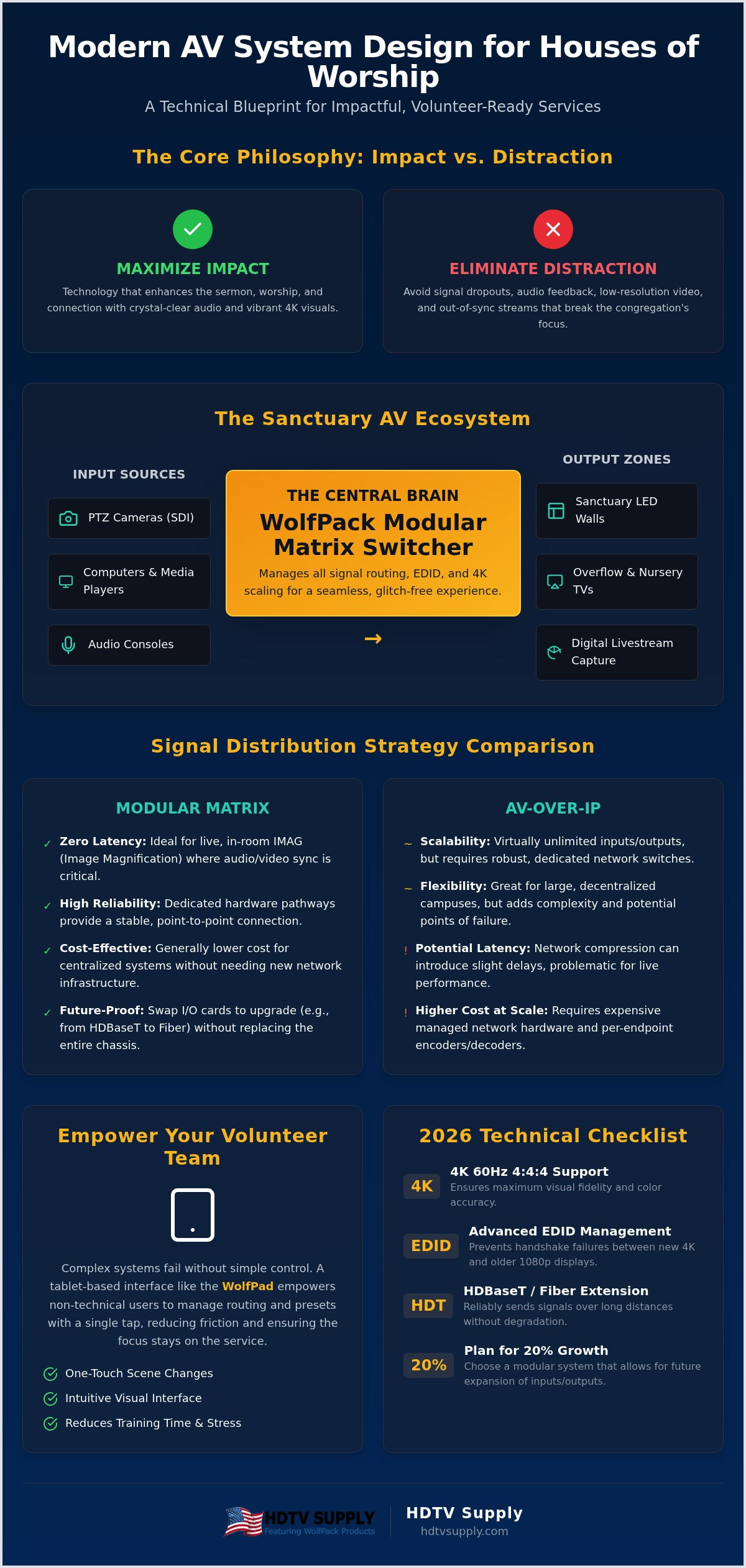
The most effective systems operate under the “Impact vs. Distraction” framework. Technology provides impact when it enhances the sermon and worship music. It becomes a distraction when signal dropouts, feedback, or low-resolution visuals pull the congregation out of the moment. To maintain this balance, your design must account for three distinct zones: the Sanctuary for the in-person experience, Overflow for auxiliary rooms, and Digital for global streaming. As of 2026, the baseline for these zones has shifted from 1080p to 4K 60Hz 4:4:4 to ensure maximum visual fidelity across all platforms.
Visual Clarity and Sightlines
Screen size isn’t a matter of preference; it’s a calculation. You must determine the screen dimensions based on the furthest congregant to ensure text and lyrics are legible. While high-lumen projectors remain a budget-friendly option for smaller rooms, direct-view LED walls are becoming the standard for larger spaces due to their superior contrast and performance in high ambient light. Additionally, your system must support precise color accuracy. This is critical for ensuring diverse skin tones appear natural on camera and on-screen during live broadcasts.
Audio Intelligibility and Coverage
In a sanctuary, volume does not equal clarity. Many large acoustic spaces suffer from excessive reverberation that turns a sermon into an unintelligible wash of sound. High-performance AV system design for house of worship prioritizes audio intelligibility by integrating digital audio consoles directly with the video distribution network. This integration is vital for managing latency. If the audio and video signals are out of sync on your main displays or your livestream, the distraction becomes insurmountable. Your infrastructure must handle high-bandwidth signals with minimal processing delay to keep the experience unified for every attendee, whether they are in the front row or watching from home.
Essential Hardware Components for a Sanctuary AV Ecosystem
Every successful AV system design for house of worship relies on a robust hardware foundation. Think of your hardware as an ecosystem where every component must communicate without friction. The centerpiece of this architecture is the “central brain,” which manages routing and signal integrity across multiple zones. Without a high-capacity matrix at the core, your system is just a collection of disconnected parts.
Choosing the Right Matrix Switcher
Modular HDMI matrix switchers are non-negotiable for growing ministries. Fixed-port switchers limit your future expansion, while modular systems allow you to swap input and output cards as your needs change. A critical aspect of this is HDMI matrix switcher EDID management. Without proper EDID handling, mixing a 4K projector in the sanctuary with a 1080p display in the nursery will cause system-wide handshake failures. You need a system that determines I/O requirements based on your current sources while leaving room for at least 20% growth. If you’re unsure which modules fit your specific sanctuary layout, HDTV Supply provides expert guidance to help you select the right WolfPack components.
Cameras and Capture Hardware
Source management starts with PTZ (Pan-Tilt-Zoom) cameras. These units offer a low-footprint operation, allowing a single volunteer to manage multiple angles from a joystick or tablet. When selecting interfaces, SDI is often preferred for long-distance stability, while HDMI remains the standard for short-run PC inputs and media players. To bridge these sources for online audiences, high-performance video capture cards are essential for stable 4K streaming. This hardware selection process is a pillar of modern ministry, as noted in this Ultimate Guide to Church Audio, Video, & Lighting.
Long-distance signal distribution requires HDBaseT or Fiber extension. Standard HDMI cables often fail or lose signal integrity beyond 50 feet. HDBaseT extends 4K signals up to 330 feet over standard Category cable, making it ideal for reaching distant projectors or foyer displays. For the tech booth, multi-viewers are vital. They allow operators to monitor all camera feeds and PC inputs on a single screen. Stage confidence monitors are equally important, providing speakers with a clear view of their presentation slides or timing cues without forcing them to look back at the main screens.
Signal Distribution Strategies: Modular Matrix vs. AV-over-IP
Choosing the right distribution architecture is the most consequential decision in AV system design for house of worship. You’re essentially choosing between a hardware-centric model (Modular Matrix) and a network-centric model (AV-over-IP). Traditional matrix switchers act as a physical hub where all sources and displays converge. In contrast, AV-over-IP decentralizes the system, converting signals into data packets that travel over your existing IT network. For a comprehensive overview of the audio-visual infrastructure, you must evaluate how these technologies handle latency and reliability during a live service.
Latency is the primary enemy of Image Magnification (IMAG). If your main screens show the pastor speaking even a few milliseconds after the live audio reaches the congregation, the “lip-sync” error becomes a massive distraction. Modular matrix switchers provide uncompressed, zero-latency switching that IP-based systems struggle to match without expensive 10G networking. While some argue that a matrix is a “single point of failure,” modern modular designs mitigate this risk with hot-swappable power supplies and redundant cards. A network crash, conversely, can take down both your AV and your church’s internal operations simultaneously.
When to Choose a Modular HDMI Matrix
A modular matrix is the superior choice for sanctuaries managing 16 to 32 displays and sources within a single building. It offers a “set and forget” reliability that volunteer teams appreciate. You don’t need a degree in network engineering to troubleshoot a physical cable seated in a port. The latest modular HDMI matrix switchers for 2026 feature advanced diagnostics that identify cable failures instantly. This simplicity ensures your tech team spends less time debugging and more time focused on the service production.
The Case for AV-over-IP in Multi-Site Churches
AV-over-IP excels when you need to scale across an entire campus or multiple sites. It allows you to route a 4K 60Hz 4:4:4 signal from the main sanctuary to a foyer, a nursery, and a secondary building over standard Category cable. However, this requires strict bandwidth management. A single 4K stream can saturate a standard 1G network, leading to dropped frames. You’ll need managed switches and robust security protocols to isolate AV traffic from the general church Wi-Fi. This prevents a surge in guest logins from lagging your video feeds during a critical moment in the service.
How to Design Your Church AV Workflow: A Step-by-Step Guide
A high-performance AV system design for house of worship requires more than just high-end hardware; it demands a logical, repeatable workflow. You don’t want your technical team guessing which button to press during a live service. Follow this five-step blueprint to build a reliable architecture.
- Step 1: Map your inputs. Log every PTZ camera, ProPresenter workstation, and guest laptop.
- Step 2: Define your outputs. Determine which signals go to the main sanctuary, foyer, nursery, and streaming encoder.
- Step 3: Calculate distances. Use HDBaseT 3.0 for long-distance 4K 60Hz transmission to maintain signal integrity.
- Step 4: Design the control interface. Build presets that allow non-technical volunteers to execute complex transitions with one touch.
- Step 5: Plan for redundancy. Install Uninterruptible Power Supplies (UPS) for all rack equipment to prevent system crashes during power flickers.
Mapping the Signal Path
Creating a detailed I/O chart is the only way to prevent signal confusion. This document should track every connection from the source to the final display. You must ensure HDCP 2.2 compliance across the entire chain to avoid “black screen” handshake issues. For ministries using multi-screen stage backdrops, integrating video wall processors allows you to manage massive pixel counts across several LED panels seamlessly. If your team needs assistance mapping these complex routes, HDTV Supply offers free custom AV design services to ensure your project succeeds from day one.
Planning for the Tech Booth
Booth ergonomics directly impact the quality of your production. Place your matrix switchers, preview monitors, and audio boards within easy reach to reduce operator fatigue. Effective cable management is mandatory. Use labeled trunking to prevent “spaghetti” wiring that makes troubleshooting impossible. Finally, prioritize ventilation. Rack-mounted equipment generates significant heat. Without active cooling and proper airflow, your modular components may throttle or fail prematurely during a long service.
Scaling for Success: WolfPack Systems and Volunteer-Ready Control
Effective AV system design for house of worship demands a plan for long-term scalability and immediate operational simplicity. The WolfPack Modular Matrix Switcher serves as the definitive centerpiece for this strategy. By utilizing a modular chassis, your ministry gains the flexibility to add or swap I/O cards as your technical requirements expand. This eliminates the need for a total system overhaul when you decide to upgrade a foyer display or add a new 4K source to your sanctuary. With a catalog of over 12,000 products, we provide the specific components required to maintain a high-capacity production environment.
Simplified Control with WolfPad
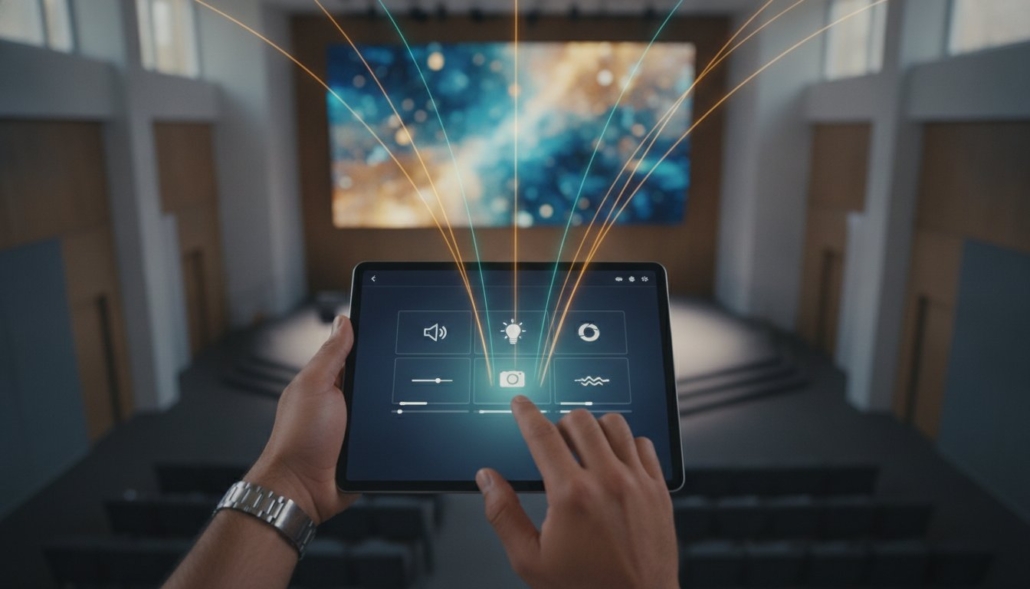
The “complexity gap” is the most common point of failure in church tech. While your system architecture might be professional-grade, your volunteer team needs a simplified interface to operate it effectively. WolfPad tablet-based control solves this by providing a customized iPad layout designed for “one-touch” service starts. Program specific presets that route the sermon feed to the nursery and lobby simultaneously with a single tap. To maintain system integrity, use WolfPad to restrict access to deep configuration menus. This prevents well-meaning volunteers from accidentally changing critical matrix settings or EDID configurations during a live event. Controlling multiple zones from a single tablet ensures your production remains synchronized across the entire facility without requiring a dedicated engineer at every screen.
Custom Design and Scaling
Scaling your infrastructure often involves borrowing logic from other high-capacity environments. Utilize 2026 sports bar TV distribution principles to manage complex overflow rooms and multi-screen lobbies without overcomplicating your main sanctuary rack. This approach allows for a seamless, phased transition from 1080p to UHD. Because WolfPack systems are modular, replace individual 1080p cards with 4K 60Hz modules over time to spread your investment across multiple budget cycles. Every sanctuary floor plan presents unique acoustic and visual challenges. To ensure your hardware matches your specific requirements, contact HDTV Supply for a free custom HoW AV design. Our specialists leverage decades of industry experience to build a reliable, professional-grade blueprint tailored to your ministry’s vision and technical scale.
Future-Proofing Your Ministry’s Technical Vision
Mastering AV system design for house of worship ensures your message reaches every congregant without technical interference. Success in 2026 relies on a disciplined integration of modular hardware, simplified volunteer-ready control, and a scalable signal path. By prioritizing 4K 60Hz 4:4:4 signal integrity and utilizing intuitive interfaces like the WolfPad, you eliminate the technical friction that often plagues live productions. Your sanctuary deserves a professional system that supports your vision without the constant threat of signal dropouts or complex configuration errors.
Don’t navigate these technical complexities alone. Leverage our 25+ years of Pro AV expertise and the security of the WolfPack Modular Guarantee to build your ideal sanctuary ecosystem. We offer free technical support to ensure your system integration remains stable and efficient long after the initial purchase. Request Your Free Custom AV System Design from HDTV Supply today. It’s time to build a reliable, professional-grade foundation that empowers your ministry and engages your congregation every Sunday.
Frequently Asked Questions
What is the most important component in a church AV system design?
The central matrix switcher is the most critical component because it functions as the brain of your entire sanctuary. In a professional AV system design for house of worship, this hardware manages all signal routing from cameras and PCs to your screens and stream. Using a modular WolfPack system allows you to manage EDID and HDCP handshakes across different display types without signal failure. It’s the hardware that ensures every input reaches its destination with zero latency.
Can we use existing Cat6 cabling for a new 4K AV system?
You can use existing Cat6 cabling, but it must be tested for bandwidth integrity to support 4K 60Hz signals. While Cat6 is capable of carrying high-resolution video, the distance and shielded nature of the cable matter. For stable 4K distribution over long runs, we recommend using HDBaseT 3.0 extenders. These modules allow you to push uncompressed video up to 330 feet. If your current runs exceed this or use low-quality copper, you’ll likely see signal dropouts.
How do we prevent latency between our live band and the video screens?
Preventing latency requires a signal path that avoids heavy compression and unnecessary processing layers. For live Image Magnification (IMAG), you should use a hardware-based modular matrix rather than standard network-based distribution. Modular matrix switchers provide uncompressed, zero-latency switching that keeps the video on your screens perfectly synchronized with the live audio. This is vital for maintaining the balance during worship music where lip-sync errors are highly visible and distract the congregation.
What is the difference between an HDMI matrix and a video switcher for churches?
An HDMI matrix is designed for signal distribution, allowing you to send any input to any combination of outputs like foyers or nurseries. A video switcher is a production tool used for live mixing, adding transitions, and creating a single feed for a stream or main screen. Most churches require both. The matrix acts as the backbone that routes the final production feed from the switcher to various zones across your entire facility without signal degradation.
How many cameras do we need for a professional-looking live stream?
A professional-looking live stream typically requires at least three cameras to maintain visual interest. We recommend a wide shot of the stage, a tight shot for the pastor’s sermon, and a third camera for audience reactions or musician close-ups. Using PTZ cameras allows a single volunteer to manage all three angles from a central joystick or tablet. This setup provides the variety needed to keep online congregants engaged without requiring a large, expensive production crew.
Do we need a dedicated network for our AV-over-IP system?
Yes, a dedicated or physically isolated network is mandatory for a reliable AV-over-IP implementation. High-resolution 4K 60Hz 4:4:4 video streams consume massive amounts of bandwidth that can easily saturate a standard church network. Without a dedicated VLAN or separate managed switches, you risk network congestion that causes lag, dropped frames, and security vulnerabilities. Keeping your AV traffic separate from guest Wi-Fi and office data ensures you don’t face lag during your production.
Is it better to buy a fixed matrix or a modular one for a growing church?
A modular matrix is always the superior choice for a growing church because it offers unmatched future-proofing. Fixed matrices limit you to a specific number of ports, forcing a total hardware replacement when you expand. With a WolfPack modular system, you simply add new input or output cards as your ministry grows. This allows you to transition from 1080p to 4K or add more sanctuary displays without discarding your initial investment in the rack-mounted chassis.
How can we make our complex AV system easy for volunteers to use?
You can simplify complex AV system design for house of worship by implementing a tablet-based control system like the WolfPad. Instead of forcing volunteers to navigate complicated rack equipment, you provide a customized iPad interface with one-touch presets. These presets can automate the entire service start, including powering on displays and routing specific feeds. Restricting access to advanced technical settings ensures that volunteers can operate the system confidently so they don’t risk accidental configuration changes.
Leave a Reply
Want to join the discussion?Feel free to contribute!