
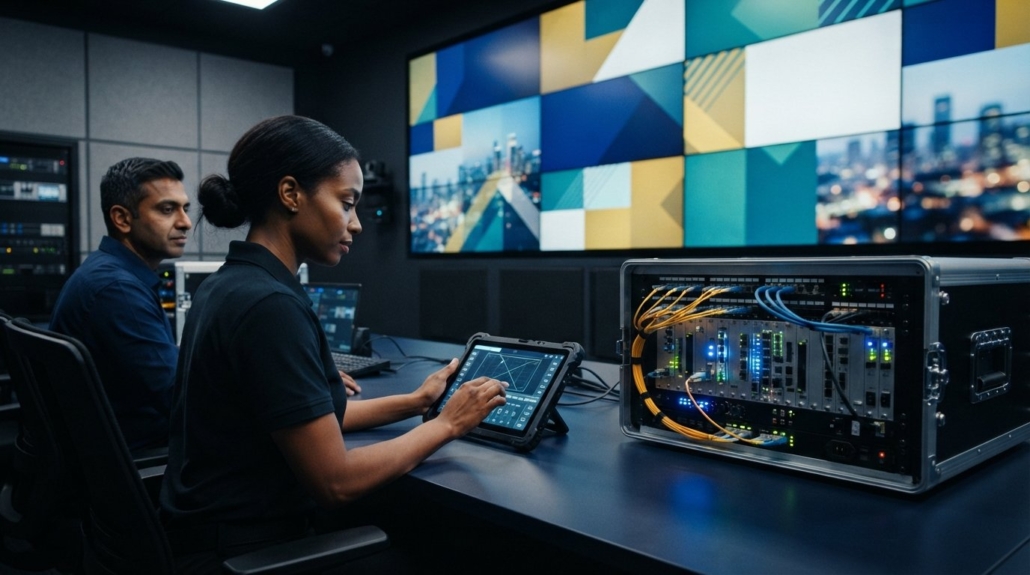
2026 Guide: Choosing Digital Signage Video Wall Controllers
73% of new video wall installations in 2026 have transitioned to networked distribution, yet many professional environments still suffer from screen tearing and synchronization lag. You’ve likely felt the frustration of a system that fails to handle HDCP-protected content or requires an expensive programmer just to swap a source. It’s a common pain point for those managing mission-critical displays that must run 24/7 without a single crash. This guide delivers the technical specifications and configuration requirements you need to select a high-performance digital signage video wall controller that masters 4K 60Hz 4:4:4 signals with absolute precision.
We’ll show you how to move past rigid, legacy hardware and embrace scalable solutions like the WolfPack modular architecture. You’ll learn how to implement future-proof hardware that supports the latest EU standby power mandates and U.S. federal procurement rules. By the end of this article, you’ll know exactly how to deploy a system that offers seamless iPad control through the WolfPad interface, ensuring your staff can manage complex layouts with a single tap. We’re covering everything from FPGA-based deterministic routing to the latest AV-over-IP standards to ensure your next project is reliable, compliant, and visually stunning.
Key Takeaways
- Master the requirements for 4K 60Hz 4:4:4 and HDCP compliance to ensure your system handles modern, protected content without signal degradation.
- Identify why a hardware-based digital signage video wall controller outperforms PC-based software solutions for 24/7 mission-critical applications.
- Compare cost-effective fixed-frame processors for small retail installs against the scalable WolfPack modular architecture designed for enterprise growth.
- Eliminate complex programming and high labor costs by utilizing intuitive iPad control systems like WolfPad for daily management.
- Follow a precise two-step selection process to match your specific input sources and display counts with the right processing power.
What is a Digital Signage Video Wall Controller?
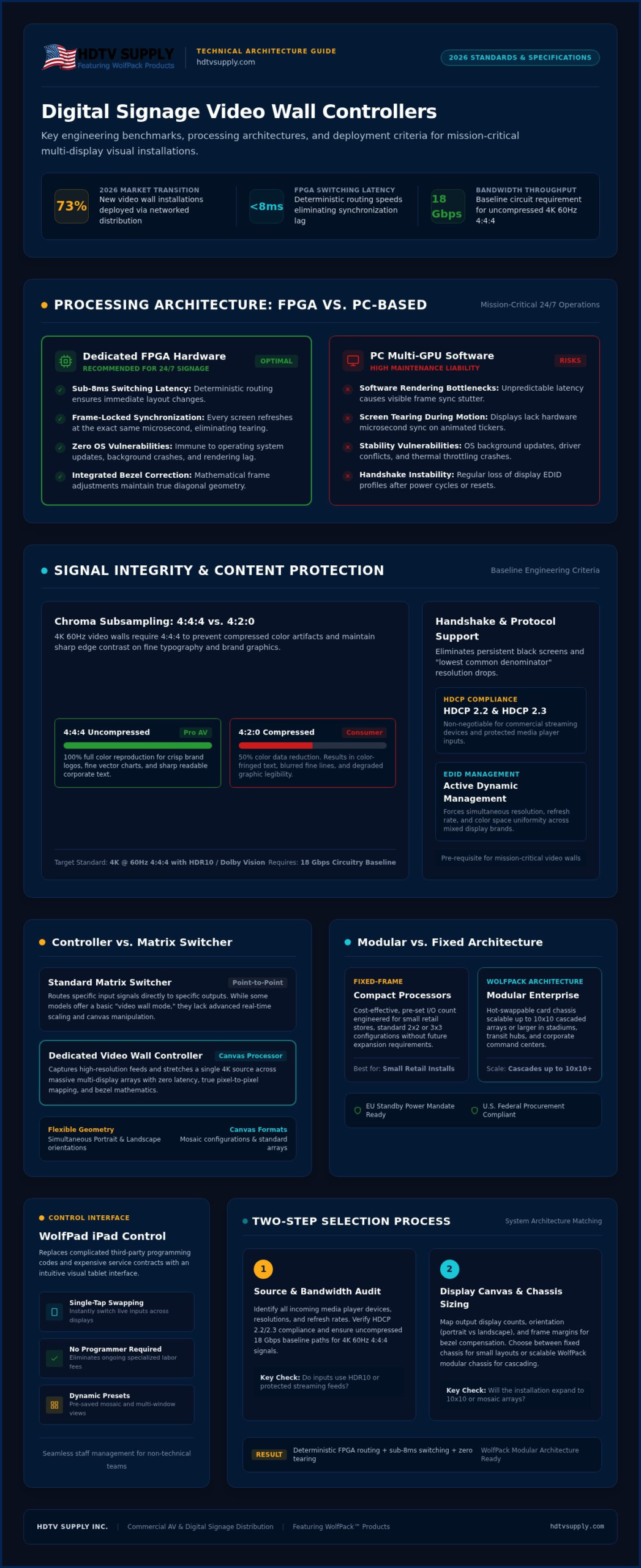
A dedicated hardware digital signage video wall controller functions as the central processor for your multi-display system. It captures high-resolution signals from media players or PCs and maps them across a combined pixel canvas. While a PC with multiple GPU outputs might seem like a cost-effective shortcut, it’s often a liability in commercial environments. Hardware-based processors utilize FPGA-based deterministic routing. This architecture delivers sub-8ms switching latency and eliminates the stability risks associated with software-based rendering and operating system updates.
Professional digital signage requires frame-locked synchronization. This ensures every display in the wall refreshes at the exact same microsecond. Without it, you’ll see visual tearing, especially during fast-moving branding animations or scrolling tickers. The controller also manages bezel compensation. It mathematically accounts for the physical frames of the monitors, ensuring a diagonal line across the wall appears straight rather than staggered. It’s the technical difference between a professional, cohesive installation and a distracting DIY setup.
Video Wall Controller vs. Matrix Switcher
A standard matrix switcher acts as a router. It sends a specific input to a specific output. While some WolfPack modular matrix switchers include a “video wall mode,” dedicated controllers offer far superior scaling and pixel-to-pixel mapping. Our guide on Video Wall Processor vs. Matrix Switcher technology highlights that processors are necessary when you need to stretch a single 4K source across a massive array with zero latency. Use a matrix for standard distribution; use a controller for a seamless visual experience.
Common Layout Configurations
Layouts aren’t restricted to simple 2×2 or 3×3 grids. While these remain the commercial building blocks for retail signage, 2026 trends favor artistic flexibility. Modern HDMI Video Wall Processors handle portrait and landscape orientations simultaneously, allowing for mosaic-style walls. For massive deployments in stadiums or transit hubs, you can cascade units to drive 10×10 arrays or larger. This modularity ensures your hardware grows with your display needs, providing a scalable path for future expansion without replacing the core chassis.
Technical Specifications for 2026 Digital Signage
2026 standards demand more than just “high definition.” A professional digital signage video wall controller must handle 4K 60Hz at 4:4:4 chroma subsampling to remain competitive. While 4:2:0 subsampling is common in consumer gear, it compresses color data and leaves fine text looking blurry or fringed with artifacts. In retail or corporate lobbies where branding and legibility are everything, this lack of clarity is unacceptable. You need a processor that reproduces every pixel of the source content with absolute fidelity.
Bandwidth is the backbone of this performance. You require 18Gbps circuitry as the absolute minimum to pass uncompressed 4K 60Hz signals. Without this throughput, the system will struggle to maintain the frame rate, leading to stuttering video or complete signal loss. For high-end installations involving HDR10 or Dolby Vision, these bandwidth requirements become even more stringent to prevent bottlenecks at the controller level.
The Importance of High Bandwidth
High-traffic environments can’t afford signal dropouts. When your infrastructure lacks the necessary throughput, you’ll see flickering or total blackouts during peak usage. Proper bandwidth management ensures the signal stays locked from source to screen without degradation. You can learn more about optimizing these signal paths in our guide on Mastering HDMI Matrix EDID Management. For uncompressed 4K 60Hz signals, a consistent 18Gbps throughput is the technical baseline for modern digital signage.
EDID and HDCP Management
Advanced management of the “handshake” between devices is critical for a stable wall. Without it, mixing different display brands often results in a “lowest common denominator” resolution or a persistent black screen. HDCP 2.2 and 2.3 compliance is also non-negotiable for playing protected commercial content from media players or streaming devices. Professional controllers resolve these handshake failures by actively managing the EDID data. This ensures every screen in the array displays the correct resolution, refresh rate, and color space simultaneously. If you’re building a mission-critical system, our WolfPackSecure 4K 60 4:4:4 HDMI Matrix Switchers provide the robust HDCP management needed for 24/7 reliability. These systems prevent the common “black screen” errors that plague lower-tier hardware when switching between encrypted sources.
Modular vs. Fixed Video Wall Architecture
Choosing the right architecture for your digital signage video wall controller depends on your current scale and future expansion plans. Fixed-frame controllers are the standard for static installations, such as 2×2 or 3×3 retail displays. These units offer a cost-effective, plug-and-play solution with a predetermined number of inputs and outputs. They’re reliable for specific, unchanging layouts but lack the flexibility to adapt if your signage requirements grow. If you’re certain your screen count won’t change, a fixed-chassis processor provides high-performance scaling without the premium price of a modular system.
Enterprise environments require the WolfPack modular architecture. This system uses a central chassis with hot-swappable I/O cards, allowing you to mix and match signal types like HDMI, SDI, and HDBaseT in a single unit. This versatility is vital for stadiums or corporate campuses where sources might come from different distances or formats. Modular systems provide a significant advantage in future-proofing. Instead of replacing an entire processor when display standards shift, you simply swap an input or output card. This modularity protects your initial investment and keeps your hardware relevant for years.
When to Choose a Modular System
Select a modular system when you need to scale from a single lobby wall to a multi-room distribution network. While the upfront cost is higher than fixed units, the cost-per-port over a five-year lifecycle is often lower because you aren’t rebuying core processing power. You can start with a 16×16 chassis and only populate the cards you need today. Our Modular HDMI Matrix Switchers Guide explains how this architecture handles complex signal routing while maintaining 4K 60Hz integrity across every output.
Reliability in High-Traffic Venues
High-traffic venues like sports bars and command centers can’t tolerate downtime. Professional rack-mount controllers feature redundant power supplies to ensure the wall stays live even if a primary power source fails. Thermal management is another critical differentiator. Unlike consumer-grade dongles that overheat under constant load, WolfPack hardware utilizes active fan cooling and industrial-grade heat sinks. For mission-critical 24/7 uptime, WolfPackSecure features provide the stability needed to run encrypted content without the risk of system crashes or signal dropouts. It’s the dependable choice for professionals who prioritize system integration and long-term results.
Control Systems: Managing Your Video Wall
Traditional control systems are often the hidden cost of a Pro AV installation. In the past, changing a simple screen layout required hiring a specialized programmer at a high hourly rate. This complexity creates a bottleneck for businesses that need to adapt their content quickly. Modern IP-based control has replaced legacy RS232 as the preferred method for managing a digital signage video wall controller. While RS232 is still used for basic point-to-point commands, IP control allows for infinite scalability and remote management across your entire network.
Integrating your hardware with a third-party Content Management System (CMS) is essential for 2026 deployments. The CMS handles the media scheduling, while the controller ensures the hardware rendering is flawless. To maintain system integrity, professional units allow for granular user access levels. This prevents unauthorized staff members from accidentally changing the video wall configuration while still allowing them to swap sources as needed. This security layer is vital for public-facing displays where a single error can disrupt the customer experience.
The WolfPad Advantage: No-Programming Control
The WolfPad TV Control Systems eliminate the need for expensive custom code. This interface allows staff to manage complex video walls via an intuitive iPad app. It’s particularly effective in high-pressure environments where speed is critical. For instance, in a large venue, a manager can instantly swap a marketing loop for a live broadcast without touching a rack. You can see how this scales in our guide on Sports Bar TV Distribution Systems. This “no-programming” approach reduces labor costs and empowers your on-site team to handle daily operations with confidence.
Web GUI and Remote Access
Every professional controller should include a robust Web GUI. This allows your IT department to manage layouts and monitor signal health from any standard web browser. Remote access is a vital diagnostic tool. It lets you check the status of every display and verify that the HDMI handshakes are active without being physically present at the rack. You can also set up automated schedules. This ensures your video wall transitions from high-energy morning promotions to subtle evening branding automatically. If you’re ready to simplify your display management, explore our full range of WolfPad TV Control Systems to find the right interface for your team.
Buying Guide: Selecting the Right Controller
Selecting a digital signage video wall controller requires a methodical evaluation of your infrastructure and content goals. Don’t let the vast selection of Pro AV hardware overwhelm your procurement process. Break your requirements down into four logical steps to ensure the system you deploy today remains functional through 2030. Start by defining your output count. This isn’t just about the number of screens you have now, but also your potential for expansion. A 2×2 wall requires four outputs, but choosing a modular chassis allows you to scale to 4×4 or larger without replacing the core processor.
Identify your input sources next. Are you running a single 4K media player, or do you need to window multiple live feeds and PC workstations? Each source requires a dedicated input port on the controller. Once your I/O is set, determine your signal distance. High-resolution 4K 60Hz signals are sensitive to cable length. Finally, choose your control method. If your staff needs to change layouts on the fly, an iPad interface like WolfPad is the most efficient choice. For automated retail environments, look for controllers that support scheduled layout changes through a Web GUI.
Signal Distribution and Distance
Distance is often the most overlooked factor in video wall design. While short HDMI cables work for in-rack sources, distant walls require specialized distribution. Using HDMI over Cat6 or Coax ensures that your 18Gbps signal reaches the display without dropouts or artifacts. For more on Coax distribution, read The Professional Guide to HDMI Modulators. Switch from HDMI to HDBaseT cabling when signal runs exceed 50 feet to maintain 4K 60Hz integrity without packet loss. This hardware transition is critical for maintaining the high-performance standards expected in 2026 corporate and retail environments.
Final Pre-Purchase Checklist
Before finalizing your order, verify these technical requirements to avoid compatibility issues during installation. A single weak link in the signal chain can cause the entire wall to fail. Use this checklist to confirm your hardware is ready for 24/7 operation:
- Verify HDCP 2.2 and 2.3 compliance for every media player, cable, and controller port to ensure protected content playback.
- Check for bezel compensation settings within the controller software to guarantee a seamless image across screen seams.
- Confirm resolution support matches the native resolution of your displays, specifically for 4K 60Hz 4:4:4 signals.
- Ensure thermal management is sufficient for the installation environment, prioritizing fan-cooled rack-mount units.
Ready to build your system? Shop HDTV Supply’s full range of WolfPack Video Wall Controllers to find a reliable, high-performance solution for your next project.
Deploying Your Next-Generation Video Wall with Confidence
Transitioning to a high-performance digital signage video wall controller is about more than just resolution. It’s about ensuring frame-locked synchronization and 4K 60Hz 4:4:4 clarity to meet 2026 commercial standards. You now have the technical roadmap to choose between cost-effective fixed-frame units and scalable WolfPack modular systems. By prioritizing hardware-based processing and intuitive WolfPad tablet control, you eliminate the risks of software crashes and the high costs of specialized programming. This strategic approach ensures your infrastructure handles HDCP-protected content and non-standard layouts with ease.
HDTV Supply stands as your global resource for these mission-critical Pro AV systems. We maintain a catalog of over 12,000 professional products to ensure immediate accessibility for any project scale. Our team provides expert technical support via our toll-free number and offers reliable global shipping for installers and integrators. Don’t let technical lag or synchronization issues compromise your branding. Take the next step toward a seamless, 24/7 display solution that delivers results today and well into the future.
Browse Professional WolfPack Video Wall Controllers at HDTV Supply
Frequently Asked Questions
Do I need a special PC to run a digital signage video wall controller?
A hardware-based digital signage video wall controller is a standalone appliance that doesn’t require a specialized PC for processing. It captures inputs from any standard media player, laptop, or PC and manages the display canvas internally. Unlike software-only solutions, these dedicated processors don’t rely on a computer’s graphics card or operating system. This architecture ensures 24/7 stability and eliminates the risk of OS-driven crashes during critical marketing loops.
Can I use different sized monitors in my video wall layout?
Yes, modern processors support non-standard layouts and mixed orientations. While traditional grids use identical screens, high-end controllers allow you to combine portrait and landscape displays or even different sizes. The processor manages the complex pixel mapping and scaling required to align the image across mismatched bezels. This flexibility is essential for artistic or mosaic-style displays that need to stand out in high-traffic retail environments.
How do I prevent HDMI signal loss over long distances to my video wall?
Use HDBaseT or HDMI over Cat6 for any run exceeding 50 feet. Standard HDMI cables lose signal integrity over long distances, which causes flickering or complete blackouts. Implementing active extenders or modular cards within your WolfPack chassis ensures a stable 18Gbps throughput. This setup maintains 4K 60Hz 4:4:4 signals across large venues, ensuring your content remains crisp and synchronized regardless of the equipment rack’s physical location.
What is bezel compensation and why is it important for signage?
Bezel compensation is a mathematical adjustment that accounts for the physical frames of your monitors. Without it, images appear staggered or “cut off” where the screens meet. The controller “hides” pixels behind the bezels to maintain the correct geometry of the overall image. It’s a critical feature for any professional digital signage video wall controller to ensure that diagonal lines and text appear continuous and natural across multiple displays.
Is a video wall controller better than using an HDMI matrix switcher?
It depends on your scaling requirements. A matrix switcher routes specific inputs to specific outputs, but it doesn’t always stretch a single image across multiple screens with frame-locked precision. A dedicated video wall processor is designed specifically for canvas scaling and bezel management. If you need a seamless, unified image across an array, the processor is the superior choice for high-performance rendering and professional synchronization.
Does the WolfPack controller support 4K 60Hz 4:4:4 signals?
Yes, the WolfPackSecure series is specifically engineered to handle 4K 60Hz 4:4:4 signals. This ensures full color depth and sharp text clarity, which is the baseline for 2026 commercial signage. These systems provide the 18Gbps bandwidth necessary to handle uncompressed video without artifacts. Choosing this hardware ensures your system is future-proof and compatible with the latest high-resolution media players and protected HDCP 2.3 content streams.
Can I control my video wall using an iPad or Android tablet?
Absolutely. The WolfPad TV Control System allows you to manage layouts and sources directly from an iPad. You don’t need to hire a specialized programmer to make simple changes to your video wall. The interface is intuitive, allowing on-site staff to swap sources or trigger new layouts with a single tap. This IP-based control method is more efficient and user-friendly than traditional RS232 or PC-only management tools.
What happens if one of my video wall screens fails?
Professional controllers allow you to reconfigure the remaining screens instantly. If one display in a 3×3 wall goes dark, you can adjust the processor settings to bypass that screen or resize the canvas to the remaining monitors. In modular systems, you can also swap the output card if the issue is at the processor level. This redundancy is vital for 24/7 mission-critical environments where any display downtime is unacceptable.
Leave a Reply
Want to join the discussion?Feel free to contribute!