

What is HDBaseT 3.0? Benefits for 4K 60 Pro AV
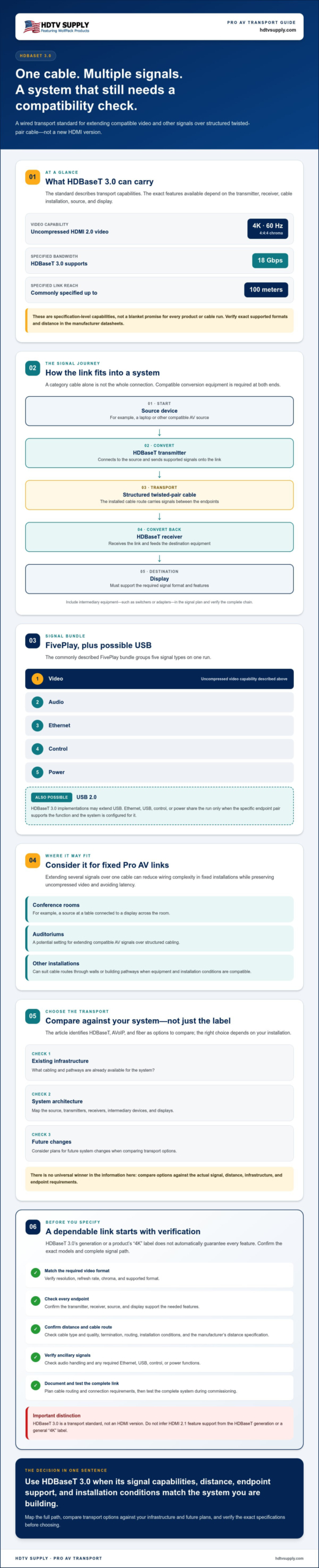
Could one cable simplify a 4K installation without compromising signal quality? If you’re asking “what is HDBaseT 3.0 and why should I use it,” the answer depends on your system’s distance, signal needs, and equipment compatibility. It carries uncompressed 4K at 60Hz with 4:4:4 color, along with audio, Ethernet, USB 2.0, control, and power over a single category cable for up to 100 meters.
It’s easy to confuse HDBaseT generations with HDMI versions, but they describe different parts of the signal path. HDBaseT 3.0 is a transport standard, not an HDMI version. Its ability to extend multiple signals over one cable can reduce wiring complexity in fixed Pro AV systems, while preserving uncompressed video and avoiding latency.
This guide explains what HDBaseT 3.0 carries, how it fits between source and display, and where it may suit conference rooms, auditoriums, and other installations. You’ll also learn how to compare it with AVoIP and fiber, and what to verify across transmitters, receivers, cable, and display specifications before choosing a transport option.
Key Takeaways
- Use “what is HDBaseT 3.0 and why should I use it” to frame your evaluation around the installation’s actual signal, distance, and endpoint requirements.
- Map the full signal path from source through transmitter and cabling to receiver and display, then confirm which ancillary signals the system must carry.
- Compare HDBaseT, AVoIP, and fiber against your existing infrastructure, system architecture, and plans for future changes.
- Before purchasing, verify the exact supported formats and features in the transmitter, receiver, and display datasheets.
- Plan and document cable routing, distance, and connection requirements, then test the complete link during commissioning.
What Is HDBaseT 3.0? A Clear Definition for Pro AV Systems
HDBaseT 3.0 is a wired transport technology that distributes video and other signals over suitable twisted-pair cable. It’s a way to carry a signal between AV equipment, not a new HDMI connector or HDMI version. If you’re asking what is HDBaseT 3.0 and why should I use it, start with its role: it can extend compatible, uncompressed 4K at 60 Hz with 4:4:4 chroma over structured cabling. The HDBaseT overview provides background on the standard and its development.
The specification describes transport capabilities, but the performance of a real link depends on the complete system. The transmitter, receiver, cable type and route, connected source, and display must all support the required format. HDBaseT 3.0 is commonly specified for links up to 100 meters, but that maximum isn’t a blanket promise for every device or cable installation. Check the manufacturer’s datasheet for the exact supported format and distance.
How HDBaseT 3.0 differs from an HDMI cable
A direct HDMI connection runs from a source to a display over an HDMI cable. An HDBaseT link uses conversion equipment at both ends: the source connects to a transmitter, the signal travels over structured twisted-pair cabling, and a receiver converts it back for the display. The endpoints are essential; a category cable alone doesn’t replace an HDMI connection.
This arrangement can suit a conference room where the source is at a table and the display is mounted across the room, or where a cable needs to pass through walls or building pathways. Plan for a compatible transmitter and receiver at the endpoints, and confirm the cable route and installation conditions before specifying the link.
What HDBaseT 3.0 does not guarantee
A standard’s capabilities aren’t automatically available in every product. One transmitter-receiver pair may support a particular video format or ancillary feature that another pair doesn’t. Verify resolution, refresh rate, chroma, maximum distance, audio handling, and any required control, network, or power functions against the exact model documentation.
HDBaseT 3.0 also doesn’t automatically mean HDMI 2.1 feature support. Don’t infer support for a feature from the HDBaseT generation or a product’s general “4K” label. Match the source, both transport endpoints, cable, and display to the signal requirements. That compatibility check is what turns a standard-level capability into a dependable system design.
How HDBaseT 3.0 Carries Video and Other Signals
An HDBaseT 3.0 link uses a transmitter and receiver to move signals between AV endpoints over structured twisted-pair cable. The source connects to the transmitter, the cable run carries the signal, and the receiver feeds the destination display. The standard’s commonly described FivePlay bundle covers video, audio, Ethernet, control, and power. HDBaseT 3.0 implementations may also extend USB, but the actual feature set depends on the connected equipment.
Signal path: Source device → HDBaseT transmitter → structured twisted-pair cable → HDBaseT receiver → display
Caption: The transmitter and receiver convert signals at each end so a compatible AV source can connect to a display over a structured-cable run.
The transmitter-and-receiver path
Consider a presentation system with a laptop at a conference table and a display across the room. The laptop connects to the transmitter, which sends the supported signals over the cable to a receiver near the display. Ethernet, USB, control, or power can share the run only if the specific endpoint pair supports those functions and the system is configured for them.
Both ends must support the required video format and transport features. Include any intermediary equipment, such as switchers or adapters, in the signal plan. A device in the path can affect format support or signal handling, so verify the complete chain rather than checking transmitter and receiver specifications in isolation.
Resolution, chroma, refresh rate, and cable distance
HDBaseT 3.0 is specified to carry uncompressed HDMI 2.0 video at 4K, 60 Hz, and 4:4:4 chroma. The HDBaseT Spec 3.0 announcement from the HDBaseT Alliance describes this capability. In practical terms, 4:4:4 preserves full color detail across the image, which can help keep fine text and graphics clear on presentation displays.
The specification supports up to 18 Gbps and links up to 100 meters, but those figures aren’t universal guarantees for every product or installation. Check the manufacturer datasheets for supported formats and maximum distance. Cable category and quality, termination, routing, and installation conditions all matter. Use the specified cable type, and don’t route the link through a network switch unless the equipment documentation explicitly supports that topology.
If you’re evaluating system components, verify each product’s exact HDBaseT configuration against its datasheet before purchase. That check helps confirm the required video format and any Ethernet, USB, control, or power functions your installation needs.
HDBaseT 3.0 vs. HDMI Extenders, AVoIP, and Fiber
The right transport method depends on the system architecture, cable route, required signal format, and how the installation may change over time. HDBaseT 3.0 is a point-to-point option for a defined source-to-display link, while AVoIP distributes signals across a network. HDMI extenders vary by design, and fiber may suit projects with particular distance or electrical-isolation needs. Compare the actual equipment specifications, not just the technology labels.
Option
Infrastructure and architecture
Format and operational considerations
HDBaseT 3.0
Structured twisted-pair cable; typically a transmitter-to-receiver link.
Check supported video and ancillary features on both endpoints. See the HDBaseT 3.0 specification and equipment datasheets.
HDMI extender
Depends on the extender design and required cable route.
The term covers different implementations. Verify format, distance, cabling, and whether the system needs matched transmitter and receiver units.
AVoIP
Uses network infrastructure and compatible networked endpoints.
Can support network-based routing and scalable distribution, but requires planning for network capacity, configuration, and endpoint compatibility.
Fiber
Uses optical cabling and compatible optical interfaces or conversion equipment.
May fit specific distance, bandwidth, or electrical-isolation requirements. Confirm the design and signal support for the project.
When HDBaseT 3.0 is a practical fit
Choose HDBaseT 3.0 for a fixed source-to-display route when structured cabling is available or planned and a compatible endpoint pair meets the signal requirements. For example, a room with a presentation source at one end and a display at the other may suit a direct point-to-point design. Confirm the required format, control or other ancillary signals, and matching HDBaseT features at both endpoints before specifying equipment.
When another transport method may fit better
Consider an HDMI extender when its verified format, cable route, and distance match the installation. AVoIP may be more suitable when sources and displays need network-based routing or the system must scale across multiple endpoints. Fiber is worth evaluating if copper-cable limitations or project conditions make it the stronger engineering choice. Each option still needs a compatibility check.
So, what is HDBaseT 3.0 and why should I use it? Use it when its point-to-point architecture and supported signal transport align with the planned cable route and endpoints. If the system calls for network distribution, a different route, or specialized cabling, compare those requirements against AVoIP or fiber before deciding.
How to Specify and Install an HDBaseT 3.0 Link
A reliable HDBaseT 3.0 link starts with a complete signal plan, not a cable choice made in isolation. Document what the source must send, what the display must receive, and which functions need to travel between endpoints. Then match every component and test the full path before closing walls or finalizing the cable route.
Pre-installation compatibility checklist
Before installation, compare the transmitter and receiver datasheets. Confirm they support the same HDBaseT generation, required video format, and any needed audio, Ethernet, USB, control, or power features. Check the source, display, and any intermediary devices too. One unsupported component can limit the whole signal chain.
Use this workflow to specify the link:
- Define the signal requirement. Record resolution, refresh rate, chroma, audio format, and any control, network, USB, or power needs.
- Map the complete signal path. List the source, transmitter, receiver, display, and every device between them. Verify format compatibility across the chain.
- Check the cable route. Confirm cable category, total run length, connectors, termination, and environmental conditions against the equipment manufacturer’s guidance. Account for the actual route, not just the straight-line distance between endpoints.
- Review installation requirements. Follow the manufacturer’s instructions for cable handling, power, grounding, and any other specified conditions. Don’t assume that a cable or feature supported by one model is supported by another.
- Test before finalizing. Connect and test the complete link using the intended source and display settings before concealing or permanently securing the cabling.
Commissioning the link and avoiding common failures
During commissioning, test the signal at the required resolution, refresh rate, and chroma setting. Confirm audio and any required control, network, USB, or power functions separately. A picture appearing at a lower setting doesn’t prove the system supports the final operating format.
If the image is unstable or absent, check the basics methodically: confirm device configuration and input selection, inspect cable terminations and connectors, and review the route for conditions the manufacturer warns against. Retest after each adjustment so you can identify the cause rather than changing several variables at once.
Keep a record of endpoint models, cable type and route, tested formats, connected intermediary devices, and final settings. That documentation gives service teams a clear reference if the system changes or needs troubleshooting. If you’re evaluating related AV components, review professional AV equipment and confirm each product’s exact capabilities against its manufacturer datasheet.
Should You Use HDBaseT 3.0? Make the Decision Against Your System Needs
So, what is HDBaseT 3.0 and why should I use it? It’s a transport option to consider when its supported signal format, cable route, distance, and endpoint features match a defined system requirement. Its point-to-point approach can carry multiple signals over structured cabling, but it also requires compatible equipment and a configuration that meets the project’s needs. It isn’t automatically the best choice for every installation.
A quick project-fit checklist
Before choosing a transport method, document what the system actually needs. Use this checklist to compare HDBaseT 3.0 with suitable alternatives:
- Signal: Record resolution, refresh rate, chroma, and audio requirements for the full source-to-display path.
- Additional functions: Identify whether Ethernet, USB, control, or power must travel between endpoints, and verify support on the specific equipment.
- Cable route: Check the planned route, total length, cable type, and installation conditions against the chosen manufacturer’s specifications.
- Compatibility: Confirm that the transmitter, receiver, source, display, and any intervening devices support the required format and features.
- Alternatives: Compare the complete system requirements with HDMI extenders, AVoIP, and fiber. Don’t choose based on a headline distance or format claim alone.
If the link is fixed, the cable path is suitable, and compatible endpoints provide the required features, HDBaseT 3.0 may be a practical fit. If the design needs network-based routing, different cabling, or capabilities the selected endpoints don’t support, evaluate another approach. Verify the exact product specifications before selecting or ordering professional AV hardware.
Find compatible AV equipment and technical guidance
HDTV Supply sells professional AV equipment, including WolfPack Modular Matrix Switchers. A matrix switcher can be part of a broader distribution design, but don’t assume that a particular model supports HDBaseT 3.0 or any specific transport configuration. Check the manufacturer’s datasheet for that exact capability and confirm compatibility with the rest of the signal chain.
For matrix-based systems, use the HDMI matrix switcher EDID management guide to review a related compatibility consideration. If you’re planning a modular distribution design, consult the modular HDMI matrix switcher guide as a planning resource. Treat both guides as starting points, then verify the selected equipment’s specifications against your project requirements.
Choose the Transport That Fits Your System
The practical answer to what is HDBaseT 3.0 and why should I use it comes down to whether its point-to-point signal transport matches your project. Start with the required video format and distance, then check the cable route, ancillary signals, and compatibility of every endpoint. HDBaseT 3.0 can be a strong fit for a defined link, but AVoIP, HDMI extenders, or fiber may better suit other system requirements.
Before ordering, verify exact model specifications rather than relying on a technology label or headline capability. Confirm that the source, transport equipment, and display support the formats and features your system needs.
HDTV Supply offers a catalog of more than 12,000 AV products and technical support for installers and integrators worldwide. Browse professional AV equipment and contact HDTV Supply for product guidance as you evaluate compatible system components.
With a clear signal plan and verified specifications, you can choose your transport method with confidence and move forward with a system built around the project’s actual needs.
Frequently Asked Questions
What is HDBaseT 3.0?
HDBaseT 3.0 is an AV transport standard for carrying video and other signals over suitable structured cabling between compatible devices. It isn’t an HDMI connector or a new HDMI version; it describes how signals travel between equipment. The applicable specification defines transport capabilities, while the transmitter and receiver models determine which formats and features a particular link supports. Check both datasheets, along with source and display compatibility.
How far can HDBaseT 3.0 transmit 4K video?
There isn’t one guaranteed distance for every HDBaseT 3.0 link. The achievable run depends on the applicable specification and the selected transmitter and receiver, as well as cable category, quality, termination, and installation conditions. Check the exact endpoint datasheets for the distance supported at your required resolution and refresh rate. Then validate the full cable route with the intended equipment before concealing or finalizing the cabling.
Does HDBaseT 3.0 support uncompressed 4K 60 Hz 4:4:4?
Uncompressed 4K at 60 Hz with 4:4:4 chroma is a commonly cited HDBaseT 3.0 capability, but the standard label alone doesn’t confirm support across a complete system. Verify the applicable specification and both endpoint datasheets. The source, display, cable, and any intermediary devices must also support the required format. Confirm compatibility across the entire signal path before specifying the equipment or relying on that video mode.
Is HDBaseT 3.0 the same as HDMI 2.1?
No. HDBaseT describes a signal-transport technology, while HDMI versions define interface specifications and associated features. The actual resolution, refresh rate, HDR, audio, and other functions depend on the specific devices in the signal chain. Don’t infer HDMI 2.1 support from an HDBaseT 3.0 label. Compare the source, transmitter, receiver, intermediary equipment, and display datasheets to confirm the capabilities the system needs.
Can HDBaseT 3.0 carry USB, Ethernet, control, and power?
HDBaseT is associated with transporting multiple signal types, but available functions vary by specification, implementation, and product. Check the transmitter and receiver datasheets for each required feature, including USB, Ethernet, control, and power. Don’t assume every HDBaseT 3.0 link supports all of them, or that connected devices will automatically work together. Confirm the required connections and functions across the complete system before selecting equipment.
Is HDBaseT 3.0 better than AVoIP or fiber?
Neither option is universally better. If you’re asking “what is HDBaseT 3.0 and why should I use it,” compare the project’s architecture, cable route, required formats, distance, routing needs, and endpoint compatibility. HDBaseT can suit a compatible point-to-point link; AVoIP can fit network-based distribution; fiber may meet particular distance or infrastructure requirements. Compare verified system specifications and operational needs before choosing a transport method.
What cable do I need for HDBaseT 3.0?
The required cable category and construction depend on the selected equipment, signal format, and intended distance. Follow the transmitter and receiver manufacturers’ cable guidance, and check requirements for proper termination and installation conditions. Account for the complete installed route and its environment, not just the distance between endpoints. Don’t assume a cable type or maximum run applies universally; confirm it against the exact equipment specifications before installation.
Leave a Reply
Want to join the discussion?Feel free to contribute!