
The Definitive Guide to HDCP 2.2 Matrix Switchers for 4K AV Distribution
A single outdated component in your signal chain can turn a premium AV installation into a series of expensive black screens. You’ve likely experienced the frustration of a handshake failure during a live event or discovered your new 4K sources won’t communicate with existing displays. The culprit is rarely the cable. It’s usually a misunderstanding of High-bandwidth Digital Content Protection. Deploying a professional grade HDCP 2.2 matrix switcher is the only way to bridge the gap between legacy hardware and modern 18Gbps content without losing signal integrity.
We know that troubleshooting signal dropouts is a drain on your time and resources when you need a “set and forget” distribution system. This guide ensures you master the complexities of bandwidth requirements and learn how to select a matrix that maintains full 4K 60Hz resolution across your entire venue. We’ll examine the technical specifications of the WolfPackSecure line, clarify the confusion between HDMI 2.0 and HDCP 2.2, and provide a roadmap for achieving zero handshake delays in any commercial environment.
Key Takeaways
- Understand how the HDCP 2.2 handshake functions as the critical gatekeeper for 4K UHD content protection between your sources and displays.
- Learn how to prevent “Key Exhaustion” failures that often occur when an unoptimized HDCP 2.2 matrix switcher attempts to connect more than eight displays.
- Discover how internal downscaling technology prevents a single legacy 1080p display from forcing your entire 4K system into lower resolutions.
- Evaluate the differences between fixed frame and modular architectures to select hardware that supports both immediate needs and future venue expansion.
- Identify the technical advantages of WolfPackSecure systems for maintaining uncompressed 18Gbps signal integrity and 4K 60 4:4:4 performance.
What is an HDCP 2.2 Matrix Switcher and Why Does It Matter?
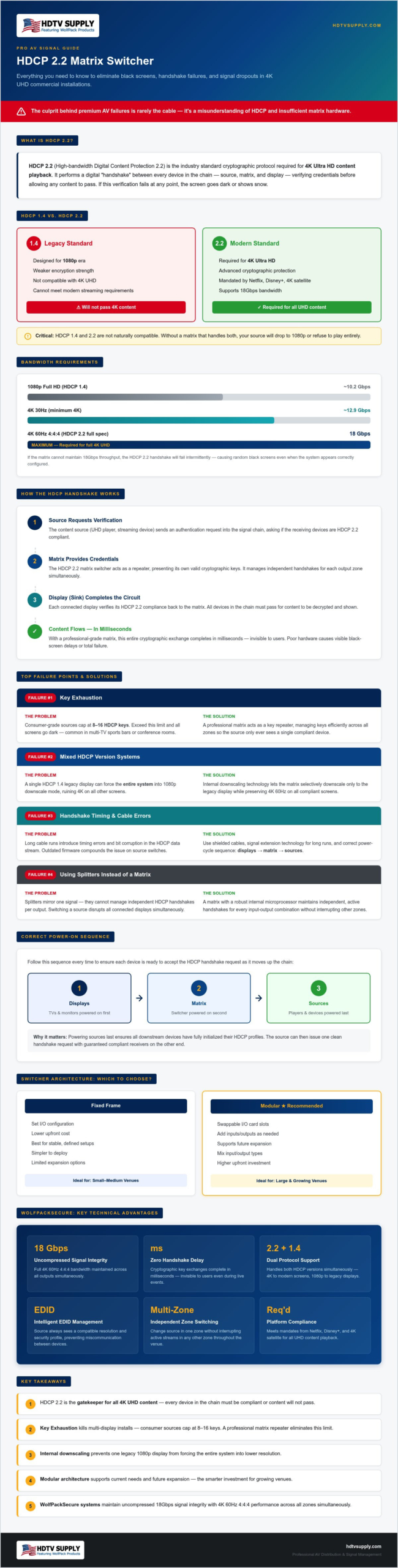
HDCP 2.2 is the industry standard designed specifically to prevent the illegal copying of 4K Ultra HD content. Without it, your high-end displays are essentially paperweights when connected to modern UHD players. An HDCP 2.2 matrix switcher acts as the central intelligence hub, managing the complex digital “handshake” between your video sources and your displays. It’s a cryptographic exchange where each device verifies the other’s credentials before allowing a single pixel to pass. If this verification fails at any point in the chain, the content remains encrypted and inaccessible.
While the older HDCP 1.4 standard served the 1080p era well, it lacks the encryption strength required for modern 4K ecosystems. The two standards are not naturally compatible. If your matrix doesn’t support the 2.2 protocol, your source will either drop the resolution to 1080p or refuse to play entirely. This results in the “Black Screen” or digital “Snow” that plagues poorly planned AV installations. Using a WolfPackSecure system ensures these handshakes happen in milliseconds, preventing the frustration of delayed content or signal loss.
The Evolution of Content Protection in 2026
Major streaming platforms like Netflix and Disney+, along with 4K satellite receivers, now mandate HDCP 2.2 for all UHD playback. As the industry moves toward uncompressed 4K 60Hz 4:4:4 signals, the bandwidth and security requirements have tightened. A professional HDCP 2.2 matrix switcher must handle multiple simultaneous keys across different zones. This ensures that a source in the main viewing area can play 4K while a legacy screen in a secondary zone doesn’t crash the entire system. High-capacity systems must manage these keys dynamically to avoid signal dropouts in large-scale venues.
Matrix Switching vs. Simple Splitters
Managing HDCP in a matrix environment is significantly more difficult than using a basic 1×2 splitter. A splitter simply mirrors one signal, but a matrix must maintain active, independent handshakes for every possible input-to-output combination. This requires a robust internal microprocessor to prevent signal dropouts during switching. Every time you change a source, the matrix must re-verify the link without disrupting other active zones. In this technical chain, the “source” is the device generating the content, while the “sink” refers to the display or projector receiving the signal.
The Mechanics of HDCP 2.2 Handshaking in Multi-Zone Systems
In a multi-zone environment, every source switch triggers a cryptographic “Key Exchange.” The source device requests verification, the matrix provides its credentials, and the sink device completes the circuit. This process happens in the background, but its efficiency determines whether you see a clean transition or a frustrating black-out. A high-performance HDCP 2.2 matrix switcher manages these keys across dozens of zones simultaneously, ensuring that one active stream doesn’t interrupt another.
A common failure point in large installations is “Key Exhaustion.” Many source devices, such as consumer-grade media players, have a hard limit on the number of keys they can issue, often capped at 8 or 16 displays. When your system exceeds this limit, the handshake fails and screens go dark. Professional systems mitigate this by acting as a repeater that manages keys more efficiently. Stabilizing these connections often requires HDMI matrix switcher EDID management to ensure the source always sees a compatible resolution and security profile.
Signal Integrity and Bandwidth Requirements
Achieving 4K 60Hz 4:4:4 resolution requires a consistent 18Gbps bandwidth. If the matrix cannot maintain this throughput, the HDCP 2.2 handshake will fail intermittently. In high-traffic environments like sports bars, high-speed switching is mandatory to prevent signal drops when changing channels across multiple TVs. Reliability also depends on physical infrastructure. Long cable runs can introduce timing errors that break the handshake, making signal extension technology a necessity for larger venues.
Troubleshooting Common Handshake Failures
When a handshake fails, the issue usually stems from the cable, the source, or outdated matrix firmware. Start by checking the “Power Cycle” sequence. For the best results, power on the displays first, then the matrix, and finally the sources. This allows each device to be ready for the handshake request as it moves up the chain. Using high-quality shielded cables is essential for preventing bit errors that can corrupt the HDCP data stream and cause sync loss.
If you’re dealing with persistent connectivity issues in a complex setup, our technical team can help you identify the right WolfPackSecure hardware to stabilize your signal chain.
Solving the Mixed-Version Dilemma: HDCP 2.2 vs. 1.4
The “Lowest Common Denominator” rule is the primary obstacle in modern AV integration. If your system includes a single 1080p display with HDCP 1.4, your 4K source may automatically downscale its output to match that legacy screen. This results in every zone receiving a 1080p signal, rendering your UHD investment useless. A professional HDCP 2.2 matrix switcher solves this by utilizing internal downscalers. These components allow the matrix to pull a full 4K signal from the source while simultaneously serving 1080p to legacy zones and UHD to 4K zones. This ensures that your high-end displays aren’t penalized for the hardware limitations of secondary screens.
HDCP converters can assist in legacy integration, but they often introduce latency or signal instability. Forcing a system-wide downgrade to HDCP 1.4 is a common “quick fix,” but it’s a poor strategy for the long term. It prevents you from accessing high-value 4K content from streaming services that mandate the 2.2 protocol. While 1.4 is more stable for long cable runs in some specific instances, the loss of resolution and dynamic range makes it an unacceptable compromise for modern venues. Relying on hardware that can handle mixed versions natively is the only way to maintain system uptime.
Managing Legacy Displays in a 4K System
Modular architectures offer the most flexibility for mixed environments. By using specific input and output cards, you can tailor each port to the specific requirements of the connected hardware. Understanding the differences between WolfPackSecure vs WolfPack Modular matrix switchers is essential when planning a system that includes various display types. Internal scaling remains the most reliable method for ensuring that a legacy display in a bar area doesn’t degrade the viewing experience in the main theater. It allows for a “set and forget” installation where the hardware handles the heavy lifting of format conversion.
EDID Management as a Solution
EDID management is the technical bridge that stabilizes these mixed environments. “Copy EDID” functions allow the matrix to mirror the capabilities of your best display back to the source, tricking it into remaining in 4K mode. In mission-critical settings, setting a “Fixed EDID” prevents the source from constantly renegotiating the connection, which reduces sync times. You must also consider audio profiles. If one zone only supports 2-channel stereo, a poorly configured EDID might force the entire system to drop its multi-channel audio stream. Proper configuration ensures that high-definition audio and video remain intact across all compliant zones.
Evaluating Switcher Architecture: Modular vs. Fixed Frame
Fixed frame switchers provide a stable, cost-effective foundation for environments with defined, static requirements. If your venue only needs a 4×4, 8×8, or 16×16 setup that won’t change for the foreseeable future, these units offer immediate reliability. However, high-bandwidth applications often demand more than just fixed ports. A professional HDCP 2.2 matrix switcher must maintain a high-speed internal chassis backplane to handle the massive data throughput of encrypted 4K content across all outputs simultaneously. Without sufficient backplane speed, the system may struggle to maintain simultaneous handshakes, leading to intermittent sync issues. Integrating these systems with a WolfPad TV control system allows for seamless management of complex routing and security handshakes from a single, intuitive interface.
When to Choose a Modular Chassis
Modular systems are the definitive choice for future-proofing and large-scale growth. They allow you to scale your hardware as your business expands, perhaps starting with an 8×8 configuration inside a 32×32 frame. This architecture also excels at mixing signal types on a single platform. You can add specialized input and output cards for SDI, HDBaseT, or Fiber alongside standard HDMI. Field-serviceability is another critical advantage. If a single port fails, you can swap the specific I/O card in minutes without taking the entire system offline. This minimizes downtime in mission-critical environments like command centers or high-volume sports bars where every second of uptime is vital.
Performance Standards: 4:4:4 vs. 4:2:0
Chroma subsampling is a major differentiator in professional AV that many consumer-grade guides overlook. While basic gear often utilizes 4:2:0 subsampling to save bandwidth, professional 4:4:4 subsampling is mandatory for displaying crisp text and high-detail retail graphics without color bleeding. HDCP 2.2 is designed to protect this high-bit-depth content, including advanced HDR10 and Dolby Vision formats that require massive data throughput. 18Gbps uncompressed switching is superior for pro AV because it eliminates the signal artifacts and processing latency introduced by heavy compression algorithms. To ensure your venue meets these rigorous performance standards, select a WolfPackSecure matrix switcher that guarantees 4:4:4 compliance across every zone.
The WolfPackSecure Solution: Professional-Grade Compliance
WolfPackSecure hardware is engineered to eliminate the vulnerabilities inherent in standard AV distribution. By deploying an HDCP 2.2 matrix switcher from this specialized line, you secure guaranteed 4K 60 4:4:4 performance across every output in your facility. Professional installers prioritize WolfPack hardware because it’s built for mission-critical reliability, handling the heavy lifting of constant cryptographic verification without dropping signals. HDTV Supply provides a comprehensive “One-Stop” experience, combining a vast inventory of over 12,000 products with global technical support to ensure your system architecture is sound from the first power cycle.
Why Reliability Trumps Initial Cost
Cheap consumer-grade gear often leads to significant hidden costs that far outweigh any initial savings. Every time a system fails due to a handshake error or key exhaustion, you face the expense of truck rolls, technician hours, and venue downtime. WolfPack hardware is specifically designed for 24/7 operation in demanding environments like sports bars, casinos, and command centers. These units manage heat and signal timing more effectively than entry-level alternatives, preventing the component fatigue that leads to premature failure. Our Sports Bar TV Distribution System solutions utilize these robust components to ensure that game-day broadcasts remain uninterrupted across dozens of screens simultaneously. For project managers sourcing hardware at scale, understanding how to procure commercial AV equipment online without sacrificing system compatibility or professional-grade reliability is an essential part of keeping deployment costs under control. Optional extended warranties offer additional long-term protection, ensuring your investment remains secure as content standards continue to evolve. Before your manufacturer coverage expires, it’s worth evaluating whether a pro AV extended warranty is worth it for your WolfPack infrastructure to eliminate unpredictable repair costs and secure priority technical support.
Getting Started with Your 4K Upgrade
Designing a custom 4K distribution system shouldn’t be a manual burden for your team. We offer a free custom design service to help you layout your system correctly before you purchase a single cable. This planning stage is vital for identifying potential bottlenecks in your network or existing cabling that might not meet the 18Gbps requirements of a modern HDCP 2.2 matrix switcher. We analyze your specific venue needs, whether you are integrating a massive video wall or a multi-zone corporate office. Once your layout is finalized, our global technical support team remains available to assist with the complexities of multi-zone integration and EDID configuration. Contact an HDTV Supply expert today to design your HDCP 2.2 compliant system and ensure total signal integrity across your entire venue.
Securing Your 4K Infrastructure for Long-Term Performance
Mastering the complexities of high-bandwidth content protection is the difference between a reliable AV system and a source of constant downtime. You now understand that HDCP 2.2 isn’t just a specification; it’s the gatekeeper for every 4K stream in your venue. By selecting the right HDCP 2.2 matrix switcher, you eliminate handshake delays and ensure that legacy 1080p displays don’t compromise your UHD sources. Whether you choose a fixed frame for immediate efficiency or a modular chassis for future expansion, the goal remains the same: uncompressed 4K 60Hz 4:4:4 signal integrity.
With over 12,000 professional AV products in our catalog, HDTV Supply provides the specialized hardware and expert technical support required for mission-critical installations. Our industry veterans are ready to help you navigate specific system requirements and architecture challenges. It’s time to move past the frustration of signal dropouts and embrace a “set and forget” distribution strategy. Browse our full range of WolfPackSecure HDCP 2.2 Matrix Switchers and build a system that performs flawlessly today and scales for tomorrow. Your venue’s visual experience is in expert hands.
Frequently Asked Questions
Will an HDCP 2.2 matrix switcher work with my old 1080p TVs?
Yes, but you must account for resolution differences. Most HDCP 2.2 matrix switchers are backward compatible with 1080p displays using the older 1.4 standard. However, without internal downscaling, a 4K source might be forced to output 1080p to every screen in the system. Using a WolfPack system with built-in scaling allows you to maintain 4K in one zone while serving 1080p to your older televisions, preventing a system-wide resolution drop.
Do I need special HDMI cables for HDCP 2.2 matrix switching?
You must use “Premium High Speed” HDMI cables rated for 18Gbps to ensure reliable performance. While standard cables might work for 1080p, they often lack the bandwidth required for the encrypted 4K 60Hz 4:4:4 handshake. Using cables that aren’t rated for this throughput will cause intermittent signal dropouts or complete sync failure. Always verify that your cables are certified for HDMI 2.0b specifications to maintain total system uptime and signal integrity.
What happens if I connect a non-HDCP compliant device to the matrix?
If you connect a non-compliant source or display, the system will likely fail to show protected content. You’ll see a black screen, digital noise, or an on-screen error message. Unprotected content, like a PC desktop or home movies, might still pass through the system. However, commercial streaming services and UHD discs will block the signal entirely if they don’t detect a secure, end-to-end cryptographic link between every device in the chain.
Can I bypass HDCP 2.2 using a matrix switcher?
No, a professional HDCP 2.2 matrix switcher is designed to manage and pass these security keys, not circumvent them. These devices are legally required to comply with content protection standards to prevent illegal copying. Attempting to bypass encryption is a violation of industry regulations and typically results in total signal failure. Instead of looking for a bypass, you should focus on hardware that manages handshakes efficiently to ensure seamless switching across all your zones.
Is HDCP 2.2 backward compatible with HDCP 1.4?
HDCP 2.2 is not naturally backward compatible with 1.4, but most modern matrix switchers include hardware to bridge this gap. While a 2.2 source won’t play 4K content on a 1.4 display, the matrix can often negotiate a lower resolution or use internal conversion to maintain the link. It’s important to remember that 2.2 was built specifically for 4K security, whereas 1.4 was designed for the 1080p era, making them fundamentally different protocols.
How many displays can a single WolfPack matrix switcher handle before hitting a key limit?
WolfPack systems are engineered to handle large-scale distributions, but the ultimate limit often depends on the source device’s key capacity. Many consumer players are limited to 8 or 16 keys. However, our professional-grade hardware acts as an active repeater, managing these cryptographic keys to support up to 32, 64, or even more displays in a single system. This architecture prevents the “Key Exhaustion” issues that often plague cheaper, unmanaged splitters and entry-level switches.
Why is my 4K screen showing a “content protected” error message?
This error usually indicates a handshake failure somewhere in your signal chain. It often happens when one device, such as a cable or an older display, doesn’t support the 2.2 standard. If the source doesn’t receive the correct cryptographic response within a specific timeframe, it blocks the video for security. Check your firmware versions and ensure every component, including any extenders or converters, is fully compliant with modern 18Gbps 4K security and bandwidth protocols.
What is the difference between HDMI 2.0 and HDCP 2.2?
HDMI 2.0 is the physical connection standard that defines bandwidth and features, while HDCP 2.2 is the security protocol that protects the content. You can have an HDMI 2.0 port that doesn’t support HDCP 2.2, which is a common source of confusion in older 4K hardware. For a successful 4K installation, your HDCP 2.2 matrix switcher must support both the 18Gbps physical throughput of HDMI 2.0 and the cryptographic requirements of the 2.2 security standard.
Leave a Reply
Want to join the discussion?Feel free to contribute!