

Fail-Safe AV System Design: Build Resilience Into Every Signal Path
What if a single failed source, switcher, network link, or power supply takes essential displays offline? Fail-safe AV system design starts by deciding what must keep working when a component fails, not by duplicating every device. A backup that shares the same vulnerable connection or power source may add complexity without protecting the signal path that matters.
It’s reasonable to expect critical content to remain available during a partial outage, but resilience depends on matching the strategy to the risk. Backup components, alternate paths, and graceful degradation each protect different functions. In networked AV, the design also needs to account for the network and control layer, not just the hardware carrying the signal.
This guide will help you prioritize essential AV functions, trace failure points across sources, switching, distribution, network, and power, and compare practical resilience strategies. You’ll also learn how to distinguish a system that defaults to a controlled state from one that continues operating at reduced capacity, then turn your requirements into a design brief for selecting compatible switching and distribution equipment.
Key Takeaways
- Define what must remain available during an outage, then distinguish controlled safe-state behavior from continued operation and reduced-capacity fallback.
- Trace each signal path from source to display, including shared power, network, control, and cabling dependencies that could create a single point of failure.
- Use fail-safe AV system design to match resilience strategies to specific risks, weighing failure coverage against switching behavior, complexity, and recovery needs.
- Turn essential functions into measurable acceptance criteria, then test realistic failure scenarios to verify expected behavior and recovery.
- Translate the approved architecture into requirements for switching, distribution, control, and display processing before selecting compatible AV hardware.
Fail-Safe AV System Design for Real-World Operations
Fail-safe AV system design defines how a system should behave when a signal path, component, or connection fails, so essential functions remain protected and disruption stays controlled. The goal isn’t to promise zero downtime. It’s to make the system’s response predictable, limit the impact of a fault, and preserve the services that matter most.
That distinction matters in commercial AV. A blank secondary display may be an acceptable fault; losing emergency information or an operator’s ability to monitor a venue may not be. The right response depends on what the system supports and what users need during an outage. General fail-safe design principles emphasize controlled behavior rather than assuming that duplicated components alone prevent failure.
Which AV functions must remain available?
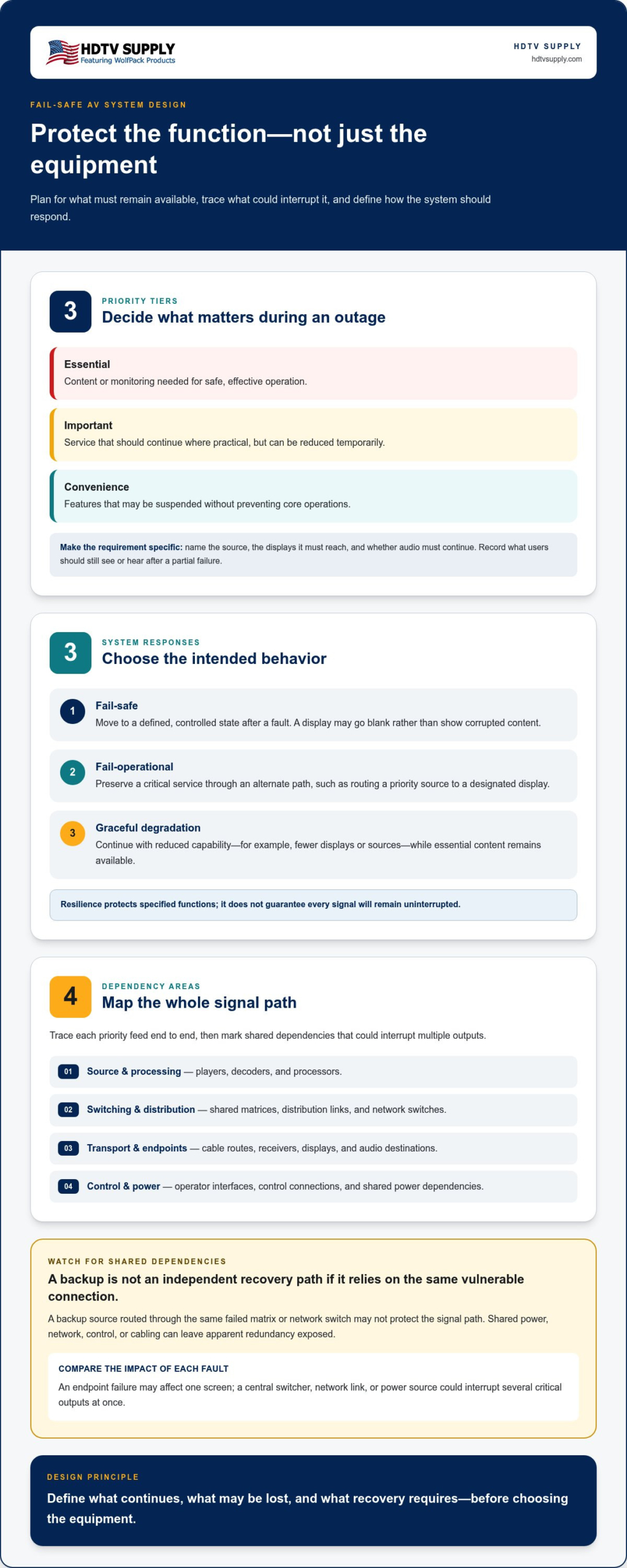
Start with the required function, not the equipment list. Separate mission-critical content and monitoring from secondary features such as confidence displays, optional signage, or convenience routing. A venue might prioritize emergency information on designated displays, keep primary venue programming available, and preserve operator monitoring, while accepting the loss of a nonessential screen or an alternate source.
For each function, ask: After a partial failure, what should users still see or hear? Record the answer by audience and location. “Keep video running” is too broad. Specify the source, the displays it must reach, and whether audio must continue. This turns priorities into requirements that can guide signal-path mapping and equipment selection.
- Essential: Content or monitoring needed for safe, effective operation.
- Important: Service that should continue where practical, but can be reduced temporarily.
- Convenience: Features that may be suspended without preventing core operations.
These categories depend on the application. Emergency messaging in one facility may be essential, while a secondary program feed in another may be a convenience.
Fail-safe versus fail-operational AV behavior
Fail-safe behavior moves the system into a defined, controlled state after a fault. For example, a display may go blank rather than show corrupted content, or a control system may prevent an unreliable route from being selected. The outcome is deliberate, even if the service is temporarily unavailable.
Fail-operational behavior preserves a critical service through an alternate path after a failure, such as routing a priority source through an available path to a designated display. Graceful degradation sits between full operation and shutdown: the system continues with reduced capability, perhaps supporting fewer displays or sources while essential content remains available.
Choose an approach based on the consequences of failure. A controlled blank screen may be preferable to misleading or unstable content. Where losing a specific feed would disrupt operations, an alternate route or reduced-capacity mode may be justified. Define which functions should continue, what may be lost, and what recovery requires. Resilience protects specified functions; it does not guarantee that every signal will remain uninterrupted.
Map AV Failure Points Across Sources, Switching, Distribution, and Displays
A resilient design starts with a map of the signal path, not a list of equipment. Trace each critical feed from its origin through processing, switching, transport, and distribution to every display and audio endpoint. Add the control interfaces and power dependencies that keep each stage usable. This end-to-end view helps distinguish a local fault from one that could interrupt service across a room or an entire venue.
Apparent redundancy can fail if alternate paths still depend on the same power, network, control interface, or cable route. A backup source routed through the same failed matrix or network switch is not an independent recovery path.
Find single points of failure in an AV signal chain
Build one path for each priority source and mark every device and connection it uses. For example: media player, processor, matrix switcher, transport link, distribution device, then assigned displays and audio endpoints. Draw control separately to show how an operator selects a source and how commands reach the equipment.
Next, look for shared dependencies. A single matrix may feed several displays; one network switch may carry multiple AV streams and control traffic; a shared power circuit may support both primary and backup devices. Mark these as potential single points of failure. Then compare their impact: a failed endpoint may affect one screen, while a central switcher, network link, or power source could interrupt several critical outputs at once.
- Source and processing: Note which feeds depend on a specific player, decoder, or processor.
- Switching and distribution: Identify shared matrices, distribution links, and network switches.
- Transport and endpoints: Record cable routes, receivers, displays, and audio destinations.
- Control and power: Map operator interfaces, control connections, and shared power dependencies.
Dependency mapping is useful beyond audiovisual systems. NIST’s work on reliable and safe automated vehicles focuses on road vehicles rather than AV signal chains, but also addresses dependable operation and communications.
Prioritize failure scenarios by operational impact
Don’t treat every fault as equally urgent. For each mapped failure, record the functions and users affected, the expected duration, and whether an operator has a workable fallback. A disconnected local display might have a simple workaround. Loss of a shared network switch could affect multiple rooms and require a different response.
Separate plausible operational faults, such as a loose connection or source-device failure, from low-probability, high-impact events, such as loss of a shared power source. Include assumptions in the map: which equipment shares power, whether network access is available during an outage, how quickly an operator can respond, and whether spare inputs or alternate routes exist. These assumptions expose gaps before they become test failures.
Once dependencies are visible, integrators can match switching and distribution requirements to the architecture. HDTV Supply offers professional AV hardware, including matrix switching and distribution categories that can be evaluated against those requirements.
Compare AV Redundancy Strategies Without Adding Unnecessary Complexity
Choose a resilience measure for a defined failure and priority function. A standby device, alternate route, local fallback, or reduced-capacity mode can each help, but they protect against different faults and require different recovery steps. In fail-safe AV system design, the useful question isn’t “How much can we duplicate?” It’s “What service must survive, and which failure could interrupt it?”
Use this comparison to narrow the options. Actual behavior depends on how each path is connected, powered, controlled, and operated.
Duplicate hardware: Covers failure of a primary component if a suitable standby is available. Changeover may be automatic or operator-directed. Complexity increases when the spare must be maintained, configured, and tested.
Alternate routing: Provides another signal path around a failed link or switching point. It may require manual or automated route selection, and recovery depends on the alternate route being available and compatible.
Local fallback: Keeps a limited source or function available at a location if the central path is disrupted. It can reduce dependence on shared distribution, but may require local controls and a simpler operating procedure.
Graceful degradation: Preserves selected priority outputs while secondary features are unavailable. It may avoid complex changeover, but users accept reduced system functionality until full service is restored.
None of these approaches covers every failure mode. Redundancy only helps when the backup avoids the dependency that caused the original fault. Two signal paths that share one power source, network switch, control interface, or cable route may fail together. Assess independence across the whole path rather than assuming duplicate boxes provide it.
When does AV hardware redundancy make sense?
Consider standby equipment where losing a function would have a serious operational consequence and a spare can restore it. A standby device replaces a failed component; an alternate signal path routes around a failure point. Either approach can add complexity. Check whether both paths rely on shared power, network, or control. If they do, the apparent backup may not cover the failure that matters.
When is graceful degradation the better choice?
Use graceful degradation when essential content can continue without every feature. A venue might retain priority programming on selected displays while secondary screens or optional routing remain unavailable. Manual source selection or a simpler local fallback may be appropriate if operators can use it reliably. The trade-off is straightforward: basic service continues, but full functionality waits for recovery.
Before selecting a strategy, compare its failure coverage with the operational impact and the effort required to restore normal service. Specify what should switch, who initiates the change, what users will notice, and how the system returns to its normal configuration. These decisions turn redundancy from a vague goal into a testable design choice.
Build a Fail-Safe AV Design Brief and Test Its Failure Scenarios
A design brief turns operational priorities into requirements that can be selected, tested, and handed over. For fail-safe AV system design, document both normal performance and expected behavior under fault. Avoid broad targets such as “reliable video.” State which sources and outputs matter, what interruption is acceptable, and how operators should restore service.
Use this workflow to build the brief:
- 1. Define essential service. List priority content, destinations, associated audio, control functions, and the users who depend on them.
- 2. Set performance requirements. Record required formats, interfaces, signal distances, and acceptable interruption or recovery time for each critical function.
- 3. Map dependencies. Connect each source to its processing, switching, transport, control, power, and endpoint requirements. Note shared dependencies and assumptions.
- 4. Specify fallback behavior. Describe what remains available after each priority failure, whether changeover is manual or automatic, and what reduced functionality is acceptable.
- 5. Separate required from optional. Mark resilience requirements as must-have, and distinguish them from convenience features that can be suspended during an outage.
- 6. Validate and record. Test the agreed failure scenarios, compare results with acceptance criteria, and document recovery steps for operators.
Centralized routing decisions affect how sources can reach multiple destinations and which alternate routes are practical. Use the modular HDMI matrix switcher guide as a reference when defining routing requirements. The system architecture and documented capabilities should determine the final design.
Turn operational priorities into design requirements
Write requirements in terms that can be verified. For example: “The priority source must reach the designated displays after loss of the primary signal link, using the documented fallback procedure.” Add measurable limits for interruption and recovery where the project requires them. Specify supported signal formats, interfaces, control actions, and path distances, then identify which features are essential and which are optional.
Also state the assumptions behind the design. Note power availability, network access, operator authority, spare inputs, and who is responsible for initiating recovery. If an assumption changes, the design may no longer meet its intended criteria.
Validate the design with controlled failure tests
Before operational handover, test representative source, link, switcher, network, and power-loss scenarios under controlled conditions. For each test, record the initiating fault, affected outputs, content that remains available, operator actions, interruption, and time to restore the required service. Confirm control behavior as well as signal delivery.
Compare every result with the acceptance criteria. If a priority output fails, recovery takes longer than allowed, or the fallback depends on an unavailable control path, revise the design or procedure and retest. Keep the test record with the system documentation so operators know what was verified and how to respond.
Use the completed brief to compare compatible switching and distribution hardware. Explore professional AV hardware that aligns with the documented architecture and requirements.
Select AV Hardware That Supports the Resilience Plan
Once the resilience requirements are documented, evaluate equipment by function and system fit. A device can meet a format requirement yet still fail to support the planned signal path, control method, or fallback procedure. Architecture determines resilience; no individual product should be treated as a guarantee of uninterrupted operation.
For fail-safe AV system design, compare each candidate’s current documentation with the approved requirements. Confirm the complete path, from source output through switching and distribution to the display or audio endpoint, rather than checking components in isolation. Include control and power dependencies so the selected hardware fits the intended operating and recovery plans.
Match equipment categories to system functions
Select product categories according to the job the system must perform. A matrix switcher suits applications that route multiple sources to multiple destinations. Modular matrix switching can support an architecture built around centralized routing, while an HDMI video wall processor is relevant when displays must function as a coordinated visual canvas. TV distribution equipment serves systems that deliver centrally managed content to multiple screens.
HDTV Supply offers professional AV hardware categories including WolfPack Modular Matrix Switchers, HDMI Video Wall Processors, and TV distribution systems. These categories help integrators align equipment selection with the signal flow and endpoint requirements defined in the design brief.
Use product documentation to confirm design fit
Check every relevant specification against the project requirements before selection. Compare supported resolutions and formats, input and output interfaces, control methods, and signal-distance needs. Confirm compatibility across connected devices, not just the central switcher. EDID behavior can affect how a source and display negotiate video formats, so the HDMI matrix EDID management guide provides useful context for evaluating signal compatibility.
Verify any claimed redundancy, failover, or monitoring functions in the current product documentation. Don’t infer these capabilities from a product category or from the presence of multiple inputs and outputs. Record the documented behavior alongside the design requirement, then confirm it matches the intended failure response and test plan.
- Routing: Confirm source and destination needs align with the matrix design.
- Processing: Check video wall processing requirements against the display layout and intended canvas.
- Distribution: Match the distribution approach to the screens receiving managed content.
- Control: Verify the required operator commands and interfaces fit the operating plan.
HDTV Supply sells professional AV hardware and provides product assistance and technical support for installers and integrators. Use the design brief to compare compatible switching, distribution, control, and display-processing equipment. Keep the final selection tied to documented specifications and the resilience behavior the system is expected to deliver.
Make Resilience the Starting Point for Your Next AV Project
Carry your documented requirements into the next equipment decision. A clear operating target keeps fail-safe AV system design grounded in the service users need, rather than in redundancy for its own sake. Use it to guide compatibility checks, procurement, and future system changes, then retain the failure-test results as a practical reference for operators and integrators.
For equipment selection, HDTV Supply brings together more than 12,000 professional AV products, with worldwide product support for installers and integrators. Its offerings include WolfPack modular matrix switchers and HDMI video wall processors, which can be assessed against your approved architecture and signal requirements. The design determines the resilience, so match each device’s documented capabilities to its intended role.
Explore professional AV switching and distribution equipment to compare hardware options for your plan. With requirements in hand, you can make focused comparisons and move toward a system that responds predictably when a component or connection fails.
Frequently Asked Questions
What does fail-safe mean in AV system design?
Fail-safe AV system design means a system has a defined response to faults, rather than behaving unpredictably when a device or connection stops working. That response might protect users from misleading content, preserve a limited service, or make the affected signal path unavailable in a controlled way. For example, a display could show a known fallback screen instead of unstable video. The right behavior depends on the function and the consequences of failure.
Can an AV system keep working if the matrix switcher fails?
Yes, but only if the design provides a way to route around or work without the failed switcher. A direct connection from a priority source to a designated display, for example, may preserve limited service if it doesn’t rely on the matrix. The workaround may require manual reconnection or source selection. Check whether the fallback also depends on the switcher’s power, control system, or shared cabling before treating it as an independent path.
What is the difference between fail-safe and fail-operational AV design?
Fail-safe design prioritizes a controlled response to a fault, even if that means a function becomes unavailable. Fail-operational design aims to keep a critical function running after a fault, typically through an alternate path or resource. For example, a system might blank an unreliable display in a fail-safe response, while a fail-operational plan routes priority content to another available display. Choose based on what users need and the consequences of losing service.
How do you identify a single point of failure in an AV system?
Trace a critical signal from its source to its destination, then list every device, connection, power source, and control dependency it needs. A component is a potential single point of failure if its loss interrupts a required function and no usable workaround exists. Check shared equipment closely: one network switch or control interface may serve multiple rooms, even if each room has its own display and source.
Does redundant AV equipment guarantee zero downtime?
No. Redundancy can reduce the impact of specific failures, but it can’t guarantee uninterrupted operation. A standby device may share power, network access, configuration, or control with the primary device, leaving both exposed to the same fault. Changeover can also take time or require operator action. Define which failures the backup is intended to cover, then test whether the alternate path works under those conditions.
What should an AV system failure test include?
Test failures that challenge different parts of the design, such as loss of a source, a signal link, a central switcher, network access, or power to a relevant device. For each test, verify the expected output and control behavior, note what users experience, and record the operator steps needed to restore service. Use a controlled test plan that protects active operations, and document unexpected results for corrective action and retesting.
How can a modular HDMI matrix switcher support a resilient AV design?
A modular HDMI matrix switcher can serve as the central routing point for sources and destinations when the system requires flexible signal distribution. Its role in a resilient design depends on how the complete system handles switcher faults, alternate routes, power, and control. Modularity alone doesn’t provide failover. Compare documented inputs, outputs, formats, and control methods with the project requirements, and verify any resilience claims in current product documentation.
Leave a Reply
Want to join the discussion?Feel free to contribute!