
4:4:4 Chroma Subsampling for Pro AV: The Professional’s Guide to Uncompressed Color
If your 4K display looks stunning for video but displays blurry, unreadable text from a PC, your signal chain is failing the most basic requirement of professional integration. You’ve likely spent hours troubleshooting why a premium 4K60 installation still results in client complaints about legibility or color fringing around fine lines. It’s a frustrating reality in commercial environments where high-detail graphics and desktop interfaces are the primary content. Achieving pixel-perfect reproduction requires a deep understanding of 4:4:4 chroma subsampling for pro AV and the bandwidth constraints that often throttle performance.
This guide provides the technical mastery you need to implement uncompressed color correctly, ensuring every pixel is rendered with absolute accuracy. You’ll learn how to manage the shift from HDMI 2.0 to the 96Gbps capabilities of HDMI 2.2 and why HDBaseT 3.0 is now the standard for 100-meter uncompressed runs. We’ll also detail how to select the right WolfPackSecure matrix switcher to handle 18Gbps 4K60 4:4:4 signals without degradation. By the end of this article, you’ll have a clear roadmap to future-proof your commercial installations and eliminate the technical bottlenecks that compromise visual integrity.
Key Takeaways
- Identify why 4:4:4 provides the uncompressed color accuracy necessary for high-detail graphics and professional-grade desktop reproduction.
- Master the technical distinctions between 4:4:4, 4:2:2, and 4:2:0 to correctly specify 4:4:4 chroma subsampling for pro AV in client installations.
- Resolve common complaints regarding blurry text and color fringing by implementing full chroma resolution for 4K displays and digital signage.
- Navigate the bandwidth requirements of 18Gbps signal chains and select the appropriate cables to prevent signal degradation over long distances.
- Select and configure WolfPackSecure matrix switchers to achieve reliable, high-capacity switching for uncompressed 4K60 4:4:4 video environments.
What is 4:4:4 Chroma Subsampling in Pro AV?
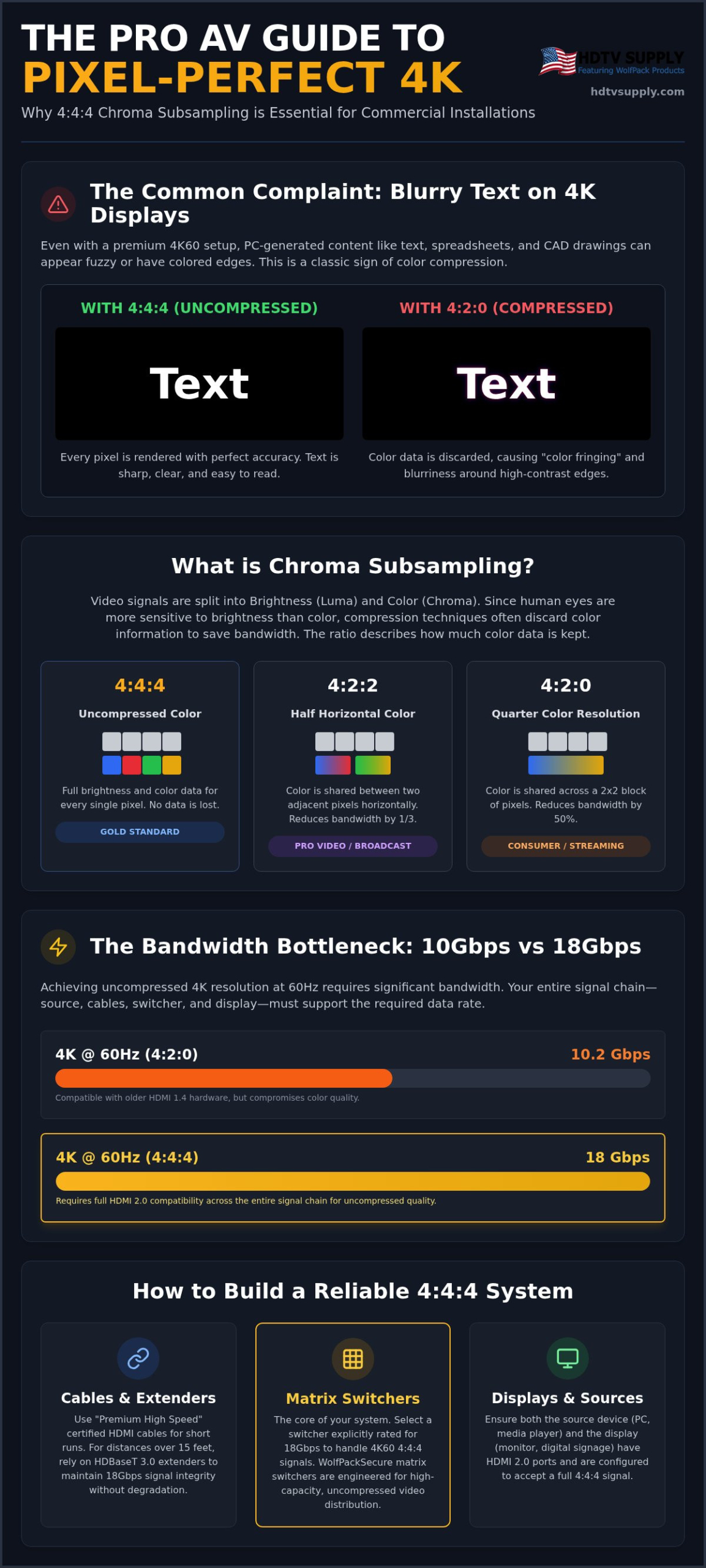
4:4:4 chroma subsampling for pro AV is the specific method of encoding video where every single pixel retains its own unique color and brightness data. In technical terms, it signifies a signal with zero color compression. While consumer electronics often prioritize small file sizes over fidelity, professional environments require uncompressed accuracy to maintain the integrity of the source material. In a 4:4:4 system, the signal delivers full resolution for both color and brightness, ensuring that what the source generates is exactly what the display shows.
The engineering rationale behind subsampling is based on human biology. Our eyes are significantly more sensitive to brightness, known as luminance, than they are to color, or chrominance. Engineers exploit this by discarding color data while keeping brightness intact to save bandwidth. This works well for movies where motion hides the loss. However, pro AV differs because it frequently involves static text, sharp user interfaces, and high-contrast logos. In these scenarios, the missing color data becomes immediately apparent to the viewer.
The Role of Luma and Chroma in Signal Distribution
Video signals are typically split into three components: the “Y” for luma and “CbCr” for chroma. Chroma subsampling allows encoders to reduce the overall bit rate by sampling the color components at a lower resolution than the brightness. When a system uses 4:2:2 or 4:2:0 ratios, it’s effectively “averaging” the color of adjacent pixels to reduce data load. 4:4:4 is the gold standard for zero-loss color reproduction because it refuses to discard this data. It provides a 1:1 relationship between the luma and chroma samples for every pixel on the screen.
Visual Impact: Why Your Eyes Notice Subsampling
The most common visual artifact of subsampling is “color bleeding” or fringing. This effect appears as a blurry shadow around sharp edges, specifically where bright colors meet dark backgrounds. If you use 4:2:0 subsampling, the system smudges color information across a four-pixel block. This might be invisible when you’re sitting ten feet away from a home theater screen watching a film. It’s a different story at a commercial workstation or a digital signage kiosk. At these closer viewing distances, the lack of 4:4:4 chroma subsampling for pro AV makes small text appear fuzzy and unreadable. High-capacity distribution requires the full color depth to keep spreadsheets, CAD drawings, and menu boards looking sharp and professional.
Comparing Ratios: 4:4:4 vs. 4:2:2 vs. 4:2:0
Understanding the numerical ratios used in signal processing is the first step toward optimizing your distribution system. These numbers represent the sampling frequency of the luma and chroma components. 4:4:4 is uncompressed, meaning the system maintains full color and brightness for every pixel. This is the requirement for PC signals and digital signage where precision is mandatory. 4:2:2 is the professional video standard, often used in high-end broadcast, providing half the horizontal chroma resolution. Finally, 4:2:0 is the consumer standard for streaming services like Netflix and Blu-ray, where chroma resolution is halved both horizontally and vertically to save space.
The practical difference between these ratios is the data load they place on your hardware. 4:4:4 requires significantly higher throughput than compressed alternatives. If you’re building a system for a corporate boardroom or a control center, specifying 4:4:4 chroma subsampling for pro AV ensures that detailed graphics don’t suffer from the smearing common in 4:2:0 signals. When you prioritize Image Quality in Pro AV, you must account for the hardware’s ability to process these uncompressed streams without introducing latency or artifacts.
The Bandwidth Math: 10.2Gbps vs. 18Gbps
Bandwidth is the primary constraint when moving from compressed to uncompressed color. To push 4K resolution at 60Hz with 4:4:4 color, you need the full 18Gbps capacity of the HDMI 2.0 specification. Many older matrix switchers or budget distribution systems are capped at 10.2Gbps, the limit for HDMI 1.4. These legacy systems can only handle 4K60 by forcing the signal down to 4:2:0. This creates a bottleneck that effectively downgrades your high-end displays to consumer-grade performance. Identifying this limitation early prevents costly hardware replacements after the installation is complete.
When is 4:2:0 ‘Good Enough’?
Not every environment requires the high-bandwidth overhead of 4:4:4. In sports bar installations, for example, the primary content is live broadcast television. Since almost all sports broadcasts are delivered in 4:2:0, using a 4:4:4 signal chain won’t magically add detail that isn’t in the source. Hospitality venues and movie theaters also prioritize luminance and motion over fine color detail. In these cases, 4:2:0 offers a better cost-to-performance ratio. However, if your project involves workstations or presentations, you should consider the WolfPackSecure 4K 60 4:4:4 HDMI Matrix Switchers to ensure the system handles uncompressed data without compromise.
Why 4:4:4 is Essential for Commercial Displays and Signage
In environments where data density is high, 4:4:4 chroma subsampling for pro AV isn’t just a preference; it’s a functional requirement. Text legibility in Excel spreadsheets or digital restaurant menus depends on sharp transitions between pixels. If you compress the color, those edges blur. Command centers monitoring map data or telemetry require uncompressed color to ensure every line and coordinate is distinct. In medical imaging, diagnostic-grade video distribution relies on this precision to prevent misinterpretation of subtle visual cues; for medical professionals seeking high-performance portable workstations, click here to see how Dextro Imaging Solutions supports these requirements. When accuracy is the priority, 4:4:4 is the only acceptable standard.
Commercial installations often face unique challenges that consumer setups don’t. A sports bar might get away with 4:2:0 for a football game, but a corporate boardroom displaying a high-resolution CAD drawing will fail without full chroma. The loss of detail in compressed signals creates a “smearing” effect that makes complex data difficult to read. This leads to eye strain for operators and a perceived lack of quality for clients. You must specify hardware that supports uncompressed color to avoid these common pitfalls in professional settings.
Computers output RGB 4:4:4 by default. When a distribution system converts this to 4:2:0 to save bandwidth, the visual quality drops instantly. You’ve likely seen “fringed” text where black letters on a red background seem to vibrate or disappear entirely. This happens because 4:2:0 subsampling smudges the chroma data. In conference rooms, this makes laptop-driven presentations look unprofessional and amateurish. You can find technical definitions of chroma subsampling that explain the math, but the practical result is a loss of detail that clients will notice immediately. Optimizing conference room systems means ensuring the signal path stays at 4:4:4 from the laptop to the display.
Digital Signage and Branding
Branding consistency is a major concern for large-scale commercial projects. Whether it’s 100 screens in a stadium or a single high-end retail kiosk, color accuracy matters. Subsampling can actually alter the perceived “shade” of a primary brand color. A specific blue might look slightly off if the chroma information is averaged across multiple pixels. For installers using 4K video wall processors, 4:4:4 chroma subsampling for pro AV ensures that fine graphics and logos retain their sharp edges. It’s about protecting the brand’s visual identity. Don’t let compression artifacts compromise a client’s multi-million dollar marketing strategy. High-contrast logos and fine graphics require every bit of color data to look their best on a 4K display.
Technical Constraints: Bandwidth, Cables, and Signal Integrity
The 18Gbps barrier is the primary technical hurdle for any high-performance installation. Older HDMI distribution systems, built on the 10.2Gbps limit of HDMI 1.4, simply can’t handle the data load of 4K60 at 4:4:4. When you push a signal that exceeds the hardware’s throughput, the system typically defaults to 4:2:0 or fails entirely. To maintain the integrity of 4:4:4 chroma subsampling for pro AV, every component in your signal chain must be rated for the full 18Gbps bandwidth. This includes your source, switcher, cables, and display. If one link in the chain is weak, the entire output suffers.
Cable quality is non-negotiable for uncompressed signals. You must use Premium Certified HDMI cables to ensure signal integrity across even short distances. While standard “High Speed” cables might work for 1080p or compressed 4K, they often introduce bit errors and “sparkles” when forced to carry uncompressed 4:4:4 data. EDID management also plays a critical role. You must configure your EDID settings to force the source to output the correct chroma subsampling rate. This prevents the handshake from defaulting to a lower, compressed standard. It’s a simple step that saves hours of troubleshooting.
Handling 4:4:4 in Matrix Switchers
The internal architecture of your matrix switcher is often a hidden bottleneck. Many budget switchers claim 4K support but downsample the signal to 4:2:0 internally to reduce processing costs. This defeats the purpose of an uncompressed source. HDCP 2.2 compliance is equally vital, as it adds further overhead to high-bandwidth signals. WolfPack modular systems are engineered with 18Gbps backplanes to ensure that every port maintains full signal fidelity without internal compression. For mission-critical environments, you should view the WolfPackSecure 4K 60 4:4:4 HDMI Matrix Switchers to guarantee uncompressed throughput across your entire facility.
Long Distance Distribution (HDBaseT vs. Fiber)
Standard HDBaseT solutions are limited to 10.2Gbps. This makes them incapable of carrying uncompressed 4K60 4:4:4 without using some form of visually lossless compression. To achieve true uncompressed delivery over long runs, you must transition to HDBaseT 3.0 or active fiber optic HDMI extenders. Fiber is particularly effective for runs exceeding 50 feet. It’s immune to electromagnetic interference and signal attenuation. Pushing 4:4:4 over 50 feet using traditional copper cables carries a severe risk of catastrophic signal loss and intermittent blackouts. Transitioning to uncompressed 18Gbps hardware ensures that your long-distance runs remain as sharp as a direct local connection.
Selecting 4:4:4 Matrix Switchers for Pro AV Integration
Selecting the right hardware is the final step in ensuring your signal chain maintains uncompressed integrity. Most standard 4K switchers on the market don’t specify their chroma support, often hiding the fact that they downsample to 4:2:0 to save on processing power. When you specify 4:4:4 chroma subsampling for pro AV, you’re demanding a system where the internal backplane can handle the full 18Gbps required for every port. The WolfPackSecure line is specifically engineered for this high-capacity environment. It ensures that your 4K60 signals remain uncompressed from the source to the final display without the “smearing” artifacts caused by internal conversion.
Modular flexibility is another critical factor for professional installers. Whether you need a 16×16 or a 32×32 configuration, a modular approach allows you to customize the input and output cards to match your project’s specific requirements. You can mix HDMI, HDBaseT, and Fiber outputs within the same chassis while maintaining uncompressed color across the entire matrix. This level of control is essential for complex commercial installations where different zones have varying bandwidth needs and distance requirements.
WolfPackSecure: Engineered for Uncompressed Video
WolfPackSecure 4K 60 4:4:4 HDMI Matrix Switchers provide a dedicated 18Gbps pathway for every signal. This hardware is built for high-stakes environments where instant signal acquisition and seamless switching are non-negotiable. Key technical advantages include:
- Full support for 4K60 4:4:4 uncompressed video across all ports.
- Compatibility with HDR10 and Dolby Vision metadata for superior dynamic range.
- Dedicated 18Gbps backplanes to prevent internal signal degradation.
- HDCP 2.2 compliance for secure, high-bandwidth content distribution.
This ensures that your installation isn’t just sharp, but also capable of the visual performance modern commercial clients expect. It’s a comprehensive solution for mission-critical video distribution where signal failure isn’t an option.
Planning Your System Architecture
Effective system design often involves balancing performance with budget. You might have a corporate lobby that requires 4:4:4 chroma subsampling for pro AV for digital signage while a secondary breakroom is served by 4:2:0 broadcast content. A modular WolfPack system allows you to allocate high-bandwidth resources where they matter most. To manage these complex configurations, the WolfPad TV Control System provides an intuitive interface for technicians and end-users. It simplifies the routing of uncompressed signals across vast facilities. Investing in 4:4:4 infrastructure today isn’t just about immediate quality; it’s a strategic move to future-proof your facility against the hardware upgrades expected by 2027.
Shop WolfPackSecure 4K 60 4:4:4 HDMI Matrix Switchers
Mastering Your Uncompressed Signal Path
Implementing 4:4:4 chroma subsampling for pro AV is the only way to ensure pixel-perfect text legibility and brand color accuracy in commercial displays. You’ve seen how the 18Gbps barrier and cable quality define the success of your installation. By prioritizing uncompressed color, you eliminate the smearing and artifacts that compromise professional environments like command centers and corporate boardrooms. It’s about delivering a visual experience that meets the highest technical standards without compromise.
Our specialized 4:4:4 60Hz switching technology provides the reliability required for high-stakes distribution. With modular designs for easy field upgrades, your infrastructure remains scalable as your technical needs evolve. If you encounter complex integration challenges, our expert technical support is available via toll-free assistance to guide you through the process. Take control of your signal integrity today and deliver the visual excellence your clients demand. Upgrade to 18Gbps with WolfPackSecure 4:4:4 Matrix Switchers and secure your facility’s future-proof performance.
Frequently Asked Questions
What is the main difference between 4:4:4 and 4:2:0 chroma subsampling?
4:4:4 maintains full color data for every pixel, while 4:2:0 discards 75% of the color information to reduce bandwidth requirements. In a 4:4:4 system, every pixel has its own unique chroma sample. In 4:2:0, the system samples color once for every four pixels. This distinction is vital for 4:4:4 chroma subsampling for pro AV because it determines whether fine text and sharp edges appear clear or smudged on the screen.
Does 4:4:4 chroma subsampling require a special HDMI cable?
Yes, you must use a Premium Certified HDMI cable rated for 18Gbps to handle 4K60 at 4:4:4. Standard High-Speed cables are often capped at 10.2Gbps, which is insufficient for uncompressed 4K signals. If your cable lacks the necessary bandwidth, you’ll experience signal dropouts, black screens, or visual artifacts. For distances over 50 feet, consider active fiber optic HDMI cables to maintain signal integrity and avoid data loss across the run.
Why does text look blurry on my 4K TV when connected to a PC?
Blurry text usually indicates that your display or signal chain is using 4:2:0 subsampling instead of 4:4:4. Computers generate RGB signals where every pixel requires unique color data. When this is compressed to 4:2:0, the fine lines in letters become smudged across adjacent pixels. Switching your source and display settings to 4:4:4 chroma subsampling for pro AV will restore pixel-perfect clarity for spreadsheets, CAD drawings, and desktop interfaces.
Can I run 4K60 4:4:4 over a standard HDBaseT extender?
Most standard HDBaseT extenders are limited to 10.2Gbps and cannot support uncompressed 4K60 4:4:4. To achieve this, you need HDBaseT 3.0 technology, which supports the full 18Gbps bandwidth required for uncompressed color. Alternatively, some extenders use visually lossless compression to fit the signal into a smaller pipe. For true uncompressed results, always verify that the hardware specifically lists 18Gbps or HDBaseT 3.0 compatibility in the technical specifications before purchase.
Is 4:4:4 necessary for a sports bar TV distribution system?
It’s generally not required for a sports bar because live broadcasts and streaming services use 4:2:0 compression at the source. Since the source material already lacks full chroma data, a 4:4:4 signal chain won’t improve the image quality of the game. However, if your distribution system also handles digital menu boards or PC-based promotional graphics, 4:4:4 becomes essential for text legibility. In these hybrid environments, modular WolfPack systems allow you to scale bandwidth where needed.
What happens if my matrix switcher only supports 10.2Gbps but my source is 4:4:4?
The system will typically force a handshake that downgrades the signal to 4:2:0 or 1080p to fit the bandwidth limit. This prevents you from seeing the full detail of your 4K source. In some cases, you may see no image at all if the EDID management fails to negotiate a compatible resolution. Upgrading to WolfPackSecure hardware ensures your matrix backplane can handle the 18Gbps throughput required for uncompressed 4:4:4 signals without internal degradation.
Does 4:4:4 improve the quality of standard cable TV or streaming video?
No, 4:4:4 cannot restore color data that was removed during the initial encoding process. Cable TV, satellite, and streaming platforms like Netflix use 4:2:0 subsampling to reduce file sizes for transmission. While a 4:4:4 signal chain will faithfully pass that 4:2:0 signal, it won’t add extra detail or color depth. The primary benefit of 4:4:4 is for local sources like high-end PCs, gaming consoles, and professional media servers that output uncompressed color.
How do I check if my display is actually receiving a 4:4:4 signal?
Most professional displays have an info or status menu that lists the current resolution, refresh rate, and color format. Look for 4K60 and 4:4:4 or RGB in the signal details provided by the display. You can also use a chroma test pattern, which features fine colored text on contrasting backgrounds. If the text is sharp and readable, the signal is 4:4:4. If the text appears fuzzy or bleeds into the background, the signal is being subsampled.
Leave a Reply
Want to join the discussion?Feel free to contribute!