

Boardroom AV Design Guide: Plan a Connected Meeting Room
What if a reliable boardroom AV system starts with fewer equipment decisions, not more? Choosing a display, camera, and control panel before mapping how people meet can create compatibility issues and leave key needs unmet. This boardroom AV system design guide starts with the workflow, then follows the signals.
You’ll learn how to define room requirements for in-person and remote participants, plan sightlines and audio coverage, and understand the roles of displays, cameras, processors, control systems, and matrix switchers. A matrix system is one option when multiple sources need to reach one or more displays. The goal is a clear design process, not a one-size-fits-all equipment list.
We’ll trace how audio and video move through a connected meeting room, identify the questions that shape equipment selection, and consider how room layout and future changes affect the plan. With requirements in place first, you can build a system around the meetings you hold now and leave room to adapt as needs evolve.
Key Takeaways
- Start your boardroom AV system design guide with meeting types and participant needs to define what the room must support.
- Trace content-sharing and conferencing signals separately to clarify how sources, routing equipment, and room outputs connect.
- Compare centralized and distributed layouts based on cable pathways, equipment access, expansion, and troubleshooting.
- Use a step-by-step checklist to document room use, physical constraints, connection counts, and signal routes before selecting equipment.
- Match equipment to system roles, and consider WolfPack HDMI matrix systems for source-to-display routing.
Boardroom AV System Design Starts with the Room and Its Meeting Needs
A boardroom has to work for people around the table and participants joining remotely. If remote attendees can’t hear a speaker clearly, or people in the room can’t see shared content, adding equipment won’t fix a plan that overlooked how meetings happen. Start by documenting meeting workflows, room use, and participant needs. This requirements-first approach gives your boardroom AV system design guide a practical foundation before you select equipment.
List the meeting formats the room needs to support: presentations, video conferences, collaborative discussions, and meetings that move between them. For each format, identify who presents content, who speaks, who starts or controls the meeting, and how remote participants contribute. Separate essential functions from capabilities you may want later. A room used mainly for presentations can have different connection and display requirements from one where participants regularly share laptops and join video calls.
Room conditions are part of the system requirements, not finishing details. Table shape and seat positions affect whether people can see displays and whether a camera can capture participants without blocked sightlines. Windows, overhead lighting, and reflective surfaces can affect what a camera sees. Room finishes and background noise can influence speech clarity. These details help determine where to place displays, cameras, microphones, and speakers. Because audiovisual systems combine sound and visual elements, understanding the basics of audiovisual technology helps you think of the room as a connected environment rather than a collection of devices.
Which boardroom meetings should the AV system support?
Describe typical meetings by the actions people take, not just the equipment in the room. A presentation may involve one presenter sharing slides while others listen. A hybrid discussion needs people in the room and online to see and hear one another. Note whether attendees share from a room computer, personal laptops, or both, and who operates the controls. Mark each function as essential now or a possible future requirement. This keeps the initial design focused while making potential expansion visible.
How do room layout and sightlines affect boardroom AV?
Sketch the table, every seat, doors, windows, and likely display positions. Check whether each seat has a clear view of the display and whether the camera can capture the people who need to appear on screen. Note the lighting in the camera’s field of view, along with noise sources and hard surfaces that may affect speech. Include room dimensions and proposed cable routes so you can assess equipment placement against the actual space.
Before drafting the system design, answer these questions:
- Which meeting formats and participant workflows must the room support?
- Who shares content, speaks, joins remotely, and controls each meeting?
- Where are the seats, displays, cameras, windows, and lighting sources?
- What room dimensions, acoustic conditions, and cable pathways constrain placement?
- Which capabilities are required now, and which may be considered for future changes?
Use your answers as the room brief. Once the needs and constraints are documented, you can evaluate equipment against a defined purpose.
How Boardroom AV Components Connect: Follow the Signal Flow
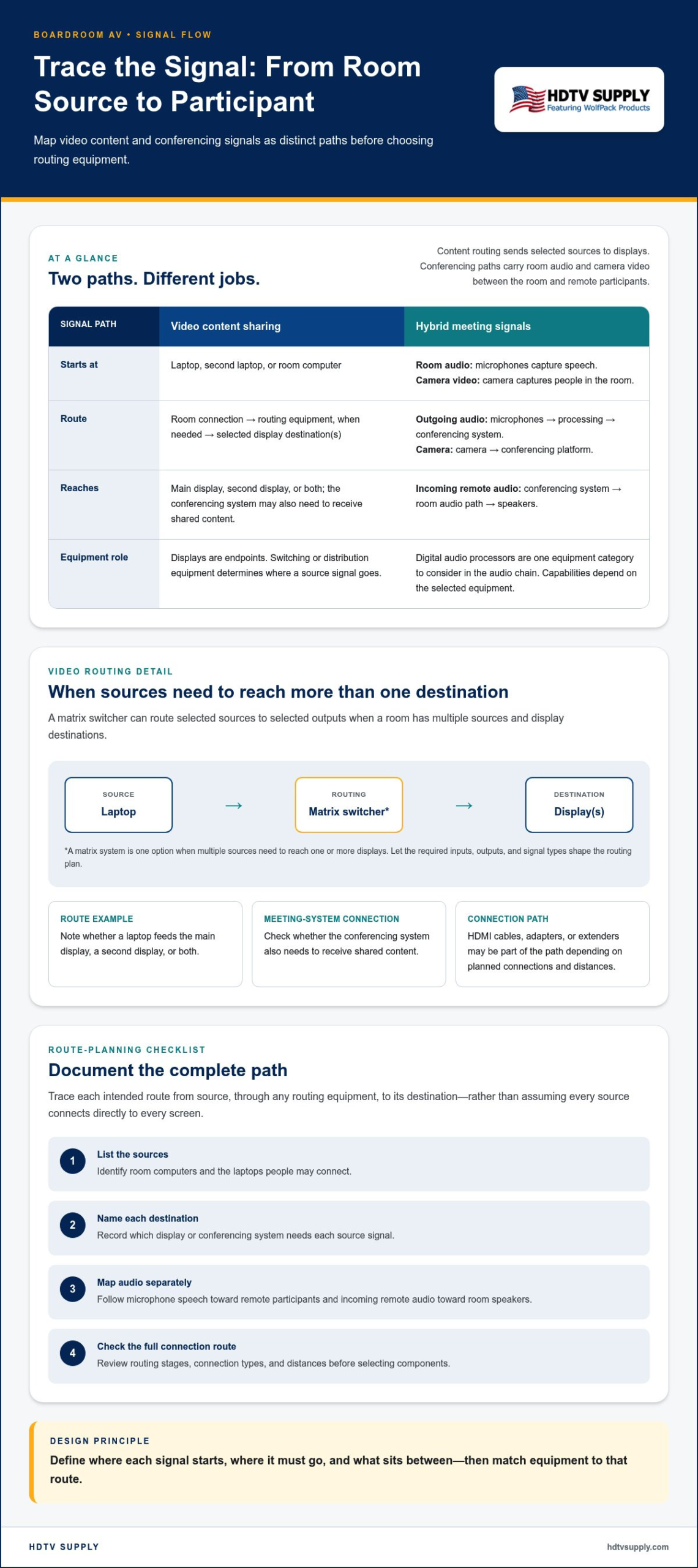
Signal flow is the route audio and video take from their source devices to the displays, conferencing system, and speakers that use them. Mapping the route turns a room plan into a system design: it shows where signals enter, where they need to go, and which connections or routing stages sit between them. In this boardroom AV system design guide, treat video content and participant audio and video as related but distinct paths.
How does boardroom video travel from source to display?
During a presentation, a laptop sends its video signal through the room’s connection and routing path to a display. Another source, such as a second laptop or room computer, may also need to reach that display. If the room has multiple sources and display destinations, a matrix switcher can route selected sources to selected outputs. Let the required inputs, outputs, and signal types shape the routing plan. For background on this equipment category, see modular HDMI matrix switchers.
Document each intended route rather than assuming every source connects directly to every screen. For example, note whether a laptop should feed the main display, a second display, or both, and whether the conferencing system also needs to receive that content. Displays are endpoints; switching or distribution equipment determines where a source signal goes. HDMI cables, adapters, or extenders may also be part of the path, depending on the planned connections and distances. Review the full route, from source through routing equipment to destination, before choosing components.
How do room audio and conferencing signals move?
Audio follows its own route. Room microphones capture speech and send it toward processing and the conferencing system, which carries it to remote participants. Incoming remote audio travels from the conferencing system through the room’s audio path to its speakers. Digital audio processors are one equipment category to consider in this chain. Their role depends on the system plan, so don’t assume capabilities that haven’t been established for the selected equipment.
Camera video has a separate capture path. The camera sends its signal to the conferencing platform so remote attendees can see people in the room. The platform handles the meeting’s outgoing and incoming audio and video connections. Make this relationship explicit in the diagram: camera video and microphone audio must reach the conferencing system, while remote audio must return to the room’s playback path.
Use a simple flow list to check that no connection has been overlooked:
- Content: source device to switching or distribution stage to display, and to the conferencing system if required.
- Room audio: microphones to processing to conferencing system, then remote audio to room speakers.
- Camera: camera to conferencing system for remote viewing.
Before selecting hardware, verify that each device’s connections align with the planned upstream and downstream equipment. HDTV Supply’s professional AV equipment includes HDMI matrix systems and digital audio processors to consider by system role.
Which Boardroom AV System Architecture Fits Your Room?
Architecture describes where equipment sits and how signals move through the room. A centralized design brings key routing equipment together in one location. A distributed design places some equipment closer to the sources or destinations it serves. Neither approach is automatically better. The right fit depends on the number of sources and display destinations, room geometry, cable pathways, and how the boardroom is used.
A larger equipment list doesn’t automatically make a stronger design. Each additional component and connection adds something to document and troubleshoot. A clear boardroom AV system design guide matches the architecture to actual workflows, provides a practical path for expected changes, and avoids complexity that doesn’t address a defined need.
When should a boardroom use centralized AV routing?
Centralized routing can organize connections when multiple sources need to reach one or more displays. A central equipment location can make routing relationships easier to document and provide a single place to access the routing hardware. Before selecting equipment, count the sources and destinations, map the intended routes, and plan cable pathways between connection points and the equipment location. Long or difficult pathways may affect whether this layout suits the room.
When should a design distribute equipment around the room?
A distributed layout may suit a room where sources and display destinations are separated by the room’s geometry or where connections are needed in more than one location. Placing equipment nearer to those points changes the cable runs and where troubleshooting access is needed. It can also affect future room changes: moving a table or adding a display may mean revisiting local connections and routes. Record each location and pathway before settling on this approach.
Compare the approaches against the room plan, not a general rule. A single source feeding one display may need a simpler route than several meeting sources serving multiple displays. A system with more destinations may call for centralized switching, distributed connections, or a combination, depending on equipment placement and cable pathways. For designs involving multiple HDMI sources and displays, HDMI matrix EDID management is a technical consideration when reviewing how connected devices coordinate display requirements.
- Source and destination count: List each meeting source and every display it may need to reach.
- Room pathways: Mark cable routes, connection locations, and equipment spaces on the floor plan.
- Access: Identify where equipment can be reached for inspection or troubleshooting.
- Change plans: Note likely adjustments, such as relocating a display or changing how participants connect.
Choose the simplest architecture that supports the documented routes and room use. If a centralized rack makes every cable run difficult, reconsider its placement. If distributed equipment creates scattered connections that are hard to track, simplify the layout. Explore HDTV Supply’s AV matrix equipment as a category for planned source-to-display routing.
Use This Boardroom AV Design Checklist Before Choosing Equipment
Turn the room brief and signal plan into a decision sequence before selecting hardware. This boardroom AV system design guide checklist separates user needs from room constraints, then connects those findings to equipment roles. Use it to document requirements and connections before finalizing the design.
- Document room use. Record meeting formats, where participants join from, who shares content, and how the room is controlled. Separate essential functions from capabilities that may be added later.
- Map the physical room. Sketch dimensions, table and seating positions, existing infrastructure, display locations, equipment spaces, connection points, and possible cable paths. Note physical constraints that could affect placement.
- Count connections. List each source, display, camera, microphone, speaker, and conferencing-system connection required by the planned workflows. Distinguish the number of devices from the routes they need to support.
- Map signal paths. Trace each audio and video signal from its source through any switching, distribution, or processing stage to its destination. Mark the connection type at each point.
- Review the plan. Compare the room drawing, signal diagram, connection list, and equipment categories. Resolve mismatches before finalizing the design.
What information belongs in a boardroom AV design brief?
Organize the brief into four sections: user requirements, physical constraints, signal routing, and equipment categories. Include meeting formats, participant locations, content sources, displays, and room-control needs. Add dimensions, seating, existing infrastructure, cable routes, and proposed equipment locations to the room plan. In the routing section, show each source-to-destination path. Mark confirmed decisions separately from unresolved requirements so assumptions don’t become hidden design constraints.
Use consistent labels across the floor plan, signal diagram, and connection list. If a laptop source is labeled “Table input A” on one document, use that label wherever its route appears. Consistent naming makes it easier to spot a missing destination or a cable path that doesn’t match the room layout. Record assumptions, too, such as whether a display is intended to show shared content or conferencing video.
How can you review compatibility before finalizing the design?
Check planned connections from end to end. Confirm that the source, switching or distribution equipment, and displays have compatible connection requirements, and document relevant signal-format and EDID considerations. Don’t assume a particular result from an EDID setting. Check that the design requirements align with the selected equipment. Finally, trace each route on the diagram and confirm that it matches the physical connection points and intended workflow.
Keep the checklist as a working design record, updating it when a requirement or room condition changes. Once the equipment roles are clear, explore boardroom AV equipment options that align with your system plan.
Select Boardroom AV Equipment by System Role with HDTV Supply
Once the room plan and signal paths are documented, narrow equipment choices by function. A boardroom doesn’t need a component simply because it’s common in AV systems. It needs equipment that supports a defined connection, routing, capture, or audio role in the design. This final step of the boardroom AV system design guide connects your requirements to professional AV equipment categories at HDTV Supply.
Which HDTV Supply equipment categories may fit a boardroom design?
For source-to-display routing, consider WolfPack HDMI matrix systems. Compare the sources and destinations in your diagram with the routing role the system needs to perform. HDTV Supply offers WolfPack HDMI Matrix Systems with free video-wall processing. Use your documented connections and requirements to guide equipment selection across the full signal path.
Other system roles point to different categories. WolfPack PTZ cameras may fit the room’s video-capture plan, while WolfPack digital audio processors are a category to consider in the audio chain. WolfPack HDMI-over-LAN splitters, which support up to 47 TVs, and WolfPack HDMI-to-Cat6 extenders may fit a connection plan that calls for those types of signal distribution or extension. WolfPack HDMI cables and adapters can also form part of the physical connections between system components. Select by role and documented requirements, not by category name alone.
Keep the relationship between equipment and the room clear. A camera belongs on the video path to the conferencing system. A matrix system belongs in the source-routing plan. Cables, extenders, and adapters form connections between devices. This role-based approach helps keep equipment decisions tied to the workflows the room must support.
What should you prepare before exploring AV equipment?
Have your key planning documents ready so you can compare categories against a specific design rather than browse without context. Bring the room brief, signal-flow diagram, source list, display destination count, and connection requirements. Include the physical layout and any equipment locations or cable pathways that affect connections.
Then match each requirement to a system role. If your design routes multiple sources to displays, focus on matrix systems. If it includes camera capture or signal extension, review the corresponding categories. Keep a separate note of unresolved questions, such as a connection requirement that still needs review. HDTV Supply’s catalog includes more than 12,000 AV products, and the company provides technical support to installers and integrators worldwide.
Use your documentation to guide the next step, and explore Explore professional AV equipment at HDTV Supply. A focused equipment review makes it easier to connect each category to the boardroom’s planned signal paths and system roles.
Put Your Boardroom Plan into Motion
A useful AV design is a working reference, not a one-time shopping list. Keep the room plan and connection documentation available as meeting habits, room layouts, or display needs change. Before adjusting the system, compare the proposed change with the documented signal paths and connection requirements. This keeps future decisions tied to how the boardroom is actually used.
Use this boardroom AV system design guide to translate room requirements into equipment roles. Assess relevant components against your documented design rather than choosing hardware in isolation. HDTV Supply’s technical support for installers and integrators can help as you evaluate professional AV options.
Explore professional AV equipment at HDTV Supply and take the next step toward a boardroom plan built around your meetings. With a clear design record in hand, you can make equipment decisions against the planned signal paths and adapt the design as needs evolve.
Frequently Asked Questions
What should a boardroom AV system include?
A boardroom AV system should include the equipment categories needed for its meeting workflows: displays, conferencing audio and video, source connections, switching or distribution where routing is required, and a way to control the system. Build the list from specific tasks. A room with one presentation source and one screen has different routing needs from a room where several presenters share content across multiple displays. Include only the connection accessories the plan requires.
How do you design a boardroom for hybrid meetings?
Design around how people in the room and online will participate. Identify where remote attendees appear, who needs to be visible, and how in-room voices and incoming remote audio will be heard. Map content sharing and conferencing separately so shared material isn’t confused with camera video. Then walk through the planned workflow: joining a call, sharing from a laptop, and checking that participants in both locations can follow the discussion.
How do room layout and sightlines affect boardroom AV design?
Seating and table shape determine which participants can see displays and fit within camera views. A long table may leave end seats outside the camera’s view, while a display mounted off-axis can be difficult for some participants to see comfortably. Note window glare and bright sources behind speakers, as well as reflective or noisy areas that may affect speech. Use a room sketch to compare seats, display positions, camera views, and lighting before deciding on equipment locations.
What is the difference between an AV matrix switcher and an HDMI splitter?
An AV matrix switcher routes sources to selected display destinations according to the system’s connection requirements. An HDMI splitter generally distributes a source signal to multiple outputs. They serve different routing purposes, so choose based on whether the room needs destination selection or distribution of a source. Check device connection requirements and the complete signal path; don’t assume a particular model supports a specific arrangement without reviewing its documentation.
How do you plan signal flow for a boardroom AV system?
Start each path at the source and follow it through the system to its destination. For example, document a laptop’s video route through any switching or distribution stage to the display. Map conferencing separately: camera video and microphone audio travel toward the conferencing system, while remote audio returns to room playback. Label connection points and note the requirements at each step. This boardroom AV system design guide approach helps reveal gaps before equipment is selected.
Can a boardroom AV system support different meeting formats?
Yes, if the design accounts for each intended format and the selected equipment supports the documented connections. A room might host a slide presentation in one meeting and a hybrid discussion in the next. Record how sources, displays, cameras, audio, and controls are used in each case, then check that the planned signal paths cover those workflows. Flexibility depends on the requirements and room constraints, not simply on adding more components.
What information should an AV system design document include?
An AV design document should include a room plan with dimensions, seating, display and equipment locations, and cable routes. Add an equipment-role list, source and destination inventory, connection requirements, and signal-flow diagrams for audio and video. Record assumptions, unresolved questions, and decisions separately. For example, note whether an additional display is a confirmed requirement or a future possibility. Clear labels across the documents make the design easier to review and update.
Leave a Reply
Want to join the discussion?Feel free to contribute!