
Explain 4:4:4 Chroma Subsampling: A Practical HDMI Guide
Why can a 4K display look crisp in a movie but leave small colored desktop text blurry? The difference may be chroma subsampling, not resolution. If you’re trying to explain 4:4:4 chroma subsampling, start here: 4:4:4 retains full color detail at every position in the luma grid, while 4:2:2 and 4:2:0 reduce some color information to save bandwidth. That reduction is often hard to notice in films, but it can soften fine text and graphics on colored backgrounds.
One compatible device won’t guarantee a 4:4:4 image. The source, any HDMI switcher or matrix, the cable path, and the display all need to support the selected format. This guide explains what the numbers mean, when full chroma resolution matters, and how to check each part of your signal chain. It also covers why matrix-switcher specifications matter when routing sources to multiple displays, with WolfPackSecure 4K 60 4:4:4 HDMI Matrix Switchers as an example of professional AV hardware.
Key Takeaways
- To explain 4:4:4 chroma subsampling, distinguish color detail from image brightness and understand what the three-number notation describes.
- Use a simple 2-by-2 pixel example to see how full chroma resolution retains color information across an image.
- Know which content can expose chroma loss, including colored text, spreadsheets, desktop interfaces, and fine graphics.
- Trace the HDMI signal from source to processing equipment to display, checking format support and input settings at every step.
- Set your resolution, refresh rate, color format, and bit-depth requirements before choosing equipment for a routed AV system.
What 4:4:4 Chroma Subsampling Means in an HDMI Signal
4:4:4 retains full chroma resolution: color information is sampled at every position in the luma grid, rather than being reduced through chroma subsampling. Luma represents the image’s brightness structure, including light and dark edges. Chroma carries color information. Retaining chroma at full resolution can preserve fine colored edges, but the 4:4:4 label alone doesn’t specify the image’s resolution, refresh rate, or bit depth.
Those distinctions matter when comparing HDMI formats. A signal can use 4:4:4 at different resolutions and refresh rates, and at different bit depths. These are separate characteristics. The Chroma subsampling overview explains how sampling ratios describe the amount of color information relative to brightness information.
Plain-language definition: 4:4:4 means the signal carries chroma samples at every position in its luma sampling grid. It describes color sampling, not picture resolution or frame rate.
What do the three numbers in 4:4:4 represent?
The notation compares luma samples with chroma samples across a small group of pixels. Picture a two-row group spanning four pixel positions:
Top row: Y Y Y Y, with four corresponding samples for each chroma component.
Bottom row: Y Y Y Y, also with four corresponding samples for each chroma component.
Here, Y represents a luma sample. In a YCbCr signal, the two chroma components are Cb and Cr. The first number sets the reference luma sampling across the group; the second and third describe chroma sampling on the first and second rows. In 4:4:4, chroma isn’t reduced relative to the luma grid, so each pixel position has corresponding color samples. The notation describes a sampling relationship, not how many colors the display can show.
A practical way to explain 4:4:4 chroma subsampling is to picture each pixel retaining its own color detail alongside its brightness information. This doesn’t mean the signal is free of every kind of compression or processing. It means the chroma hasn’t been downsampled according to this ratio.
Is 4:4:4 the same as RGB?
No. RGB and YCbCr are different ways to represent image color. RGB describes each pixel through red, green, and blue components. YCbCr separates luma from two color-difference components, which makes it possible to describe chroma sampling with ratios such as 4:4:4.
So 4:4:4 can describe full-resolution chroma in a YCbCr signal. It doesn’t turn YCbCr into RGB, and the terms aren’t interchangeable settings. When reviewing an HDMI format, treat color representation and chroma sampling as separate details. A device may offer different encoding options, while the 4:4:4 notation specifically describes the relationship between chroma and luma sampling.
How 4:4:4 Chroma Sampling Preserves Color Detail
An image signal carries information about both brightness and color. These components combine to form the picture, but they don’t have to be sampled at the same rate. That’s why 4:4:4 can retain crisp color boundaries, especially where one pixel’s color differs from the next.
How luminance and chroma work together
Luma is the brightness-related part of a signal; chroma carries color-related information. In the common YCbCr representation, Y carries luma, while Cb and Cr carry color-difference information. Separating these components allows a video signal to represent brightness detail and color detail at different sampling rates. Reducing chroma therefore doesn’t necessarily remove the same amount of fine structure from the luma information.
Consider a sharp red-on-white boundary in a computer graphic. Brightness changes may still define a clear edge, while reduced color sampling can spread or soften the red boundary. HP’s Chroma Subsampling Explained by HP discusses the practical connection between chroma sampling and monitor text clarity.
What a 4:4:4 pixel pattern looks like
Picture a small two-by-two block. Each position has its own luma sample and corresponding chroma information:
Pixel grid: P1 P2
P3 P4
4:4:4 sampling: Y, Cb, Cr | Y, Cb, Cr
Y, Cb, Cr | Y, Cb, Cr
Each pixel position retains its own set of color samples. With reduced chroma sampling, some positions share color information or have fewer chroma samples than luma samples. Neighboring colors can look less distinct even when the image’s brightness structure remains detailed. This diagram is a simplified illustration of the relationship, not a pixel-by-pixel description of every encoding implementation.
Fact for quick reference: In 4:4:4 YCbCr sampling, each pixel position in the luma grid has corresponding Cb and Cr samples, so chroma resolution is not reduced relative to luma.
Full chroma sampling preserves color detail, but it doesn’t guarantee a high-quality image by itself. Source quality, resolution, bit depth, display processing, and the rest of the signal path also affect what appears onscreen. A signal can retain full chroma and still look poor if another part of the chain limits or alters it.
In a routed AV system, the switcher is one part of the signal path, alongside the source and display. HDTV Supply’s WolfPackSecure 4K 60 4:4:4 HDMI Matrix Switchers are matrix hardware identified with 4:4:4 support. The full configuration still needs to support the intended format. Professional HDMI matrix switchers can route sources to displays as part of a system designed around those requirements.
When 4:4:4 Chroma Subsampling Makes a Visible Difference
Full chroma resolution is most useful when an image contains small color changes packed closely together. Common examples include computer interfaces, spreadsheets, fine diagrams, and graphics with thin colored lines. Adjacent pixels in these images may differ in color even when their brightness is similar. Reducing chroma detail can soften those boundaries or make colored edges bleed slightly into nearby areas.
The perceived benefit of 4:4:4 depends on image content and viewing use. A desktop used for reading or detailed work can reveal differences that are hard to spot during ordinary video playback. This isn’t a universal upgrade in visible picture quality. It’s a format choice that matters most for content with precise color transitions.
Why computer text and graphics can benefit
Small colored lettering is a useful example. Imagine a thin blue label on a gray interface or red spreadsheet text on a pale background. With full chroma detail, the color boundary has a sample at each pixel position. If chroma is reduced, the brightness structure may remain, but the color edge can appear less defined. The display’s resolution hasn’t changed; the difference is how finely color information is represented.
Try a simple pattern on the display you use for work. Compare small colored text on a contrasting background with larger white text on black. Look closely at letter edges and narrow colored lines. A chroma test pattern can make subtle smearing or color bleed easier to spot than a busy photo. Keep the display settings and viewing distance the same for each comparison, and confirm that the source is outputting the format you intend to test.
These details matter in everyday tasks. A spreadsheet may combine small labels, gridlines, and colored status indicators. A desktop interface may use compact icons or fine outlines. In a diagram, a one-pixel colored line can carry meaning. If color edges look less precise, the image may feel less crisp even though its overall pixel count is unchanged.
Why 4:4:4 isn’t a universal picture-quality guarantee
Movies and television are different viewing cases. Most movies and TV shows use 4:2:0 chroma subsampling, and their photographic images generally don’t rely on tiny, sharply bounded areas of color in the same way computer text does. The difference between full and reduced chroma may therefore be difficult to notice during typical viewing. That doesn’t mean 4:4:4 never matters for video; content and viewing conditions determine whether the difference is visible.
Keep the specification in context. Chroma sampling describes how color information is represented; it doesn’t specify resolution, bit depth, contrast, or the display’s capabilities. Source material, scaling, and downstream processing also influence the final image. A 4:4:4 signal can preserve chroma detail, but it can’t restore detail missing from the source or compensate for a display or device that alters the signal.
How to Check Whether Your HDMI Chain Preserves 4:4:4
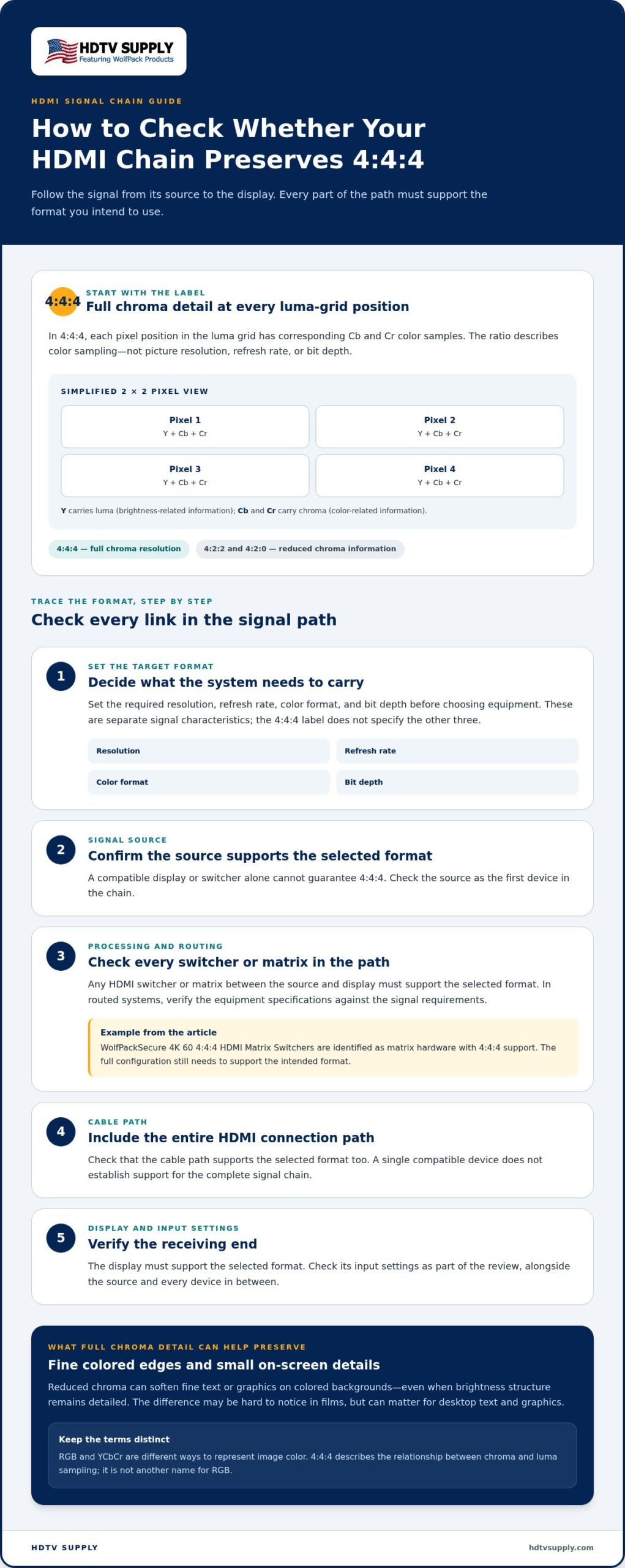
Verify the complete signal path, not just the source or display. A source may output 4:4:4, but a switcher, extender, cable connection, or display input may limit the format. Check the target resolution, refresh rate, color format, and bit depth at each stage. If the source changes its output after you connect the system, EDID negotiation may be affecting the available options.
Check source, switcher, connection, and display settings
Work in signal-flow order. Write down the format you intend to use, then compare each device’s specifications and menus with that requirement:
- Source: Open its video or display settings. Select the intended resolution, refresh rate, and color format, then check the reported bit depth if available.
- Processing equipment: Check the matrix switcher or extender documentation for support of that exact signal combination on the relevant inputs and outputs. For a system with multiple sources and displays, modular HDMI matrix switchers add routing options, so verify the format along the route you’re testing.
- Connection: Consider the complete format and cable distance together. Cable suitability depends on the signal requirements and connection path, so a cable label alone doesn’t confirm that the system passes the target format reliably.
- Display: Check the menu for the specific HDMI input in use. A PC mode or enhanced input format setting may be needed to enable the display’s full input capability.
EDID, or Extended Display Identification Data, helps communicate display capabilities to the source. When a switcher is in the path, its EDID handling can affect what the source detects and which output formats it offers. If the source falls back to a different format, review how the switcher presents display information to that source. The guide to HDMI matrix switcher EDID management provides broader context for this part of signal configuration.
Use a test image to spot chroma detail loss
After checking device settings, test the image on screen. Display a high-contrast pattern with small colored text, thin colored lines, or fine edges. Look for blurred lettering or color bleeding at boundaries. A test image can reveal visible changes, but it won’t identify the cause by itself. Confirm the active output format in the source and device menus too.
Change one setting at a time. Compare the pattern before and after adjusting the source format, switcher route, or display input mode. Keep other settings fixed so you can isolate which change affects the result. If the image looks wrong only through the routed path, test the source directly on the display where practical, then add processing devices back into the chain one at a time.
HDMI matrix options for routed AV systems are one part of planning a system around its source and display requirements.
Applying 4:4:4 Support in a Professional HDMI System
Start with what the system needs to do. A display used for computer interfaces, fine text, spreadsheets, or colored graphics may benefit from 4:4:4 because precise color edges matter for this content. A system used mainly for ordinary video may have different priorities. Define the use case first, then specify the required resolution, refresh rate, color format, and bit depth before comparing equipment.
This is the practical way to explain 4:4:4 chroma subsampling in a system design: it’s a color-sampling requirement for the complete signal path, not a standalone quality label. A specification on one device doesn’t guarantee that the source, routing hardware, connection, and destination display will all operate at the intended format together.
Match the format requirement to the AV application
Map each intended signal route from source to display. Identify the format required for the content and display use case, then compare that requirement with the capabilities of every device in the path. If a source feeds several displays through a matrix, account for the capabilities of the selected outputs as well as the input signal.
- Content: Identify whether users need sharp computer text, fine graphics, or primarily video playback.
- Source: Confirm it can output the intended resolution, refresh rate, chroma format, and bit depth.
- Routing hardware: Check support for the required signal combination across the relevant inputs and outputs.
- Display: Verify that the display and the specific input can receive and show the intended format.
Don’t rely on assumptions based on a product label. A device name or a single format reference isn’t a substitute for checking the requirements of a complete route. Consider the whole signal configuration, especially when sources or displays have different capabilities.
Explore 4:4:4-capable matrix switching
A matrix switcher routes selected sources to selected displays. It’s an important part of a multi-source system, but routing alone doesn’t guarantee that every signal format will be preserved. Check the specifications for the exact source-to-display paths and operating format you intend to use.
HDTV Supply’s WolfPackSecure 4K 60 4:4:4 HDMI Matrix Switchers are professional matrix hardware identified with 4:4:4 support. That product name is a useful starting point when considering the capability, but it doesn’t establish that every possible system configuration supports every format. Match the system’s sources, routing needs, displays, and signal settings.
Once those requirements are clear, you can compare equipment without treating 4:4:4 as an isolated checkbox. Professional AV equipment at HDTV Supply includes options to consider when planning your signal paths.
Make 4:4:4 a Clear System Requirement
Turn the format decision into a clear requirement for your AV design. Record which applications need the extra color detail, identify the signal routes that must support it, and include the intended format in equipment planning and system documentation. This gives project teams a shared reference instead of leaving “4:4:4” as an unexplained line in a specification. If you need to explain 4:4:4 chroma subsampling to colleagues or stakeholders, connect the requirement to the content they’ll view and the displays they’ll use.
For routed systems, include matrix hardware in that design conversation. HDTV Supply specializes in professional AV equipment for customers worldwide and carries WolfPackSecure 4K 60 4:4:4 HDMI Matrix Switchers, equipment identified with 4:4:4 support. Match the product to the specific signal paths and system requirements rather than relying on a label alone.
Explore professional AV equipment at HDTV Supply to plan your next HDMI system. A clearly defined format requirement makes equipment comparisons more straightforward and helps align the system with its content.
Frequently Asked Questions
Does 4:4:4 chroma subsampling mean there is no chroma subsampling?
Yes, in the usual sense: 4:4:4 means chroma isn’t reduced relative to the luma sampling grid. To explain 4:4:4 chroma subsampling precisely, note that the ratio describes color sampling, not every kind of signal compression or image processing. A video can use 4:4:4 and still be compressed in other ways, or have image detail affected by its source or processing.
Can I see the difference between 4:4:4 and lower chroma sampling?
Sometimes. Fine colored text, thin interface lines, and small labels are more likely to reveal differences than a detailed photograph. The result also depends on the display, its scaling and processing, and viewing distance. For a practical comparison, use the same source image and display settings, then change only the chroma output setting. Look for softened colored edges rather than a change in overall sharpness.
Does 4:4:4 increase resolution or refresh rate?
No. 4:4:4 identifies chroma sampling, not the number of pixels or how often the image refreshes. Resolution and refresh rate are separate signal settings. They can interact in a real system because available bandwidth is limited: a source or device may offer different combinations of resolution, refresh rate, color format, and bit depth. Check the complete combination your setup needs rather than treating 4:4:4 as a resolution upgrade.
What happens if one device in my HDMI chain does not support 4:4:4?
The source may negotiate a different format the connected devices can handle, such as reduced chroma sampling, or it may offer a lower resolution or refresh rate. In some incompatible setups, the image may be unstable or fail to appear. The behavior depends on the devices and their settings. Check the source’s active output information, then test the signal with processing devices bypassed where practical.
Is 4:4:4 necessary for watching movies?
Usually, it isn’t essential for typical movie viewing. Most movies and TV shows are distributed using 4:2:0 chroma sampling, so sending them as 4:4:4 doesn’t restore color detail that wasn’t present in the source. For a movie-focused setup, other factors may matter more. Full chroma is more relevant if the same display also handles computer text, graphics, or detailed desktop work.
How can I test whether my display is showing 4:4:4 correctly?
Display a chroma test pattern with small, high-contrast colored text and fine colored edges. Check whether the details remain distinct, but don’t rely on appearance alone: scaling and display processing can affect the result. Confirm the source’s active output format in its status menu and review the display settings for that HDMI input. If possible, compare a direct connection with the routed signal path.
Does 4:4:4 determine color depth or HDR support?
No. Chroma sampling, color depth, and HDR describe different signal characteristics. A 4:4:4 label doesn’t tell you whether a signal is 8-bit, 10-bit, or HDR, and HDR capability doesn’t guarantee 4:4:4. Devices must support the particular combination being sent. Review each component’s specifications and settings for chroma format, bit depth, HDR, resolution, and refresh rate, because bandwidth or compatibility limits can affect which combinations are available.
Leave a Reply
Want to join the discussion?Feel free to contribute!