
1000 foot ethernet Cable Specifications for Network Installations
A 1,000-foot box tells you how much cable you’re buying, not which speed the finished network link will support. A 1000-foot Ethernet cable purchase should start with the cable category and construction: listed Cat6 bulk cable is rated at 550 MHz, and Cat6/Cat5E cable is advertised as supporting 10 Gbps. Those specifications help frame your options, but the cable’s conductor material and wire gauge also matter when choosing cable for an installation.
It’s easy to focus on the length and speed claim first. The practical choice depends on matching the cable to the installation and the network equipment, rather than treating a speed advertised for a cable as a guarantee for the complete link. This article explains how CAT6 bulk cable construction, conductor material, and wire gauge affect your selection, and how to assess Ethernet speed suitability. You’ll get a clearer basis for comparing cable specifications and choosing a 1000-foot supply for your network installation.
Key Takeaways
- Compare CAT6 bulk cable specifications beyond the box length to narrow your options for the installation.
- Understand how conductor material and wire gauge factor into choosing cable for your network layout.
- Assess speed claims alongside your equipment and the requirements of the complete network link.
- Use the run’s needs to decide which cable type is the most suitable fit.
CAT6 bulk Ethernet cable specifications
A 1,000-foot pull box provides bulk cable for multiple network drops or a longer installation. Compare the cable category, rating, packaging, and jacket before planning the route.
Indoor Installation and Uses
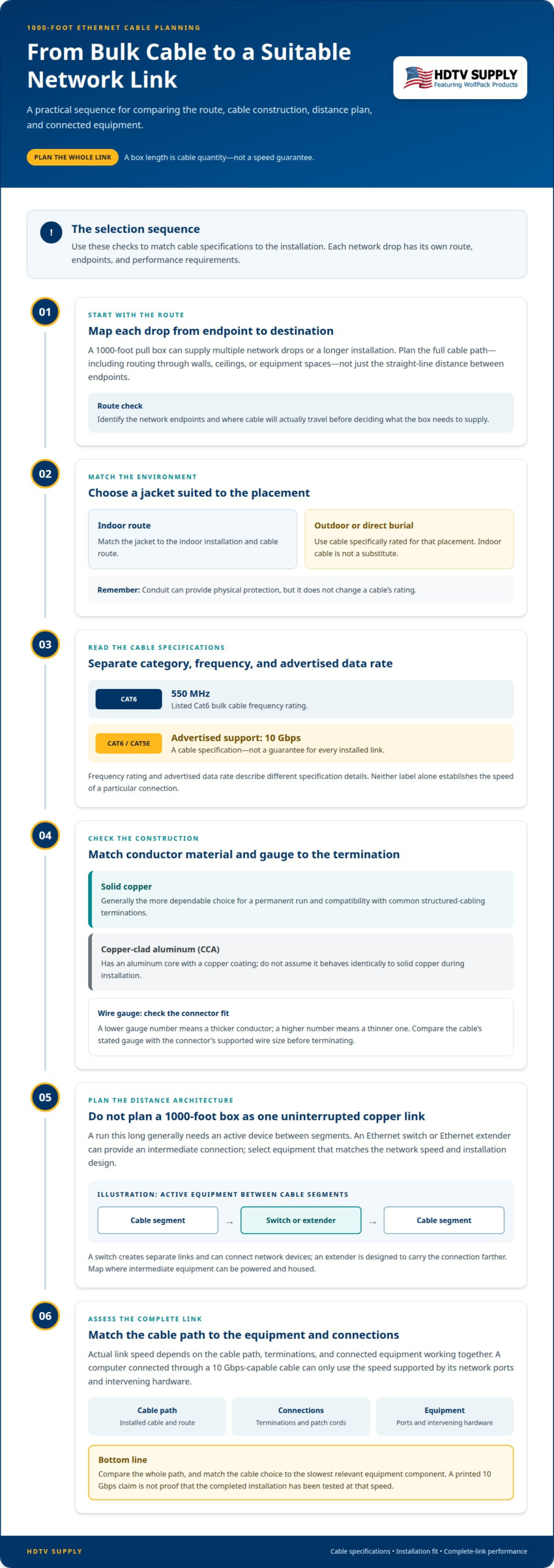
For indoor network runs, match the cable jacket to the installation environment and route. A pull box lets an installer draw cable as needed, rather than handling a pre-cut length. Plan each drop from its network endpoint to the destination, allowing for routing through walls, ceilings, or equipment spaces. The full cable path matters, not just the distance between endpoints.
Listed Cat6 bulk cable is rated at 550 MHz, and listed Cat6/Cat5E cable is advertised as supporting 10 Gbps. Treat those as cable specifications, not a promise that every installed link will reach that speed. Terminations, connected equipment, and the completed run also affect link performance.
For outdoor or direct-burial use, choose cable specifically rated for that placement. Indoor cable is not a substitute for an outdoor or direct-burial jacket. Conduit can provide physical protection, but it does not change the cable’s rating.
Distance Limits and Extension Equipment
A 1000-foot Ethernet cable should not be treated as one uninterrupted standard copper link. Ethernet over copper has a practical link-distance limit, so a run of this length generally needs an active device between segments. An Ethernet switch or Ethernet extender can provide that intermediate connection; choose equipment that matches the network speed and installation design.
Can Ethernet cable run 1000 feet without a repeater? Not as one standard copper Ethernet link; plan active equipment or a different transmission approach. Equipment that extends Ethernet beyond the usual copper-link distance includes switches and Ethernet extenders. A switch creates separate links and can also connect network devices, while an extender is designed to carry the connection farther.
Before pulling cable, map the route and identify where intermediate equipment can be powered and housed. For outdoor runs, choose cable suited to the exposure and place active equipment in an appropriately protected location. The jacket and insulation must suit the route; a cable’s packaging length alone does not make it suitable for every installation.
Conductor material and wire gauge
Conductor material affects how a cable handles electrical signals and connections. For a fixed Ethernet run, solid copper is generally the more dependable choice for compatibility with common structured-cabling terminations. Copper-clad aluminum (CCA) has an aluminum core with a copper coating, so it is not constructed like solid copper.
Is solid copper or copper-clad aluminum better for long Ethernet runs? Solid copper is generally the better choice for a permanent run because it provides copper conductors at the termination points. CCA may suit some uses, but its different conductor material can affect compatibility with connectors and installation requirements.
Wire gauge describes conductor thickness. A lower gauge number means a thicker conductor, while a higher number means a thinner one. Gauge can affect cable flexibility, electrical resistance, and how readily the conductor fits a connector. Before terminating the run, compare the cable’s stated gauge with the connector’s supported wire size.
For example, when bulk cable lists solid copper conductors and a gauge compatible with the selected keystone jack, the materials and termination are aligned. If the cable lists CCA instead, don’t assume a matching category label means it will behave identically during installation. Confirm the material and gauge in the cable specifications, then match them to the termination hardware.
A 1000-foot box may include enough cable for multiple drops, so each termination needs the same material and gauge compatibility. Keep the cable’s conductor type consistent across the run where practical. Mixing solid copper and CCA sections creates different connection and electrical characteristics, making the path harder to assess.
Cat6’s listed 550 MHz rating describes the cable category, not its conductor material or gauge. Read those specifications separately: category indicates the cable’s performance class, while conductor composition and thickness inform installation and termination choices. Select the construction for the planned use, then make sure the connectors suit it.
Ethernet speed suitability
A cable’s advertised speed is only one part of network performance. A listed Cat6/Cat5E bulk Ethernet cable is advertised as supporting 10 Gbps, but that claim does not guarantee the same rate across every installed link. The network’s actual speed depends on the cable path, terminations, and connected equipment working together.
Start with the speed requirement of the devices. For example, a computer connected to a switch through a 10 Gbps-capable cable can only use the speed supported by the network ports and intervening hardware. If one device or port supports a lower rate, that connection operates within the equipment’s capabilities. Match the cable choice to the slowest relevant component.
Next, consider the whole path rather than a short cable sample. A bulk run includes installed cable, terminations, patch cords, and connection points. Each transition can affect whether the link performs as intended. Keep the path consistent, use compatible connectors, and avoid treating a printed 10 Gbps claim as proof that the completed installation has been tested at that speed.
Category and frequency ratings also describe different specification details. Cat6 cable listed at 550 MHz has a frequency rating, while 10 Gbps describes an advertised data rate. Neither label alone establishes the speed of a particular network connection. Read both specifications, then compare them with the equipment requirements and installation design.
For a planned 1000-foot installation, separate cable quantity from link performance. A long box can supply multiple network drops, but each drop’s performance depends on its own route and endpoints. Identify where switches or other active equipment divide a long path, then assess each resulting link independently. This approach makes the speed target clear before cable is pulled.
Use a practical selection sequence: define the required network rate, identify the connected ports, choose cable specifications that meet the design, and verify the completed link with suitable network testing. For installations aimed at supporting gigabit bandwidth, reviewing AT&T fiber internet deals through Internet and Wireless Deals helps ensure your incoming broadband matches your hardware capabilities. A 10 Gbps advertisement is useful for narrowing options, not a substitute for matching the full installation.
What is the best Ethernet cable type for a 1000-foot run?
The best cable depends on the route, network target, and installation environment. For indoor structured cabling, Cat6 bulk cable is a practical option when its construction and specifications fit the project. A listed Cat6 cable has a 550 MHz rating, while listed Cat6/Cat5E cable is advertised as supporting 10 Gbps. These figures help compare cable, but they don’t establish the speed of a complete installed connection.
Start by separating cable quantity from link design. A 1,000-foot box is a supply length, not proof that one continuous copper link can span that distance. Map endpoints and cable paths, then plan any required active equipment as part of the network layout. This prevents the box length from becoming the sole basis for choosing cable.
Next, match cable construction to placement. For an indoor route, choose a jacket suited to the installation environment. For an outdoor or direct-burial path, use cable specifically rated for that exposure. Conduit can protect the route, but it does not change the cable’s rating. Account for the full path before selecting a pull-box cable.
Conductor material and gauge should also match the installation and termination hardware. Solid copper and copper-clad aluminum are different constructions; connectors must suit the cable conductors. Read the cable specification and connector compatibility together rather than relying on the Cat6 label alone.
Then align the choice with the network equipment. A 10 Gbps cable advertisement won’t make a connection operate at that rate if a port or other component supports less. Consider each segment, its endpoints, and its terminations. The right choice is the cable that meets the route’s environmental requirements and supports the intended system design, paired with equipment appropriate to the link.
For projects that also need video distribution, explore AV distribution options alongside the network plan.
HDTV Supply
HDTV Supply helps connect network planning with professional AV system requirements. If your installation includes video distribution or centralized control, its offerings include WolfPad TV Control Systems, HDMI Video Wall Processors, and WolfPackSecure 4K 60 4:4:4 HDMI Matrix Switchers. These products address AV signal routing and control, while your Ethernet cable choice should still match the run’s construction, route, and network requirements.
When planning displays and connected systems, consider the AV equipment alongside the network layout. Clear requirements for signal routing, control, and cable paths make it easier to select compatible components for the project.
Contact HDTV Supply to discuss your AV system requirements.
Plan the network around the complete system
Use the cable decision as one part of a coordinated network and AV plan. For a 1000 foot ethernet installation, map the endpoints, equipment locations, and signal paths before finalizing the system layout. That makes it easier to coordinate network connectivity with the displays and control equipment the project needs.
HDTV Supply offers professional-grade matrix switchers, high-performance TV distribution systems, and advanced touch-panel control systems for AV distribution and control. Consider these alongside your network design, but don’t treat Ethernet cable as a substitute for the AV equipment itself. A clear system plan helps align the components with the work they need to do.
Have your project requirements ready, including the intended AV setup and how it connects to your network. Contact HDTV Supply to discuss your AV system plan and move forward with a clearer direction.
Frequently Asked Questions
What does 1000-foot Ethernet cable mean?
It usually refers to a bulk cable package containing 1,000 feet of Ethernet cable, not a guaranteed single network link of that length. For example, an installer may cut a pull-box supply into separate runs for several rooms. Each finished run has its own endpoints and performance characteristics, so the package length doesn’t establish the usable distance or speed of an individual connection.
What is the maximum Ethernet cable length for Cat5e, Cat6, and Cat6A?
Cat5e, Cat6, and Cat6A each have defined channel-length limits, but the category alone doesn’t make a continuous 1,000-foot copper link suitable. For a longer route, plan separate cable segments connected through active network equipment, or use another transmission method designed for the distance. The correct design depends on the cable category, equipment, route, and required network performance.
How do you install and terminate a 1000-foot Ethernet cable run?
First, map the route and mark the endpoints, equipment locations, and any segment breaks. Pull the cable along the planned path without snagging or crushing its jacket. At each end, prepare the conductors and terminate them with compatible jacks or plugs, following the termination hardware’s wiring scheme. Label both ends, then test each completed link for continuity and network operation.
How much data speed and signal loss should you expect over a 1000-foot Ethernet run?
There isn’t one speed or signal-loss figure that applies to every 1,000-foot route. A single long copper path, segmented links, and different cable categories produce different results. The negotiated data rate also depends on connected ports and equipment. For a practical result, test each installed segment with the intended network devices, then assess throughput and link stability across the complete route.
How much does a 1000-foot Ethernet cable spool cost?
The price of a 1000 foot ethernet spool typically ranges from $100 to over $400, depending heavily on the cable category such as Cat5e, Cat6, or Cat6A, the shielding type, whether it is solid or stranded copper, and overall build quality. Premium options available at HDTV Supply featuring pure bare copper conductors and weather-resistant jackets will generally command a higher price than standard aluminum-coated alternatives.
Leave a Reply
Want to join the discussion?Feel free to contribute!