
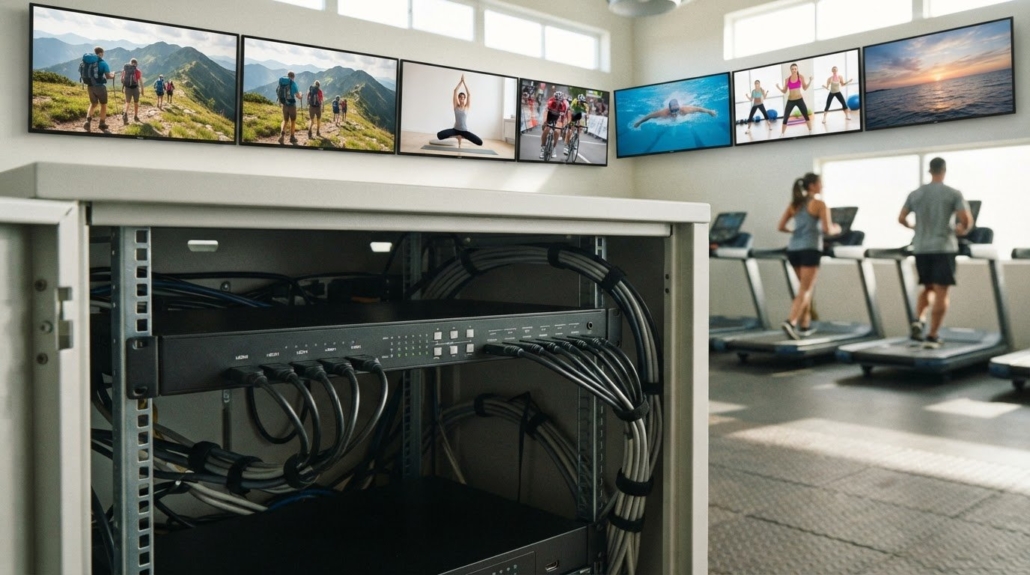
High-density HDMI matrix switcher for AV system control
More screens don’t have to mean more separate source connections. A high-density HDMI matrix switcher routes multiple HDMI sources to multiple displays, so each screen can receive its assigned content. For a system with 6 sources and 7 displays, an 8×8 matrix is the recommended minimum.
A matrix offers more routing flexibility than a basic switch or splitter, but choosing the right setup means considering more than port count. This guide explains how source-to-display routing works, how HDMI audio can be embedded, extracted, or routed independently, and how front-panel, IR, RS-232, or network controls fit into system operation. You’ll also learn when a matrix is the right tool, when a switch is enough, and when a splitter better suits the job. By the end, you’ll have a practical framework for evaluating the system your AV setup needs.
Key Takeaways
- Plan audio routing alongside video: the right matrix can separate audio from HDMI and direct it to the outputs your system needs.
- Match control methods to your setup, from hands-on front-panel operation to integration through IR, RS-232, or TCP/IP.
- Choose a matrix for flexible source-to-display routing, a switch to select a source, or a splitter to duplicate one source across displays.
- Explore HDTV Supply’s WolfPad TV Control Systems, HDMI Video Wall Processors, and WolfPackSecure 4K 60 4:4:4 HDMI Matrix Switchers for relevant AV system components.
Audio de-embedding and independent audio routing
HDMI carries audio and video together, but some systems need separate audio paths. Audio de-embedding extracts sound from an HDMI signal so it can feed an audio processor, amplifier, or separate sound system. For example, a display can show a presentation while room speakers play the extracted audio.
For extraction, EDID management, and control, choose a matrix with audio outputs suited to the connected equipment, configurable EDID, and control options such as IR, RS-232, TCP/IP, or front-panel buttons. EDID settings help manage the format information a source receives from connected displays, which can affect the signal it sends.
Some matrices also embed an external audio signal into HDMI or route audio independently from video. An 8×8 HDMI matrix with 4K 60Hz capability, analog audio embedding, and audio extraction can support those functions. Independent routing lets an operator send one source’s video to a display while directing audio to a separate destination.
Downmixing matters when the source audio format and destination system differ. A matrix’s supported audio formats and downmix functions determine whether it can adapt audio for the receiving equipment. Match those capabilities to the signal source, audio processor, and required output before selecting a model.
Audio delay can help align sound with video when processing creates a timing difference. Check whether the matrix provides adjustable delay and whether the correction can be made in the matrix or connected audio equipment. Test spoken dialogue, then adjust timing until speech and lip movement align.
US buyers should look for documentation identifying applicable safety certifications, the exact warranty term and exclusions, and a clear process for support or warranty claims. These details clarify product coverage and the assistance available for setup or troubleshooting.
What is an HDMI matrix switcher?
An HDMI matrix connects multiple sources to multiple displays, letting each output select its own input. Installation involves connecting sources to inputs and displays to outputs, configuring routes, then testing each screen.
Input and Output Capacity
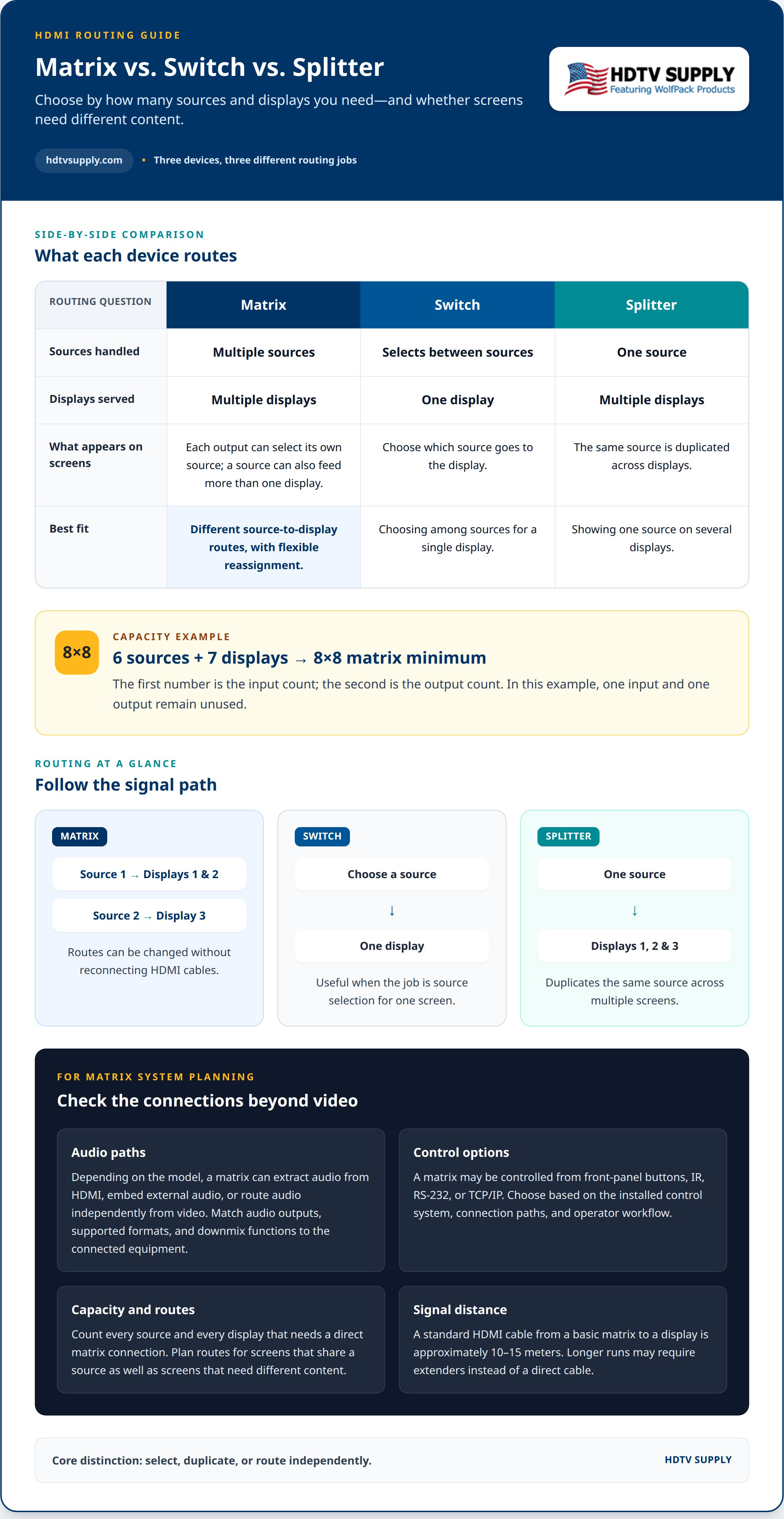
Capacity is the number of source inputs and display outputs, shown as a format such as 8×8. The first number counts inputs; the second counts outputs. For a setup with 6 sources and 7 displays, an 8×8 matrix is the recommended minimum. This leaves one input and one output unused, while supporting the stated system size.
Count every HDMI source, including devices used occasionally, then count every display needing a direct matrix connection. A room with multiple screens may need more outputs than sources, while a control room with many feeds may need more inputs. Choose capacity for the routing plan, not just the equipment used on installation day.
Input-to-Output Routing Configurations
A matrix assigns an input to one or more outputs. For example, a media player on input 1 can feed displays 1 and 2, while a presentation source on input 2 feeds display 3. The operator can change these assignments without reconnecting HDMI cables. This is the key distinction between a matrix and a simple one-source-to-one-display connection.
Before configuring the system, label each source and display consistently, such as “PC” and “Conference Room Screen.” Then use the matrix control interface to map inputs to outputs. Test each route at the display, including cases where several screens share one source. This reveals incorrect assignments and helps confirm the intended distribution.
Signal distance also affects installation choices. A standard HDMI cable from a basic matrix to a display is approximately 10-15 meters. Longer runs may require extenders rather than a direct cable, so include the route length and connection path in the system design. A high-density HDMI matrix switcher is useful when multiple sources must serve multiple destinations with selectable routing.
IR, RS-232, TCP/IP, and front-panel control
Control determines how operators change routes without reconnecting HDMI cables. A matrix may offer direct front-panel selection, infrared (IR), RS-232 serial commands, or TCP/IP network control. Choose the method that fits the room’s existing control setup and the people operating it.
Front-panel buttons let an operator select an input and output at the equipment rack. IR control uses commands from a remote or compatible control system. RS-232 sends serial commands through a wired connection, while TCP/IP carries control over a network. A 4×4 HDMI matrix with 4K 30Hz capability and RS-232 and IR control is one example of these options.
Control-system drivers translate a controller’s actions into commands the matrix understands. Before integration, match the driver to the matrix model and its supported command method. For example, a “select input 2 for output 1” command should produce that route, with feedback where the system supports it. Test each required command during setup.
Matrix routing and video wall control serve different purposes. A matrix assigns source signals to display outputs. A video wall processor manages how content appears across a wall, such as arranging an image across multiple panels. If a project needs both source selection and wall layout, plan each function separately.
Plan operation by identifying the control location, selecting the connection method, mapping required commands, then testing routes and wall layouts. A rack-based system may suit front-panel or wired serial control; a networked room may use TCP/IP. Choose based on the installed controller, cable paths, and operator workflow.
Choosing between a matrix, switch, and splitter
Choose equipment based on how many sources must reach how many displays, and whether screens need different content. An HDMI splitter duplicates one source to multiple displays; an HDMI matrix routes multiple sources to multiple displays. A switch selects between sources for one display, while a matrix lets each output have its own routing choice.
Use a splitter when every screen should show the same feed, such as one information channel across several lobby displays. It fits when the source stays fixed and no display needs independent content. A switch suits one display that needs access to several sources, such as a room screen used with a media player or presentation computer.
Select a matrix when display assignments vary. For example, a meeting room may show a presentation on one screen while another displays a separate source. The input and output counts should cover all connected devices, including those that need separate routes. A high-density HDMI matrix switcher is most useful when independent source selection across multiple outputs is essential.
- Splitter: one source is copied to multiple displays.
- Switch: one display selects from multiple sources.
- Matrix: multiple sources can be routed to multiple displays.
Before choosing, map each source to the displays it must serve. If every display shares one source, a matrix may add routing capacity the system doesn’t need. If different screens must show different feeds, a splitter won’t provide independent selection. For mixed requirements, list the routes operators need to change, then choose equipment that supports them.
Also consider the installation path. A basic matrix-to-display HDMI cable run is approximately 10-15 meters; longer runs may require extenders instead of direct cables. That can affect whether a compact switch, splitter, or matrix best fits the complete signal chain. Choose for the required routing first, then account for cable distance and connected equipment.
HDTV Supply
HDTV Supply helps readers connect system requirements with relevant professional AV equipment. Once you’ve mapped source and display routes, considered audio handling, and identified a control method, use those needs to narrow your equipment selection. The catalog includes WolfPackSecure 4K 60 4:4:4 HDMI Matrix Switchers, WolfPad TV Control Systems, and HDMI Video Wall Processors. These options address matrix switching, system control, and video wall processing as distinct parts of an AV setup. For a project that combines multiple displays or needs coordinated control, consider how each component fits the signal path and operator workflow. HDTV Supply can assist with product questions and equipment selection. Contact HDTV Supply to discuss your AV system requirements.
Plan the Next Step for Your AV System
Turn the room’s operating plan into a concise equipment brief. Record which sources matter, who changes routes, and whether the system needs venue-wide distribution. This keeps equipment selection tied to real use instead of choosing capacity or controls without a defined purpose. A high-density HDMI matrix switcher should fit the complete system architecture, not just the display count.
HDTV Supply offers flexible routing hardware, custom commercial distribution packages, and advanced touch-panel control systems. These solutions address different AV requirements, including source routing, venue distribution, and system control. Include the intended signal flow, control approach, existing system requirements, and planned functions in equipment planning so compatibility is part of the decision.
Contact HDTV Supply to discuss your setup. A clear brief is a practical starting point for moving your AV system forward.
Frequently Asked Questions
Why Do Some Matrix Setups Have Blank Screens or Flicker?
Blank screens or flicker often point to a signal-path or compatibility issue. Check that each source and display connects to the intended input and output, then test the route with a different source or display. Examine cable connections and any extenders in the path. If only one route fails, isolate its devices and connections before changing other settings.
What is a high-density HDMI matrix switcher and how does it work?
A high-density HDMI matrix switcher manages several source signals and display destinations in one routing system. Its inputs and outputs let an operator assign feeds to screens without moving cables. For example, a control room can direct different content to separate displays, then change assignments as operating needs shift. The model’s routing and signal capabilities determine which combinations it supports.
What input and output configurations are available for high-density HDMI matrix switchers?
Configurations vary by the number of source inputs and display outputs, and those counts don’t have to match. A system with more sources than screens needs sufficient input capacity; a multi-display venue may prioritize output capacity. Some designs also combine matrix routing with video wall processing. Choose a layout based on the connections and routing needs of the complete system.
Which HDMI versions, resolutions, and refresh rates do high-density matrix switchers support?
Supported HDMI versions, resolutions, and refresh rates are model-specific. Some listed matrix models support 4K at 60Hz, while other products may have different capabilities. Compare the matrix specifications with the source and display requirements across the entire signal path. A source, matrix, and display must all support the intended format for that format to pass through the system.
Do high-density HDMI matrix switchers support HDCP 2.2 or 2.3, HDR, and Dolby Vision?
Support for HDCP 2.2 or 2.3, HDR, and Dolby Vision depends on the specific matrix and connected devices. Treat each capability separately: a resolution label alone doesn’t establish support for a particular content-protection standard or video format. For a system using a streaming device and HDR display, match the matrix’s documented capabilities to both devices and the required signal path.
How do HDMI matrix switchers compare with video over IP and HDMI splitters?
An HDMI matrix routes connected sources to selected displays, while a splitter duplicates one source across displays. Video over IP distributes AV signals through network-based equipment instead of relying only on direct HDMI connections between matrix inputs and display outputs. The best fit depends on required routing, existing infrastructure, and system control. Map those needs before choosing an architecture.
Leave a Reply
Want to join the discussion?Feel free to contribute!