
Fast switching HDMI matrix: How EDID and HDCP affect switching
A faster input change isn’t just a faster button press. A fast switching HDMI matrix reduces the interruption by managing EDID display information and HDCP authentication as sources change, while maintaining the bandwidth needed for 4K HDR signals. How it handles those handoffs affects whether the picture returns quickly or pauses while devices resynchronize.
That pause can be frustrating, especially when switching between sources with different display capabilities or copy protection. The key is understanding what the matrix preserves, what needs to be renegotiated, and how each device in the signal chain affects the changeover.
This article explains how EDID and HDCP shape switching behavior, what 4K HDR bandwidth requires, and why input changes can still take time. You’ll learn what fast switching can improve, where compatibility matters, and what to look for when selecting a matrix for your system.
Key Takeaways
- Understand how EDID exchange and HDCP authentication can affect the time it takes for a picture to return after a source change.
- For 4K HDR, use an HDMI matrix with at least 18 Gbps of bandwidth to support the signal requirements described in the article.
- See how fast switching manages input changes and why the source, display, and signal chain still influence the result.
- Compare matrix capabilities against your system’s resolution, HDR format, and control needs to narrow down the right fit.
EDID exchange and HDCP authentication
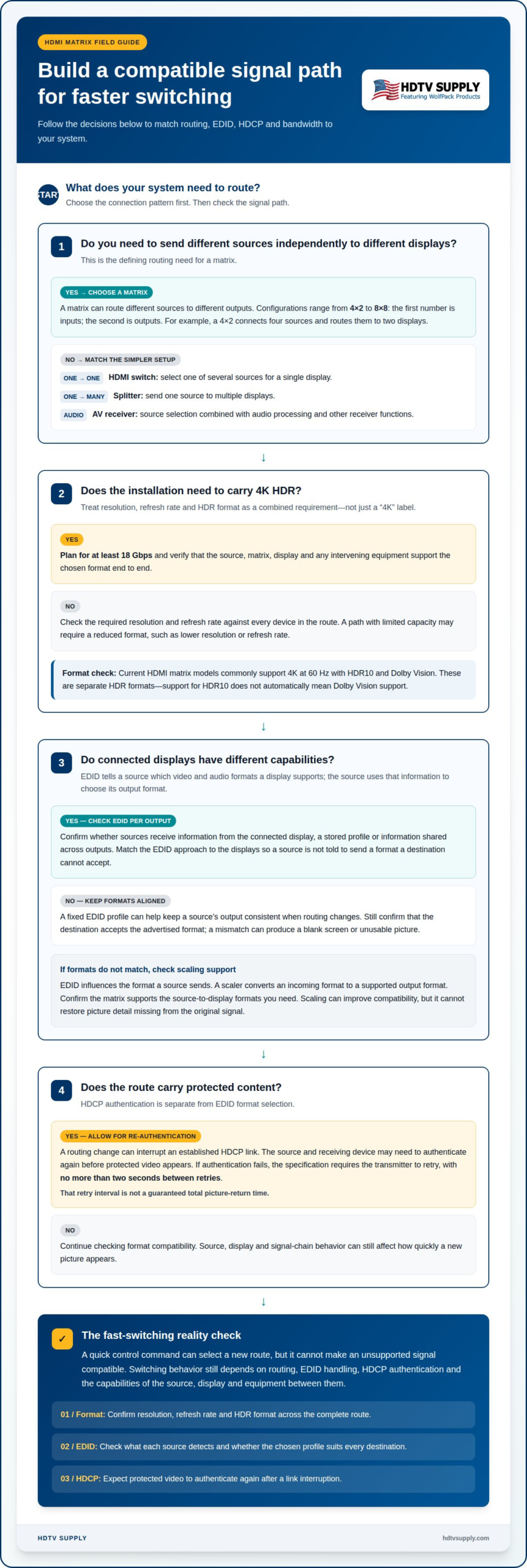
EDID tells an HDMI source which video and audio formats a connected display supports. The display provides this capability information over the connection, and the source uses it to select an output format. In a matrix system, the switcher sits between sources and displays, so its EDID handling can shape what each source detects. A source routed to a 4K display may behave differently from one routed to a 1080p display.
EDID management determines whether sources receive data from the connected display, a stored profile, or information shared across outputs. A fixed profile can help keep a source’s output consistent when routing changes. However, if a profile advertises a format the destination cannot accept, the screen may go blank or fail to show a usable picture. Matching the EDID strategy to the connected displays helps avoid capability conflicts.
HDCP adds a separate authentication step for protected content. The source and receiving device establish that the signal path supports the required protection before playback continues. If authentication fails, the HDCP specification requires the transmitter to retry, with no more than two seconds between retries. A matrix change can interrupt an established link, requiring devices to authenticate again before protected video appears.
Slow switching, black screens, and handshake delays commonly occur when a source must renegotiate EDID or repeat HDCP authentication after routing changes. Different display capabilities, failed authentication, or a source taking time to settle on a new output format can extend the interruption. EDID management and scaling address different parts of the signal path: EDID influences the format a source sends, while a scaler converts an incoming format to a supported output format. For example, a matrix can scale a source signal for a display with a different resolution. Scaling can improve compatibility, but it cannot restore picture detail missing from the original signal. Check how the system handles EDID per output and whether scaling supports the source-to-display formats you need.
Bandwidth and 4K HDR requirements
Bandwidth determines whether a matrix can carry a source’s chosen video format to its display. For a system intended for 4K HDR, the recommendation is at least 18 Gbps. A lower-capacity path may require a reduced format, such as a lower resolution or refresh rate. The matrix must support the signal, but it is only one part of the route. Source, display, and any intervening equipment also need compatible capabilities.
Resolution and refresh rate both affect the signal the system must carry. A 4K image contains more picture information than a lower-resolution image, while a higher refresh rate sends frames more frequently. HDR adds format requirements, too. The practical target is the most demanding combination the installation needs, rather than a single label on the matrix. For example, a source set to 4K HDR must connect through a path that supports that format end to end.
Format support should be read as a combination of capabilities. Current HDMI matrix models commonly support 4K at 60 Hz with HDR10 and Dolby Vision. These are separate HDR formats, so a device supporting HDR10 does not automatically mean it supports Dolby Vision. Match the source’s output and the display’s accepted formats to the matrix specification. This avoids selecting equipment based on “4K” alone.
Bandwidth also matters during switching. If an input sends a format beyond the matrix’s supported capacity, a quick route change cannot make that signal compatible. The system may need to use a supported output format instead. Consider a 4K HDR source routed to a display that accepts a different format: the signal path must accommodate the source, matrix, and destination together.
Use 18 Gbps as the baseline when planning for 4K HDR, then compare the full format requirements across connected devices. Check resolution, refresh rate, and HDR format as a set. For a multi-display system, account for the least capable destination on any route that shares a source signal. This gives switching a compatible signal to carry and helps prevent format limits from being mistaken for a switching-speed problem.
How HDMI fast switching improves input selection
A fast switching HDMI matrix routes selected sources to chosen displays, often across several rooms or screens. Fast switching can reduce the visible interruption when someone changes inputs by keeping the system ready to route another signal. The control action selects a new source and destination path, but the source, display, and matrix still need compatible signal formats. For example, a control system can make it straightforward to choose a media player instead of a cable box.
An HDMI switch selects one of several sources for a single display. A splitter sends one source to multiple displays, while an AV receiver combines source selection with audio processing and other receiver functions. A matrix offers flexible routing, sending different sources to different outputs. Choose based on whether you need one-to-one selection, duplicated video, audio processing, or independent source-to-display routes.
There is no single cost for a fast-switching matrix in the United States. Price depends on the required input and output count, supported video formats, and features such as scaling or control integration. A small system with a few sources and displays has different requirements from a multi-room installation routing several sources independently.
Matrix configurations can range from 4×2 to 8×8. The first number represents inputs, and the second represents outputs. A 4×2 unit, for example, can connect four sources and route them to two displays. An 8×8 configuration provides more connection and routing capacity. Select a layout that accounts for every source and display needing a direct matrix connection.
Fast input selection depends on more than the control command. The system must route the signal, maintain compatible formats, and allow the receiving display to show the new source. Separate source controls can also make switching easier, especially when users select inputs by room or display rather than connector number. Map source names such as “conference PC” or “streaming player” to their matrix inputs. Clear labels help operators select the intended feed quickly and reduce accidental routing to the wrong screen.
Which HDMI matrix switches have the fastest input switching times?
The fastest choice is the matrix that minimizes signal interruptions across your actual source and display combination. A published switching time is useful only if it describes the complete change, not just the internal routing command. For example, a matrix may change routes quickly while a display still needs time to show the incoming picture. Compare performance under matching conditions.
Look for a specification that defines when timing starts and ends. Does it measure the time from the control command to the route change, or from the command until a stable image appears? Those are different results. A useful comparison identifies the source, display, resolution, HDR format, and whether HDCP-protected content was active. Without those details, quoted times may describe different tests.
Input changes also depend on signal behavior. Switching between two sources using the same output format can differ from switching between a media player and a computer using different formats. EDID and HDCP handling influence whether devices must renegotiate after a route change. A matrix that manages these transitions efficiently can reduce avoidable pauses, but the connected devices remain part of the switching path.
For a practical evaluation, test the exact routes users will select. Measure from the input command until the intended image appears, then repeat with each relevant source and display. Include protected content and the formats used in the installation. Record whether the screen stays blank, shows a temporary signal loss, or returns directly to the picture. This reveals the user experience more clearly than a routing-only figure.
Prioritize documented switching behavior, format compatibility, and control method over a speed label alone. A remote, keypad, or control interface may affect how quickly a user can issue a selection, but it does not determine the display’s resynchronization time. Choose a matrix suited to the system’s sources and destinations, then assess its complete input-change behavior. For the right fit, explore HDMI matrix options for your routing requirements.
The fastest HDMI matrix switches minimize the full interval from an input command until a stable image appears, including EDID and HDCP transitions. Compare them using the same sources, displays, formats, and protected-content conditions. Routing-command speed alone is not enough.
HDTV Supply
HDTV Supply offers HDMI matrix options for systems that need flexible routing, alongside control and video wall equipment. If your choice depends on source and display counts, supported formats, or how users select inputs, those requirements help narrow the right equipment category.
For routing 4K signals, explore WolfPackSecure 4K 60 4:4:4 HDMI Matrix Switchers. WolfPad TV Control Systems address input selection, while HDMI Video Wall Processors support video wall applications. The right fit depends on the system’s routing and control needs, not switching speed alone.
Contact HDTV Supply for help choosing equipment for your HDMI signal path.
Plan the next change with your system in mind
Use your next equipment decision to define how people will select sources across the system. A fast switching HDMI matrix is most useful when its routing, control method, and connected devices suit the way each room or display is used. Think beyond the switch command: consider who selects inputs, which screens need independent feeds, and whether the system may expand.
For installations with broader distribution needs, HDTV Supply offers WolfPack Modular Matrix Switchers and a Sports Bar TV Distribution System. These options suit different routing scenarios, so start by identifying the sources, destinations, and control requirements. This gives your equipment decision a practical foundation instead of relying on a speed label alone.
Ready to discuss the right setup for your signal path? Contact HDTV Supply for HDMI advice. A well-matched system can make everyday source selection simpler and more consistent.
Frequently Asked Questions
Background: What is Fast Switching?
Fast switching describes a matrix’s ability to change the selected source and route it to a display with minimal interruption. It refers to the system’s response to a selection, not a guarantee that every display immediately shows the new image. For instance, a command can change the route before a display finishes preparing to show the incoming source.
What is a fast-switching HDMI matrix switch and how does it work?
A fast-switching HDMI matrix routes multiple sources to multiple displays and is designed to make route changes more responsive. For example, a control interface can assign a presentation laptop to a conference-room display, then route a media player there instead. The matrix changes the source-to-output path, but the display and source must still process the newly routed signal.
What HDMI versions, resolutions, refresh rates, and HDR formats do fast-switching matrix switches support?
Support depends on the specific matrix and its signal path, so assess the required combination rather than relying on an HDMI version label alone. For a gaming setup, compare the console’s output mode with the display’s accepted resolution, refresh rate, and HDR format. Include any intermediate devices in that compatibility check, since each device can limit the available format.
Do HDMI matrix switches support HDCP 2.2 or 2.3, EDID management, and audio extraction?
These are separate capabilities, and support varies by matrix model. For protected video, the source, matrix, and display must work with the required HDCP version. EDID management controls the display capability information presented to sources, while audio extraction routes audio separately from video. Treat each function as its own requirement when planning the signal chain.
How do you set up and configure an HDMI matrix switch for multiple sources and displays?
Start by mapping each source to its intended display, then connect the devices and assign routes using the matrix’s supported control method. For example, label a laptop input “Presentation” and route it to the meeting-room display. Set the EDID approach to suit the connected displays, then test each route with the formats and protected content used in normal operation.
What should you check before buying an HDMI matrix switch for gaming, home theater, or commercial AV?
Match the matrix to the actual signal routes, not just the number of devices. For gaming, prioritize compatibility with the console’s and display’s intended output mode. For home theater, account for protected video and the audio path. For commercial AV, map independent source-to-screen needs and the control method operators will use. Also consider whether the system may need additional routes later.
Leave a Reply
Want to join the discussion?Feel free to contribute!