
Extending HDMI over Fiber Optic Cable for AV Systems
Fiber gives HDMI systems more reach than a standard copper run: fiber-based extenders can support distances up to 300 meters on multimode fiber and up to 10 km on single-mode fiber. For long cable paths, extending HDMI over fiber optic cable can carry video without relying on a long copper HDMI cable, whose reliable range is typically up to 50 feet.
That extra reach is useful, but distance alone doesn’t determine compatibility. The fiber type and extender’s supported video bandwidth must match the source and display, including resolution, refresh rate, HDR, audio, and control requirements.
This guide explains why fiber suits long HDMI runs and what to assess before choosing a system. You’ll learn how multimode and single-mode fiber differ, how bandwidth affects 4K and 8K formats, and which audio and control features need to travel alongside video. The result is a clearer way to plan a link that fits the signal and the route, rather than choosing by distance alone.
Key Takeaways
- Match the extender’s bandwidth to the source and display formats, including resolution, refresh rate, and chroma.
- Choose multimode or single-mode fiber based on the route and the system’s transmission requirements.
- Plan for audio return, HDR metadata, and control signals alongside video, since each can affect system compatibility.
- Use the connection requirements to guide AV system design, including how matrix switching, video walls, and TV control fit the setup.
Why Use Fiber to Extend HDMI?
Fiber suits long HDMI runs where copper cable reach or signal quality becomes a constraint. For a successful link, match the extender’s bandwidth, fiber type, connectors, and direction to the source, display, and cable route.
Long-Distance HDMI Signal Extension
An HDMI-over-fiber extender uses a transmitter to convert the source’s electrical HDMI signal into optical data. A receiver converts that data back to HDMI at the display. For HDMI 2.1, assess the extender’s supported resolution, refresh rate, chroma, HDR, audio, and control features together. Some fiber extender terminations specify support for 8K at 60 Hz, 4K at 144 Hz uncompressed with 4:4:4 chroma, or 4K at 240 Hz with DSC. Those figures describe particular system capabilities, not every fiber link. Check the full signal path, including the source and display.
Fiber and Copper Extension Distances
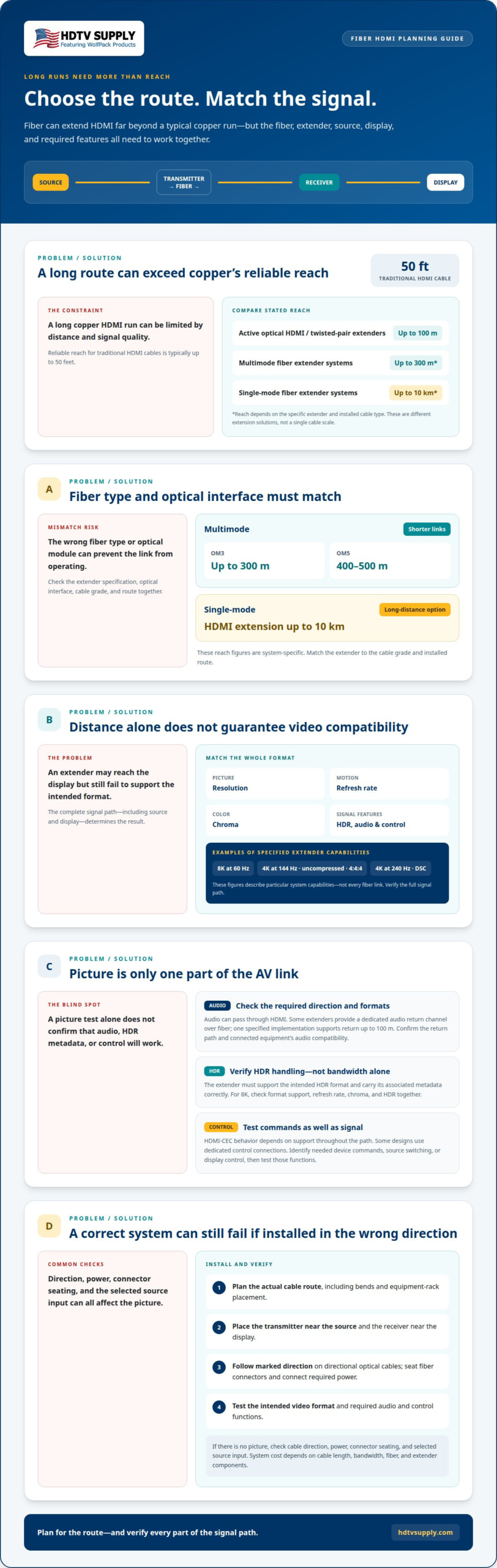
Traditional HDMI cables reliably support signals up to 50 feet. Active optical HDMI cables and twisted-pair extenders can support up to 100 meters, while fiber-based HDMI extenders can reach up to 300 meters on multimode fiber and up to 10 km on single-mode fiber. These are different solutions, so compare the extender’s stated reach with the installed cable type. Fiber carries optical signals along the run; a copper HDMI connection carries electrical signals and is more distance-limited.
Cable Length and Connector Direction
Choose a cable long enough to follow the actual route from source to display, including bends and equipment-rack placement. Confirm the connector ends and direction: directional optical HDMI cables label the source and display ends, while extender systems use a transmitter near the source and a receiver near the display. For installation, connect each end as marked, seat the fiber connectors, then connect HDMI and any required power. Test the intended video format. If there’s no picture, check the direction, power, connector seating, and selected source input. HDMI-over-fiber cost depends on cable length, bandwidth, fiber, and extender components; the system configuration determines the total.
HDMI audio, HDR, and control features
A fiber link must carry more than picture data when an AV system depends on sound, HDR, or device control. Before finalizing the design, check each extender’s signal support against the source, display, and connected audio equipment.
Audio formats can pass through the HDMI signal, while some extenders provide a dedicated audio return channel over fiber. One specified implementation supports audio return up to 100 meters. This matters when sound travels back from a display to an AV receiver or audio system. Confirm that the extender supports the required return path, and that connected equipment uses compatible audio formats.
HDR depends on video and associated metadata reaching the display correctly. An extender must support the intended HDR format along with the video signal; bandwidth alone doesn’t establish HDR compatibility. For an 8K installation, assess the extender’s stated 8K format support, refresh rate, chroma, and HDR handling as a combined specification. The source and display must also support the selected format. A mismatch in any part of the chain can limit the output.
Control requires a separate compatibility check. HDMI-CEC can carry commands between connected devices, but system behavior depends on support throughout the signal path. Other designs may use dedicated control connections, so identify whether the installation needs device commands, source switching, or display control. After connecting the system, test the intended functions, not just the picture and audio.
For a room with multiple displays, separate centralized control from HDMI signal transport. Explore WolfPad TV Control Systems as an option for managing TV control alongside the video design. Keep the control plan aligned with the extender’s supported connections and the equipment being operated.
Use this sequence when reviewing an 8K extender: match source and display formats, confirm HDR and audio support, then map required control signals. That process helps distinguish a complete AV link from one that only carries video.
Multimode and single mode fiber compatibility
Choose fiber based on the extender’s supported fiber type, optical interface, and required transmission distance. A mismatch between the installed cable and the transmitter or receiver can prevent the link from operating.
Multimode fiber is suited to shorter links. An HDMI extender specified for OM3 multimode fiber supports lengths up to 300 meters, while OM5 multimode fiber supports 400 to 500 meters. Single-mode fiber supports HDMI extension up to 10 km. These are system-specific reach figures, so match the extender specification to the cable grade and route.
Check the optical connections as well as the fiber label. An HDMI-over-fiber extender uses transmitter and receiver units, and the optical modules must match the fiber type. By contrast, an active optical HDMI cable integrates optical conversion into the cable assembly and typically has directional source and display ends. Use an extender when the design calls for separate endpoints and installed fiber. Choose an active optical cable when its integrated form suits the run.
CAT-6 extenders use copper cabling, and the stated maximum speed for CAT-6 extenders is 10 gigabits per second. HDMI extenders over fiber use optical transmission and may support longer routes, depending on fiber type and system design. A CAT-6 extender is not interchangeable with an Ethernet media converter: HDBaseT and Ethernet use different signaling, bit rates, and processing. An Ethernet converter cannot transmit or receive HDBaseT signals.
HDBaseT carries HDMI over twisted-pair cable through compatible extender equipment. SDI is a separate video connection standard, while wireless HDMI sends signals over a radio link rather than installed fiber. Choose among them based on the available infrastructure, endpoint connections, and required route. A dual-mode HDBaseT device may carry standard Ethernet, but that mode transports network traffic, not HDMI.
For a planned fiber route, document the installed grade and extender compatibility before connecting equipment. A 12-strand OM3 cable, for example, provides multiple strands for system design, but the chosen extender still needs compatible optical connections.
Supported video resolutions, refresh rates, and bandwidth
Resolution alone doesn’t define an HDMI link’s bandwidth needs. Refresh rate and chroma also affect the data rate, while the source, extender, fiber path, and display must all support the chosen format. When extending HDMI over fiber optic cable, compare the complete signal chain. Higher-resolution video and faster refresh rates generally require more bandwidth. A lower-bandwidth component can limit the signal even when the display supports a higher format.
Compare the extender’s stated bandwidth with the exact video mode. A 100-foot 4K fiber-optic HDMI cable is listed at 18 Gbps. A 300-foot 4K fiber-optic cable is also listed at 18 Gbps, with support for 4K at 60 Hz. These examples show why distance and bandwidth should be assessed together, rather than assuming every fiber cable supports the same video formats.
Refresh rate changes the data requirement. A listed 50-foot fiber-optic HDMI cable supports 8K at 60 Hz and 4K at 120 Hz. Another extender specification gives a video data rate of up to 10.3 Gbps with an SFP module. That rate is not equivalent to an 18 Gbps specification, so match each product’s stated modes to the signal you need to transport.
For future readiness, plan around the highest format the system must carry, not just its current source. Check resolution, refresh rate, chroma, HDR, and compression support in the extender specifications. Then confirm compatibility across both endpoints and any video-processing equipment. Extending HDMI over fiber optic cable can carry uncompressed 4K and 8K over long runs, but the complete link still depends on every component supporting the selected format.
For multi-display designs, align the signal requirements with the processing stage. Explore HDMI Video Wall Processors as part of planning video distribution, and match the processor’s role to the system’s required resolution and refresh rate.
HDTV Supply
HDTV Supply helps readers connect long-distance HDMI planning with the wider AV system, including signal distribution, display processing, and control. Its offerings include advanced modular matrix switchers, HDMI video wall processors, and comprehensive television control systems. For systems requiring 4K at 60 Hz with 4:4:4 chroma, high-performance secure HDMI matrix switchers provide a relevant matrix-switching option when extending HDMI over fiber optic cable.
Consider these tools when a fiber link is part of a larger setup with multiple sources, displays, or control needs. The right system depends on the video formats and routing requirements established for the installation. Contact HDTV Supply to discuss your AV system requirements.
Turn Your Signal Plan Into a Working AV System
A sound plan for extending HDMI over fiber optic cable starts with the job the whole system must perform. Define how sources, displays, audio, and control should work together, then select equipment to match that plan. This keeps the cable choice connected to the larger AV design.
HDTV Supply offers WolfPack Modular Matrix Switchers, a Sports Bar TV Distribution System, and WolfPad TV Control Systems for different distribution and control needs. Consider how these components fit your signal path and display environment, rather than treating the fiber link as an isolated decision.
Bring your planned setup and requirements into the next conversation. Contact HDTV Supply about HDMI over fiber to discuss the AV equipment that fits your system. A clear design brief makes the next step easier, and puts your project on a practical path forward.
Frequently Asked Questions
What HDMI versions, resolutions, refresh rates, HDR, and HDCP do fiber optic HDMI cables support?
Support depends on the cable or extender model, not the word “fiber” alone. Check its specifications for HDMI version, resolution, refresh rate, chroma, HDR format, and HDCP support. Then compare those requirements with the source and display. For example, an 8K signal may require different settings than a 4K signal, and HDCP compatibility must extend across every connected device.
What is the maximum distance for HDMI over fiber compared with copper HDMI?
Fiber-based HDMI extenders can reach up to 10 km on single-mode fiber or 300 meters on multimode fiber. Traditional HDMI cables reliably carry signals up to 50 feet. Treat these as different system limits, not a guarantee for every cable: extender design, fiber type, and signal format affect usable reach. For a long route, match the extender’s specified distance to the installed fiber.
Can HDMI over fiber carry ARC, eARC, Ethernet, CEC, and power?
These features depend on the extender’s design, so a fiber connection doesn’t automatically carry every HDMI function. A dedicated audio return channel is specified for up to 100 meters in one extender implementation. Detachable fiber terminations may also need continuous USB-A power at 5 volts and 50 milliamperes. Check support for ARC or eARC, Ethernet, CEC, and power separately for the exact system.
Do HDMI fiber optic cables need special care, and what is their minimum bend radius?
Handle fiber cables carefully: avoid crushing them, sharply bending them, or pulling them by their connectors. There is no single minimum bend radius for every HDMI fiber cable; it depends on the cable’s construction and specification. Follow the stated radius for the exact cable during routing, and keep bends gradual. If a link fails after installation, inspect the route for tight bends or connector strain.
What does HDMI over fiber cost in the United States?
The total cost depends on cable length, bandwidth, fiber type, and extender components.
Leave a Reply
Want to join the discussion?Feel free to contribute!