
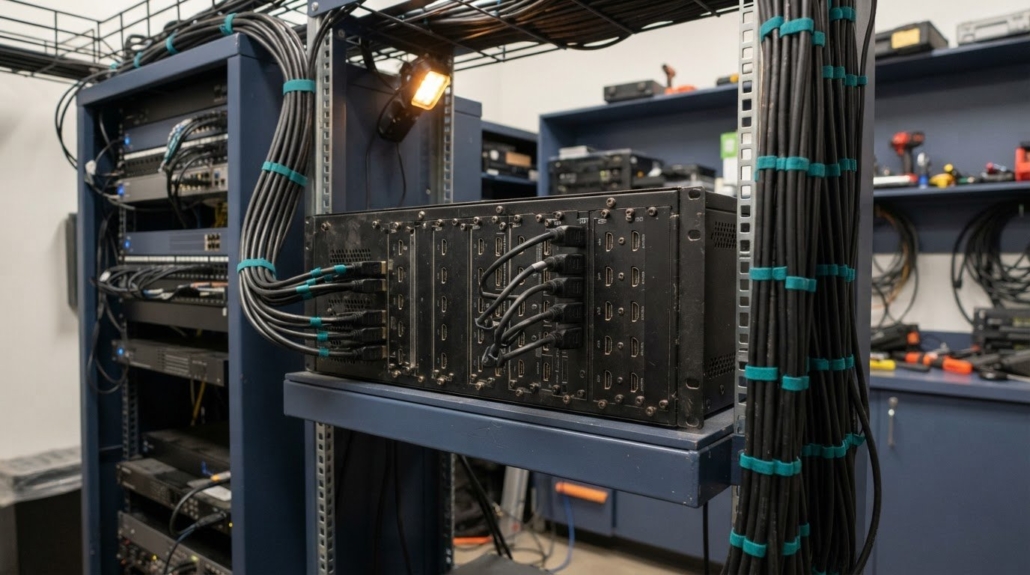
WolfPack 12×32 Matrix Switch Cost & Pricing Guide
The key to understanding how much a WolfPack 12×32 HDMI sports bar matrix switch costs is to look beyond the 12 inputs and 32 outputs. Modular card choices and HDMI and HDCP compatibility shape the configuration, so the right fit depends on the sources, displays, and video requirements in your system.
A high-capacity matrix switch can be a substantial investment, and it’s reasonable to want clarity on what drives the price before choosing a setup. This guide explains the factors that affect pricing and how the 12×32 configuration compares with other matrix options.
You’ll also see how card selection and signal compatibility influence system design, what the switch’s 12-input, 32-output capacity means for a sports bar, and which details matter when planning distribution across multiple screens. Use those points to assess whether this configuration aligns with your venue’s needs.
Key Takeaways
- Match the 12-input, 32-output capacity to the sources and displays in your venue before selecting a configuration.
- Understand how modular card choices and HDMI and HDCP compatibility affect the system fit for your equipment.
- Use the switch’s video wall capability as one factor when planning how content will appear across multiple TVs.
- Compare matrix options by their capacity and signal-distribution approach to identify the setup that best suits your sports bar.
What features and specifications does the WolfPack 12×32 HDMI matrix switch include?
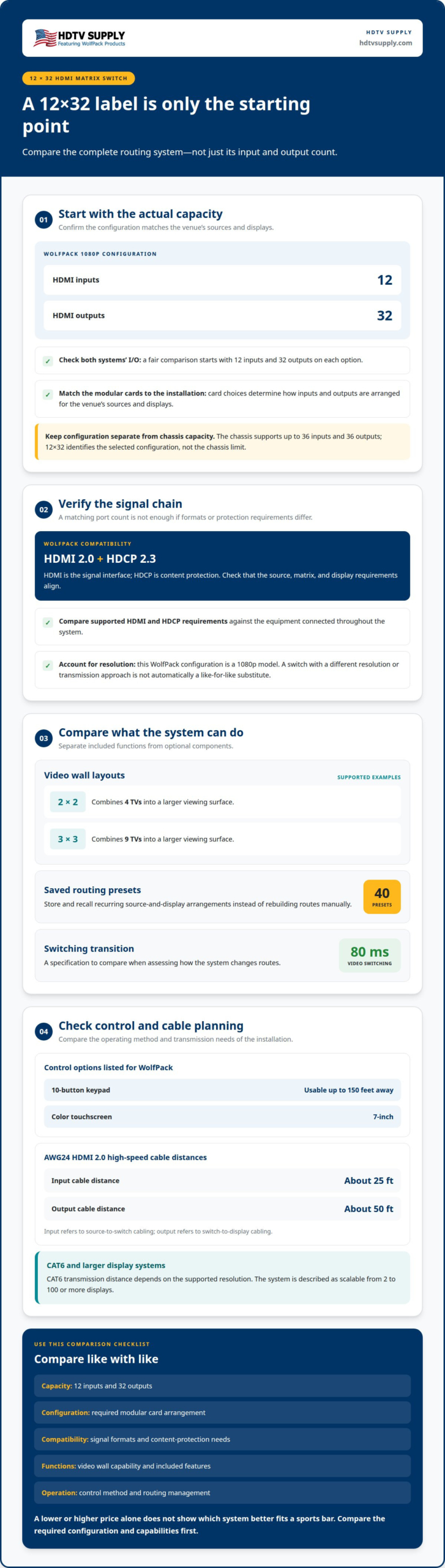
The 1080p WolfPack 12×32 configuration provides 12 HDMI inputs and 32 HDMI outputs. Each input connects a source, such as a receiver or media player. Each output routes selected content to a display. This capacity lets a venue distribute source signals across numerous screens. It also allows different outputs to show different sources.
Its modular design matters when planning a system. The chassis supports up to 36 inputs and 36 outputs. The 12×32 configuration uses fewer than that maximum in each direction. Modular cards determine how inputs and outputs are arranged. This gives system designers a way to match the switch’s I/O layout to the venue’s source and display plan. The 12×32 label identifies the chosen configuration, not the chassis limit.
Routing speed is another practical specification. The WolfPack modular HDMI matrix switch switches video in 80 milliseconds. This figure describes the switch’s transition time when changing routes. For example, staff can move a display from one source to another without treating every screen as a separate system. The value is useful when assessing switching behavior alongside input count and output count.
Compatibility depends on the signal format and protection requirements. The WolfPack HDMI matrix switch supports HDMI 2.0 and HDCP 2.3 compliance. HDMI describes the signal interface, while HDCP is content protection. Both matter when sources and displays must pass protected video. A connection chain is only as useful as its compatible components, so source, switch, and display requirements should align.
Video wall functions extend routing beyond individual screens. The switch can create a 2-by-2 video wall using four TVs. It can also create a 3-by-3 layout using nine TVs. These configurations combine displays into a larger viewing surface. A 2-by-2 arrangement suits a four-screen layout; a 3-by-3 arrangement uses nine screens. Those examples clarify the wall sizes supported in the listed feature set.
Preset scenes help manage recurring routing layouts. The modular switch supports 40 saved and recalled presets. A preset can store a preferred arrangement of sources and displays. Staff can then recall a saved setup instead of rebuilding the same routes manually. For example, a venue could keep separate scenes for different viewing arrangements. The preset count defines how many saved scenes the system supports.
Transmission distance depends on the connection type. With AWG24 HDMI 2.0 high-speed cables, the supported input cable distance is about 25 feet. The supported output cable distance is about 50 feet. These figures distinguish source-to-switch cabling from switch-to-display cabling. They help identify where cable length may influence the room plan.
CAT6 transmission extends reach beyond those HDMI cable distances. CAT6 transmission distance depends on the supported resolution. These are different resolution-specific distances, not interchangeable figures. The system is described as scalable from 2 to 100 or more displays, allowing layouts beyond a single 12×32 configuration to be considered.
Control options include a 10-button keypad usable up to 150 feet away and 7-inch color touchscreens. These options provide ways to operate the system from different points. Together, the specifications give planners concrete items to compare: modular I/O, HDMI and HDCP compatibility, switching speed, video wall layouts, presets, and transmission distances.
How does the WolfPack 12×32 compare in price with other 12×32 HDMI matrix switches?
A useful comparison starts with the same 12×32 capacity. That label means 12 inputs and 32 outputs. It does not, by itself, describe every capability included in the system. Two switches with the same I/O count can differ in modular card choices, supported signal formats, video wall functions, and control methods. Compare those items before treating two prices as directly equivalent.
For the WolfPack 12×32, evaluate the configuration as a complete signal-routing system. Its listed specification includes a 1080p matrix, video wall functionality, and modular construction. Those characteristics define what the configuration is designed to do. Other 12×32 options may use different architectures or feature sets, so a lower or higher price alone cannot show which system better fits a sports bar.
Use these comparison points to structure the review:
- I/O configuration: Confirm that both options provide 12 inputs and 32 outputs.
- Signal compatibility: Compare HDMI version and HDCP support against connected equipment.
- Modular cards: Identify the card arrangement required for the venue’s sources and displays.
- Functions: Separate included features, such as video wall processing, from optional system components.
- Control: Compare how operators select sources and manage display routing.
Card selection is central to modular-system comparisons. A card arrangement suited to a venue’s actual source and output plan may differ from one designed for another installation. For example, a system feeding 32 displays has different output demands from a layout using fewer screens. Compare the required card configuration, rather than assuming every 12×32 chassis contains identical cards.
Compatibility also changes the value of a configuration. The WolfPack model supports HDMI 2.0 and HDCP 2.3 compliance. Compare other switches against the formats and content-protection requirements of the sources and displays in the planned system. A matrix that matches the I/O count but not the necessary signal chain is not an equivalent comparison. Check the whole route: source, matrix, and display.
Resolution is another key distinction. The WolfPack configuration in this comparison is a 1080p model. A 12×32 switch supporting a different resolution or transmission approach should not be treated as a like-for-like substitute without considering the venue’s playback requirements. For example, a system built around 1080p sources may have different priorities from one designed around higher-resolution signals.
Separate the matrix switch from the rest of the installation. Cabling, displays, source devices, control hardware and signal-extension components can all affect the project budget, and two quotes may include different equipment. Compare each configuration item by item, then distinguish the switch itself from the additional equipment your venue needs.
A practical comparison follows three steps. First, match the 12-input, 32-output layout. Second, align the required video format, HDCP support, and modular card choices. Third, compare the included functions and any supporting equipment. This method reveals whether a price difference reflects a different configuration or a genuinely comparable switch.
For a sports bar, the best comparison is the one tied to the operating plan. List the sources, displays, video wall needs, and control requirements. Then assess each 12×32 configuration against that list. The result is a clearer view of what each system delivers, without confusing port count with complete system value.
A price comparison should also distinguish the matrix from equipment that may support or extend a routing installation. These are prices for separate products, not a price for the 12×32 matrix itself, so they should not be used as direct substitutes in a comparison of matrix-switch prices.
Control and source equipment can also affect the cost of a complete setup. Consider these items only if the planned system needs their functions, and keep their costs separate from the switch price when comparing 12×32 options. This makes it easier to distinguish the price of the routing chassis from the budget for supporting displays, control, signal extension, or source handling. A useful comparison therefore pairs equivalent matrix configurations first, then accounts for any additional equipment required by the venue.
HDTV Supply: WolfPack Modular Matrix Switchers
HDTV Supply sells WolfPack Modular Matrix Switchers for venues routing sources to multiple displays. Consider this range when matching matrix capacity, modular card choices and signal compatibility to your sports bar’s display layout.
For broader distribution needs, customizable AV over IP solutions provide another relevant option. WolfPackSecure 4K 60 4:4:4 HDMI Matrix Switchers may suit systems requiring that signal format, while WolfPad TV Control Systems address TV control. The right direction depends on your sources, screens, and operating requirements.
Share your system requirements with HDTV Supply to discuss which option fits your setup.
Build a Clear Brief for Your Next Step
Turn your venue’s daily operation into a focused purchasing brief. Note who manages screen routing, how viewing arrangements change during service and which system behaviors matter most to staff. Separate essential requirements from future preferences. This gives your configuration discussion a practical starting point and keeps the decision tied to how the room operates, not just the equipment label.
If you’re assessing how much a WolfPack 12×32 HDMI sports bar matrix switch costs for your venue, connect the system requirements to the outcomes you need. A clear brief can help frame the discussion around your priorities and make it easier to evaluate the right fit. Consider the decisions your team needs to make and the workflows the system should support. Then contact HDTV Supply about pricing to discuss your requirements. With a defined plan, you can move forward with greater confidence.
Frequently Asked Questions
What is the current price of a WolfPack 12×32 HDMI sports bar matrix switch?
If you’re asking how much a WolfPack 12×32 HDMI sports bar matrix switch costs, that’s the listed configuration to use for your comparison. To assess how much a WolfPack 12×32 HDMI sports bar matrix switch costs for your venue, budget separately for any other equipment your setup requires.
Leave a Reply
Want to join the discussion?Feel free to contribute!