
HDMI over IP Security Risks and How to Reduce Them
A networked display can become an entry point for disruption. HDMI over IP carries audio and video across an IP network, connecting encoders, decoders, and displays. That connection also creates security considerations. Understanding HDMI over IP security risks means accounting for unauthorized access, malicious commands, and traffic that can interrupt what screens display.
It’s easy to focus on picture quality and signal routing, but access controls and network design matter too. Strong passwords, encryption, firewalls, VLANs, and IGMP Snooping each help protect the system in different ways, while network capacity affects display performance.
This guide explains how HDMI over IP works, how attacks can disrupt displays, and which safeguards help reduce exposure. Learn how to limit access, isolate video traffic, and manage multicast streams with IGMP Snooping, so you can make informed decisions about securing an HDMI over IP setup.
Key Takeaways
- Understand how moving HDMI signals onto an IP network changes the system’s exposure and creates new ways displays can be disrupted.
- Reduce unauthorized access by combining strong passwords, encryption, and firewall controls rather than relying on a single safeguard.
- Use managed switching, VLAN segmentation, and IGMP Snooping to keep video traffic organized and limit unnecessary network load.
- Match display-control and video-distribution equipment to the system’s security and routing requirements before expanding the setup.
Denial-of-service attacks against displays
HDMI over IP carries display signals across a network, so disruption can affect connected screens. One demonstrated attack repeatedly cycles through four display input selections.
Display Disruption Attacks
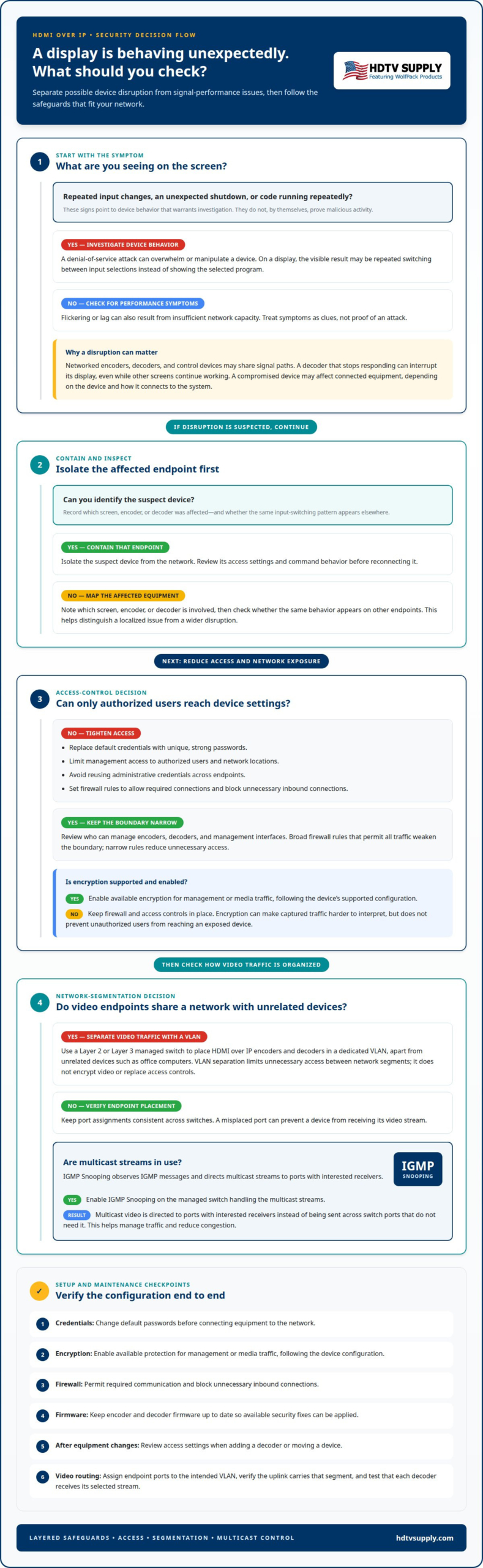
A denial-of-service attack overwhelms or manipulates a device so it cannot perform its intended function. On a display system, the visible result may be a screen repeatedly switching inputs instead of showing the selected program. In a control room, venue, or digital signage system, this can prevent viewers from seeing the content they need.
Device Vulnerability Findings
Vulnerabilities can arise when an attacker gains access to an unsecured HDMI-enabled device and sends commands it was not intended to perform. Those commands may cause repeated code execution or shut the device down. Exposed access and weak command handling can enable unintended actions, including disruption. The risk depends on the device and how it connects to the system.
HDMI over IP security risks can extend beyond one screen when networked encoders, decoders, or control devices share signal paths. If a compromised device can affect connected equipment, disruption may spread across the viewing system. For example, a decoder that stops responding can interrupt its display, even while other screens continue working.
Distinguish signs of an attack from ordinary signal faults. Repeated input changes, an unexpected shutdown, or code running repeatedly point to device behavior that warrants investigation. Flickering or lag, by contrast, can also result from insufficient network capacity, so symptoms alone do not prove malicious activity.
First, contain the affected endpoint. Isolate the suspect device from the network, then review its access settings and command behavior before reconnecting it. Record which screen, encoder, or decoder was affected and whether the same input-switching pattern appears elsewhere. These details help distinguish a localized endpoint issue from a wider disruption.
Password, encryption, and firewall protections
HDMI over IP devices can expose video or audio if unauthorized users gain access to the network or equipment. Since HDMI carries both signals, securing the network path matters alongside controlling physical access.
Use layered controls. Strong passwords help prevent unauthorized access to device settings, while encryption can protect transmitted data when supported and enabled. A firewall can restrict which network connections reach encoders, decoders, and their management interfaces.
Start with device access. Replace default credentials with unique, strong passwords, and limit management access to authorized users and network locations. For example, a display decoder should not accept management connections from every device on a shared network. Avoid reusing administrative credentials across endpoints, since one exposed password could affect more equipment.
Use encryption and firewall rules as complementary protections. Encryption can make captured traffic harder to interpret, but it does not prevent unauthorized users from reaching an exposed device. A firewall limits that access by allowing only the connections the system needs. Broad rules that permit all traffic weaken this boundary; narrow rules reduce unnecessary access.
Secure installation and maintenance include these practical steps:
- Change default passwords before connecting HDMI over IP equipment to the network.
- Enable available encryption for management or media traffic, following the device’s supported configuration.
- Set firewall rules to permit required communication and block unnecessary inbound connections.
- Keep encoder and decoder firmware up to date, so available security fixes can be applied.
- Review access settings after equipment changes, such as adding a decoder or moving a device.
For systems routing content across multiple screens, HDMI Video Wall Processors can handle the display-processing role; passwords, encryption, and firewall rules remain network safeguards. Treat those controls as separate layers, then review how each device is reached and managed. This approach helps reduce exposure without assuming that a single setting protects every signal path.
VLANs and IGMP Snooping
A managed Ethernet switch can help control HDMI over IP traffic. VLANs separate video traffic logically, while IGMP Snooping manages multicast delivery.
A VLAN, or virtual local area network, groups selected switch ports into a separate network segment. Assigning HDMI over IP encoders and decoders to one VLAN keeps their traffic apart from unrelated devices, such as office computers. This separation can limit unnecessary access between network segments, but it does not encrypt video or replace access controls.
Use a Layer 2 or Layer 3 managed switch for these controls. Configure the ports connected to the encoders, decoders, and network uplink for the intended VLAN. A misplaced port can prevent a device from receiving its video stream, so map each endpoint to the correct segment and keep the configuration consistent across switches.
IGMP Snooping manages multicast traffic. It observes Internet Group Management Protocol messages exchanged by devices and directs multicast streams to ports with interested receivers. Without this filtering, multicast video may be sent across switch ports that do not need it. Enabling IGMP Snooping helps manage traffic and reduce congestion on the HDMI over IP network.
During setup, use this sequence:
- Create a dedicated VLAN for HDMI over IP encoders, decoders, and related video traffic.
- Assign each endpoint port to the correct VLAN and verify the uplink carries that segment.
- Enable IGMP Snooping on the managed switch handling the multicast streams.
- Test that each decoder receives its selected stream and unrelated ports avoid unnecessary video traffic.
VLANs and IGMP Snooping solve different problems. A VLAN separates traffic into a logical segment; IGMP Snooping controls where multicast traffic travels within the switched network. Together, they create clearer traffic boundaries and help prevent video streams from using switch capacity on ports that don’t need them. Review both settings when adding an encoder, decoder, or switch.
VLANs for isolating HDMI over IP traffic
A dedicated VLAN separates HDMI over IP traffic from other network traffic. This creates a clear boundary for video devices and helps limit unnecessary access between network segments.
Place the system’s encoders and decoders on the video VLAN, apart from everyday devices such as office computers. Assign switch ports deliberately, including uplinks that carry traffic between switches. A port in the wrong VLAN can expose traffic to an unintended segment or prevent a decoder from receiving its stream.
A VLAN separates traffic, but it does not encrypt it. It doesn’t hide video from a device that can access the segment, and it doesn’t replace strong credentials or firewall rules. Pair VLAN isolation with those controls so network boundaries and device access work together. For example, restrict equipment management to authorized network locations instead of allowing every office workstation to reach it.
How do HDMI over IP security risks compare with HDBaseT and direct HDMI? HDMI over IP connects display equipment to an IP network, creating network-based access paths that direct HDMI cabling doesn’t inherently create. HDBaseT uses a different transmission architecture, so exposure depends on its equipment and connections. Neither cabling choice removes the risk of physical tampering.
Use this VLAN design checklist:
- Group only the HDMI over IP endpoints and required network interfaces in the video VLAN.
- Keep office computers and unrelated devices on separate network segments.
- Limit routing between the video VLAN and other segments to necessary communication.
- Test video delivery and management access after changes to switch ports or uplinks.
These boundaries are especially useful when a display network shares switching infrastructure with business devices. Document the intended VLAN membership and update it when an encoder, decoder, or switch changes location. For help matching display-processing equipment to your signal-routing plan, explore display system options.
HDTV Supply
HDTV Supply offers professional AV equipment for display routing and control, including WolfPack HDMI matrix systems with free video-wall processing and commercial multi-screen video distribution packages with tablet control. If you’re planning a video wall or revising how signals reach displays, match the routing and control requirements to your network boundaries and access protections.
Available options include WolfPad TV Control Systems, HDMI Video Wall Processors, and WolfPackSecure 4K 60 4:4:4 HDMI Matrix Switchers. These products address different AV system needs; they don’t replace VLAN configuration, passwords, encryption, or firewall rules. Keep the equipment choice and network security plan aligned from the outset.
For equipment options suited to your display system, contact HDTV Supply.
Plan Your Next Display-System Upgrade
Use your next system change to align display routing with the way your network is managed. A plan for HDMI over IP security risks should account for who needs access, how devices will be controlled, and what happens as the system grows. Organizations seeking comprehensive network oversight can turn to CX IT Services for professional IT support and helpdesk management. Record these decisions alongside your AV design so future changes don’t undermine existing protections.
HDTV Supply offers WolfPack Modular Matrix Switchers, a Sports Bar TV Distribution System, and WolfPad TV Control Systems for different display-routing and control requirements. Choosing equipment is one part of the planning process; network security settings remain essential to the finished design.
Ready to discuss equipment for your display system? Contact HDTV Supply for HDMI over IP advice and take the next step with a clearer plan.
Frequently Asked Questions
What is HDMI over IP?
HDMI over IP distributes audio and video signals through an IP network rather than relying only on a direct HDMI cable between source and display. For example, a source can feed an encoder, which sends the signal across the network to a decoder connected to a screen. This approach uses network infrastructure to carry AV signals between connected devices.
What is HDMI over IP and how does it work?
HDMI over IP converts an HDMI source signal into network traffic for delivery to a compatible receiver. An encoder takes input from equipment such as a media player; a decoder receives the stream and outputs it to a display. The network switch and system configuration determine how the stream reaches its intended display or displays.
What security risks do HDMI over IP extenders and AV-over-IP systems pose?
The main HDMI over IP security risks come from exposing AV equipment to network access and allowing commands or traffic from unauthorized devices. A compromised endpoint could disrupt connected displays or expose audio and video signals. Physical access matters too: someone who tampers with a device or its output path may capture content without attacking the network.
Do HDMI over IP systems use encryption and authentication?
Encryption and authentication depend on the capabilities and configuration of the specific equipment. Authentication controls who can access a device or its management interface; encryption protects data in transit if it is captured. Review the system configuration and enable supported protections. Don’t assume that connecting an encoder and decoder automatically secures their communication.
How can HDMI over IP devices be isolated on a network?
Place HDMI over IP endpoints on a dedicated VLAN, separate from general office devices and unrelated systems. For example, assign encoders and decoders to ports on the AV VLAN, while employee computers remain on another segment. Control communication between those segments through network policies, and limit device management access to the intended administrators.
What firewall, VLAN, and access-control settings help secure AV-over-IP systems?
Use a dedicated AV VLAN, then configure firewall rules to allow only the communication the system requires. Restrict management access to authorized users and network locations, and replace default device passwords with unique credentials. For example, office workstations that only need internet access shouldn’t also have unrestricted access to encoder or decoder management interfaces.
Leave a Reply
Want to join the discussion?Feel free to contribute!