
Enterprise AV Systems for Room and Multi-Display Routing
Replacing every screen isn’t always the first step. Existing displays can receive distributed content when their connections and supported formats match the source and signal path. An enterprise AV distribution system routes content from sources to selected destinations, but compatibility depends on the entire path, not just the display.
It’s reasonable to start by asking whether a screen can show the picture. Then consider how content will reach it, which rooms or displays need access, and whether the existing infrastructure supports the required performance. These decisions determine whether current screens can remain in service and how the system can expand.
This article explains how room and multi-display routing works, what to assess when using existing displays, and how routing architecture affects latency, picture quality, bandwidth, and resilience. It also compares matrix switching and networked video to clarify the trade-offs before you choose an approach.
Key Takeaways
- Determine whether existing displays can receive routed content by considering the connections, supported formats, and complete signal path.
- See how room needs and multi-display layouts shape the choice between local routing and networked distribution.
- Learn which performance and network factors affect latency, picture quality, bandwidth, and resilience.
- Explore how WolfPad TV Control Systems, matrix switchers, and video wall processors relate to different distribution needs.
Can existing displays receive distributed content?
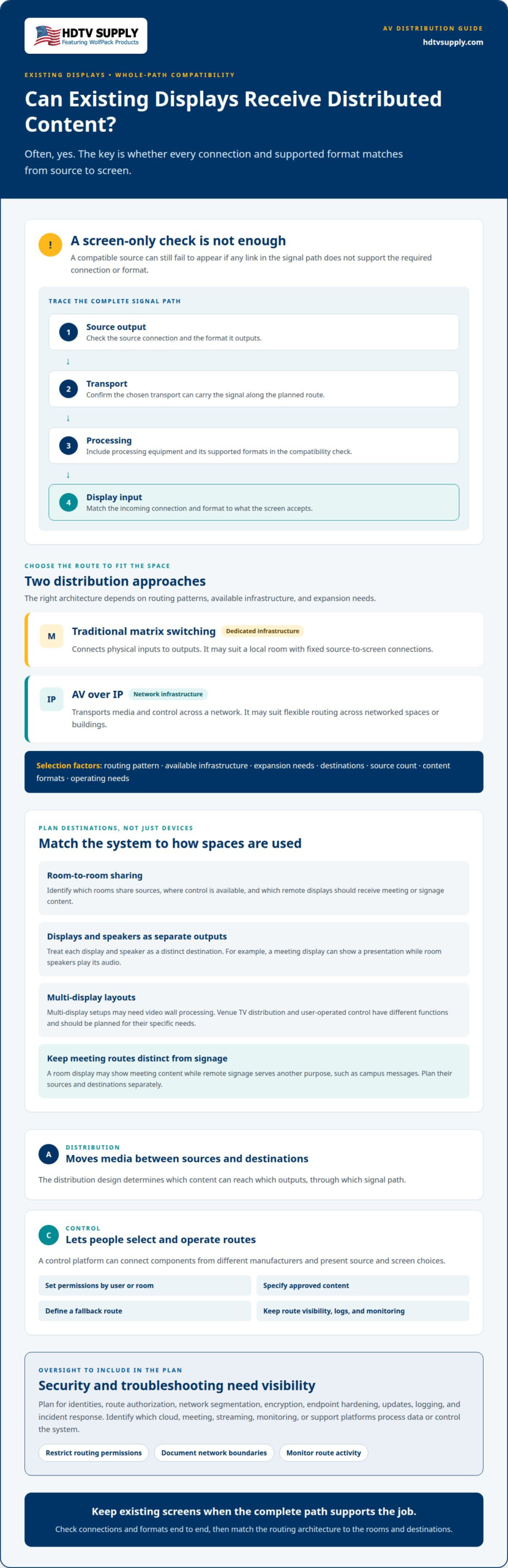
Often, yes. An existing screen can receive distributed content when its inputs and supported formats match the source and signal path. An enterprise AV distribution system must account for every link, including source output, transport, processing, and display input. A mismatch at the display, for example, can prevent a compatible source from appearing.
AV distribution moves media between sources and destinations; AV control manages how people select and operate those routes. A control platform can connect components from different manufacturers, present source and screen choices, and determine who may route content where. Set permissions by user or room, specify approved content, and define a fallback route. Clear ownership, route visibility, logs, and monitoring also make troubleshooting easier.
AV over IP transports media and control across network infrastructure. Traditional matrix switching connects physical inputs to outputs through dedicated infrastructure. Choose based on the routing pattern, available infrastructure, and expansion needs rather than assuming one architecture suits every room.
There’s no single best system or vendor for every use case. Matrix switching may suit a local room with fixed source-to-screen connections; AV over IP may suit flexible routing across networked spaces. Multi-display setups may need video wall processing, while venue TV distribution and user-operated control require different functions. Match the architecture to the destinations, source count, content formats, and operating needs.
Commercial installation requirements depend on the project’s location and design, so there is no universal checklist for every United States installation. Installation and maintenance costs also depend on system scale, signal paths, equipment, and support needs. These factors define the project scope rather than a standard price.
Security planning should cover identities, route authorization, network segmentation, encryption, endpoint hardening, updates, logging, and incident response. Identify which cloud, meeting, streaming, monitoring, or support platforms process data or control the system. Restrict routing permissions, document network boundaries, and monitor route activity to strengthen oversight.
Meeting-space control can combine room selection with display routing and automation. Scheduling platforms such as Microsoft 365 or Google Workspace can connect with room panels or hallway displays. Virtualized or cloud-hosted control can centralize some infrastructure instead of relying entirely on local processors, while the media path still depends on the system’s transport design.
Local room and multi-display routing patterns
Room routing connects sources to local displays, speakers, or destinations in another room. The layout depends on the room’s use, its infrastructure, and compatibility across each signal path.
Room-to-Room Distribution
Room-to-room distribution sends selected content from one space to outputs elsewhere in an organization. For example, a meeting-room presentation source can feed a remote display if the route includes that destination. Networked video can extend routing across buildings, while local switching can serve fixed room connections. This distinction matters when planning which rooms share sources, where control is available, and how signage or meeting content reaches each display.
Displays and Speakers as Outputs
Displays and speakers are endpoints that present routed video and audio in a room. A meeting display might show a shared presentation while room speakers play its audio; a separate screen can show signage or another selected source. Treat each output as a distinct destination in the routing plan. This clarifies source selection and helps prevent a display or speaker from receiving content intended for another space.
Huddle rooms commonly have a central table, a few chairs, and a display for video and audio conferencing. A compact routing setup can connect a meeting source to that display and the room’s audio outputs. Keep operation simple: select the meeting source, route it to the intended outputs, and return the room to its standard state afterward. This makes use repeatable without unnecessary switching steps.
Scheduling can connect room availability with the display experience. Connected systems can integrate with Microsoft 365, Google Workspace, Teams Panels, and hallway scheduling displays to show availability and support booking. That information helps people find a room, while AV routing handles the content once a meeting begins. Remote signage can serve a different purpose, such as showing campus messages, so its source and destination should remain distinct from meeting routes.
Latency, quality, bandwidth, and resilience requirements
Define performance around the room’s activity, source, and destination. Test the complete audiovisual transport path, not just individual devices.
Latency Requirements
Latency is the delay between a source signal and its appearance or playback at an output. The acceptable level depends on the task: for a live presentation, spoken audio should stay aligned with the displayed image. Set requirements around actual room use, then measure end to end. A deployment pilot can record latency, picture quality, bandwidth, errors, route-switching time, endpoint health, and support effort as numerical results.
Content Routing and Timing
Content routing and timing describe how signals travel from sources to destinations and remain synchronized. Document each path, including unicast or multicast behavior where applicable, bandwidth, quality of service, timing, addressing, DNS, certificates, and routing boundaries. This makes dependencies visible across an enterprise or campus and gives the network team a clear basis for assessing traffic, troubleshooting interruptions, and planning resilience if a route or device becomes unavailable.
Network Requirements and Protocols
AV over IP uses network infrastructure to transport media and control, so enterprise switches and network design affect delivery. Switches used for networked video should support protocols such as IGMP snooping and jumbo frames. Define bandwidth and quality-of-service expectations for the intended sources and destinations, then test under planned conditions. Dedicated local paths can serve latency-sensitive or high-value room functions, while networked transport can extend content across flexible spaces.
High-density audiovisual cabling needs a design matched to the signal and distance. HDBaseT can carry high-bandwidth signals for high-resolution displays across distances up to 150 meters using a single category-rated cable. For resilience, document routing boundaries and fallback behavior, then include route-switching time and endpoint health in pilot measurements. These checks turn broad goals such as “high quality” into observable performance criteria.
Enterprise video distribution
Enterprise video distribution moves content from sources to selected screens across rooms, buildings, or campuses. An enterprise AV distribution system brings together source devices, processing, transport, destinations, control, and ongoing monitoring. Treating these as distinct layers clarifies where hardware fits and how the system can grow.
Traditional matrix switchers route physical inputs to physical outputs through dedicated infrastructure. Networked video transports media and control over enterprise network infrastructure, supporting routes between screens in one or multiple buildings. A hybrid design can keep a dedicated local path for a high-value room while using network transport to extend content to flexible spaces. The right approach depends on routes, use cases, and network capacity.
Plan for growth at the architecture stage. A networked video system designed for 10 screens should be able to expand to 100 screens without a full hardware overhaul. That means separating sources, processing, transport, destinations, and control instead of designing around one fixed room. Document endpoint status and route visibility as well, so operations teams can identify where a signal path needs attention.
Distribution can support collaboration beyond live meetings. Enterprise streaming can deliver town halls, training, and internal communications, while digital signage can carry campus messaging or wayfinding. Cloud-connected infrastructure may combine conferencing, scheduling, monitoring, and management; cloud-managed signage can support remote content updates and playback monitoring. Each use case has distinct routing, access, and reliability needs, so define its path and control requirements clearly.
For multi-display layouts, processing determines how a source is arranged across the screens. HDMI video wall processors address layouts where one image spans multiple displays or content is organized across a video wall. A sports bar, by contrast, may need flexible distribution of different sources to separate screens. Define the output layout and content behavior before selecting hardware. To explore hardware options for multi-display distribution, browse video distribution equipment.
HDTV Supply: WolfPad TV Control Systems
HDTV Supply offers WolfPad TV Control Systems for projects where TV control is part of the room design. Pair the control requirement with the routing task: WolfPackSecure 4K 60 4:4:4 HDMI Matrix Switchers address HDMI source-to-display routing, while HDMI Video Wall Processors support multi-display layouts. For advanced venue setups, a dedicated enterprise AV distribution system fits a comprehensive commercial use case.
Start with the room’s sources, destinations, display layout, and desired control approach. These details help narrow the hardware category that fits the system design, without confusing control with signal distribution.
Contact HDTV Supply to discuss equipment for your AV distribution requirements.
Turn the Design into a Clear Equipment Brief
Before selecting hardware, turn the room plan into an equipment brief. Record the sources, destinations, control expectations, network boundaries, and outcomes the system must support. Separate immediate needs from planned changes, and assign responsibility for future route and configuration updates. This gives procurement and technical teams a shared reference. A well-defined enterprise AV distribution system starts with these decisions, not a product name.
Match equipment categories to the job. WolfPack Modular Matrix Switchers address matrix-routing needs, the Sports Bar TV Distribution System supports venue TV distribution, and WolfPad TV Control Systems provide TV control. HDTV Supply offers these options for organizations planning or refining their AV setup. Use the equipment brief to identify the category that fits the project’s priorities.
Ready to discuss equipment for your design? Start a conversation with HDTV Supply about your requirements and next steps. A clear plan makes the decisions ahead more manageable.
Frequently Asked Questions
What Is an AV Distribution System?
An AV distribution system carries audio or video from sources to selected outputs. An enterprise AV distribution system might route a laptop presentation to a room display and speakers while a signage player feeds a separate screen. The system may use dedicated switching hardware, network transport, or both. Its purpose is to deliver the required content to the intended destinations.
What is an enterprise AV distribution system and how does it work?
An enterprise AV distribution system coordinates content delivery across an organization’s rooms or facilities. A user selects a source, control software or hardware applies the route, and the signal travels through the chosen transport to its destination. For example, a shared presentation could appear on a conference-room display while a different source stays on a lobby screen.
What are the main components of an enterprise AV distribution system?
The main components are sources, routing or switching hardware, signal processing, transport infrastructure, destination devices, control, and monitoring. A source might be a computer or media player; destinations can include displays and speakers. Processing handles format or layout needs, while control provides route selection. Monitoring helps operations teams locate faults by showing endpoint condition or path status.
How do you size an AV distribution system for rooms, endpoints, and bandwidth?
Size the system by inventorying rooms, sources, destinations, and simultaneous routes. Record each endpoint’s input and output connections, required content formats, and whether sources must reach multiple destinations. For network transport, include expected media traffic and network capacity. Account for planned room changes too, since a design limited to current connections may need replacement as requirements grow.
How do you integrate AV distribution with video conferencing, digital signage, and room control?
Integrating an enterprise AV distribution system means connecting each application to the routes and controls it needs. A conferencing system can provide a meeting source, signage software can supply scheduled content, and room control can present the right choices to users. Define which sources each space can access, then test typical transitions, such as ending a meeting and returning the display to signage playback.
What are the steps to plan, deploy, test, and manage an enterprise AV distribution system?
Start by documenting use cases, sources, destinations, control needs, and network dependencies. Then select the routing architecture and equipment, and configure routes and permissions. Test representative room scenarios end to end, including picture and audio behavior, route changes, and recovery from an interrupted path. After deployment, maintain route records, endpoint status, configuration history, and an update process.
Leave a Reply
Want to join the discussion?Feel free to contribute!