
Calculating AV System Power Requirements: PSU Wattage Reference
A PSU calculator is a planning tool, not a substitute for manufacturer specifications. When calculating AV system power requirements, use each component’s rated draw, convert volts and amps to watts when needed, then add the loads. Choose a PSU with a wattage rating above the combined demand to support stable operation and future upgrades.
It’s easy to focus on the largest device and overlook the cumulative load from amplifiers, displays, cameras, switches, and control equipment. A calculator can help organize your estimate, but enter the ratings specified for the equipment itself.
This guide shows you how to calculate watts from volts and amps, total AV equipment loads, and compare the result with PSU and circuit capacity. You’ll also learn where to leave headroom and how to reduce overload risk, so you can plan a dependable system without treating an estimate as a substitute for the specifications of the equipment you’re using.
Key Takeaways
- Use voltage multiplied by current to estimate watts, then reverse the calculation to see how much current a planned load draws from its circuit.
- Build an equipment-by-equipment load list, including signal distribution, displays, cameras, and audio gear, rather than sizing the system around its largest device.
- Apply Ohm’s law and Watt’s law to understand how voltage, current, resistance, and power relate when assessing a component or circuit.
- For continuous loads, the National Electrical Code’s 80% circuit limit helps identify when equipment should be distributed across circuits.
- Compare component power ratings and circuit capacity separately; the right PSU rating alone doesn’t establish that the circuit can support the full system load.
Estimating PSU wattage from system components
For U.S. continuous loads, the National Electrical Code (NEC) limits circuit use to 80% of its rating. Estimate peak demand from simultaneous equipment loads, then compare it with average demand across normal operating periods.
Power Supply Wattage Estimates
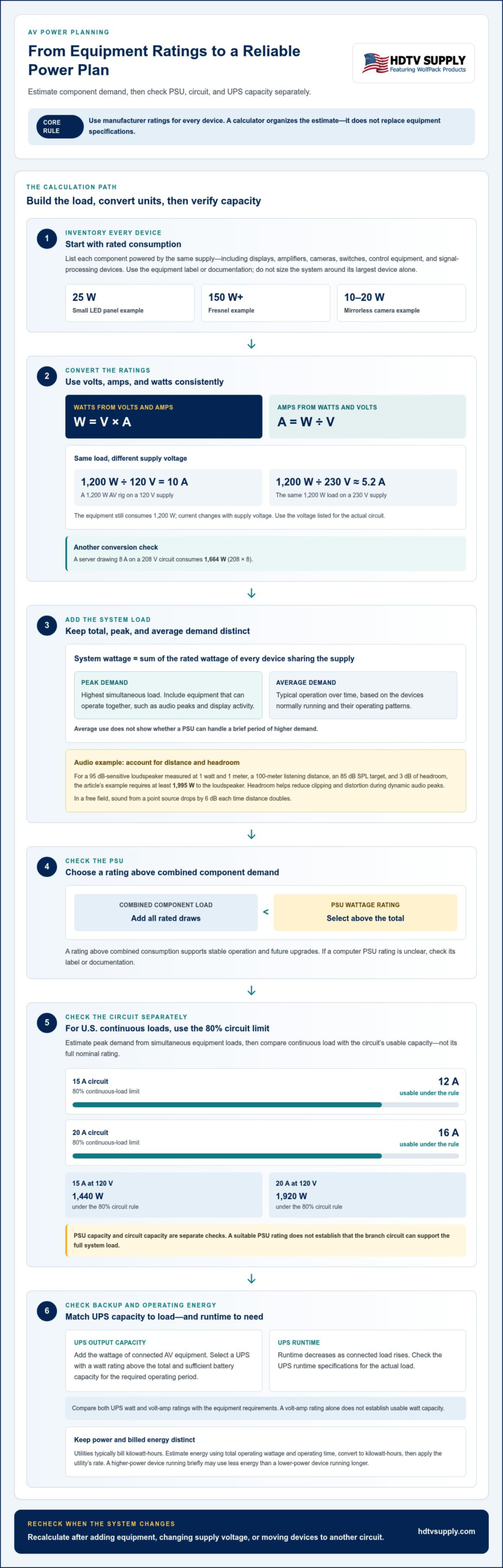
A PSU wattage estimate is the total power demand of the components it supplies. List each device and use its rated consumption, then add those figures. Don’t estimate the whole system from its largest component alone. A small LED panel may draw 25 W, while a Fresnel may draw 150 W or more. A mirrorless camera draws 10-20 W.
Use equipment labels and documentation to find actual ratings. Add every device powered by the same supply, including control and signal-processing components. Choose a PSU with a wattage rating above the combined consumption to support stable operation and future upgrades. If a computer’s PSU rating is unclear, check its label or documentation, or use a calculator to help identify it.
Peak and Average Power Demand
Peak demand is the highest simultaneous load; average demand reflects typical operation over time. Estimate peak demand by adding the loads of equipment that can operate together, including audio peaks and display activity. Estimate average demand from the devices normally running and their operating patterns. Keep the figures separate: average use doesn’t show whether the PSU can handle a brief period of higher demand.
For a U.S. circuit, the 80% limit also matters when assessing continuous load. A 15A circuit provides 12A under that rule, while a 20A circuit provides 16A. Treat PSU capacity and circuit capacity as separate checks. A suitable PSU rating doesn’t by itself show that the branch circuit can support the system.
Amplifier output power is the electrical power delivered to loudspeakers. Estimate it from the target sound level, speaker sensitivity, listening distance, and headroom. One example uses a 95 dB loudspeaker sensitivity rating measured at 1 watt and 1 meter, with a listening position 100 meters away. The example targets 85 dB SPL and adds 3 dB of headroom, requiring at least 1,995 watts to the loudspeaker.
Headroom helps reduce clipping and distortion during dynamic audio peaks. Sound from a point source in a free field drops by 6 dB each time distance doubles. A power calculator can guide the estimate, but amplifier and speaker ratings remain essential inputs.
Energy cost estimation converts power use into billed energy. Utilities typically bill consumption in kilowatt-hours, so use total operating wattage and operating time to estimate energy consumption. Convert the result to kilowatt-hours, then apply the utility’s rate to estimate cost. For example, include the operating hours of a 25 W LED panel rather than treating its wattage rating as its energy use. A higher-power device running briefly may consume less energy than a lower-power device running for longer.
Amps-volts-watts calculation
Voltage is electrical potential, current is the flow of charge, and power is the rate of energy use. Electrical power can be estimated from voltage and current. Rearrange the formula to calculate current: A = W ÷ V. These equations let you compare electrical loads using equipment specifications.
A 1,200W AV rig on a 120V supply draws 10A, because 1,200 ÷ 120 = 10. On a 230V supply, the same load draws about 5.2A. The equipment still consumes 1,200W; the current changes with supply voltage. Use the voltage listed for the actual circuit, not a different region’s standard.
For a practical check, calculate each device’s current or total the watts first. A server drawing 8A on a 208V circuit consumes 1,664W, using 208 × 8. If equipment lists watts and circuit voltage, divide watts by volts to estimate current. If it lists amps and volts, multiply them to estimate watts.
Allow for circuit capacity as well as equipment demand. A 15A circuit at 120V provides 1,440W under the 80% circuit rule. A 20A circuit at 120V provides 1,920W under that same limit. Compare the total continuous load with this usable capacity, rather than the circuit’s full nominal rating.
UPS capacity is the output load a battery-backed unit can support; runtime is how long it can sustain that load. Add the AV equipment’s wattage, then select a UPS with a watt rating above the total and sufficient battery capacity for the required operating period. Runtime decreases as connected load rises, so use the UPS runtime specifications for the actual load.
For example, total the watts for a display, control unit, and network switch before sizing a UPS. Compare that sum with the UPS’s watt and volt-amp ratings. A volt-amp rating alone doesn’t establish usable watt capacity, so check both ratings against the equipment requirements.
Power factor explains why volt-amperes and watts can differ in AC systems. It describes the relationship between apparent power and real power. If you know a load’s power factor, multiply volt-amperes by that factor to estimate watts. Keep the units distinct: amps measure current, volts measure potential, and watts measure real power.
Use manufacturer specifications for each device’s rated voltage, current, and power. These values make the calculation practical and show when a load approaches circuit or UPS limits. Recalculate after adding equipment, changing the supply voltage, or moving devices to another circuit.
Adding equipment wattages
An equipment load is the electrical power a device draws during operation. Add the wattage of every component sharing a supply to estimate the system total. Use manufacturer ratings as your reference, since devices in the same category can draw different amounts. Basing the total only on the largest device misses the combined demand of the rest.
A reference range is a planning guide, not a substitute for a device’s own rating. These AV equipment examples show how much component loads can vary:
- Powered speakers typically draw 200-2000 W each.
- PoE switches draw 60-250 W, depending on port count.
- Cinema cameras draw 40-80 W; PTZ cameras draw 20-30 W.
- Production video switchers use 50-200 W.
- Field monitors use 10-15 W; reference monitors use 40-60 W.
- Large displays use 80-150 W; small audio mixers use 15-20 W.
A component inventory is a device-by-device list of equipment and its rated draw. Record the model, quantity, and wattage for each item. Multiply the rating by the number of identical devices, then add those subtotals. For example, two powered speakers rated at 200 W each contribute 400 W before other devices enter the calculation.
Consider a sample system with one powered speaker, one PoE switch, one PTZ camera, one large display, and one small mixer. Using the listed ranges, its combined component draw could span 375-2,450 W. The low end adds 200, 60, 20, 80, and 15 W. The high end adds 2,000, 250, 30, 150, and 20 W. This range illustrates why actual equipment ratings matter.
Coincident load is the combined draw of devices operating at the same time. Include equipment that may run together instead of assuming that each device operates separately. For example, a display, PTZ camera, PoE switch, and mixer may all remain active during the same program. List standby devices separately if their ratings differ from their operating loads.
Check each device’s label or documentation for its rated consumption. For a computer, find the PSU wattage on its label, in its documentation, with an online calculator, or by examining the PSU. Record the supply rating separately from measured or specified component draw. A PSU rating describes its capacity, not the system’s actual consumption.
Use this calculation as a reference, then compare the sum with the PSU rating and circuit capacity. Recalculate when the quantity or models of equipment change. A new display or additional speaker can increase the total, even if the largest device in the existing system stays the same.
Ohm’s law and Watt’s law
Ohm’s law describes the relationship between voltage, current, and resistance. Its formula is V = I × R, where V means volts, I means amps, and R means ohms. Rearrange it to find current, I = V ÷ R, or resistance, R = V ÷ I. When calculating AV system power requirements, use this relationship to understand how resistance affects current at a given voltage.
Watt’s law calculates electrical power from voltage and current. Use P = V × I, where P represents watts. Combining it with Ohm’s law gives two other forms: P = I² × R and P = V² ÷ R. Choose the formula that fits the specifications you have. If resistance isn’t provided, use the voltage and current ratings instead.
For a practical calculation, write down the known values, choose the matching formula, and keep units consistent. Multiplying volts by amps gives watts; dividing watts by volts gives amps. When calculating AV system power requirements, distinguish a calculated estimate from a device’s stated power rating. Compare both with the equipment specifications before planning a shared supply.
Power factor is the relationship between real power in watts and apparent power in volt-amperes. It matters when a device’s AC load is expressed in VA. Multiply VA by the power factor to estimate watts. An AI-ready rack power calculator uses a 0.95 power factor. Treat that as a calculator input, not a universal value for AV equipment.
A decibel ratio expresses a change between two power or voltage levels. The power ratio formula is 10 × log10(output power ÷ input power). The voltage ratio formula is 20 × log10(output voltage ÷ input voltage). These relationships help interpret amplifier changes: a decibel figure describes a ratio, not a direct wattage value.
For loudspeaker planning, sensitivity references output at 1 watt and 1 meter. An amplifier estimate also depends on target sound pressure level, listening distance, and headroom. A 3 dB headroom allowance in the calculator example helps accommodate dynamic audio peaks and reduce clipping or distortion. Keep that amplifier estimate distinct from the total mains draw of all system components.
Use Ohm’s law to relate resistance, voltage, and current, then use Watt’s law to convert those values into power. Compare the result with the equipment rating and the circuit’s usable capacity. This sequence makes calculations easier to review and helps identify when a specification, power factor, or load assumption changes the estimate.
Overload prevention
An overload occurs when connected electrical demand exceeds a circuit or power supply’s capacity. Prevent it by comparing the combined load with both ratings. Check circuit capacity and PSU capacity separately: a suitable PSU doesn’t increase the circuit’s available capacity.
In the United States, the National Electrical Code (NEC) requires continuous loads not to exceed 80% of a circuit’s rating. Under this rule, a 20A circuit provides 16A for continuous loads. Calculate the system’s current from its watts and supply voltage, then compare that current with the circuit’s usable capacity.
A dedicated circuit serves equipment on its own branch circuit. It may be appropriate when the combined AV load approaches the circuit’s usable capacity or shares a circuit with other significant loads. Professional electrical installation is needed to add or alter branch-circuit wiring, or when the existing circuit cannot support the planned load.
Headroom is spare capacity above the expected operating load. For circuits carrying continuous loads, use the NEC’s 80% limit as the circuit-capacity boundary, not as spare PSU capacity. For the PSU, select a wattage rating above the combined component demand. The required margin depends on simultaneous operation, dynamic peaks, and planned equipment additions.
Separate average and peak estimates before making a change. An amplifier may draw more during loud audio peaks, while displays and control equipment can remain active continuously. Compare the highest simultaneous load with the relevant PSU rating and circuit capacity. A low average reading doesn’t rule out a peak that exceeds either limit.
Load distribution means allocating equipment across available circuits. List each device, its rated watts, and its assigned circuit. Convert watts to amps using the supply voltage, then total the current on each circuit. If a 20A circuit’s continuous load exceeds 16A, the NEC limit is exceeded; reducing the load or redistributing devices addresses that constraint.
Watch for practical warning signs such as a tripped breaker, random shutdowns, or instability. An underpowered PSU can cause computer instability or random shutdowns and may damage the PSU or other hardware. Treat recurring trips as a reason to reassess circuit loading, rather than repeatedly resetting the breaker.
Before adding displays or control equipment, update the load list and recalculate each circuit. For multi-screen venues, explore AV distribution options as part of planning how equipment fits into the system. Keep electrical capacity calculations separate from signal routing and control requirements.
HDTV Supply: WolfPad TV Control Systems
HDTV Supply offers WolfPad TV Control Systems for AV setups that need centralized TV control. After planning equipment loads and circuit capacity, consider how the system will route and manage video sources across displays.
For multi-display configurations, HDMI Video Wall Processors support video wall system designs, while WolfPackSecure 4K 60 4:4:4 HDMI Matrix Switchers address HDMI source distribution. These offerings solve signal routing and control needs, not electrical capacity calculations, so keep checking power ratings and circuit loads separately during system planning.
If you’re selecting control or video distribution equipment for an AV system, contact HDTV Supply to discuss your setup.
Turn Your Power Plan Into a System Plan
Use your power estimate alongside the signal path and control requirements as a planning document. This gives you a clearer basis for selecting equipment and spotting design changes before they affect the system. As you continue calculating AV system power requirements, keep device specifications and the planned configuration together so you can assess updates more easily.
For AV distribution and control, HDTV Supply offers WolfPack Modular Matrix Switchers, a Sports Bar TV Distribution System, and WolfPad TV Control Systems. These products address signal routing and TV control, complementing the electrical planning covered in this guide.
Ready to discuss equipment for your AV setup? Contact HDTV Supply about AV power and take the next step with a clearer system plan.
Frequently Asked Questions
Does this calculator replace manufacturer specifications?
No. A calculator organizes estimates, while manufacturer specifications provide the device-specific ratings that should guide planning. Use a calculator to test scenarios, such as adding another display or changing the system configuration. Then compare the estimate with each device’s rated input and operating requirements. If a calculator’s result differs from a product label or manual, use that component’s documentation.
How do you calculate total power consumption for an AV system?
Add the power draw of every device that may operate at the same time. Include sources, displays, audio equipment, control hardware, and network devices, counting identical units individually. If a device has multiple operating modes, use the rated load relevant to your planned use. Keep separate totals for equipment on different circuits, then review each against its supply and circuit limits.
How do you find the watts and current draw of AV equipment?
Look for input watts, amps, and voltage on the equipment label or in its manual. If the device lists watts and volts, divide watts by volts to calculate current. If it lists amps and volts, multiply them to calculate watts. For a computer, check the PSU label or documentation for its capacity, and distinguish that rating from the system’s actual power consumption.
How do you calculate amperage from watts and voltage for AV equipment?
Divide the equipment’s watts by the supply voltage: amps = watts ÷ volts. Keep the units consistent and use the voltage of the circuit powering the equipment. If the documentation provides a watt rating and the circuit voltage, the quotient estimates current draw. For multiple devices, calculate each current draw or total the watts first, then divide by the circuit voltage.
How do you account for power needs of displays, projectors, control systems, and network equipment?
List each device by type, model, quantity, and rated input. Include projectors, displays, control processors, and network switches, as well as equipment that powers them, such as PoE devices. Check whether a display or projector has different operating modes, and use the rating relevant to the planned setup. Count control and network hardware even when it handles signals rather than producing audio or video.
What are common risks of overloading AV circuits or power strips?
Excess load can trip a breaker and interrupt connected AV equipment. A power strip adds outlets, not circuit capacity, so its connected devices still contribute to the upstream load. A PSU that cannot adequately support computer components may cause instability or random shutdowns and may damage the PSU or other hardware. Repeated trips or shutdowns call for a fresh load assessment, not simply another reset.
Leave a Reply
Want to join the discussion?Feel free to contribute!