

Budgeting for a Commercial AV System: A Planning Guide
What if the biggest budgeting mistake isn’t choosing expensive equipment, but choosing equipment before defining the job? Planning a budget for commercial AV system needs can quickly lose focus when the scope is unclear. It becomes difficult to compare options, and a hardware-only estimate can leave essential features and deployment expenses out of the plan.
Start with how the system needs to work. Room size and acoustics, display type, audio needs, and user workflows all shape the scope. Once those requirements are clear, compare equipment against operational priorities instead of building a list around specifications alone.
This guide shows you how to create a scope-led budget, separate hardware from deployment expenses, and rank purchases against a spending limit. You’ll also learn how to account for future expansion and commonly overlooked requirements, so your plan supports a workable system without costly omissions.
Key Takeaways
- Define the venue, users, and daily workflows before choosing equipment so the system brief reflects actual operating needs.
- Organize your budget for commercial AV system by function, separating hardware purchases from deployment and other project allowances.
- Compare options against requirements, priorities, and future growth needs instead of relying on headline specifications alone.
- Use a worksheet to record quantities, purpose, priorities, assumptions, and open decisions before placing orders.
- Once the scope and budget categories are clear, explore commercial AV hardware through HDTV Supply, an online retailer with more than 12,000 AV products.
Start a commercial AV system budget with the job the system must do
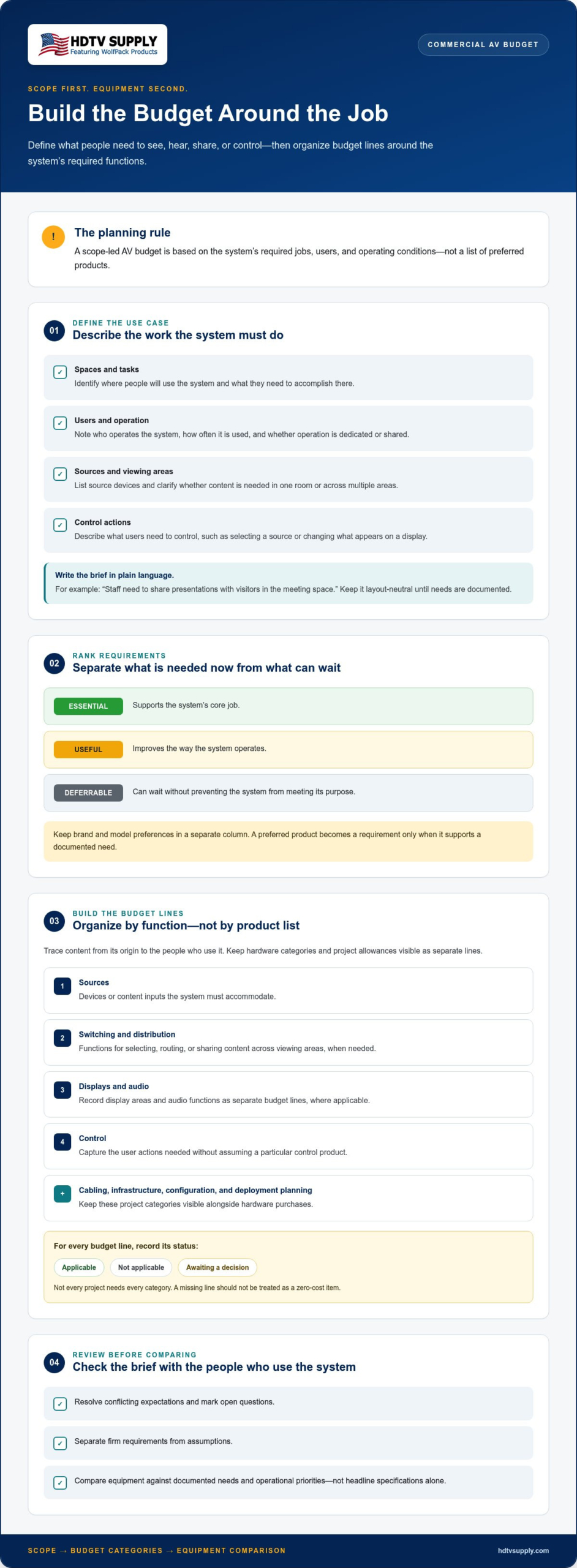
Define operating needs before selecting equipment or setting purchase priorities. A budget built around a product list can miss the workflows, viewing areas, and control requirements that determine whether the system will serve the business. Start with the outcome: what should people be able to see, hear, share, or control, and where will they do it?
A scope-led AV budget is a spending plan based on the system’s required jobs, users, and operating conditions, not on a list of preferred products. This keeps the brief focused and gives decision-makers a consistent basis for comparing equipment. It also separates required outcomes from optional capabilities without assigning unsupported dollar values.
Venue type shapes the requirements. A presentation room, a hospitality space with multiple viewing areas, and a shared workplace may all need AV, but their daily tasks and users differ. Consider who operates the system, how often it’s used, whether users need to switch sources, and whether content must differ between areas. These are functional questions, not model-selection decisions. A broad overview of audiovisual systems can help frame the mix of sound, video, and related components involved.
- Identify the spaces where people will use the system and the tasks it must support.
- List source devices, such as presentation computers or other business media sources.
- Describe viewing areas and whether content needs to be available in one room or across multiple zones.
- Record the control actions users need, such as selecting a source or changing what appears on a display.
Keep the description layout-neutral until requirements are documented. A single-room brief may focus on one audience and one set of workflows. A multi-zone brief should explain how needs differ between areas without assuming a particular floor plan or routing design. This helps prevent a simple use case from being overbuilt and a complex one from being reduced to a one-room equipment list.
Turn the business use case into a system brief
Write the brief in plain language: “Staff need to share presentations with visitors in the meeting space,” or “Operators need to distribute selected content to several viewing areas.” Then note the audience, expected operating hours, and typical user workflows. These details clarify whether the system is used occasionally or throughout the day, and whether a dedicated operator or a rotating group will manage it.
Set priorities before comparing equipment
Classify each requirement as essential, useful, or deferrable for the first phase. Essential items support the system’s core job. Useful items improve operation, while deferrable items can wait without preventing the system from meeting its purpose. Keep brand and model preferences in a separate column so a preferred product becomes a requirement only when it supports a documented need.
Before moving on, review the brief with the people who use or operate the system. Resolve conflicting expectations, mark open questions, and distinguish firm requirements from assumptions. This gives the next budgeting steps a clearer foundation: equipment can be compared against the job, and purchase priorities can reflect actual operations.
Break a commercial AV budget into equipment and deployment categories
With the operating brief defined, translate it into budget lines by system function, not by an arbitrary product list. This makes it easier to see what the system must do, which equipment groups support those tasks, and what project allowances sit outside the hardware purchase. A function-based worksheet also exposes gaps, such as selecting displays without accounting for the signal path that feeds them.
A commercial AV budget should distinguish sources, switching and distribution, displays, audio, control, cabling, infrastructure, configuration, and deployment planning. Not every project needs every category. Keep each line visible and mark it applicable, not applicable, or awaiting a decision. That’s more useful than treating a missing line as a zero-cost item.
Map the signal path and core equipment groups
Trace content from its origin to the people who use it. List source devices first, then identify switching or distribution functions, displays or other endpoints, audio components, and control needs. Following this sequence shows how the pieces relate and helps prevent isolated equipment choices from obscuring system requirements.
- Sources: Note the devices or content inputs the system must accommodate.
- Switching and distribution: Identify whether content must be selected, routed, or shared across viewing areas. HDMI matrix switchers are one possible category, not a default requirement for every system.
- Displays and audio: Record the required display areas and audio functions as separate lines, where applicable.
- Control: Describe the user actions needed to operate the system without assuming a particular control product.
For example, a brief that calls for content in several viewing areas may need a distribution category in the worksheet. A single display with a straightforward source path may not. Capture the required function first, then compare equipment categories against it. HDTV Supply’s WolfPack lineup includes modular matrix switchers and TV control systems, examples of distinct switching and control categories.
Keep project allowances visible
Hardware is only one part of the project plan. Create separate lines for cabling, infrastructure, configuration, and deployment planning so these needs don’t disappear inside equipment totals. Which allowances apply depends on the project scope. Existing infrastructure, room conditions, routing choices, and the planned deployment approach can all affect the worksheet.
Label every figure by status, such as confirmed, estimated, or assumption. If a requirement is unresolved, mark it as an open decision rather than entering an invented benchmark. Keep project planning distinct from hardware sourcing so each expense has a clear purpose and place in the budget.
Once the categories are clear, review commercial AV equipment in context. HDTV Supply is an online retailer with more than 12,000 AV products, including professional AV hardware across its listed WolfPack categories. Browse commercial AV hardware at HDTV Supply after the worksheet shows which functions the system needs.
Compare commercial AV options by value, scope, and growth needs
Once requirements and budget categories are documented, compare possible system approaches against the same brief. A useful comparison shows how each option addresses essential tasks, what it leaves unresolved, and which items could be phased. This gives decision-makers a clearer basis for assessing value than a feature count or headline specification alone.
Compare system approaches against the same requirements
Use consistent inputs for every option: source count, distribution areas, control needs, and planned growth. A venue that needs content routed to several viewing areas may consider centralized distribution, while another use case may not need it. Let the brief drive the comparison rather than assuming an architecture. For sports-focused venues, assess distribution based on how content must reach the intended screens.
Use a table to expose trade-offs and unanswered questions. Keep proposed categories broad until the requirements point to a specific product type.
| Requirement | Proposed category | Priority | Open assumptions |
|---|---|---|---|
| Provide selected sources to several viewing areas | Switching or distribution | Essential | Confirm source count and which areas need access |
| Let users select or manage content | Control | Essential or useful | Identify user roles and required control actions |
| Support a possible future display expansion | Display processing or distribution | Deferrable until scoped | Define the likely addition and timing |
Compare each proposed category using the same inputs. Centralized distribution may be relevant when content needs to reach multiple areas, but the table should show why it’s being considered and which assumptions remain. HDTV Supply’s Sports Bar TV Distribution System is one category to explore for venue-specific distribution needs. Its presence in a comparison does not mean it fits every venue.
Account for expansion without overbuying
Separate immediate requirements from plausible future additions. Record what must work in the first phase, what may be added later, and what supports that future need. This keeps optional scope from displacing essentials while making growth considerations visible. A planned expansion is a planning input, not proof that a particular product will support it.
For each option, note whether phasing appears practical, what decisions remain open, and which dependencies need review before committing. Don’t assume savings, compatibility, or performance without project-specific evidence. If the display plan calls for a video wall, include video wall processing for evaluation. If it doesn’t, leave that category out rather than adding features by default.
A well-structured budget for commercial AV system comparison makes scope differences visible. Review the table for missing requirements, competing assumptions, and features that don’t support a stated use. Carry forward only options that address the brief, with future-phase items clearly separated from current operating needs.
Build a commercial AV budget worksheet before requesting or placing orders
A worksheet turns project requirements into a reviewable plan. Use the same structure for each room or zone so decision-makers can see what the system needs, what each budget line supports, and which details remain unresolved. This makes the budget for commercial AV system easier to assess before requesting or placing orders.
Use a repeatable planning sequence
Follow a consistent sequence, from capturing how the system will be used to checking that each essential requirement appears in the scope. Keep confirmed requirements distinct from technical questions that still need answers.
- Document spaces and users. List rooms or zones, audiences, operating hours, and the people who will use or operate the system.
- Record inputs and outputs. Note source devices, viewing areas, audio needs, and the content or tasks each space must support.
- Describe control workflows. Capture the actions users need to take, such as selecting sources or directing content to an intended output.
- Map requirements to categories. Assign each item to a relevant function, such as switching, distribution, display, audio, or control, then set its priority.
- Separate open decisions. Record unresolved technical questions apart from confirmed requirements. Give each question an owner or next step if known.
Give every worksheet line the same core fields: requirement, system category, quantity, purpose, priority, assumptions, and unresolved decisions. Add a status field, such as confirmed, estimated, or pending, to show how firmly each entry is defined. For example, if existing displays may be reused, list their quantity and intended purpose, but mark suitability and compatibility as assumptions until assessed. Don’t count reused equipment as a confirmed solution simply because it’s already on site.
Documented assumptions improve budget comparisons by showing which differences come from project requirements and which depend on unresolved details. Without that record, two options can appear comparable while relying on different expectations about room use, equipment reuse, or future scope.
Review scope and phase purchases
Before advancing the worksheet, trace every essential requirement to a budget line. If a required task has no corresponding category, the scope is incomplete. If a line has no clear purpose, check whether it supports an actual need or belongs in a later phase.
- Keep first-phase items tied to the operating requirements they must satisfy.
- Mark deferrable items separately and state what a later phase would accomplish.
- Revisit assumptions when room scope, users, source devices, or workflows change.
Use the final review to resolve what you can and clearly flag what remains open. Once the scope is organized, browse commercial AV equipment at HDTV Supply to explore hardware categories that align with the documented requirements.
Source commercial AV hardware through HDTV Supply when the scope is clear
Once the system scope, priorities, and budget categories are documented, equipment sourcing becomes a focused selection task. Use the worksheet to identify which functions need hardware, how many units or endpoints the project requires, and what decisions remain open. This keeps browsing anchored to the system’s purpose instead of letting a long product list define the scope.
HDTV Supply is an online retailer with more than 12,000 AV products. Its WolfPack AV categories include Over IP Matrix Systems, HDMI Matrix Systems with free video-wall processing, 4K Modular HDMI Matrix Switchers, Sports Bar Control Systems including EverPass, Sports Bar TV Systems with tablet control, and HDMI-over-LAN Splitters supporting up to 47 TVs. These are equipment categories to compare with documented requirements, not a universal package for every commercial space.
Match the equipment category to the documented requirement
Start with function. If the brief calls for source switching or distribution, a matrix system may be a relevant category to evaluate. For a video wall, consider whether video wall processing belongs in the scope. A venue distributing content to multiple screens may have different needs from a meeting room serving a single display, so match the category to the use case before comparing models.
For a sports bar or similar venue, a Sports Bar TV Distribution System may be relevant to the distribution requirements. Keep the example specific to that setting, and don’t assume a product category alone resolves every system decision. WolfPack Sports Bar TV Systems with tablet control and Sports Bar Control Systems including EverPass are listed options to compare when the brief calls for those functions. The worksheet should make the reason for each category clear.
HDTV Supply also lists WolfPack Modular Matrix Switchers and HDMI Video Wall Processors. Keep those categories distinct in the purchasing plan. Compare listed product information with the project requirements rather than assuming compatibility or a particular performance outcome.
Move from the worksheet to a purchasing conversation
Before browsing, gather the requirements and selected categories in one place. Include intended quantities, purpose, priority, assumptions, and unresolved decisions. That context helps focus the selection on relevant equipment and separate confirmed needs from items that still require technical review. It also keeps the hardware under consideration aligned with the overall budget for commercial AV system.
- Group worksheet lines by function, such as switching, distribution, control, or video wall processing.
- Keep open questions visible rather than treating them as settled specifications.
- Compare product information with the stated need and project context before adding an item to the purchasing plan.
Customers can purchase through the HDTV Supply website or call for assistance and support. HDTV Supply also provides technical support to installers and integrators worldwide. Keep the purchasing conversation focused on equipment categories tied to the project scope, then review how each selection fits the documented requirements.
Explore HDTV Supply’s commercial AV equipment to browse categories for your scoped project.
Put your AV plan into action
A clear budget for commercial AV system is a working decision tool, not a document to file away. Assign someone to own open questions, track scope changes, and keep purchasing decisions aligned with the outcomes the system must support. Before committing, review the plan against current operations. A change in users, workflows, or venue requirements can affect which choices still make sense.
Use the documented requirements to focus equipment research, and keep unresolved assumptions visible rather than letting them quietly become purchase decisions. This gives your team a stronger basis for evaluating options and coordinating the next steps of the project.
Explore commercial AV equipment at HDTV Supply and identify categories that align with your plan. With a practical scope and clear priorities in hand, you’re ready to make informed decisions for your operation.
Frequently Asked Questions
How much should I budget for a commercial AV system?
There isn’t one budget figure that fits every commercial AV system. The amount depends on the project’s scope and equipment requirements. A presentation setup and a multi-area display system have different needs. Estimate only after identifying the spaces, sources, outputs, control requirements, and applicable deployment work. Build the budget from those project-specific line items rather than using an unrelated system’s total as a benchmark.
What should a commercial AV system budget include?
A commercial AV budget should account for the hardware categories required by the project, plus applicable non-hardware project needs. Depending on the system, that may include source equipment, switching or distribution, displays, audio, control, cabling, infrastructure, and configuration. Include a line only when it serves a documented requirement. Label estimates and unresolved items clearly so they aren’t mistaken for confirmed selections or final amounts.
Should I budget for AV equipment and installation separately?
Yes. Keep equipment purchases separate from installation or other deployment expenses so each cost has a clear source and purpose. The equipment list describes the hardware the system requires, while deployment planning accounts for the work needed to put the project into operation. The scope determines which deployment costs apply.
Can I reuse existing equipment in a commercial AV system?
Potentially, but record reused equipment as a candidate until its suitability is assessed. Note the make and model, available connections, condition, and intended role. Then compare those details with the planned signal path and other system components. A display already in a room, for example, may lack an input needed for the planned source. Avoid counting it as a confirmed solution until it has been reviewed.
How do I prioritize commercial AV purchases when the budget is limited?
Protect the functions the business needs to operate first. Rank each requested item by whether the system can perform its core job without it, then separate enhancements that can wait. For example, preserve the equipment needed to route required content before adding a secondary viewing area that isn’t needed in the first phase. Document what each deferred item would enable so later decisions can be made against a clear operational need.
What information should I prepare before buying commercial AV equipment?
Prepare a room or zone list, the number and type of source devices, the intended displays or outputs, and the actions users need to perform. Include model details for equipment you may reuse, plus known connection requirements. Note who will use the system and any outstanding decisions. This gives you a practical basis for comparing product categories and helps surface missing information before purchase decisions are made.
How should I budget for a sports bar TV system?
Start by documenting how the venue plans to distribute content. Identify source inputs, viewing areas, user control needs, and whether different areas have distinct requirements. A simple map showing screen locations and the content intended for each can clarify the scope. Then match those needs to relevant equipment categories. HDTV Supply offers a Sports Bar TV Distribution System, and the venue’s documented requirements should guide product selection.
Leave a Reply
Want to join the discussion?Feel free to contribute!