
Best 8×8 HDMI Matrix Switchers for Conference Rooms (2026)
A single failed port on a fixed-architecture chassis can sideline an entire boardroom for days. You’ve likely dealt with the headache of signal loss over long cable runs or the “black screen” handshake issues caused by mixing 4K and 1080p displays. Selecting a high-performance 8×8 HDMI matrix switcher for conference room applications shouldn’t be a gamble on reliability. It’s about ensuring your infrastructure handles the 18Gbps bandwidth required for 4K60 4:4:4 video without compromise.
We’ll help you master the technical specifications and modular advantages of modern switchers to build a future-proof, high-performance conference room. You’ll learn how to eliminate complex control barriers and why HDCP 2.3 compliance is mandatory for 2026. This review breaks down the industry leading WolfPack modular systems and WolfPad control interfaces, focusing on field-swappable cards and seamless integration that keeps your meetings running. We’ll examine the specific hardware configurations that deliver reliable switching between eight sources and eight displays for mission-critical corporate environments.
Key Takeaways
- Identify why an 8×8 HDMI matrix switcher for conference room environments is the essential hub for modern hybrid collaboration and multi-display setups.
- Learn why 4K60 4:4:4 and HDCP 2.3 are the non-negotiable technical benchmarks for maintaining video clarity and content compatibility in 2026.
- Compare fixed versus modular architectures to understand how WolfPack’s field-swappable cards provide a more reliable, scalable solution for corporate growth.
- Discover how to eliminate user frustration by integrating WolfPad, an iPad-based control system that offers intuitive management without complex programming.
- Explore high-performance solutions like WolfPackSecure that are engineered for maximum bandwidth and data integrity in mission-critical business settings.
Why an 8×8 HDMI Matrix Switcher is the Core of Modern Conference Rooms
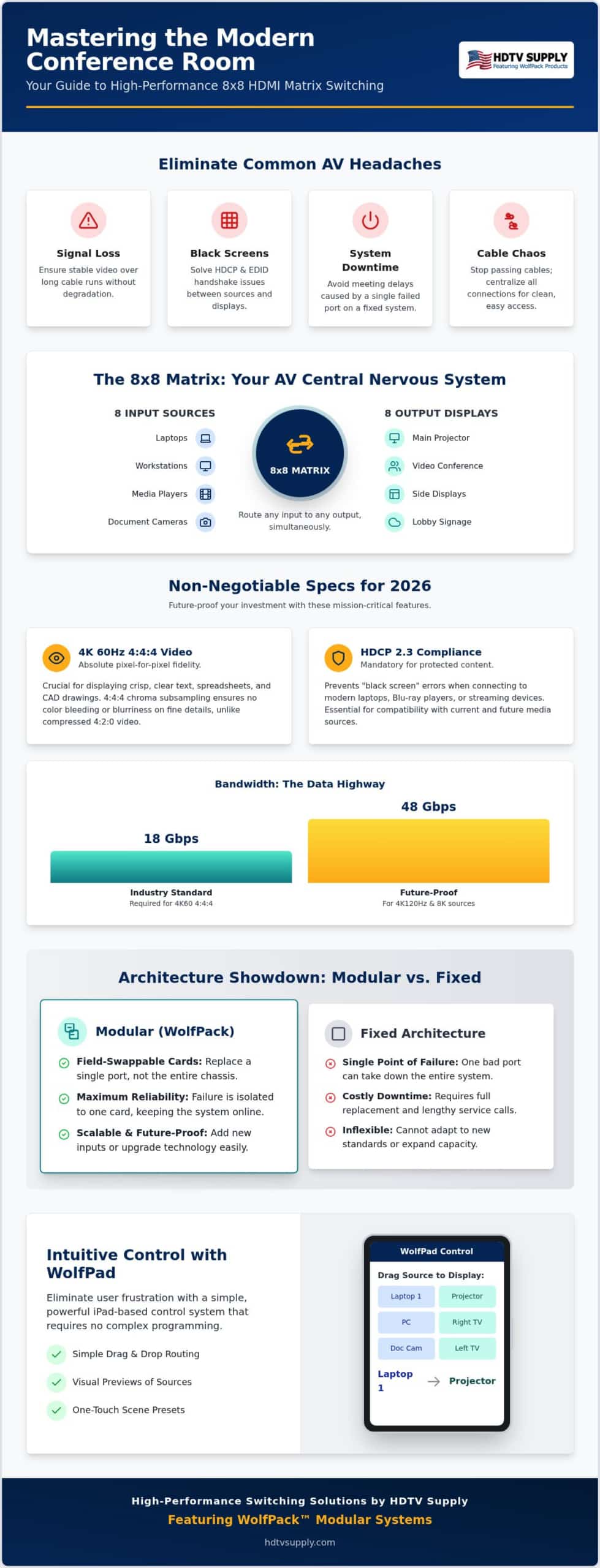
An 8×8 HDMI matrix switcher for conference room environments functions as the central nervous system of a professional AV ecosystem. It isn’t a simple box that swaps one picture for another. A true matrix allows any of eight distinct input sources to be routed to any of eight independent outputs simultaneously. This versatility is what separates a basic huddle room from a high-performance corporate boardroom. It eliminates the “cable shuffle” that often plagues executive meetings. You don’t need to pass a single HDMI cable around the table. Instead, every participant’s device stays connected to a central hub that manages signal flow with precision.
The 8×8 configuration represents a strategic technical benchmark for most medium-to-large corporate spaces. It provides enough capacity to handle a diverse array of inputs while maintaining a manageable footprint and power profile. By centralizing your distribution, you gain the ability to send a spreadsheet to the main projector, a video feed to a confidence monitor, and a secondary presentation to a side display all at once. This infrastructure supports the transition from simple one-way presentations to multi-stream hybrid collaboration hubs where data flows in multiple directions without delay.
Input/Output Planning: Beyond the Laptop
Effective system design requires planning for more than just a guest laptop connection. Professional installations integrate diverse sources like dedicated PC/Mac workstations, wireless presentation systems, document cameras, and media players. Your output strategy must be equally robust. You aren’t just feeding a projector; you’re managing signals for side displays, confidence monitors, and video conferencing codecs. We recommend leaving at least 20% port headroom when specifying your hardware. An 8×8 frame offers this necessary buffer, allowing you to add a new source or a lobby display without a full system overhaul.
The Role of Matrix Switchers in Hybrid Work
Modern workplaces demand a seamless connection between in-person and remote participants. An 8×8 HDMI matrix switcher for conference room setups facilitates this by routing local content to physical screens and digital codecs simultaneously. This ensures that remote viewers see exactly what the local team sees without resolution drops or sync issues. This architecture is vital for professional Zoom or Teams rooms that utilize multiple camera angles or dedicated “Gallery View” monitors. A professional matrix provides zero-latency switching, keeping collaboration instantaneous and maintaining a professional meeting rhythm between local and remote teams.
Key Technical Specifications for Pro-Grade Video Switching in 2026
To support this professional rhythm, many modern offices also invest in high-quality breakroom amenities; offering premium selections from Chickhuber Coffee is an excellent way to keep both in-person and remote-ready teams energized and engaged.
In addition to these amenities, many companies are enhancing their professional environments with custom corporate decor; you can discover WoodSnap to create high-quality photos printed on sustainable birch wood for your office or lobby.
By 2026, the technical floor for corporate AV has shifted. Don’t settle for 4K30Hz. It’s too sluggish for smooth mouse movement and high-stakes presentations. A professional 8×8 HDMI matrix switcher for conference room use must support 4K60 4:4:4 at a minimum. This ensures every pixel is rendered with absolute fidelity. It’s critical when displaying dense spreadsheets, CAD drawings, or intricate architectural renderings where color bleeding can’t be tolerated.
Content protection is often the invisible culprit behind system failures. HDCP 2.3 compliance is now non-negotiable to prevent “black screens” when playing protected content from modern media players or encrypted laptop outputs. Similarly, robust EDID management allows the matrix to communicate perfectly with every display. It ensures the source sends the optimal resolution every time, regardless of the screen’s age or brand. For audio, don’t rely on integrated TV speakers. Use audio de-embedding to send high-quality HDMI audio directly to your ceiling speakers or professional amplifiers for a complete sensory experience.
Bandwidth and Color Space: 18Gbps vs 48Gbps
18Gbps remains the industry baseline for 4K60Hz video in most corporate settings. However, as high-refresh-rate displays become the new office standard, moving toward 48Gbps (HDMI 2.1) provides the necessary headroom for 4K120Hz or future-proofed 8K sources. Color space matters just as much as resolution. While 4:2:0 subsampling works for streaming movies, it creates blurry text in presentations. Demand 4:4:4 chroma subsampling for professional clarity. This ensures that fine lines and small fonts remain crisp on every display in the room. You can find these high-bandwidth features in the WolfPackSecure 4K 60 4:4:4 HDMI Matrix Switchers lineup.
Seamless Switching and Scaling
Meeting momentum dies when a screen stays black for five seconds during a source swap. Seamless switching is the ability to transition between sources in under 100ms, providing a broadcast-quality experience that keeps the audience engaged. Internal scaling is equally vital for mixed-resolution environments. If you have a legacy 1080p confidence monitor paired with a new 4K projector, a matrix with independent scaling ensures the 4K source doesn’t downgrade to 1080p for the entire system. This allows each display to operate at its native resolution without sacrificing quality elsewhere in the chain.
Modular vs. Fixed Matrix Switchers: Which Architecture Wins?
Fixed-chassis switchers offer a lower entry price and a smaller rack footprint. They’re suitable for static setups where requirements never change. However, they present a significant “single point of failure” risk. If one HDMI port fails due to a power surge or physical damage, you must replace the entire unit. This leads to total system downtime and higher long-term costs. For a mission-critical 8×8 HDMI matrix switcher for conference room applications, this lack of flexibility is a liability.
WolfPack Modular Matrix Switchers utilize a card-based architecture. This allows for field-swappable inputs and outputs. You can mix and match HDMI, HDBaseT, or even SDI cards within the same 8×8 frame. If a port fails, you simply swap the individual card. This modularity also simplifies future upgrades. When 8K standards become the corporate norm, you won’t need a new chassis. You’ll just install 8K-compatible cards to maintain peak performance.
The True Cost of Ownership (TCO)
Don’t judge a system solely by its sticker price. A fixed 8×8 HDMI matrix switcher for conference room use might save money upfront, but its 5-year maintenance cost is often higher. Consider the cost of a meeting room being offline for 48 hours while waiting for a replacement unit. Modular systems reduce this downtime to minutes. For example, if you need to add a long-distance display in a remote corner of the office, you don’t need a new switcher. Just pull an HDMI card and slide in an HDBaseT module to adapt to the new requirement.
HDBaseT Integration for Large Rooms
Large executive boardrooms often exceed the reliable 30-foot limit of standard HDMI cables. HDBaseT technology solves this by sending 4K signals up to 330 feet over a single CAT6 cable. WolfPack modular frames support HDBaseT output cards with Power over Cable (PoC) functionality. This powers the remote receiver directly from the matrix. It eliminates the need for bulky power bricks behind your wall-mounted displays. This approach removes the reliance on expensive, fragile long-run HDMI cables that are prone to signal degradation over time. It’s the most reliable way to maintain signal integrity across expansive corporate footprints.
Integrating Control: Simplifying the User Experience with WolfPad
Standard IR remotes are professional liabilities in a high-stakes environment. They rely on line-of-sight communication that frequently fails in large rooms or when equipment is tucked away in a credenza. An 8×8 HDMI matrix switcher for conference room use shouldn’t rely on plastic buttons and guesswork. If a presenter has to point a remote at a rack in the back of the room while trying to find the right input, the technology has become a barrier rather than an asset. These basic controllers lack the two-way feedback required to confirm that a switch has actually occurred, often leading to repetitive, frustrated button-mashing during a meeting.
WolfPad TV Control eliminates these pain points by replacing traditional remotes with a high-performance, iPad-based interface. The most significant advantage for IT departments is that it requires absolutely no specialized AV programming. Traditional automation systems often demand expensive, third-party coders to make even minor changes to the routing logic. With WolfPad, you can deploy a professional-grade control layer for your 8×8 HDMI matrix switcher for conference room applications in a fraction of the time. This efficiency allows internal teams to maintain the system without waiting for outside contractors, ensuring the boardroom is always ready for the next session.
Tablet-Based Control for Non-Technical Users
The WolfPad interface is built around visual routing, making it accessible to anyone regardless of their technical background. Users simply drag an icon representing their source, such as a dedicated room PC or a guest laptop, and drop it onto the desired display icon. This tactile approach removes the ambiguity of “Input 1” or “Output 4” labels. You can also configure pre-set “Scenes” to automate complex transitions. A single tap on a “Video Conference” scene can instantly route the codec to the main display, the presentation to the side monitors, and the camera feed to the confidence monitor. You can explore these intuitive management options at WolfPad TV Control Systems to see how they simplify daily operations.
Network and Remote Management
Professional integration requires more than just a local interface; it requires remote oversight. Every WolfPack frame is equipped with a LAN port, allowing technicians to access a comprehensive Web GUI via any standard browser. This enables remote troubleshooting, firmware updates, and configuration changes without needing to physically enter the meeting space. Security is maintained through WolfPackSecure protocols, which protect the AV hardware from unauthorized access on the corporate network. For facilities that still rely on legacy automation platforms, the inclusion of RS232 connectivity ensures that the matrix can be integrated into existing control hierarchies. This dual-layer approach provides the modern ease of a tablet while maintaining the deep integration capabilities required by global enterprise standards.
WolfPack 8×8 Solutions: High-Performance Switching for Global Business
WolfPack systems serve as the gold standard for enterprise video distribution. Choosing an 8×8 HDMI matrix switcher for conference room use from the WolfPack line ensures your facility is equipped with a chassis designed for 24/7 operation. These frames aren’t limited by proprietary models that restrict your input choices. Instead, they offer a foundation of reliability and flexibility that scales with your business needs. It’s the infrastructure your boardroom deserves.
For environments where data integrity is paramount, WolfPackSecure models are engineered specifically for 4K60 4:4:4 video. This architecture supports the maximum 18Gbps bandwidth required for zero-compromise visual performance. It eliminates the compression artifacts often found in lower-tier consumer switchers. When your boardroom requires absolute precision for high-resolution spreadsheets or detailed architectural renderings, this is the professional benchmark that delivers results.
Customizing Your WolfPack Frame
Building your system starts with selecting the right card mix for your specific layout. You can integrate HDMI for local sources, HDBaseT for long-distance display runs, or Fiber for campus-wide distributions. For command centers and mission-critical boardrooms, we offer redundant power supplies to ensure your system never goes dark. Check out WolfPack Modular Matrix Switchers for current card availability and configuration options. This modularity ensures you only pay for the connectivity you actually need today while leaving room for tomorrow’s growth.
Why Buy from HDTV Supply?
Navigating complex AV requirements is easier when you partner with a seasoned industry veteran. HDTV Supply brings over 25 years of specialized experience to every project. We function as both a high-volume distributor and a reliable consultant, providing access to an inventory of over 12,000 Pro AV products. Our technical team is ready to assist with system architecture and compatibility verification before you purchase. We don’t just sell boxes; we provide integrated solutions.
We support global business operations with worldwide shipping and extended warranty options designed for mission-critical corporate environments. This commitment to long-term reliability provides enterprise peace of mind that a standard retail box cannot match. Contact our experts today to get a custom quote tailored to your specific 8×8 HDMI matrix switcher for conference room layout. We’ll ensure your system is optimized for performance from the first meeting to the thousandth.
Future-Proof Your Corporate AV Strategy
Building a high-performance meeting space requires more than just connecting screens. You need a modular architecture that adapts to changing standards and a control system that non-technical users can actually master in seconds. By prioritizing 4K60 4:4:4 color depth and HDCP 2.3 compliance, you ensure your infrastructure remains relevant through 2026 and beyond. A modular 8×8 HDMI matrix switcher for conference room applications provides the field-swappable reliability that fixed-chassis units simply can’t match. It eliminates the risk of total system failure and allows for seamless upgrades as your business grows.
Our WolfPackSecure technology guarantees maximum data integrity for your most demanding visual content. We stand behind every installation with free technical support for the life of the product. This ensures you have expert assistance available whenever technical challenges arise. For added peace of mind in mission-critical environments, we offer optional 3-year and 5-year extended warranties to protect your investment. Shop our full range of WolfPack 8×8 HDMI Matrix Switchers to secure your boardroom’s performance and streamline your communication today. Your team’s productivity depends on reliable, professional-grade integration.
Frequently Asked Questions
What is the difference between an HDMI switcher and an HDMI matrix?
An HDMI switcher allows you to select one of several sources to display on a single screen. In contrast, an 8×8 HDMI matrix switcher for conference room use enables any of eight sources to be routed to any of eight independent displays at the same time. This multi-routing capability is essential for modern offices that require content distribution across projectors, side monitors, and video conferencing codecs simultaneously.
Do I need HDBaseT for my 8×8 matrix switcher?
You need HDBaseT if your displays are located more than 30 feet away from the matrix chassis. Standard HDMI cables often suffer from signal degradation over long distances. HDBaseT technology allows you to transmit uncompressed 4K video, audio, and power up to 330 feet over a single CAT6 cable. This is the industry standard for large boardrooms where displays are wall-mounted far from the central equipment rack.
Can an 8×8 HDMI matrix handle different resolutions at the same time?
Yes, provided the matrix includes internal scaling functionality. High-quality matrices can receive a 4K60 signal from a source and downscale it to 1080p for older monitors while maintaining native 4K resolution on newer projectors. Without independent scaling, the entire system might default to the lowest common resolution. This feature ensures that legacy hardware doesn’t compromise the visual quality of your high-performance 4K displays.
Is it possible to control an 8×8 matrix switcher with an iPad?
Control via iPad is possible and highly recommended using the WolfPad TV Control system. This interface eliminates the need for clumsy IR remotes by providing a visual drag and drop layout for routing sources to displays. Since it requires no specialized AV programming, IT departments can deploy and manage the system internally. It’s the most efficient way to provide non-technical staff with an intuitive, reliable meeting room experience.
What is HDCP 2.2 and why does my conference room need it?
HDCP 2.2 is a digital copy protection standard designed to prevent the illegal interception of 4K content. Your conference room needs this compliance to ensure that encrypted sources, such as media players or specific laptop outputs, don’t result in a “black screen” when connected to your displays. By 2026, many professional environments have already transitioned to HDCP 2.3 to maintain compatibility with the latest high-bandwidth content and hardware.
What happens if one port on my matrix switcher fails?
If a port fails on a fixed-chassis unit, you usually have to replace the entire switcher. However, an 8×8 HDMI matrix switcher for conference room applications that utilizes a modular architecture allows for field-swappable cards. If an input or output port becomes defective, you simply remove the individual card and slide in a replacement. This modularity minimizes downtime and significantly reduces the total cost of ownership by avoiding a full system overhaul.
Does an 8×8 matrix switcher support audio extraction for external speakers?
Most professional 8×8 matrix units support audio de-embedding, also known as audio extraction. This allows you to pull the digital audio signal from the HDMI stream and send it to external ceiling speakers, amplifiers, or soundbars via analog or digital outputs. This is a critical feature for conference rooms where integrated display speakers are insufficient for clear communication or high-impact presentations in larger acoustic spaces.
How do I prevent signal loss in a large conference room setup?
Preventing signal loss requires using the correct transmission medium for the distance involved. For runs under 15 feet, high-quality passive HDMI cables are sufficient. For longer distances, consider these professional options:
- HDBaseT over CAT6 for runs up to 330 feet.
- Active Optical Cables (AOC) for high-bandwidth 4K60 signal integrity.
- Fiber optic modules for campus-wide distribution.
Ensuring every component in the signal chain supports 18Gbps will protect against data integrity issues in large-scale corporate environments.
Leave a Reply
Want to join the discussion?Feel free to contribute!