
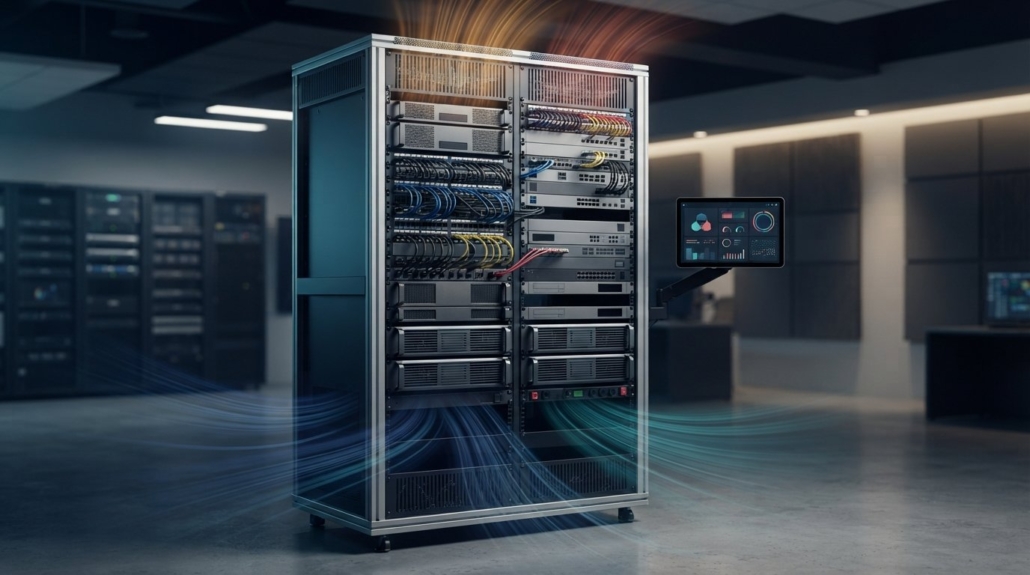
AV Rack Cooling: Manage Heat with Fans and Monitoring
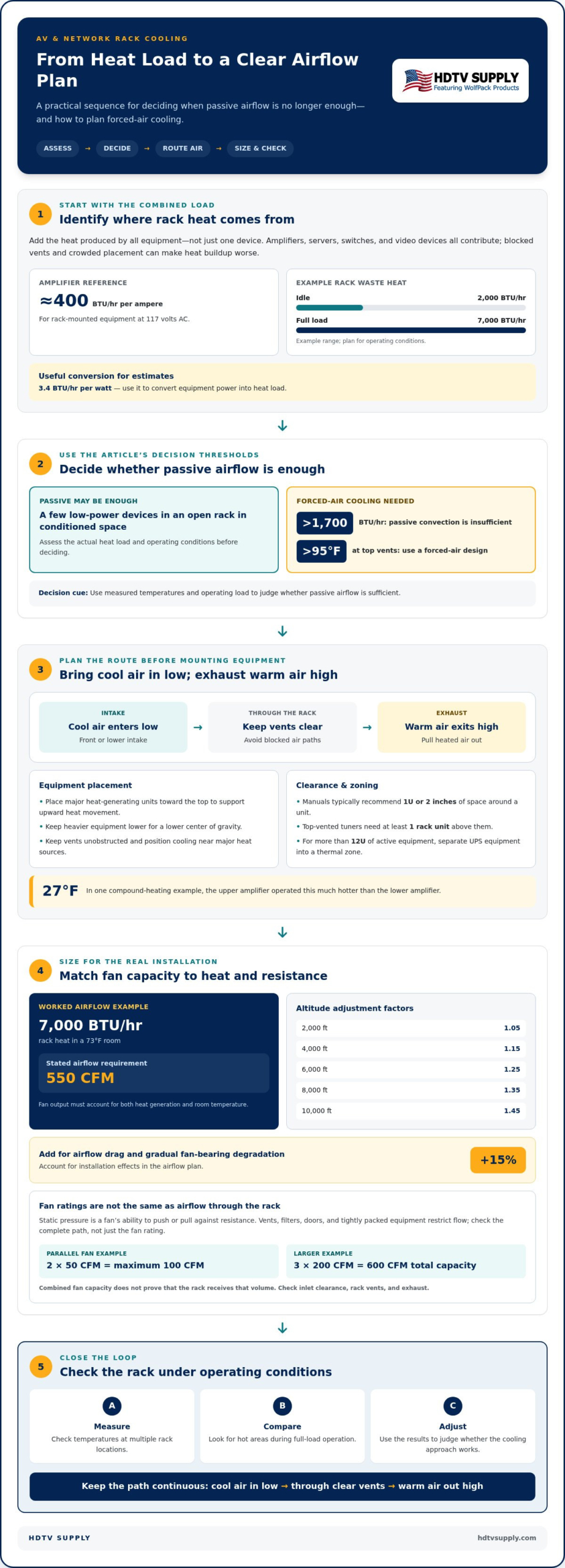
Rack airflow protects equipment by carrying heat away before it builds up around components. To understand how to manage heat in an AV rack, start with its heat load: passive convection is insufficient above 1,700 BTU/hr, and a rack needs forced-air cooling if its top vents measure above 95°F. When passive airflow falls short, draw cool air in low and exhaust warm air high.
It’s easy to focus on the fans and miss the cause: every electronic component adds heat, while blocked vents, poor airflow, and heat trapped inside a cabinet can make the problem worse. A few low-power devices in an open rack in conditioned space may not need active cooling, but a high-load rack needs a deliberate thermal plan.
This guide explains what drives rack temperatures, how to assess whether active cooling is needed, and how fan placement supports airflow. You’ll also learn why monitoring temperatures at multiple points matters, so you can spot hot areas and see whether your cooling approach works under load.
Key Takeaways
- Assess equipment power use and operating conditions to identify where rack heat is coming from.
- Keep vents clear and account for airflow resistance from doors, panels, and crowded equipment.
- Place fans to remove heated air without starving lower equipment of fresh airflow.
- Measure temperatures at multiple rack locations, including during full-load operation, to spot hot zones.
- Match fan control and cooling capacity to the heat load, while accounting for noise and heat trapped in the surrounding enclosure.
When Does an AV or Network Rack Need Active Cooling?
Reduce heat from amplifiers, servers, and other high-power equipment by identifying heat sources, preserving airflow, and adding forced-air cooling when passive convection falls short. A passive design may be insufficient when natural convection cannot remove enough heat from the rack.
Heat from Amplifiers and AV Equipment
Amplifiers and other AV components turn some of their electrical power into heat during operation. Digital amplifiers can consume more power than they deliver to speakers at low or moderate listening levels, and that difference becomes heat. Rack-mounted equipment produces nearly 400 BTU/hour per ampere of line current at 117 volts AC. This matters because accumulated heat can impair performance and contribute to premature equipment failure.
Heat from Network Equipment
Network equipment, including switches and servers in AV installations, adds heat alongside amplifiers and video devices. Each electronic component generates some heat, so a rack’s combined load matters more than any single unit alone. A standard managed network switch typically occupies 1U, but compact placement can still obstruct airflow. In racks with more than 12U of active equipment, separate UPS equipment into a thermal zone to limit heat buildup around other components.
Reducing Heat from High-Power Equipment
Reducing heat means controlling where hot equipment sits and how air moves around it. Place the biggest heat-generating units toward the top, where their rising heat can dissipate without warming equipment above them. Keep vents unobstructed and position cooling equipment near major heat sources. This matters because one compound-heating example found the upper amplifier operating 27°F hotter than the lower amplifier.
Placement also affects rack stability. Keep heavier equipment lower in the rack to maintain a lower center of gravity, while arranging hot-running components to support upward airflow. These goals can coexist: distribute weight low, but preserve clear air paths around amplifiers and devices with top vents. Satellite and cable tuners with top vents need at least one rack unit of clearance above them.
For a larger system, distribute equipment across multiple racks when one enclosure concentrates too much heat or blocks airflow. Separate heat-generating groups, and plan cooling around each rack’s equipment, vent locations, and air entry and exit points. A rack example’s waste heat ranged from 2,000 BTU/hr at idle to 7,000 BTU/hr at full load, showing why cooling must account for operating conditions.
Use measured temperatures and operating load to decide whether passive airflow is enough. If the rack exceeds 1,700 BTU/hr, passive convection is insufficient; if top vents rise above 95°F, the rack needs a forced-air design. Draw cool air in low and exhaust warm air high. For front-and-rear-door racks, heat-generating equipment may need relocation toward the top and top-mounted fans.
Thermal Management Part 2: How Hot Is Too Hot?
Manufacturers’ guidance commonly calls for clearance above and below equipment to support ventilation. Manuals typically recommend 1U or 2 inches of space around a unit, while top-vented tuners need at least one rack unit above them.
Estimating Heat Loads and Airflow
Heat-load estimation totals the heat produced by rack equipment, then relates that load to the airflow needed to remove it. For calculations, use the conversion of 3.4 BTU/hr per watt. A rack producing 7,000 BTU/hr in a 73°F room has a stated airflow requirement of 550 CFM. That example shows why fan output must match both heat generation and room temperature.
Air density also affects airflow calculations. At 2,000 ft, the adjustment factor is 1.05; at 4,000 ft, it is 1.15. The factors rise to 1.25 at 6,000 ft, 1.35 at 8,000 ft, and 1.45 at 10,000 ft. Add 15% to account for airflow drag and gradual fan-bearing degradation.
Plan the airflow path from intake to exhaust before equipment is mounted. Cool air should enter low, pass through unobstructed equipment vents, and leave near the top. Position units to reduce hot spots and support upward movement. Vent panels directly above amplifiers and any DSP drawing more than 50 watts help keep those openings available.
Fan Airflow and Static Pressure
Fan airflow describes the volume of air a fan can move, while static pressure reflects its ability to push or pull air against resistance. Vents, filters, doors, and tightly packed equipment restrict flow, so a fan’s rated output doesn’t automatically equal airflow through an installed rack. Two 50 CFM fans arranged in parallel can provide a maximum system airflow of 100 CFM.
Keep the path clear. Even partial blockage can disrupt convection currents, and objects within one fan diameter of an intake can reduce airflow and increase noise. When sizing ventilation, account for grille openings and other restrictions, not just fan capacity. A fresh-air gap under a cabinet or closet door can be 3/8-½ inch, but heated air still needs an exit route.
For a larger installation, three fans rated at 200 CFM each in parallel provide 600 CFM total airflow. Treat this as combined fan capacity, not proof that the rack receives that volume. Check the full route, including inlet clearance, rack vents, and exhaust. Proper spacing and clear openings help prevent overheating by letting the intended airflow reach each unit.
Forced-air cooling and fan placement
Forced-air cooling works when fans, vents, and panels create a continuous route through the rack. Draw cooler air in through the front or a lower intake, then pull heated air out through the top.
Positioning Rack Fans
Rack fan placement determines whether fresh air reaches hot equipment or bypasses it. For forced-air cooling, pull hot air out rather than pushing air downward into the enclosure. Position exhaust fans above major heat-generating components, with a vent panel below if the door doesn’t block airflow. Keep objects at least one fan diameter from each intake to avoid restricting airflow or adding noise.
A rear-mounted fan can exhaust heat when the rack has no rear door. Top-mounted fans need careful placement: they can draw fresh air near the rack’s top while leaving little airflow at the bottom. Check the entire path, including the lower intake and equipment vents, so fan output reaches more than the uppermost devices.
Strategic Vent Placement
Vent placement should match each unit’s intake and exhaust locations, not simply fill open rack spaces. Place vent panels directly above amplifiers and any DSP drawing more than 50 watts. This gives rising heat an exit path instead of trapping it above a heat source. Keep the inlet clear, too, so the fan can draw replacement air through the rack.
For a rack fitted with a door, allow an upper inlet clearance of 1 inch and a lower inlet clearance of 2 inches. These openings support the intended airflow path. If a closed door blocks a fan’s route, reposition the cooling where air can move freely rather than relying on a fan behind an obstruction.
Using Blanking Panels for Cooling
Blanking panels close unused rack spaces, while vent panels provide openings for air movement. Each typically occupies 1U, so choose the correct panel for each position. Use blanking panels where open gaps would let exhaust air recirculate toward an intake; retain vent panels where equipment needs airflow through that rack location.
Panel placement should support front-to-top airflow, not create shortcuts. For example, an open space directly beside a fan may let air bypass equipment instead of cooling it. Keep equipment vents unobstructed, and align openings with the heat source and exhaust route. This makes thermal management more effective than adding panels without considering airflow.
After installing fans and panels, check airflow at the lower intake, equipment vents, and upper exhaust. If the rack has front and rear doors, confirm that neither blocks the route. Correct placement supports cooling, but passive convection alone may not remove heat from a substantial load.
Temperature monitoring and fan control
Rack cooling costs depend on fan count, required airflow, enclosure design, and whether dedicated air conditioning is needed. Monitor temperatures at multiple points, then match fan control to the rack’s heat load.
Monitoring Rack Temperature
Temperature monitoring measures heat at different rack locations and reveals hot spots a single reading can miss. Place sensors near the bottom, middle, and top, especially beside heat-producing equipment. Compare readings during operation, not just when the rack is idle. This gives you a clearer picture of how air moves through connected AV systems.
Check the rack under full load, when installed equipment is producing more heat. A forced-air rack’s internal temperature should remain below 85°F (30°C) under full load. If the upper section is warmer than the lower area, examine the exhaust path and nearby equipment. If temperatures rise around one component, check whether its vents are obstructed or warm air is recirculating.
Measure more than the room temperature around the enclosure. A cool room reading can hide heat trapped around an amplifier or server. Record readings at multiple points and compare them across operating conditions. This creates a practical baseline: later readings can show whether a change in fan settings or equipment placement improves the thermal pattern.
Selecting and Controlling Rack Fans
Choose rack fans by matching airflow capacity, control method, and noise characteristics to the installation. Intelligent rack fans adjust speed as needed, which can reduce energy use and noise compared with constant operation. Select a control arrangement that responds to measured rack temperature, then confirm that airflow increases as the equipment warms.
Don’t assume preinstalled fans provide automatic thermal control. Most lack it and are rarely quiet; most are AC-powered. AC fans can move substantial air, but their motor noise and airflow may be disruptive in a control room or quiet viewing space. Review fan noise specifications for the rack’s location.
Consider the fan’s bearing type as part of selection. Fans with ball bearings may last as much as 50% longer than other fans. For a rack serving a sports bar, fan noise may matter less than it would near a quiet meeting room, but airflow and temperature remain essential. Set control based on the rack’s measured heat, not room sound alone.
After connecting temperature monitoring to fan control, test the response under full load. Confirm the fans respond to rising temperatures and that the rack stays below 85°F (30°C). Recheck the bottom, middle, and top readings after adjusting controls. This validates the thermal management setup across the enclosure, rather than relying on a single sensor or fan speed setting.
Causes of heat buildup in AV and network racks
Rack heat buildup has two distinct causes: equipment produces heat, and the installation fails to remove it. Almost no AV or IT device is completely efficient; 100 percent efficiency is uncommon. Power not converted into useful output becomes heat, so each connected component adds to the rack’s thermal load.
The heat load changes with operating conditions. A digital amplifier, video processor, network switch, and server can all draw power simultaneously, while usage varies throughout the day. A rack that feels cool at idle may warm substantially during active operation. Assess the combined equipment load under the conditions that produce the most heat.
High equipment density makes heat harder to manage. When equipment fills nearly every rack space, warm air has fewer routes around devices and toward an exhaust. Cables, blocked vents, and misplaced panels can further restrict circulation. A crowded cabinet may therefore retain heat even when each device is operating as designed.
Airflow problems can also cause recirculation. If warm exhaust air has no clear exit, it can mix with incoming air and pass through the equipment again. For example, a fan drawing air from beside its own exhaust may move air without effectively lowering the temperature around a switch or amplifier.
Equipment placement affects how heat reaches neighboring units. Warm air rises, so components above a heat source can receive air already warmed by lower equipment. A closed-front or rear-door rack can compound the issue if its openings restrict intake or exhaust. Trace the full path from the room’s cool-air source, through the cabinet, and out of the enclosure.
The surrounding room matters, too. A rack in a warm closet has less opportunity to shed heat than one exposed to cooler conditioned air. If the cabinet releases rack heat into the closet, the warmed air must also be exhausted from the space. Otherwise, it can circulate back into the rack and raise temperatures further.
When diagnosing the cause, distinguish heat generation from heat retention. Compare component operation with temperature readings at multiple rack points, then inspect vent positions, cable obstructions, cabinet openings, and exhaust direction. This helps reveal whether the main issue is a high equipment load, restricted airflow, warm surrounding air, or a combination of factors.
For AV projects, review the system layout alongside its heat sources and airflow paths. Review your AV system layout as you plan equipment placement and signal distribution.
HDTV Supply: WolfPad TV Control Systems
HDTV Supply offers WolfPad TV Control Systems for projects that need centralized television control. For installations with multiple displays, HDMI Video Wall Processors and WolfPackSecure 4K 60 4:4:4 HDMI Matrix Switchers support video processing and signal distribution. These products address system control and video routing, while rack cooling still depends on equipment heat output, airflow, and enclosure design. Include those thermal requirements when planning the rack layout, so cooling provisions account for the complete AV system rather than one device. Contact HDTV Supply to discuss AV equipment for your project, or visit hdtvsupply.com.
Make Thermal Planning Part of Your Next AV Upgrade
Include rack cooling in the system plan whenever equipment changes. A new source, display layout, or signal path can alter the rack’s contents and how components operate together. Treat the thermal plan as part of project design, not an adjustment reserved for after commissioning. This lets you consider equipment placement and cooling alongside signal routing.
A practical approach to how to manage heat in an AV rack also considers system control and distribution requirements. HDTV Supply offers WolfPack Modular Matrix Switchers, a Sports Bar TV Distribution System, and WolfPad TV Control Systems for AV projects. These products address signal distribution and TV control, while thermal design remains a key part of the overall installation plan.
Ready to plan the AV equipment for your project? Contact HDTV Supply for AV rack help. Take the next step with a system plan that accounts for both signal flow and the environment your equipment needs.
Frequently Asked Questions
How Does Rack Ventilation Protect AV and Network Equipment?
Rack ventilation moves waste heat away from equipment, helping reduce thermal stress and interruptions. For example, a network switch that repeatedly becomes unresponsive may be operating in a hot spot even when other rack devices work normally. Air movement can reduce heat buildup around individual components. Ventilation can also help technicians determine whether a problem follows one device or affects an entire equipment group.
What Are the Signs a Rack Is Running Too Hot?
Unexpected lockups, unresponsive digital equipment, and declining performance can signal excessive heat. Compare temperatures near affected devices with readings elsewhere in the rack, then note whether symptoms appear during heavier system use. A receiver that works at idle but freezes during active operation needs attention. As part of the diagnosis, check equipment vents and airflow paths instead of relying on room temperature alone.
What Creates Effective Airflow Through an Equipment Rack?
Effective airflow follows a continuous path that brings cooler air to equipment and carries heated air away. To manage heat in an AV rack, consider each device’s intake and exhaust direction, not just fan location. Route cables away from vents, avoid gaps that let air bypass equipment, and keep exhaust air from feeding back into the intake. Reassess the path after equipment changes.
What Temperature Range Should an AV Rack Stay Within?
Under full load, a forced-air rack’s internal temperature should remain below 85°F (30°C). That’s a practical operating target from the cooling guidance, not the same as a manufacturer’s maximum environment. Manufacturers’ maximum operating environments are described as approximately 40°C to 50°C. Keep the rack below its cooling target and consult each device’s operating limits when they differ, especially in enclosed installations.
How Much Cooling Capacity Does an AV Rack Need, and How Do You Calculate It From Equipment Watts or BTU/hr?
Estimate the combined equipment heat load, then size airflow for that load and the installation conditions. Convert watts to heat output using 3.4 BTU/hr per watt; for example, 500 watts corresponds to 1,700 BTU/hr. Then account for airflow resistance and add the recommended 15% allowance. Room temperature and installation altitude also affect the airflow calculation, so fan capacity must suit the complete route.
What Are the Best Ways to Improve Airflow and Cable Management in an AV Rack?
Keep cables from covering device vents or crossing fan intakes, and route bundles along rack sides where practical. Leave connector access so servicing one component doesn’t pull cables across an airflow path. Use vent panels where equipment needs ventilation, and blank unused openings where air could bypass devices. After making changes, inspect the rack with doors closed, since doors can alter airflow around the equipment.
When Should You Use Rack Fans, an Exhaust Fan, or a Dedicated Air Conditioner?
Use rack fans when airflow inside the enclosure needs help moving past equipment. An exhaust fan with suitable ducting can remove heated air from a rack room or cabinet, provided replacement air can enter. For large heat loads, dedicated air conditioning may be the practical option. Exhaust heat from an enclosed space, too, or hot air can recirculate. Cooling below the dew point risks condensation on equipment.
How Can You Monitor Temperature and Humidity Inside an AV Rack?
Place temperature sensors at several rack heights, including near heat-producing devices, and compare readings during normal and high-load operation. A single sensor can miss a localized hot spot. A humidity sensor can add context when room conditions change, but interpret readings alongside temperature trends and equipment operation. Record sensor locations and readings consistently to make changes after maintenance or equipment additions easier to identify.
Leave a Reply
Want to join the discussion?Feel free to contribute!